Parkmate MCPK-43BG - User Manual
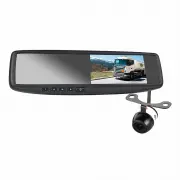
Parkmate MCPK-43BG Dashcam – User Manual, read for free online in PDF format. We hope this helps you resolve any issues you may have. If you have further questions, please contact us through the contact form.


Table of Contents:
- Page 2 – MCPK-43BG Component List; will compromise the waterproof seal.
- Page 3 – How to Operate your Mirror Monitor; Button; How to Set your monitor:
- Page 4 – Rear View Mirror Monitor Installation; MCPK-43BG functions as a rear view camera standard; Clip over factory mirror; Expand the mirror
- Page 5 – Camera Installation - Flush Mount
- Page 6 – No power to monitor while reversing.
- Page 7 – NTSC
MCPK-43BG User Manual
Universal Clip On 4.3” Rear View Mirror
Monitor & Camera Pack
with
Grid-lines
"Loading the manual" means you need to wait until the file loads and becomes available for online reading. Some manuals are very large, and the time they take to appear depends on your internet speed.
Summary
2 Thank you for purchasing Parkmate’s MCPK-43BG 4.3” Rear View Mirror Monitor & Camera Pack with Grid-lines. This state of the art Parkmate product is packed with features including a monitor embedded into the rear view mirror that automatically displays images from the rear-view camera upon sel...
3 Parkmate’s MCPK-43BG is a reverse camera and mirror monitor system for small to medium vehicles. The system utilises a clip on interior rear view mirror to display the camera view on an embedded 4.3" LCD monitor when the vehicle shifts into reverse gear. The monitor allows the driver to see bl...
4 Wiring Diagram: Rear View Mirror Monitor Installation Front view option: MCPK-43BG functions as a rear view camera standard and also supports front view. For front view, cut the thin WHITE wire near the camera lead. Power on and the image will be reversed. Grid-line option: MCPK-43BG has parking g...

