Page 2 - Features; • Pre-programmed and ready to go with Energy Star
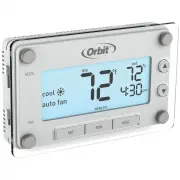
i Thank you for purchasing the Clear Comfort™ Pro thermostat from Orbit TM . We are excited to provide you a long-lasting thermostat that blends style with function. Features • Easily program 7 individual days or copy one programmed day to another • Pre-programmed and ready to go with Energy Star ® ...
Page 3 - TABLE OF CONTENTS; Quick Reference; Appendices
1 TABLE OF CONTENTS Quick Reference Easy 1-2-3 Operation ..................................................................... 2 Thermostat Controls .................................................................... 3 Display Screen ....................................................................
Page 5 - THERMOSTAT CONTROLS
3 MODE Switch: Select between Heat/Off/Cool p / q Buttons: Press to adjust temperature or use to navigate during set up HOLD: Press to override programmed schedule RUN: Press to resume programmed schedule FAN Switch: Select between Auto Fan/Fan On SET: Press to set schedule, time, and day Backlit Sc...
Page 6 - DISPLAY SCREEN
4 Heating system is on Fan setting Fan is activated Room temperature Reminder to change batteries Desired temperature setting Schedule period Current day of the week Current time Indicate which mode the system is in Cooling system is on DISPLAY SCREEN
Page 7 - BEFORE YOU BEGIN
5 This thermostat is compatible with the following systems: • Gas, oil or electric furnace • Central air conditioner • 2 wire hot water system with or without pump • Millivolt system • Central heating and cooling system • Heat pump without auxiliary/backup heat Tools Required For Installation • Phil...
Page 8 - Clear ComfortTM Pro; TIPS FOR INSTALLATION
6 When replacing an existing thermostat, position your new Clear Comfort™ Pro thermostat in the same location as your old one, unless the conditions that follow suggest otherwise. For a new installation, follow these guidelines for placement: • Place the thermostat in a room or hallway that is used ...
Page 9 - If your old thermostat; INSTALLING YOUR THERMOSTAT
7 Take a picture or make note of the current wiring for reference. Mercury Notice: If your old thermostat contains mercury contact your local waste management authority for information on how to safely dispose of it. 1 Switch Off Power Turn off the power to the heating and cooling equipment. 2 Remov...
Page 10 - Label Wires
8 INSTALLING YOUR THERMOSTAT 3 Label Wires Use the supplied wire labels to identify the wire by its terminal letter and not the color. Once the wires are labeled, disconnect the wires and remove the base. While labeling and removing the individual wires DO NOT let the wire fall back inside the wall....
Page 11 - Mount New Base
9 INSTALLING YOUR THERMOSTAT 4 Mount New Base a. Remove the thermostat body from the base by gently pulling them apart. b. Place the base flat against the wall by feeding the wires through the opening below the wiring terminal. c. Level the base and mark the holes for the mounting screws with a penc...
Page 12 - Stripping too much insulation from the end of a wire creates the; Remove jumper wire if you have both
10 CAUTION: Stripping too much insulation from the end of a wire creates the potential for shorting between wires and could prevent proper function of the thermostat. G O/B Y W RC R INSTALLING YOUR THERMOSTAT 5 Wire Installation for Conventional Systems a. Loosen the screws on each terminal. Note: R...
Page 13 - c. Insert each labeled wire into the matching
11 G O/B Y W RC R INSTALLING YOUR THERMOSTAT Wire Installation for Heat Pump Systems a. Loosen the screws on each terminal.b. Insert jumper wire into the Y and W terminals. c. Insert each labeled wire into the matching terminal and tighten the screws. d. Wrap exposed areas of any unused wire with el...
Page 14 - Set Heat Pump Jumper
12 INSTALLING YOUR THERMOSTAT O B Electric Heat Gas/Oil Cool Heat Cool (B) (O) Electric Heat Gas/Oil Cool Heat Cool (B) (O) 6 Set Heat Pump Jumper The following instructions are necessary to check the J3 jumper placement if you have a heat pump system. O Leave the jumper in the Cool (O) factory-set ...
Page 15 - Set Fan Control Jumper
13 Electric Heat Gas/Oil Heat Heat Heat (B) (O) INSTALLING YOUR THERMOSTAT Electric Heat Gas/Oil Heat Heat Heat (B) (O) 7 Set Fan Control Jumper Correct placement of this J2 jumper optimizes energy use and comfort levels for the connected system type. Gas/Oil Heat For gas or oil systems leave the ju...
Page 16 - Completing an installation; a. Insert three Energizer® or Duracell® AAA
14 INSTALLING YOUR THERMOSTAT G O/B Y W RC R MODE FAN SET RUN HOLD 8 Completing an installation a. Insert three Energizer® or Duracell® AAA alkaline batteries. b. Install the thermostat body by gently pushing it onto the base until it “clicks” into place. Verify that there are no gaps in the side ho...
Page 17 - Switching Between; To access the; • Press and hold for five seconds to reset all
15 RESET BUTTON TEMPERATURE FORMAT Switching Between Fahrenheit (°F) and Celsius (°C) 1. Slide the MODE switch to the off position. 2. While holding p press SET. 3. Release both buttons.4. Repeat steps 2 and 3 to toggle between °F and °C. RESET THERMOSTATFIGMINIMUMOFFTIMEMU Off Arrow down Arrow up T...
Page 18 - Do not hold the reset button for more; SET; TEMPERATURE OFFSET
16 The following four features are done in a flow-through setup. The system will walk you through each feature. To access only one feature, follow these steps then press SET until you come to the feature you would like to adjust. 1. Slide the MODE switch to the off position. 2. While holding the RES...
Page 19 - • If using a Heat Pump select HP.
17 EARLY START SYSTEM TYPE Your thermostat comes preprogrammed with early start functionality turned off. This function allows the heating or cooling system to turn on before the programmed start time so that the room temperature matches the set temperature at the start time.1. Press p or q to toggl...
Page 20 - MINIMUM CYCLE PERIOD
18 MINIMUM CYCLE PERIOD The cycle period is the minimum time in minutes between each heating or cooling cycle. As a default, your thermostat’s minimum cycle period is set to optimize energy use and comfort levels. The default can be changed if you want it to turn on more or less frequently.1. Press ...
Page 21 - HP; Recommended Cycle Periods
19 1-Stage heat pump 20 Compressor 20 1-Stage gas furnace heat with electric fan 12 1-Stage gas furnace heat with gas fan 12 1-Stage oil furnace 12 Steam and gravity 60 Hot water system 20 High efficiency furnace 20 Electric furnace 6 System Type Cycle Period (Minutes) F HP MINIMUM CYCLE PERIOD Reco...
Page 22 - SET TIME AND DAY; Set the time and day; Press and hold
20 SET TIME AND DAY Set the time and day 1. With the thermostat in off mode, press SET . 2. Press p or q to adjust the time. 3. Press SET to accept the time and continue. Note: Press and hold p or q to advance the time faster. MODE 4. Press p or q to select the day of the week. 5. Press SET to accep...
Page 23 - SELECT MODE AND FAN SETTINGS; Slide the mode switch to whether you; Slide the fan switch to the appropriate; auto fan; heat
21 SELECT MODE AND FAN SETTINGS Slide the mode switch to whether you want to heat or cool to achieve the set temperature. • heat —System will activate heating to reach the set temperature. • off —Systems are off. • cool —System will activate cooling to reach the set temperature. Slide the fan switch...
Page 24 - PROGRAMMED SCHEDULES
22 wake Set it to the time you wake up and the temperature you want it to be at that time. leave Set it to the time you leave the house and the temperature you want while you are out. return Set it to the time you return home and the temperature you want it to be when you arrive. sleep Set it to the...
Page 25 - RUN; Period
23 ENERGY STAR ® PROGRAMMED SCHEDULE For optimal energy savings your thermostat is preprogrammed with the following schedule for each day of the week. Simply switch your thermostat to the heat or cold mode and press RUN . Period Start Time Heat Cool wake 6:00 am 70°F 78°F leave 8:00 am 62°F 85°F ret...
Page 26 - MODIFYING THE PROGRAMMED SCHEDULE
24 1. Switch the thermostat to the MODE you want to program (heat or cool) and press SET . 2. Press p or q to scroll between days and press SET when the day you would like to schedule is flashing. 3. Press p or q to set your wake start time and press SET to accept the time. MODIFYING THE PROGRAMMED ...
Page 27 - “Copy from” will appear on the display.; USING THE COPY FEATURE; “Copy to” will appear on the display.
25 From the days of the week menu you can copy a schedule from a single day to one or more days. To access that menu, if you are not already there, switch the thermostat to the MODE you want to program (heat or cool) and press SET . 1. Press p or q to scroll to copy and press SET when the word “copy...
Page 28 - OVERRIDING SCHEDULES TEMPORARILY
26 Press p or q to raise or lower the temperature. This temporary adjustment will remain until the start time of the next period. The word “temporary” will be displayed letting you know the temperature has been adjusted. Note: Pressing the p or q button once will turn on the backlight. To change the...
Page 29 - OVERRIDING SCHEDULES PERMANENTLY; HOLD
27 OVERRIDING SCHEDULES PERMANENTLY Press HOLD to override the programmed schedule. All programmed temperature changes for all periods will be ignored. While the system is in hold you can manually change the temperature at any given time by pressing p or q . The thermostat will maintain this tempera...
Page 30 - TURNING OFF SCHEDULES
28 Press HOLD for five seconds until the manual indicator “ man .” appears on the screen. Your thermostat now functions as a non- programmable device with no scheduled program. SET , RUN , and HOLD will not work while in this setting. If it is too hot or too cold, you will have to manually change th...
Page 31 - BUILT IN COMPRESSOR PROTECTION
29 BUILT IN COMPRESSOR PROTECTION This function helps protect against damage to the compressor in your air conditioning or heat pump system. The compressor is forced to wait five minutes after turning off before it can turn on again. The appropriate MODE indicator icon will flash on the display when...
Page 32 - Your Wake time is set for 6:30 am with a; DO NOT
30 EARLY START FUNCTIONALITY THERMOSTAT CARE This function allows the heating or cooling system to turn on before the programmed start time so that the room temperature matches the set temperature at the start time. Example: Your Wake time is set for 6:30 am with a temperature of 72°. Your system wi...
Page 33 - If the batteries are not changed within 7; Failure to change batteries in; REPLACING THE BATTERIES
31 It is recommended that the batteries in the thermostat be replaced once a year or before leaving the home for a prolonged period of time. 1. Switch the system MODE to off before changing the batteries. 2. Remove the thermostat body from its base by gently pulling them apart. 3. Turn the thermosta...
Page 34 - TROUBLESHOOTING
32 Problem: No heating/cooling system activation Solution: 1. Verify MODE switch is in proper heat or cool mode. 2. Check batteries. Replace if necessary. (See “Replacing the Batteries,” page 31). 3. Check set temperature. Set temperature should read above room temperature in heat mode and below roo...
Page 38 - Heat/cool system doesn’t respond immediately
36 TROUBLESHOOTING Problem: Temperature does not change at programmed start time for a given period Solution: 1. Verify that the HOLD feature is not active (see “Overriding the Schedules Permanently,” page 27). 2. Check the programmed schedule (see “Modifying the Programmed Schedule,” page 24). 3. V...
Page 39 - System turns on too frequently
37 TROUBLESHOOTING Problem: Set temperature is 10°F above (in cool mode) or 10°F below (in heat mode) desired temperature Solution: Check batteries. Replace if necessary (see “Replacing the Batteries,” page 31). Problem: System turns on too frequently Solution: The Orbit Clear Comfort™ Pro thermosta...
Page 40 - Made in China; CUSTOMER ASSISTANCE
38 For technical assistance, please call: 1-800-488-6156 or 1-801-299-5555.Before returning this thermostat to the store, please call: 1-800-488-6156 or 1-801-299-5555.Orbit, Inc. North Salt Lake, UT 84054 www.orbitonline.com© 2014 Orbit, Inc. All rights reserved. Made in China CUSTOMER ASSISTANCE
Page 41 - WARRANTY INFORMATION
39 Orbit, Inc. warrants to its customers that its products will be free from defects in materials and workmanship for a period of three years from the date of purchase. We will replace, free of charge, the defective part or parts found to be defective under normal use and service for a period of up ...