OPN Sound OPNARIA - User Manual
OPN Sound OPNARIA Headphones – User Manual, read for free online in PDF format. We hope this helps you resolve any issues you may have. If you have further questions, please contact us through the contact form.


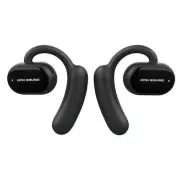
Open-Ear Truly Wireless Sports Headphones
User Manual
www.alex-technology.com
MADE IN CHINA FABRIQUE EN CHINE
IN CHINA HERGESTELLE HECHO EN CHINA
Shenzhen Alex Technology Co., Ltd.
Unit 407-409, Hehuan Business Center, Blg 36,
Yintian Gongye Rd, Bao'an, Shenzhen, Guangdong, China 518102
LED Power Display
Type-C Charging
Touch Control
L
R
HOW TO WEAR
Slide the earhook behind your ear and rotate the earbud back
until it rests gently over the top of your ear.
POWER ON/OFF
Take the earbuds out of charging case, auto power-on.
Prompt: power on pairing;
Put the earbuds into the charging case, auto power-off.
Prompt: power off.
CONNECTION
Select "Etude" in device's Bluetooth menu,
Etude will voice prompt you "Connected".
Etude
SMART CONTROL
Volume up: Touch 2x of Right earbud.
Volume down: Touch 2x of Left earbud.
Previous track: Touch 3x of Left earbud.
Next track: Touch 3x of Right earbud.
Play/pause music: Touch 1x of any earbuds.
SMART CONTROL
Answer call: Touch 1x of any earbuds.
Cancel / hang up / reject call: Touch 2x of any earbuds.
Voice command: Hold for 2 sec of any earbuds.
Alex
00:05
BATTERY CHARGING
Etude will prompt you "battery low" when battery is lower than 15%.
Low Battery
Place the earbuds into charging case to charge the earbuds;
Use DC5V adapter & type-C cable to charge charging case;
Charging case supports wireless charging.
Charging
SPECIFICATION
MODEL
EARBUD PLAY TIME
8H
1.5H
2 times
2H
DC 5V
EARBUD CHARGING
CASE CHARGE EARBUD
CASE CHARGING
CHARGING VOLTAGE
TYPE
Open-Ear Truly Wireless
BT VERSION
V5.2 EDR
CONNECTION
≈10m
WEIGHT
23g (11.4g each earbud)
Etude
ATTENTION
1. Listening to loud music for a long time may cause discomfort,
please use medium volume if possible. Do not use high volume for
long periods of time.
2. Using headphones will affect your perception of the surrounding
environment. Pay more attention when using headphones.
3. Do not remove or modify the headphone, as this may cause
damage or burn out.
4. Do not throw, sit on headphones or immerse them in water.
5. Keep it away from fire, hydration and high pressure equipment.
6. Not suitable for children under 3-year-old containing small parts.
7. Do not classify it as household waste. Please send it to the local
electrical equipment recycling station.
Note: The company does not assume any responsibility for the loss
of personal property caused by the violation of the above warnings.
Battery 75-100%
Battery 50-75%
Battery 25-50%
Battery 15-25%
LED blinks, please charge.
CHARGING CASE LED DISPLAY
真 无 线 开 放 式 运 动 耳 机
说 明 书
LED电量显示
Type-C充电口
触摸功能键
L(左耳)
R(右耳)
佩戴示意图
将耳挂置于耳后,向后旋转耳机,直至它轻贴于耳朵上方。
开/关机
从充电仓中取出耳机, 自动开机, 提示音: Power on, pairing;
将耳机放回充电仓, 自动关机, 提示音: Power off.
蓝牙连接
在设备蓝牙列表下选择“Etude”进行连接, 连接成功提示音:connected.
Etude
音乐触控操作
音量+: 双连击右耳
音量-: 双连击左耳
上一曲: 三连击左耳
下一曲: 三连击右耳
播放/暂停音乐: 单击任一耳机
通话触控操作
接听电话: 单击任一耳机
取消 / 挂断 / 拒接电话: 双连击任一耳机
激活语音助手: 长按任一耳机�秒
Alex
00:05
充电
电量低于��%时,耳机提示"battery low", 充电仓一格LED灯闪烁。
低电提醒
将耳机放入充电仓,充电时白灯常亮;
请使用DC �v充电适配器进行充电;
充电仓支持无线充电功能。
充电
产品参数
产品型号
Etude
耳机使用时间
�小时
�.�小时
耳机充电时间
充电仓使用时间
可充耳机�次
�小时
充电仓充电时间
充电电压
DC �V
耳机类型
真无线开放式运动耳机
BT版本
V�.� EDR
连接范围
≈��米
耳机重量
��g(单耳��.�g)
四颗LED常亮,电量���%
三颗LED常亮,电量��%
两颗LED常亮,电量��%
一颗LED常亮,电量��%
一颗LED闪烁,请充电。
充电仓LED显示
重要说明
�. 长时间听大音量音乐可能会带来不适感, 请尽可能使用中等左右的
音量, 避免长时间使用大音量;
�. 无论音量大小, 使用耳机都将影响您对周围环境的感知, 使用耳机
时多加注意;
�. 切勿拆除或改装耳机, 否则可能导致耳机故障或烧毁;
�. 切勿抛扔、 坐压耳机或将其投入火中;
�. 耳机应远离火、 高电压设备;
�. 不合适十岁以下儿童使用, 内包含细小零件;
�. 请勿将其归类为生活垃圾,而将其送往当地相应的电器设备回收站;
注意: 若用户因违反以上警告内容造成的人身财产损失,本公司不承
担任何责任。
"Loading the manual" means you need to wait until the file loads and becomes available for online reading. Some manuals are very large, and the time they take to appear depends on your internet speed.

