Page 2 - Table of Contents • Table des matières; English
3 Table of Contents • Table des matières Quick Overview 4 High Voltage Warning! 5 Getting Started • Install App 6 • Safety Features 7 • Critical Installation Information 9 • Warning - Turn Off Power 10 • Prepare Mysa for Install 11 Setup • 120 V 12 • 240 V 14 • Attach the In-Floor Temp Sensor 16 • S...
Page 3 - Quick Overview; In the Box
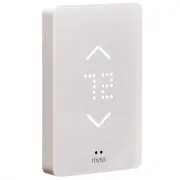
4 EN Quick Overview In the Box Mysa Smart Thermostat2x Mounting Screws4x Wire Nuts1x In-Floor Temperature Sensor What You’ll Need Phillips ScrewdriverFlat Head ScrewdriverWire Stripper (optional)Pliers (optional) Compatibility Mysa Smart Thermostat works with most 120/240 VAC, 60 Hz systems. Mysa is...
Page 4 - High Voltage Warning!; UNSURE ABOUT HANDLING ELECTRICAL WIRING?
5 EN High Voltage Warning! Installing this product involves handling high voltage wiring. Each step of the enclosed instructions must be followed carefully. To avoid personal injury, or death, turn off your circuit breakers and follow the proper safety precautions before proceeding. UNSURE ABOUT HAN...
Page 5 - Getting Started • Install App; For the best installation experience, use the Mysa app.; strongly encourage you to use the app for installation and setup.
EN 6 Getting Started • Install App For the best installation experience, use the Mysa app. Download the Mysa app from the Google Play Store or App Store and create an account or log in to your existing account. Tap on “Install & Support” then “Install” to access our most comprehensive step-by-st...
Page 6 - Getting Started • Safety Features
7 EN Getting Started • Safety Features Ground Fault Circuit Interrupter (GFCI) In the event of a ground fault, a GFCI will trip and quickly stop the flow of electricity to prevent serious injury. During a ground fault, current flows through an unintended path (like a human body) to the ground, inste...
Page 7 - Getting Started • Mysa In-Floor Safety Features; TEST button; FAULT light; RESET button
EN 8 Getting Started • Mysa In-Floor Safety Features The TEST button manually tests the GFCI’s ability to respond to a fault. If working correctly, pressing this button should activate the FAULT light and disconnect the heat indefinitely, until the Mysa is power cycled or the RESET button is pressed...
Page 8 - Getting Started • Critical Installation Information; Should you install it?; LINE Cable
9 EN Getting Started • Critical Installation Information Cable Wires Should you install it? Installing a GFCI thermostat can be more complicated than installing a conventional thermostat. Make sure that you have experience wiring circuits, understand basic wiring principles and techniques, and can i...
Page 9 - Getting Started • Warning - Turn Off Power; Turn off the power; Place the breaker in the OFF position.; Remove your existing thermostat.
EN 10 Getting Started • Warning - Turn Off Power Turn off the power before completing any electrical installation, locate your electrical panel and find the breaker that protects your in-floor heating circuit. Place the breaker in the OFF position. Confirm the heater is off by doing the following: -...
Page 10 - Getting Started • Prepare Mysa for Install; Remove the front plate; Loosen the screw on the bottom
11 EN Getting Started • Prepare Mysa for Install Remove the front plate to your Mysa to access the mounting screw holes. 5 Loosen the screw on the bottom of the front plate, but don’t remove it completely! 4
Page 11 - Connect your Mysa; The supply and load wires are not interchangeable.
EN 12 Setup • 120 V A. Mysa L Supply Wire (L) Connect Mysa’s black L wire to the supply wire - L (usually black) coming from the electrical panel. B. Mysa N Neutral Wire (N) Connect Mysa’s white N wire to the neutral wire - N (usually white) coming from the electrical panel. C. Mysa LO...
Page 15 - Setup • Attach the In-Floor Temperature Sensor
EN 16 Setup • Attach the In-Floor Temperature Sensor Attach the In-Floor Temperature Sensor. Pull the temperature sensor wires through the hole in the back on the Mysa. Then, use a Phillips screwdriver to secure the Mysa to the gang box with the provided screws. Attach the two ends of the sensor wir...
Page 16 - Setup • Secure Front Plate; Secure the front plate; Connect the front plate
17 EN Setup • Secure Front Plate Secure the front plate to the Mysa by tightening the screw. Ensure not to overtighten the screw. 9 Connect the front plate to your Mysa. It should easily glide into place. 8
Page 17 - Setup • Power on Mysa; Turn ON the power; Verify the thermostat powers ON,
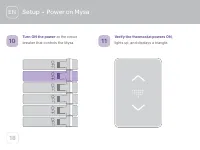
EN 18 Setup • Power on Mysa Turn ON the power at the circuit breaker that controls the Mysa. 10 Verify the thermostat powers ON, lights up, and displays a triangle. 11
Page 18 - Setup • Test Your Work; Why perform this test?; Press the TEST button. If the fault light
19 EN Setup • Test Your Work Why perform this test? If you miswire the GFCI, it may not prevent personal injury or death to a ground fault (electric shock). If you mistakenly connect the LINE wires to the LOAD terminals, the thermostat faceplate will not illuminate after installation. If you need as...
Page 19 - Setup • Symbols and Codes; com
EN 20 Setup • Symbols and Codes Welcome You’ll see Mysa smile on startup or after successful pairing. Software Update That spinning rectangle means Mysa is getting a software update from us over the internet. Settings Change Check! This will pop up when you change your settings from the app. Error C...
Page 20 - Setup • Adding a Thermostat
21 EN EN Setup • Adding a Thermostat Mysa’s smart features are all controlled by the Mysa app. Head to the Google Play Store or the App Store to download the Mysa app and create an account. Follow the instructions to pair your Mysa to your phone and take advantage of the full slate of smart features...
Page 27 - Aperçu rapide; Compatibilité
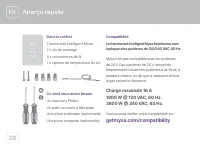
FR 28 FR Dans le coffret Thermostat intelligent Mysa2 x vis de montage4 x connecteurs de fil1 x capteur de température du sol Ce dont vous aurez besoin Un tournevis PhilipsUn petit tournevis à tête plateUne pince à dénuder (optionnelle)Une pince coupante (optionnelle) Aperçu rapide Compatibilité Le ...
Page 28 - Avertissement de haute tension !
FR 29 Avertissement de haute tension ! L’installation de ce produit implique la manipulation de câblage de haute tension.Chaque étape des instructions ci-jointes doit être respectée soigneusement. Pour éviter un dommage corporel, ou un décès, éteignez vos disjoncteurs et respectez des précautions de...
Page 29 - Démarrage • Installer l’application; Pour la meilleure expérience d’installation possible, utilisez
FR 30 Démarrage • Installer l’application Pour la meilleure expérience d’installation possible, utilisez l’application Mysa. Téléchargez l’application Mysa depuis la boutique Google Play Store ou depuis l’iOS App Store, et créez un compte ou connectez-vous à votre compte existant. Appuyez sur « Inst...
Page 30 - Démarrage • Fonctionnalités de sécurité
FR 31 Démarrage • Fonctionnalités de sécurité Disjoncteur de fuite de terre (GFCI) En cas de fuite de terre, un GFCI se déclenchera et arrêtera rapidement le flux d’électricité pour empêcher une blessure grave. Au cours d’une fuite de terre, le courant s’écoule par un chemin imprévu (tel qu’un corps...
Page 31 - bouton TEST; voyant de défaut; bouton RÉINITIALISER
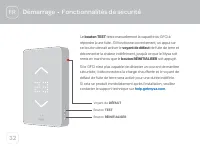
FR 32 Démarrage • Fonctionnalités de sécurité Le bouton TEST teste manuellement la capacité du GFCI à répondre à une fuite. S’il fonctionne correctement, un appui sur ce bouton devrait activer le voyant de défaut de fuite de terre et déconnecter la chaleur indéfiniment, jusqu’à ce que le Mysa soit r...
Page 32 - Démarrage • Informations essentielles sur l’installation; LIGNE par rapport à CHARGE; Câble LIGNE
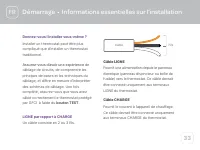
FR 33 Démarrage • Informations essentielles sur l’installation Devriez-vous l’installer vous-même ? Installer un thermostat peut être plus compliqué que d’installer un thermostat traditionnel. Assurez-vous d’avoir une expérience de câblage de circuits, de comprendre les principes de bases et les tec...
Page 33 - Démarrage • Avertissement - éteindre l’alimentation; Éteignez l’alimentation; Placez le disjoncteur en position ARRÊT.; Retirez votre thermostat existant.
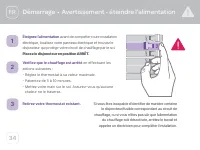
FR 34 Démarrage • Avertissement - éteindre l’alimentation Éteignez l’alimentation avant de compléter toute installation électrique, localisez votre panneau électrique et trouvez le disjoncteur qui protège votre circuit de chauffage par le sol. Placez le disjoncteur en position ARRÊT. Vérifiez que le...
Page 34 - Démarrage • Préparer Mysa pour l’installation; Retirez la plaque avant; Dévissez la vis en bas
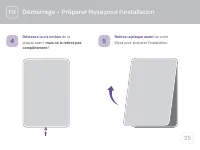
FR 35 Démarrage • Préparer Mysa pour l’installation Retirez la plaque avant de votre Mysa pour préparer l’installation. 5 Dévissez la vis en bas de la plaque avant, mais ne la retirez pas complètement ! 4
Page 35 - Mise en place • 120 V; Connectez votre Mysa; Les fils d’alimentation et de charge ne sont pas interchangeables.
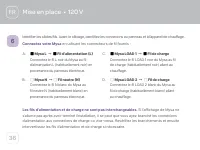
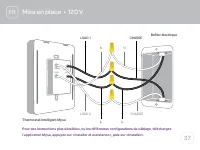
FR 36 Mise en place • 120 V A. Mysa L Fil d’alimentation (L) Connectez le fil L noir du Mysa au fil d’alimentation L (habituellement noir) en provenance du panneau électrique. B. Mysa N Fil neutre (N) Connectez le fil N blanc du Mysa au fil neutre N (habituellement blanc) en provenance d...
Page 37 - Mise en place • 240 V
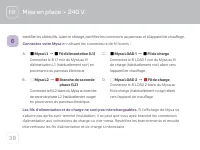
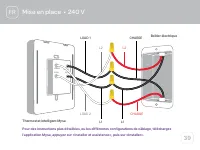
FR 38 A. Mysa L1 Fil d’alimentation (L1) Connectez le fil L1 noir du Mysa au fil d’alimentation L1 (habituellement noir) en provenance du panneau électrique. B. Mysa L2 Branche de seconde phase (L2) Connectez le fil L2 blanc du Mysa au branche de seconde phase L2 (habituellement rouge) e...
Page 39 - Mise en place • Attacher le capteur de température du sol; Attachez le capteur de température du sol.
FR 40 Mise en place • Attacher le capteur de température du sol Attachez le capteur de température du sol. Tirez les fils du capteur de température à travers le trou à l’arrière du Mysa. Ensuite, fixez le Mysa dans le boîtier électrique avec les vis fournies. Attachez les deux extrémités du fil du c...
Page 40 - Mise en place • Sécuriser la plaque avant; Sécurisez la plaque avant; Connectez la plaque avant
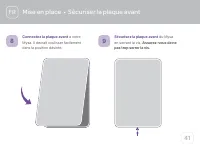
FR 41 Mise en place • Sécuriser la plaque avant Sécurisez la plaque avant du Mysa en serrant la vis. Assurez-vous de ne pas trop serrer la vis. 9 Connectez la plaque avant à votre Mysa. Il devrait coulisser facilement dans la position désirée. 8
Page 41 - Mise en place • Mettre en marche de Mysa; Mettez en marche l’alimentation
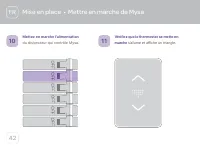
FR 42 Mise en place • Mettre en marche de Mysa Mettez en marche l’alimentation du disjoncteur qui contrôle Mysa. 10 Vérifiez que le thermostat se mette en marche s’allume et affiche un triangle. 11
Page 42 - Mise en place • Testez votre travail; Pourquoi effectuer ce test ?; Appuyez sur le bouton TEST. Si le voyant
FR 43 Mise en place • Testez votre travail Pourquoi effectuer ce test ? Si vous effectuez un mauvais raccordement du GFCI, il est possible qu’il n’empêche pas les dommages corporels ou décès pouvant être entraînés par une fuite de terre (choc électrique). Si vous avez besoin d’assistance, veuillez c...
Page 43 - Mise en place • Symboles et codes
44 FR Codes d’erreur Les codes d’erreur ont un format LETTRE/ CHIFFRE (A1, Z4, B5). Si vous voyez apparaître cela, rendez-vous sur help.getmysa.com . Mise en place • Symboles et codes Mode d’appariement Le triangle signifie que Mysa est prêt à commencer le processus d’appariement. Mise jour du logic...
Page 44 - Mise en place • Ajout d’un thermostat
FR 45 FR Mise en place • Ajout d’un thermostat Les fonctionnalités intelligentes de Mysa sont toutes contrôlées par l’application Mysa. Rendez-vous sur la boutique Google Play Store ou App Store pour télécharger l’application Mysa et créer un compte. Suivez les instructions pour apparier votre Mysa ...
Page 45 - Aspect juridique et garantie
FR 46 Aspect juridique et garantie Approbation de la Federal Communications Commission (FCC) Cet équipement a été testé et a été jugé en conformité avec les limites d’un appareil numérique de classe B, conformément à la section 15 des règlements du FCC. Ces limites sont conçues pour fournir une prot...