Page 2 - Welcome
2 After Sales Support (AU) 1300 886 649 (NZ) 0800 836 761 | tempo.org/support Welcome Welcome to your new MOBL bicycle!As part of our brand philosophy, all of our products are manufactured to the highest standards of performance and safety. This product includes a comprehensive 1 Year Warranty, as p...
Page 3 - Contents
3 After Sales Support (AU) 1300 886 649 (NZ) 0800 836 761 | tempo.org/support 02 Welcome 03 Contents04 General Safety Instructions 07 Product Overview08 Getting Started09 Assembly15 Battery Charging17 Instructions 19 FAQs and Troubleshooting Guide20 Other Useful Information Contents
Page 4 - General Safety Instructions
4 After Sales Support (AU) 1300 886 649 (NZ) 0800 836 761 | tempo.org/support General Safety Instructions WARNING: Read and follow all safety warnings before riding! • Local traffic laws : Some state and local traffic laws may require that your bicycle be equipped with a warning device, such as a ho...
Page 7 - Product Overview; Scope of delivery
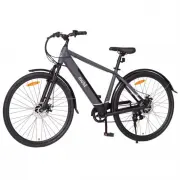
7 After Sales Support (AU) 1300 886 649 (NZ) 0800 836 761 | tempo.org/support Product Overview B Other inclusions Battery chargerMultipurpose tool C Documentation (not pictured) Instruction manualWarranty certificate Battery charger Multipurpose tool NOTE: Due to continued product improvement, image...
Page 8 - Getting Started; Before first use
8 After Sales Support (AU) 1300 886 649 (NZ) 0800 836 761 | tempo.org/support Getting Started Before first use • Unpack the e-bike , making sure to remove all parts from the packaging carton. The carton staples may be sharp, take care that you do not hurt yourself when reaching into the carton to re...
Page 9 - Assembly; Step 1: front wheel assembly
9 After Sales Support (AU) 1300 886 649 (NZ) 0800 836 761 | tempo.org/support Assembly Step 1: front wheel assembly 1. Turn the fork until the fork plate points to the front of the bicycle. 2. If the brake cable is closed, undo it, then insert the wheel into the fork (Fig. 1). 3. Install an axle nut...
Page 11 - Step 3: stem and handlebar assembly
11 After Sales Support (AU) 1300 886 649 (NZ) 0800 836 761 | tempo.org/support Assembly (Cont.) Step 2: front fender (mudguard) assembly 1. Attach the fender hanger on the fork crown, using a tool to tighten the screw from the front (washer against the bike part) (Fig. 7). 2. Adjust the fender posit...
Page 12 - Step 4: saddle assembly
12 After Sales Support (AU) 1300 886 649 (NZ) 0800 836 761 | tempo.org/support Step 4: saddle assembly The saddle is pre-assembled to the seat post.1. Loosen the seat clamp, then insert the seat post into the bicycle frame, making sure that the minimum insertion mark on the seat post is completely i...
Page 13 - Step 5: pedal assembly
13 After Sales Support (AU) 1300 886 649 (NZ) 0800 836 761 | tempo.org/support Assembly (Cont.) Step 5: pedal assembly 1. Look for the letters “R” or “L” stamped on the pedal spindle.2. Thread the pedal marked “R” into the crank arm on the chain side of the bike. Turn the pedal spindle in a clockwis...
Page 14 - Step 6: reflector assembly
14 After Sales Support (AU) 1300 886 649 (NZ) 0800 836 761 | tempo.org/support Assembly (Cont.) Step 6: reflector assembly Front reflector (white) and bell 1. Remove the clamp screw from the reflector (or bell) bracket (Fig. 13). 2. Push open the bracket 'loop' and slide it onto the handlebar. (If t...
Page 15 - Battery Charging; Battery
15 After Sales Support (AU) 1300 886 649 (NZ) 0800 836 761 | tempo.org/support Battery Charging Battery The e-bike comes with a removable lithium battery installed on the down tube of the bike. Also supplied is a key (and duplicate), attached to the brake cables, which you should have removed earlie...
Page 16 - Charger
16 After Sales Support (AU) 1300 886 649 (NZ) 0800 836 761 | tempo.org/support Charger The e-bike comes with a smart charger for easy charging.1. Insert the AC plug into an appropriate electrical outlet.2. Open the battery cover and insert the DC connector into the battery (Fig. 18).3. When the batt...
Page 17 - Instructions
17 After Sales Support (AU) 1300 886 649 (NZ) 0800 836 761 | tempo.org/support Instructions The e-bike's control panel, located on the left side of the handlebar, lets you turn on the bike for electric power, select riding modes and check the battery status. Battery status Pedal assis- tance level P...
Page 18 - Pedal speed changing
18 After Sales Support (AU) 1300 886 649 (NZ) 0800 836 761 | tempo.org/support OperationTurning on/off • Long-press the POWER [ ] button to turn on the e-bike (display). The display will show the approximate battery status and pedal assistance modes. • Long-press the POWER [ ] button to turn off the...
Page 19 - FAQs and Troubleshooting Guide
19 After Sales Support (AU) 1300 886 649 (NZ) 0800 836 761 | tempo.org/support FAQs and Troubleshooting Guide If you experience problems with your e-bike, check in the table below for solutions to common problems. If the problem persists after checking the suggested solutions, please contact our aft...
Page 20 - Other Useful Information; Cleaning and care
20 After Sales Support (AU) 1300 886 649 (NZ) 0800 836 761 | tempo.org/support Other Useful Information Cleaning and care WARNING! Clean the e-bike properly and maintain it in good working condition. The warranty will not apply in case of corrosion due to lack of maintenance. • After every ride , wa...
Page 21 - Storage; Spare parts
21 After Sales Support (AU) 1300 886 649 (NZ) 0800 836 761 | tempo.org/support Other Useful Information (Cont.) Storage When it is not in use, store the e-bike in a cool, dry place, protected from dust, high humidity and frequent temperature changes, and out of reach of children. For prolonged stora...
Page 22 - Compliance; Technical specifications
22 After Sales Support (AU) 1300 886 649 (NZ) 0800 836 761 | tempo.org/support Other Useful Information (Cont.) * EPAC = electrically power-assisted cycles This marking indicates only to charge the battery for the Electric City Bicycle with the supplied battery charger with the model number XVE-4200...
Page 23 - Responsible disposal
23 After Sales Support (AU) 1300 886 649 (NZ) 0800 836 761 | tempo.org/support Responsible disposal Packaging materials are recyclable. Please dispose of them responsibly for recycling. At the end of its working life, do not throw this appliance out with your household waste. Electrical and electron...
Page 24 - Warranty returns; claim, make sure to include all accessories with the product.; Product does not work?
24 After Sales Support (AU) 1300 886 649 (NZ) 0800 836 761 | tempo.org/support Warranty returns Should you for any reason need to return this product for a warranty claim, make sure to include all accessories with the product. Product does not work? If you encounter problems with this product, or if...