Mitsubishi MOS1- User Manual

Mitsubishi MOS1– User Manual, read for free online in PDF format. We hope this helps you resolve any issues you may have. If you have further questions, please contact us through the contact form.


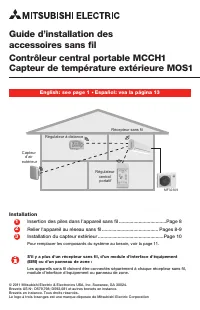
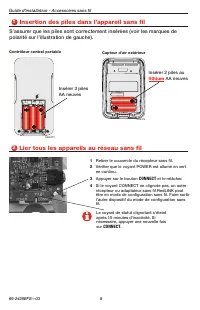
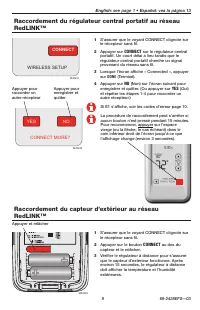
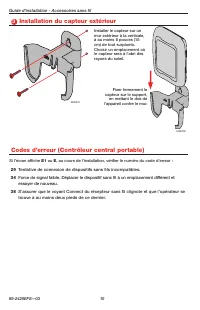



Table of Contents:
- Page 2 – Install batteries in wireless devices; Install 2 fresh AA; lithium; batteries; CONNECT
- Page 3 – Link Portable central controller to RedLINKTM network; WIRELESS SETUP
- Page 4 – Mount outdoor sensor
- Page 5 – Replacing system components; Portable central controller or outdoor sensor; At the Portable central controller:; Removing all wireless devices:
- Page 6 – Regulatory information
- Page 7 – Guide d’installation des; Español: vea la página 13
- Page 8 – Insertion des piles dans l’appareil sans fil; Insérer 2 piles au; AA neuves
- Page 9 – Raccordement du régulateur central portatif au réseau; YES
- Page 10 – Installation du capteur extérieur
- Page 11 – Remplacement des composants du système; Télécommande ou capteur extérieur; pages 8 et 9 pour le relier au réseau sans fil.; Récepteur sans fil, Module d’interface d’équipement ou tableau de; description qui suit.; Suppression de tous les appareils sans fil :
- Page 12 – Information sur la réglementation
- Page 13 – Manual de instalación; Français : voir la page 7; Instalación de las baterías
- Page 14 – Instalación de las baterías en los dispositivos inalámbricos; litio; nuevas
- Page 15 – Conexión del controlador central portátil a la red RedLINKTM
- Page 16 – Instalación del sensor exterior; Si aparece
- Page 17 – Reemplazo de los componentes del sistema; Controlador central portátil o sensor exterior; para conectarlo a la red inalámbrica.; Extracción de todos los dispositivos inalámbricos:
- Page 18 – Información reguladora
- Page 20 – o llamando sin cargo a atención al cliente de Mitsubishi Electric; sans frais le
69-2428EFS-03
© 2011 Mitsubishi Electric & Electronics USA, Inc.
Suwanee, GA 30024
US Patent No. D579,798; D592,081 and other patents
pending. All Rights Reserved.
The three diamond logo is a registered trademark
of Mitsubishi Electric Corporation
Wireless Accessories Installation Manual
MCCH1 Portable Central Controller
MOS1 Outdoor Air Sensor
Français : voir la page 7
•
Español: vea la página 13
Installation procedure
Install batteries in wireless devices ...............................................Page 2
Link devices to wireless network ............................................. Pages 2-3
Mount outdoor sensor ....................................................................Page 4
To replace system components, if needed, see page 5.
If there is more than one Wireless Receiver, Equipment Interface Module (EIM)
or zone panel:
Wireless devices must be linked separately to each Wireless Receiver, EIM or zone
panel.
1
2
3
Wireless receiver
Wireless
outdoor
air sensor
Portable
central
controller
M32309
Remote controller
"Loading the manual" means you need to wait until the file loads and becomes available for online reading. Some manuals are very large, and the time they take to appear depends on your internet speed.
Summary
Installation Guide - Wireless Accessories 69-2428EFS—03 2 1 Install batteries in wireless devices Make sure batteries are inserted properly (see polarity marks on illustrations below). 2 Link devices to wireless network M28476 M28475 Portable central controller Outdoor air sensor Install 3 fresh AA ...
Français : voir la page 7 • Español : vea la página 13 3 69-2428EFS—03 Link Portable central controller to RedLINK™ network Link outdoor sensor to RedLINK™ network CONNECT WIRELESS SETUP M28481 M28483 NO YES CONNECT MORE? M28482 1 Make sure the CONNECT light on the wireless receiver is flashing. 2 P...
Installation Guide - Wireless Accessories 69-2428EFS—03 4 M28491 M28492 Mount the sensor on a vertical exterior wall, at least 6 inches below any overhang. Choose a location protected from direct sunlight. Place sensor securely in bracket, facing away from wall. 3 Mount outdoor sensor Error codes (P...


