Page 2 - Caring for the environment; Saving energy; Disposing of your old appliance
Caring for the environment 2 Disposing of the packagingmaterial The packaging material is used forhandling and protects the appliancefrom transport damage. The packagingmaterial used is selected from materialswhich are environmentally friendly fordisposal and can generally be recycled.Recycling the ...
Page 3 - Contents; Changing bean system settings (
Contents 3 Caring for the environment ......................................................................................... 2 Saving energy .................................................................................................................. 2 Warning and Safety instructions ..........
Page 4 - Switching MobileStart
Contents 4 Expert mode ................................................................................................................... 37 Switching Expert mode on and off............................................................................... 37 Expert mode: assigning bean containers .......
Page 5 - System lock; Cleaning and care
Contents 5 Display ............................................................................................................................. 47 Brightness .................................................................................................................. 47 Colour scheme ............
Page 7 - Warning and Safety instructions
Warning and Safety instructions 7 This coffee machine complies with all the stipulated safetyrequirements. Inappropriate use can, however, lead to personalinjury and material damage. Read the operating instructions carefully before using the coffeemachine. They contain important information on safet...
Page 8 - Correct application
Warning and Safety instructions 8 Correct application This coffee machine is intended for home use. This coffee machine is not intended for outdoor use. This coffee machine must not be used at altitudes above 2000 m. It must only be used as a domestic appliance to make espresso, cappuccino, ...
Page 9 - Technical safety
Warning and Safety instructions 9 Danger of suffocation! Whilst playing, children may become entangled in packaging material (such as plastic wrapping) or pull thepackaging material over their head, presenting the risk of suffocation.Keep packaging material away from children. Technical safety I...
Page 10 - Correct use
Warning and Safety instructions 10 For safety reasons, this machine may only be used when it has been built in. If the coffee machine is to be built in above another appliance, there must be a full-width, closed intermediate shelf between them(except when it is combined with a Gourmet drawer or ...
Page 12 - Accessories and spare parts
Warning and Safety instructions 12 Accessories and spare parts Miele can only guarantee the safety of the machine when original Miele spare parts are used. Faulty components must only bereplaced by genuine Miele original spare parts. Only use original Miele accessories. If other parts are used, ...
Page 13 - Appliance description; Exterior view
Appliance description 13 Exterior view 1 2 3 4 5 6 7 8 9 10 11 a On/Off button b Optical interface (for the Miele Customer Service Department only) c MobileStart sensor d Movement sensor e “Back” sensor f Touch display g “Light” sensor h Door handle i Height-adjustable central spout with...
Page 14 - Interior view
Appliance description 14 Interior view a Bean containers ( Type A and Type C ) b Milk valve c Height-adjustable central spout with lighting d Grinder setting e Bean container ( Type B ) f Fan outlet g Water container h Drip tray with lid i Brew unit j Waste container k Maintenance container l Recept...
Page 15 - The milk container; cannot
Appliance description 15 The milk container a Lid b Milk suction tube c Sensor d Glass flask Central spout with cup rimsensor The central spout with cup rim sensorfeatures automatic spout adjustment.Thanks to this spout adjustmentfunction, the central spout moves downautomatically at the start of a ...
Page 16 - Symbols in the display; Symbol; OK
Appliance description 16 Symbols in the display The display shows symbols as well as text, e.g. symbols for the various drinks.Some of these are explained below. Symbol Explanation This symbol indicates that there is additional information andadvice about using the coffee machine. Select OK to con...
Page 17 - Operation; Touch display; Miele; Long coffee; centre
Operation 17 Touch display The delicate touch display can be scratched by pointed or sharp objects, e.g.pens.Only touch the display with your fingers. The touch display is split into multiple areas. 12:00 Miele Long coffee Coffee Espresso Ristretto Profiles The menu path appears on the...
Page 18 - Operating actions; orange; Entering numbers with the roller
Operation 18 Operating actions All the selectable options are displayed in black or white according to your selectedcolour scheme.Each time you touch a possible option, the relevant characters (word and/orsymbol) light up orange . Selecting a menu option Touch the field or value you want in the di...
Page 19 - Entering numbers using the numerical keypad; Entering a name; Displaying the context menu
Operation 19 Entering numbers using the numerical keypad Touch the centrally displayed orange value and keep your finger on it until thenumerical keypad appears. OK Select the value you want: as soon as you enter a valid value, OK turns green. Use the arrow to delete the last number entered. ...
Page 22 - Before using for the first time; Switching on for the first time; Selecting the display language; Setting the time of day; Setting the water hardness level; Fitting the cleaning cartridge
Before using for the first time 22 Have the following to hand (includedwith delivery) when setting the machineup for the first time: - Miele cleaning cartridge- Miele descaling cartridge Switching on for the first time Touch the On/Off button . Selecting the display language Select the desire...
Page 23 - Open the appliance door.; Fitting the descaling cartridge
Before using for the first time 23 Open the appliance door. Remove the maintenance containeron the left-hand side. Pull the cleaning cartridge holderforwards to remove it. Take the cleaning cartridge out of itspackaging. Unscrew the screw cap. The screw cap is no longer required. Screw t...
Page 24 - Selecting the Performance mode; Setting up the bean system; Filling the bean containers
Before using for the first time 24 Fit the descaling cartridge and push itupwards as far as it will go. Slide the descaling cartridge holderback into place. Put the maintenance container backinside the appliance. Close the appliance door. The descaling cartridge will fill withwater the next ...
Page 25 - Naming the bean types; Assigning bean types
Before using for the first time 25 Pull the bean containers out and takeoff the lids. Fill the bean containers with roastedcoffee beans. Put the lids back on the beancontainers to seal them. Push the bean containers all the wayback into the coffee machine. Closethe appliance door. Tip: Make ...
Page 26 - Touch; to select all the
Before using for the first time 26 Tip: Touch All drinks to select all the drinks. You can then deselect the drinksyou do not want. If you do not assign the beancontainers to the drinks, you will beasked what bean type you want to usefor the coffee as you make it. To ensure that any coffee residues...
Page 27 - Bean system; Type of beans
Bean system 27 Coffee or espresso can be made fromwhole roasted coffee beans which arefreshly ground for each portion.Your coffee machine has a bean systemwith 3 bean containers which can befilled with different types of beans oreven just one type. You can allocatebean types to individual coffee dri...
Page 28 - Change the assignment as required.
Bean system 28 If you switch from having identicalnames to having different names, youwill then need to assign coffee drinksto the newly named bean type. Changing how the bean containers areassigned If you have created extra user profilesfor coffee drinks in addition to thestandard Miele profile, th...
Page 29 - Filling the water container; Risk to health due to; every day; Risk of damage due to incorrect
Filling the water container 29 Risk to health due to contaminated water.Bacteria can develop in water whichhas been sitting in the watercontainer for too long and is a risk toyour health.Change the water in the watercontainer every day . Risk of damage due to incorrect operation.Unsuitable liqui...
Page 30 - Switching on and off; Touch the On/Off switch
Switching on and off 30 Switching the coffee machineon Touch the On/Off switch . The coffee machine heats up and rinsesthe pipework. Hot water will run out ofthe central spout.You can now make drinks. If the coffee machine is already atoperating temperature, rinsing will nottake place. Switchin...
Page 31 - Making drinks; Coffee
Making drinks 31 Danger of burning and scalding on the dispensing spouts.The liquids and steam dispensed arevery hot and can cause scalding.Keep well away from the areaunderneath the spouts when hotliquids and steam are beingdispensed.Do not touch hot components. Coffee Coffee drinks in detail You...
Page 32 - Rinse the milk pipework manually; Filling and inserting the milk container; Milk is; not; cooled in the milk
Making drinks 32 As soon as you select a drink containingmilk, the machine will start to heat up.The milk will be drawn up into thecentral spout where it is heated bysteam and also frothed for drinksrequiring milk froth.You can prepare hot milk and milk frothusing cow’s milk or alternative plant-bas...
Page 34 - Tea
Making drinks 34 Touch the symbol immediately before or after you start making adrink. Dispensing starts and the symbol is highlighted in orange in the display.2 portions of the desired drink will bedispensed. Coffee pot You can make several cups of coffee oneafter the other automatically wi...
Page 36 - Dispensing warm or hot water; The drinks menu is displayed.
Making drinks 36 Select the number of cups you want(3 to 8). You can interrupt preparation at anytime. Touch Cancel . Dispensing warm or hot water You can choose between the followingoptions: - Hot water at approx. 90 °C- Warm water at approx. 65 °C The drinks menu is displayed. Place a suitab...
Page 37 - Dispensing
Expert mode 37 In Expert mode, you can allocate a beantype temporarily and change the portionsize while the drink is being made. Thesetting will not be saved and will only apply for the current drink. Switching Expert mode on andoff Expert mode is located in the pull-downmenu at the top edge of the ...
Page 38 - Degree of grinding; too coarse; Adjusting the degree of grinding; exactly 1
Degree of grinding 38 The degree of grinding determines thecontact time between the ground coffeeand the water, known as the extractiontime. Only when the ideal degree ofgrinding is selected can the machinedispense a perfect cup of coffee with afine, hazelnut brown crema. Identifying the ideal degre...
Page 39 - Parameters; too low; too high; if the; Pre-brewing the ground coffee; We particularly recommend using; Portion size
Parameters 39 Type of beans You can display which type of bean iscurrently being used for this coffee drinkor change which bean container isallocated to it. Quantity of coffee The coffee machine can grind and brew7.5–12.5 g of coffee beans per cup. Thegreater the quantity of ground coffee,the strong...
Page 40 - Changing the portion size
Parameters 40 For coffee drinks with milk, you can alsoset the proportions of milk and milkfroth to suit your personal taste. You canalso set the portion sizes for hot milkand milk froth separately. The changed portion size is alwayssaved in the current profile. The nameof the current profile is sho...
Page 41 - Manual
Profiles 41 Profiles In addition to the Miele drinks menu(Miele profile), you can create individualprofiles to cater for different tastes andpreferences.Within the profile, you can adjust theportion sizes and parametersindividually for all drinks. The name of the current profile isshown in the top l...
Page 42 - Profiles: creating and editing drinks; Creating a drink; The; Select the profile you want.; Edit the entry as required.
Profiles: creating and editing drinks 42 You can save frequently made drinks in aprofile with your own individual settings(see “Profiles”).You can also change the names of yourdrinks and delete any unwanted drinksfrom your profile. You can save amaximum of 9 drinks in a profile. Creating a drink You...
Page 43 - MyMiele: adding an entry; MyMiele: deleting or moving an entry
MyMiele 43 You can display drinks you makefrequently, drinks from profiles andmaintenance programmes in theMyMiele screen. Tip: You can also set menu options that you have entered in MyMiele as yourstart screen (see “Settings – Startscreen”).The main menu is displayed. Touch MyMiele . You can now ...
Page 44 - MobileStart
MobileStart 44 With MobileStart you can, for example, start making a drink via theMiele app. You will only be able to useMobileStart if Miele@home has beenset up for your coffee machine. Danger of burning and scalding on the dispensing spouts.If liquids or steam are dispensedwhile the machin...
Page 45 - Language
Settings 45 You can personalise your coffeemachine by adapting the factory defaultsettings to suit your requirements. Displaying and changingsettings The drinks menu is displayed. Touch the sensor. Select Settings . Select the option you want to change. Change the setting. If necessary, c...
Page 46 - Appliance timer; On at
Settings 46 Timer Appliance timer The coffee machine has 3 timers: - Switch on at - Switch off at - Switch off after You can allocate the individual timerfunctions to different days of the week.For example, you can set different timesfor the timer at the weekend ( Sat. and Sun. ) and/or from Monday ...
Page 47 - Automatic; Volume; Brightness; Lighting
Settings 47 type of tea selected. You can adjust thepreset brewing time (up to a maximumof 14:59 minutes).There are 2 TeaTimer functions availableand they can be started independentlyof one another.You can choose between the followingoptions: - Automatic : The TeaTimer starts automatically once the ...
Page 48 - Eco mode
Settings 48 Eco mode Eco mode is an energy-saving mode.The system does not heat up untilsomeone starts making a drink. Barista mode This performance mode has beenoptimised for unadulterated coffeeenjoyment. Users can enjoy coffee-based drinks without any delay as thecoffee machine remains heated to ...
Page 49 - If your water hardness is >21 °dH; Movement sensor; Switch the light on; Switch the appliance on
Settings 49 Water hardness Calciumcontent mg /l Ca 2+ or ppm (mg Ca 2+ /l) Setting s °dH mmol/l 4 0.7 29 4 5 0.9 36 5 6 1.1 43 6 7 1.3 50 7 8 1.4 57 8 9 1.6 64 9 10 1.8 71 10 11 2.0 79 11 12 2.1 86 12 13 2.3 93 13 14 2.5 100 14 15 2.7 107 15 16 2.9 114 16 17 3.0 121 17 18 3.2 129 18 19 3.4 136 19 20...
Page 50 - SuperVision
Settings 50 If you want the movement sensor torespond even when the coffeemachine is switched off, activateQuickTouch as well ( Display | QuickTouch | On ). When the system lock is activated, themovement sensor functions aredeactivated. System lock You can lock the coffee machine toprevent it b...
Page 51 - SuperVision display; RemoteUpdate; Running a RemoteUpdate
Settings 51 SuperVision display When SuperVision is on ( SuperVision | On ), the symbol appears in the display. Display in Standby mode SuperVision is also available in Standbymode if the time display function isswitched on ( Settings | Time | Display | On or Night dimming ). Appliance list All h...
Page 52 - Software version; control; Factory defaults; MyMiele can be reset separately.; - The number of drinks dispensed
Settings 52 Software version The “Software version” menu option isintended for the Miele CustomerService Department. You do not needthis information for domestic use. Legal information This menu option contains details of theopen source licences used. Showroom programme (demomode) Do not activate th...
Page 53 - Risk to health due to inadequate cleaning; Overview of cleaning intervals
Cleaning and care 53 Risk to health due to inadequate cleaning Heat and moisture inside the coffee machine can cause coffee residues tobecome mouldy and/or milk residues to go off and pose a risk to health.Carefully clean the coffee machine regularly. Overview of cleaning intervals Recommended fre...
Page 55 - Unsuitable cleaning agents
Cleaning and care 55 Unsuitable cleaning agents Contact with unsuitable cleaningagents can alter or discolour theexternal surfaces. All surfaces aresusceptible to scratching. Scratcheson glass can in some circumstanceslead to breakage.Remove all cleaning agent residuesimmediately. To protect the mac...
Page 56 - Taking the drip tray apart; The orange clips are not removable.; Cleaning the contacts on the drip tray; Dry all parts thoroughly.
Cleaning and care 56 Remove the drip tray and wastecontainer from the appliance. Empty the waste container afterremoving it from the drip tray. The waste container may contain asmall amount of water from rinsing aswell as the leftover coffee grounds. Taking the drip tray apart The orange clips a...
Page 57 - Reassembling the drip tray; Cleaning the drip tray cover
Cleaning and care 57 Reassembling the drip tray Attach the drip tray lid as follows:slide the lid under the lug next to thecontacts and apply pressure to the liduntil the catches at the sides audiblyclick into place. Place the waste container on the lid. Push the drip tray and wastecontainer b...
Page 58 - To give the water container an extra; Cleaning the central spout; Removing the central spout
Cleaning and care 58 Clean the water container by handwith warm water and a little washing-up liquid. Rinse the water container with cleanwater to remove any remainingwashing-up liquid. Dry the outside of the watercontainer. Tip: To give the water container an extra thorough clean, clean it in...
Page 59 - Do; remove the milk pipework; Clean all parts thoroughly by hand.
Cleaning and care 59 Detach the milk pipework from thedispensing unit as follows: pull theopening tag to the left. Do not remove the milk pipework connecting piece.If necessary, clean the connectingpiece with the cleaning brush. Grip the dispensing unit by the sidesand pull it down to remove ...
Page 60 - Inserting the central spout; Cleaning the cup rim sensor
Cleaning and care 60 Inserting the central spout The dispensing unit is easier toreassemble if the individual parts aredampened with water first. Make sure that all parts are tightlyconnected to one another. Fit the dispensing unit back together. Press down firmly so that the spoutsbecome secure...
Page 61 - , clean it with the cleaning
Cleaning and care 61 Rinse the milk pipework in the lidunder running water and then placethe milk container lid in thedishwasher. If no water runs out of the connectingpiece , clean it with the cleaning brush. Clean the glass flask. Use a clean cloth to dry all parts,paying particular att...
Page 64 - Inserting the milk valve; switch on the coffee machine
Cleaning and care 64 Inserting the milk valve Do not switch on the coffee machine while the milk valve is removed. Insert the stainless steel bolt fromabove. Insert the silicone seal into the milkvalve holder. Insert the holder and silicone sealuntil they audibly click into place. Connect to...
Page 65 - Cleaning the bean containers
Cleaning and care 65 Attach the central spout’s stainlesssteel cover. Close the appliance door. You can now switch the coffee machineback on. Cleaning the bean containers Risk of damage from incorrect use and cleaning.Immersing the bean containers inliquids can result in malfunctions. Ifthey a...
Page 67 - Cleaning the inside of the appliance; turn the handle backwards
Cleaning and care 67 Wipe any coffee residue from thefilters. One filter is located in thefunnel. The other filter can be found tothe left of the funnel. Dry the funnel to prevent groundcoffee sticking to it the next time acoffee is made. Cleaning the inside of the appliance Use your vacuum cl...
Page 68 - Cleaning the appliance front
Cleaning and care 68 The drip tray is located at the bottom onthe inside of the appliance door.Remove and empty the drip tray on aregular basis. The drip tray isdishwasher-safe. Open the appliance door. Remove and clean the drip tray. Remove the following parts from theinterior: - Water contai...
Page 69 - Opening the Maintenance menu
Cleaning and care 69 - Degreasing the brew unit*- Descaling the machine* * If you have not fitted any cleaningand/or descaling cartridges and haveswitched off automatic cleaning, youwill need to run the maintenanceprogrammes manually yourself.Please also note that the coffeemachine pipework may also...
Page 70 - Degreasing the brew unit
Cleaning and care 70 Clean the milk pipework will appear on the display. Confirm the message with OK . Follow the instructions in the display. When Fill water container with lukewarm water and cleaning agent up to the symbol and replace it. Close thedoor appears in the display, proceed as fo...
Page 71 - Cleaning the brew unit and interior
Cleaning and care 71 Remove the water container and the brewunit. Rinse the brew unit by hand and cleanthe interior of the machine will appear in the display. Cleaning the brew unit and interior The moving parts of the brew unit arelubricated. Cleaning agents willdamage the brew unit.Only ever clean...
Page 72 - Clean the brew unit; by hand under; without using; Descaling the machine
Cleaning and care 72 Clean the brew unit by hand under warm running water without using any cleaning agents. Wipe any coffee residue from thefilters. One filter is located in thefunnel and the other to the left of thefunnel. The process of removing the brew unitcauses ground coffee to drop onto ...
Page 73 - must be carried out
Cleaning and care 73 depend on the water hardness level inyour area. Limescale must be removedregularly.The appliance will guide you through thedescaling process. Various messageswill appear in the display, e.g. you will beprompted to empty the drip tray or fillthe water container.Descaling must be ...
Page 74 - Add; Carrying out descaling; When; appears in the display:
Cleaning and care 74 Add 2 descaling tablets to the water container. Follow the instructions for thedescaler mixing ratio carefully. It isimportant that you do not fill thewater container with too much or toolittle water. Otherwise, the descalingprocess will be cancelledprematurely. Carrying out ...
Page 75 - Automatic cleaning and descaling
Automatic cleaning and descaling 75 Risk of damage from spilt cleaningand descaling solution.Sensitive surfaces and/or naturalfloors can suffer damage.One way to catch the cleaning anddescaling solution is to place themaintenance container under thecentral spout before switching off themachine.Clear...
Page 76 - Automatic cleaning; can be; The Miele cleaning cartridge; . As the cartridge fill level
Automatic cleaning and descaling 76 Automatic cleaning If you have made a drink containingmilk, the milk pipework will be cleaned4 days later at the latest.If you have made a coffee, the brew unitwill be degreased 15 days later at thelatest.Automatic cleaning takesapprox. 25 minutes. Switching autom...
Page 77 - empty; Replacing the cleaning cartridge
Automatic cleaning and descaling 77 If no cleaning cartridge has been fitted or if the fitted cartridge is empty or has expired , the milk pipework and brew unit must becleaned manually. For this, you willneed the appropriate cleaning agents(see “Cleaning and care” – “Cleaningthe milk pipework” and ...
Page 78 - Close the appliance door.; Automatic descaling; . As the descaling cartridge fill level
Automatic cleaning and descaling 78 Screw the new cartridge into theholder upside down. Push the holder and cartridge into thecoffee machine until the holderaudibly clicks into place. Put the maintenance container backinside the appliance. Close the appliance door. Automatic descaling Automa...
Page 79 - Removing the descaling cartridge
Automatic cleaning and descaling 79 If a descaling cartridge is not fitted, an empty cartridge is fitted or an expired cartridge is fitted, the coffee machine needs to be descaled usingthe Descale the appliance maintenance programme. To do this, theappropriate descaling agent isrequired (see “Clean...
Page 80 - Maintenance Timer; Setting the Maintenance Timer
Automatic cleaning and descaling 80 Tip: You can seal the descaling cartridge with the cap that can be found on thecartridge. This cap can be easilydetached by snapping it off. Dispose of the cartridge with yourhousehold waste. Fitting the descaling cartridge Insert the cartridge and push itupwa...
Page 81 - five times
Automatic cleaning and descaling 81 The start time is saved. From now on,the automatic maintenanceprogrammes will commence at thedesired time each day. Cancelling automatic cleaningand descaling You can cancel the automatic cleaningprogrammes during the activation time. If the automatic cleaning pro...
Page 82 - Problem solving guide; Messages in the display; Error messages must be confirmed with; Problem; There is an internal fault.
Problem solving guide 82 Many malfunctions and faults that can occur in daily operation can be easilyremedied. You can save time and money in many cases, as you do not need to callthe Miele Customer Service Department.Information to help you rectify faults yourself can be found at www.miele.com/serv...
Page 84 - Unusual performance of the coffee machine
Problem solving guide 84 Problem Cause and remedy F233 The cup rim sensor is not inserted or is incorrectlyinserted.If the central spout is moving upwards and the cup rimsensor is bumped, e.g. with a cup, the cup rim sensorloses its reference position. Confirm the message with OK . Refit the cu...
Page 86 - appears in
Problem solving guide 86 Problem Cause and remedy Coffee dispensing isrepeatedly interruptedand the message Fill the bean container appears in the display. This is not a fault.The brew unit has not detected the ground coffee.Certain types of coffee produce a small amount ofcoffee when they are groun...
Page 87 - Faults with automatic cleaning and/or descaling
Problem solving guide 87 Problem Cause and remedy Steam is dispensedinstead of water whilepreparing hot water ormaking tea. It is likely that the wrong altitude has been set. Change the altitude settings ( Settings Altitude ). If necessary, you can also change the temperaturesettings for t...
Page 88 - No drinks can be made.; Unsatisfactory results
Problem solving guide 88 Problem Cause and remedy When the machine isswitched on, one ofthese messagesappears: Automatic cleaning could not be carriedout. Start Automaticcleaning (duration min.)now? Otherwise Automaticcleaning will be permanentlyswitched off Or: Automatic maintenancecould not be car...
Page 89 - Fill the coffee bean container with fresh beans.; once a
Problem solving guide 89 Problem Cause and remedy The coffee grindermakes a louder noisethan usual. The coffee bean container has become empty duringthe grinding process. Fill the coffee bean container with fresh beans. There may be foreign objects such as plastic or stonesin amongst the coffee be...
Page 91 - After sales service and warranty; Contact in the event of a fault
After sales service and warranty 91 Information to help you rectify faultsyourself and about Miele spare partscan be found at www.miele.com/service. Contact in the event of a fault In the event of any faults which youcannot remedy yourself, please contactyour Miele dealer or the MieleCustomer Servic...
Page 92 - Accessories
Accessories 92 These products and other usefulaccessories can be ordered via theMiele webshop, from Miele (see backcover for contact details) or from yourMiele dealer. - Microfibre cloth for removing finger marks and lightsoiling - Cleaning agent for milk pipework for cleaning the milk system - Clea...
Page 93 - Installation; Electrical connection; Risk of fire from overheating.
Installation *INSTALLATION* 93 Electrical connection The coffee machine is supplied with amains cable and moulded plug ready forconnection to a suitable earthed socket.The socket must be easily accessibleafter the coffee machine has beeninstalled. If the socket is not easilyaccessible, ensure that a...
Page 94 - Building-in dimensions; Installation in a tall unit; Maintain a minimum installation height of 850 mm.
Installation *INSTALLATION* 94 Building-in dimensions Installation in a tall unit Maintain a minimum installation height of 850 mm. All dimensions are given in mm. The appliance can be combined with other Miele built-in appliances. If the coffeemachine is to be built in above another appliance, ther...
Page 95 - Installation and connections; All dimensions are given in mm.
Installation *INSTALLATION* 95 Installation and connections All dimensions are given in mm. a Mains connection cable b No electrical connection in this area
Page 96 - Building in the coffee machine; Danger of injury due to incorrect; Connecting the electricity supply; Remove the silicone plug; before
Installation *INSTALLATION* 96 Building in the coffee machine Danger of injury due to incorrect operation.An appliance that has not been builtin is not safe and can cause injuries.Only ever use the coffee machineonce it has been built-in. Danger of damage due to incorrect operation.If the ambien...
Page 97 - Door opening limiters
Installation *INSTALLATION* 97 Pushing in and aligning the coffeemachine Take care not to trap or damage theelectrical connection when pushingthe appliance into the niche. Push the coffee machine all the wayinto the niche until you feel someresistance. Never align the coffee machine byadjusting th...
Page 98 - Removing the door opening limiters
Installation *INSTALLATION* 98 Removing the door opening limiters Make sure that sufficient space isavailable for the larger door openingangle and that the machine door isnot going to hit an adjacent wall. Remove the door opening limitersfrom the hinges, e.g. by prising themout with a screwdriver....
Page 99 - Technical data; Electricity consumption in standby:
Technical data 99 Electricity consumption in standby: < 0.8 W Electricity consumption in networkedstandby: < 1.4 W Frequency band of the WiFi module 2.4000 GHz – 2.4835 GHz Maximum transmitting power of theWiFi module < 100 mW
Page 100 - EU Conformity declaration
EU Conformity declaration 100 Miele hereby declares that this coffeemachine complies with Directive2014/53/EU. The complete text of the EU declarationof conformity is available from one ofthe following internet addresses: - Products, Download from www.miele.ie - For service, information, operating i...
Page 101 - UK Conformity declaration; manuals and enter the name of the product or the serial number; This; Statement of Compliance; confirms this Miele product fully complies with the; Paul Wright
UK Conformity declaration 101 Miele hereby declares that this coffee machine complies with UK Radio EquipmentRegulations 2017, as amended. The complete text of the UK declaration of conformity is available from one of thefollowing internet addresses: - Products, Download from www.miele.co.uk- For se...
Page 102 - Copyrights and Licences; in the appliance for the Open Source components contained
Copyrights and Licences 102 Miele uses their own and third party software which is not subject to any so-calledOpen Source Licence for the operation and control of the appliance. This software/these software components are protected by copyright. The copyright powers ofMiele and third parties have t...
Page 103 - United Kingdom
United Kingdom Miele Co. Ltd., Fairacres, Marcham Road, Abingdon, Oxon, OX14 1TWTel: 0330 160 6600, Internet: www.miele.co.uk, E-mail: [email protected] Australia Miele Australia Pty. Ltd.ACN 005 635 398ABN 96 005 635 398Level 4, 141 Camberwell RoadHawthorn East, VIC 3123Tel: 1300 464 353E-mail: [em...
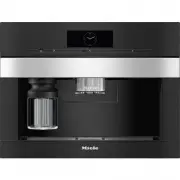


 Miele 11648140 User Manual
 Miele 11754260 User Manual
 Miele 11754290 User Manual
 Miele CM 5000 Manual
 Miele CM 5100 Manual
 Miele CM 5200 Manual
 Miele CVA 620 Manual
 Miele CVA 2650 Manual
 Miele CVA 2660 Manual
 Miele CVA 3650 Manual
 Miele CVA 3660 Manual
 Miele CVA 4080 Manual
 Miele CVA 4085 Manual
 Miele CVA 5060 Manual


