Page 2 - CONTENTS
CONTENTS 1 Safety information ........................................ 2 Identifying parts of the Washer ........................................ 3 Installation ........................................ 4-6 Control Features and Functions ........................................ 7-9 Wash Programs .......
Page 3 - SAFETY INFORMATION; WARNING symbol; CAUTION symbol; Safety precautions; Safety of children
SAFETY INFORMATION Congratulations on your new Midea washer. This manual contains important information on the installation, use and care of your appliance. Please read this manual carefully before use. Follow instructions and keep the manual for future reference. WARNING symbol The WARNING symbol i...
Page 4 - IDENTIFYING PARTS OF THE WASHER; Accessories
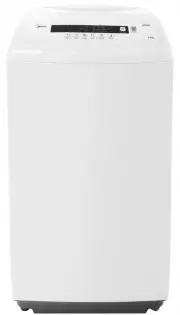
IDENTIFYING PARTS OF THE WASHER adjustable foot frame top lid cabinet handle control panel power plug & cord 3 Accessories cold water inlet hose assembly hot water inlet hose assembly base cover self-tapping screw drain hose filter detergent dispenser
Page 5 - Unpack the clothes washer; INSTALLATION; installing the washer in place; Level the clothes washer
Unpack the clothes washer 4 INSTALLATION 1. Remove the washer from the carton by lifting the carton away from the foam cushion base. 2. Take out the base cover of the cabinet on the foam cover.3. Lift the washer lid and remove the accessories from inside the washer.4. installing the washer in place ...
Page 6 - Install the water inlet hose; Fasten one end of the inlet hose to the tap.; Position the drain hose; to 1000mm above the ground.
5 INSTALLATION Install the water inlet hose CAUTION 1. Fasten one end of the inlet hose to the tap. Ensure there is a rubber washer inside the hose before fastening. The washer prevents water leakage.Securely tighten the other end of the inlet hose to the clothes washer inlet valve. Ensure the rubbe...
Page 7 - NOTE; Connect to a power source; Open the main water supply
6 WARNING Ensure the clothes washer is securely plugged into the mains power supply and it is switched to the ON position. NOTE : Ensure your hands are completely dry before touching the mains outlet, any electrical plugs or cables. Connect to a power source INSTALLATION Ensure the water mains are i...
Page 8 - CONTROL FEATURES AND FUNCTIONS; Water Level
1 2 3 4 5 6 7 8 7 CONTROL FEATURES AND FUNCTIONS 1 Water Level Press this button to select from the lowest (1) to the highest (8) water level. Each press will increase the selected water level by 1.Levels 1 - 3 - 5 - 7 will be selected when the corresponding light is solidLevels 2 - 4 - 6 - 8 will b...
Page 9 - Rinse
CONTROL FEATURES AND FUNCTIONS 8 4 Rinse Before starting, press this button to adjust the RINSE times from 1 time to 3 times and select Water Cycle function to your selected wash program. NOTE: When the Water Cycle function is selected, there will be no drainage and spinning after the last rinse, an...
Page 10 - Fuzzy Weighting Function; This feature is not available when there is water in the tub.; Self Power off Function
CONTROL FEATURES AND FUNCTIONS 9 Fuzzy Weighting Function 1. Press the ON/OFF button.2. Put in the washing load & detergent and then close the lid.3. Select a washing program (only Soaking, Jeans and Baby Clothes have this feature).4. Press the Start/Pause button. The washing machine will start ...
Page 11 - WASH PROGRAMS
WASH PROGRAMS 10 Program Description Default rinse time Default water level Water temp Estimated total time(min) Jeans Suitable for heavy stained/wearable clothes. 2 8 Hot Warm Cold(default) 48 Quick A quick wash for lightly soiled small loads. 1 2 Hot Warm Cold(default) 10 Blanket Suitable for wash...
Page 12 - WASH GUIDE; Before you wash; Sorting
WASH GUIDE Before you wash Sorting To get the best wash results it pays to sort your laundry before washing. Read care labels as they will tell you how the fabric of each garments should be washed. Sort clothes according to the type of and amount of soil. For example oily soils will require a higher...
Page 13 - Washing; To select a wash program:; Adding detergent
WASH GUIDE 12 Washing To select a wash program: a. Press the ON/OFF button b. Select a wash program c. Adjust the water level or temperature if required d. Press the S /P button tart ause End of wash cycle When the wash cycle is complete, the buzzer will sound 6 times and then the power will automat...
Page 14 - CLEANING & MAINTENANCE; Cleaning the outer surface of the washer; Please check the points below after maintenance:
13 CLEANING & MAINTENANCE Always disconnect the clothes washer from the mains power source before performing any maintenance or cleaning of the appliance.For optimal performance, regular maintenance and cleaning is highly recommended.Regular maintenance and cleaning will extend the service life ...
Page 15 - TROUBLESHOOTING GUIDE; FAULT
14 TROUBLESHOOTING GUIDE If the clothes washer does not perform as expected, malfunctions or an alarm is sounding, please check the following list of possible solutions.If a solution can not be found or the problem persists, please contact Midea service (refer to page 15).Do not, under any circumsta...
Page 16 - If service is required; Complete and retain the following information for your records:; Please retain proof of purchase for warranty claims.
15 REPAIRS, SERVICE & WARRANTY It is hazardous for anyone installing, removing, repairing servicing or testing this appliance. Only an Authorised Service Person can carry out servicing or repairs to this appliance. If service is required If you have a problem which persists after you have made t...
Page 17 - SPECIFICATIONS
16 SPECIFICATIONS Model MTW55 Rated Motor Input Power 360W Rated Capacity of Wash and Spinning 5.5Kg Voltage 240V Frequency 50Hz Washing Type Pulsator Water Pressure 0.1MPa - 0.6MPa Max. Spin Speed 700RPM Dimensions Height 930mm Width 515mm Depth 525mm Net Weight 31Kg IP Rating IPX4 NOTE: This produ...