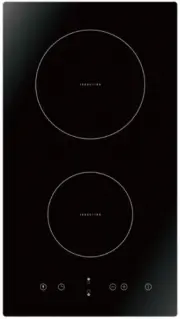
Page 2 - Congratulations; Product Overview; Top View; Control Panel
2 Congratulations on the purchase of your new Induction Hob. We recommend that you spend some time to read this Instruction / Installation Manual in order to fully understand how to install correctly and operate it. For installation, please read the installation section. Read all the safety instruct...
Page 3 - Using the Touch Controls
3 A Word on Induction Cooking Induction cooking is a safe, advanced, efficient, and economical cooking technology. It works by electromagnetic vibrations generating heat directly in the pan, rather than indirectly through heating the glass surface. The glass becomes hot only because the pan eventual...
Page 4 - Choosing the right Cookware
4 Choosing the right Cookware • Only use cookware with a base suitable for induction cooking. Look for the induction symbol on the packaging or on the bottom of the pan. • You can check whether your cookware is suitable by carrying out a magnet test. Move a magnet towards the base of the pan. If it ...
Page 5 - Using your Induction Hob; To start cooking
5 Using your Induction Hob To start cooking 1. Touch the ON/OFF control. After power on, the buzzer beeps once, all displays show “ – “ or “ – – “, indicating that the induction hob has entered the state of standby mode. 2. Place a suitable pan on the cooking zone that you wish to use. • Make sure t...
Page 6 - When you have finished cooking
6 If the display flashes alternately with the heat setting This means that: • you have not placed a pan on the correct cooking zone or, • the pan you’re using is not suitable for induction cooking or, • the pan is too small or not properly centered on the cooking zone. No heating takes place unless ...
Page 7 - Locking the Controls; Over-Temperature Protection
7 4. Beware of hot surfaces H will show which cooking zone is hot to touch. It will disappear when the surface has cooled down to a safe temperature. It can also be used as an energy saving function if you want to heat further pans, use the hotplate that is still hot. Locking the Controls • You can ...
Page 8 - Auto Shutdown Protection; Using the Timer; Using the Timer as a Minute Minder
8 Auto Shutdown Protection Auto shut down is a safety protection function for your induction hob. It shut down automatically if ever you forget to turn off your cooking. The default working times for various power levels are shown in the below table: . Power level 1 2 3 4 5 6 7 8 9 Default working t...
Page 11 - Cooking Guidelines
11 6. When cooking timer expires, the corresponding cooking zone will be switch off automatically. Other cooking zone will keep operating if they are turned on previously. Cooking Guidelines Take care when frying as the oil and fat heat up very quickly, particularly if you’re using PowerBoost. At ex...
Page 12 - Heat Settings
12 on the thickness of the steak and how cooked you want it. Times may vary from about 2 – 8 minutes per side. Press the steak to gauge how cooked it is – the firmer it feels the more ‘well done’ it will be. 5. Leave the steak to rest on a warm plate for a few minutes to allow it to relax and become...
Page 13 - Care and Cleaning
13 Care and Cleaning The settings below are guidelines only. The exact setting will depend on several factors, including your cookware and the amount you are cooking. Experiment with the cooktop to find the settings that best suit you. What? How? Important! Everyday soiling on glass (fingerprints, m...
Page 14 - Hints and Tips
14 Hints and Tips Problem Possible causes What to do The induction hob cannot be turned on. No power. Make sure the induction hob is connected to the power supply and that it is switched on. Check whether there is a power outage in your home or area. If you’ve checked everything and the problem pers...
Page 15 - Failure Display and Inspection
15 The induction hob or a cooking zone has turned itself off unexpectedly, a tone sounds and an error code is displayed (typically alternating with one or two digits in the cooking timer display). Technical fault. Please note down the error letters and numbers, switch the power to the induction hob ...
Page 16 - Zones; Installation; Selection of installation equipment
16 Cooking Hob MC-ID351 Cooking Zones 2 Zones Supply Voltage 220-240V~ 50Hz Installed Electric Power 3500 W Product Size D × W × H(mm) 288X520X56 Building-in Dimensions A × B (mm) 264X495 Weight and Dimensions are approximate. Because we continually strive to improve our products we may change speci...
Page 17 - Before you install the hob, make sure that
17 in good work state. As shown below Note: The safety distance between the hotplate and the cupboard above the hotplate should be at least 760 mm. A(mm) B(mm) C(mm) D E 760 50 mini 30 mini Air intake Air exit 10 mm Before you install the hob, make sure that • the work surface is square and level, a...
Page 18 - When you have installed the hob, make sure that; Before locating the fixing brackets
18 When you have installed the hob, make sure that • the power supply cable is not accessible through cupboard doors or drawers • there is adequate flow of fresh air from outside the cabinetry to the base of the hob • if the hob is installed above a drawer or cupboard space, a thermal protection bar...
Page 19 - Connecting the hob to the mains power supply
19 5. To avoid any damage, the sandwich layer and adhesive must be resistant to heat. Connecting the hob to the mains power supply This hob must be connected to the mains power supply only by a suitably qualified person. Before connecting the hob to the mains power supply, check that: 1. the domesti...
Page 20 - Safety Warnings
20 • The cable must not be bent or compressed. • The cable must be checked regularly and replaced by authorised technicians only. • The yellow/green wire of the power supply cable must be connected to the earth of both power supply and appliance terminals. • The manufacturer cannot be held responsib...