Lenovo ZA780023 - User Manual
Lenovo ZA780023 Docking Station – User Manual, read for free online in PDF format. We hope this helps you resolve any issues you may have. If you have further questions, please contact us through the contact form.
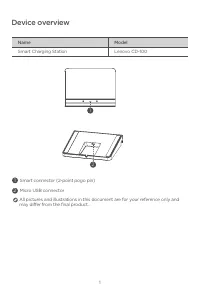
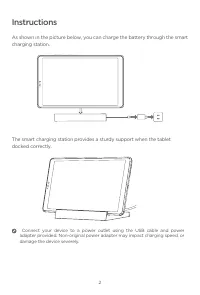

Table of Contents:
- Page 2 – Device overview
- Page 3 – Instructions
- Page 4 – Important safety and handling information; Plastic bag notice; Safety instructions for parents and adult supervisors; EurAsia compliance mark; Lenovo Limited Warranty notice
- Page 5 – Environmental, recycling, and disposal information; General recycling statement
- Page 6 – Restriction of Hazardous Substances Directive (RoHS); European Union compliance statement
Smart Charging Station
Safety, Warranty & Quick Start Guide
Lenovo CD-100
Read this guide carefully before using your device.
"Loading the manual" means you need to wait until the file loads and becomes available for online reading. Some manuals are very large, and the time they take to appear depends on your internet speed.
Summary
1 Name Model Smart Charging Station Lenovo CD-100 1 Smart connector (2-point pogo pin) 2 Micro USB connector Device overview All pictures and illustrations in this document are for your reference only and may differ from the final product. 1 2
2 As shown in the picture below, you can charge the battery through the smart charging station. The smart charging station provides a sturdy support when the tablet docked correctly. Instructions Connect your device to a power outlet using the USB cable and power adapter provided. Non-original power...
3 Important safety and handling information Plastic bag notice Danger : Plastic bags can be dangerous. Keep plastic bags away from babies and children to avoid danger of suffocation. Safety instructions for parents and adult supervisors Your device is not a toy. As with all electrical products, prec...