Konftel C5070 - User Manual
Konftel C5070 Web Camera – User Manual, read for free online in PDF format. We hope this helps you resolve any issues you may have. If you have further questions, please contact us through the contact form.
K O N F T E L . C O M
Konftel Video Solutions
with Konftel Cam50
I N S T A L L A T I O N G U I D E
Konftel is a leading company within collaboration endpoint solutions. Since 1988, our
mission has been to help people in businesses around the world to have meetings
regardless of distance. We know that remote collaboration is an effective way to save time,
money and contribute to a more sustainable world.
We are Climate Neutral Certified, offering customers an option to purchase conferencing
equipment while keeping a clear climate conscience. Crystal clear audio and a sharp video
image are essential for efficient meetings; this is why we only focus on cutting-edge
technology in our Collaboration Solutions. Our audio technology OmniSound
®
is built
into all Konftel Conference phones and devices. The products are sold globally under
the Konftel brand and our headquarters are based in Sweden.
Read more about the company and our products at
konftel.com
.
Konftel AB, Box 268, SE-901 06 Umeå, Sweden
Tel:
+46 90 70 64 89
E-mail:
K O N F T E L . C O M
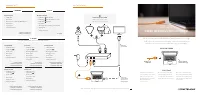
All our video kits supports Konftel One Cable Connection, so a single
USB cable is all you need to connect the camera, the speakerphone
and the room’s screen to the collaboration app on your laptop.
VIDEO MEETINGS WITH KONFTEL
1.
Before connecting the
orange cable to your laptop,
make sure you have the
DisplayLink driver installed.
Download driver at
konftel.com/occ
HOW IT WORKS
WHAT YOU NEED
Laptop with the
collaboration app
Konftel OCC
USB cable
2.
Connect the USB cable
and wait until configuration
is completed.
(The first time, it
might take up to 60 seconds.)
FIRST TIME
3.
In your collaboration app
(for example Microsoft Teams
or Zoom), go to settings and
select Konftel for both audio
and camera.
Installation guide
Konftel Cam50 video kits
900103306
Good goods!
Konftel is a Climate Neutral certified company. We have measured and offset our
entire footprint of greenhouse gases, and are committed to reduce our emissions.
Re
v 1A 2021-05-0
7
"Loading the manual" means you need to wait until the file loads and becomes available for online reading. Some manuals are very large, and the time they take to appear depends on your internet speed.