Kobalt 68686 - User Manual
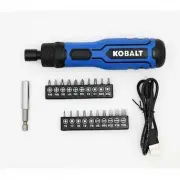
A user manual for the Kobalt 23-piece cordless screwdriver set, designed as a rechargeable, non-sparking tool featuring LED illumination and a 4-volt MAX system, covers essential topics like safety protocols, operational principles, maintenance routines, and troubleshooting common issues to ensure reliable performance. The guide emphasizes durability through impact-resistant components and highlights its compatibility with standard battery packs for versatile use across various DIY and professional tasks.


Fig.5
2
9
before connecting to power source and/or battery pack, picking up or
carrying the tool.
power tools that have the switch on invites accidents.
4) Remove any adjusting key or wrench before turning the power tool on.
A wrench or a key left attached to a rotating part of the power tool may result in
personal injury.
5) Do not overreach. Keep proper footing and balance at all times.
This enables
better control of the power tool in unexpected situations.
6) Dress properly. Do not wear loose clothing or jewellery. Keep your hair,
clothing away from moving parts.
Loose clothes, jewellery or long hair can be
caught in moving parts.
7) If devices are provided for the connection of dust extraction and collection
facilities, ensure these are connected and properly used.
Use of dust collection
can reduce dust-related hazards.
8) Do not let familiarity gained from frequent use of tools allow you to
become complacent and ignore tool safety principles.
A careless action can
cause severe injury within a fraction of a second.
Power tool use and care
1) Do not force the power tool. Use the correct power tool for your
application.
The correct power tool will do the job better and safer at the rate for
which it was designed.
Any
power tool that cannot be controlled with the switch is dangerous and must be repaired.
3) Disconnect the plug from the power source and/or the battery pack, if
detachable, from the power tool before making any adjustments, changing
accessories, or storing power tools.
Such preventive safety measures reduce the
risk of starting the power tool accidentally.
4) Store idle power tools out of the reach of children and do not allow
persons unfamiliar with the power tool or these instructions to operate the
power tool.
Power tools are dangerous in the hands of untrained users.
5) Maintain power tools and accessories. Check for misalignment or binding
the power tool’s operation. If damaged, have the power tool repaired
before use.
Many accidents are caused by poorly maintained power tools.
6) Keep cutting tools sharp and clean.
Properly maintained cutting tools with sharp
cutting edges are less likely to bind and are easier to control.
7) Use the power tool, accessories and tool bits etc. in accordance with these
instructions, taking into account the working conditions and the work to be
performed.
result in a hazardous situation.
8) Keep handles and grasping surfaces dry, clean and free from oil and
grease.
Slippery handles and grasping surfaces do not allow for safe handling and
control of the tool in unexpected situations.
Battery tool use and care
A charger
8
2
10
11
12
13
7
NOTE:
Do not use chemical, alkaline, abrasive or other aggressive detergents or
disinfectants to clean this product as they might be harmful to its surfaces.
4. Maintenance
Before and after each use, check the product and accessories (or attachments) for wear and
damage. If required, exchange them for new ones as described in this instruction manual.
Observe the technical requirements.
5. Storage
> Clean the product as described above.
> Store the product and its accessories in a dark, dry, frost-free, well-ventilated place.
> Always store the product in a place that is inaccessible to children.
> We recommend using the original package for storage or covering the product with a
suitable cloth or enclosure to protect it against dust.
> Check for worn or damaged parts. Replace worn parts as necessary or contact an
authorised service centre for repair before using the product again.
4
5
6
WARNING!
Keep in mind that there are buried objects hidden in every household!
Ensure that there are no gas, water or power lines hidden in the working area that may
be hit before operation – danger of electrical shock and serious damage to people and
property! Use a suitable detector to trace such objects in advance!
2. Screw driving
3
Additional safety warnings for charger
1)
This appliance can be used by children aged from 8 years and above and persons with
reduced physical, sensory or mental capabilities or lack of experience and knowledge if they
have been given supervision or instruction concerning use of the appliance in a safe way
and understand the hazards involved.
2)
Children shall not play with the appliance. Cleaning and user maintenance shall not be
made by children without supervision.
3)
work together. Only use the charger with the cordless screwdriver.
4)
Charge the product indoors only as the charger is designed for indoor use only.
5)
Do not charge non-rechargeable batteries.
6)
Protect the charger against moisture and wet conditions.There is a danger of electric
shock.
Service
identical replacement parts.
This will ensure that safety of the power tool is
maintained.
2) Never service damaged battery packs.
Service of battery packs should only be
performed by the manufacturer or authorized service providers.
Screwdriver safety warnings
1) Hold power tool by insulated gripping surfaces,when performing an
operation where the fastener may contact hidden wiring.
Fastener contacting a
“live” wire may make exposed metal parts of the power tool “live” and could give the
operator an electric shock.
another battery pack.
Use of any
3) When battery pack is not in use, keep it away from other metal objects,
like paper clips, coins, keys, nails, screws or other small metal objects that
can make a connection from one terminal to another.
Shorting the battery
4) Under abusive conditions, liquid may be ejected from the battery; avoid
eyes, additionally seek medical help.
Liquid ejected from the battery may cause
irritation or burns.
Damaged or
risk of injury.
7) Follow all charging instructions and do not charge the battery pack or tool
Charging
14
Additional safety warnings for built-in battery
1)
Charge/operate and store the product in an ambient temperature of 15-25°C to ensure
the longest battery life and best performance. Do not charge/operate or store the battery
in temperatures below 5°C and above 40°C.
2)
Never attempt to open the product housing for any reason. If the plastic housing of the
product breaks open or cracks, immediately discontinue its use and do not recharge it.
3)
Do not pierce the product with nails, strike the battery with a hammer, step on the
product or otherwise subject it to strong impacts or shocks.
4)
Protect the product against heat. Do not place the product in direct sunlight or use or
store the product inside cars in hot weather. Doing so may cause the battery to generate
heat, explode or ignite.
Residual risks
Even if you are operating this product in accordance with all the
safety requirements, potential risks of injury and damage
remain. The following dangers can arise in connection with the
structure and design of this product:
1)
Health defects resulting from vibration emission if the product is being used over long
periods of time or not adequately managed and properly maintained.
2)
This equipment generates, uses and radiate radio frequency energy and, if not installed and
used in accordance with the instruction, may cause harmful interference to radio
communication. However, there is no guarantee that interference will not occur in a
particular installation.
FCC SAFETY
This device complies with part 15 of the FCC Rules.
Operation is subject to the following two conditions:
(1) this device may not cause harmful interference, and
(2) this device must accept any interference received , including
interference that may cause undesired operation .
WARNING!
party responsible for compliance could void the user’s authority to operate the
equipment.
NOTE:
This equipment has been tested and found to comply with the
limits for a Class B digital device, pursuant to part 15 of the FCC Rules.
This limits are designed to provide reasonable protection against harmful
interference in a residential installation.
If this equipment does cause harmful interference to radio or television reception, which can
the interference by one or more of the following measures:
SS22178
Serial Number
Purchase Date
ITEM #5108544
4-VOLT MAX
23pc CORDLESS RECHARGEABLE LED
SCREWDRIVER SET
MODEL #68686
KOBALT and logo design are trademarks or
registered trademarks of LF, LLC. All rights reserved.
ATTACHYOUR RECEIPT HERE
Questions, problems, missing parts?
Before returning to your
retailer, call our customer service department at 1-888-3KOBALT
888-356-2258, 8 a.m. - 8 p.m., EST, Monday - Sunday.
You could also contact us at [email protected].
SAFETY INFORMATION
Read all safety warnings, instructions,illustrations and
serious injury.Save all warnings and instructions for future reference.
The term “power tool” in the warnings refers to your mains-operated
(corded) power tool or battery-operated (cordless) power tool.
Work area safety
1) Keep work area clean and well lit.
Cluttered or dark areas invite accidents.
2) Do not operate power tools in explosive atmospheres,such as in the
Power tools create sparks which may
ignite the dust or fumes.
3) Keep children and bystanders away while operating a power tool.
Distractions can cause you to lose control.
Electrical safety
1) Power tool plugs must match the outlet. Never modify the plug in any way.
Do not use any adapter plugs with earthed (grounded) power tools.
2) Avoid body contact with earthed or grounded surfaces, such as pipes,
radiators, ranges and refrigerators.
There is an increased risk of electric shock if your
body is earthed or grounded.
3) Do not expose power tools to rain or wet conditions.
Water entering a power
tool will increase the risk of electric shock.
4) Do not abuse the cord. Never use the cord for carrying, pulling or
unplugging the power tool. Keep cord away from heat, oil, sharp edges or
moving parts.
Damaged or entangled cords increase the risk of electric shock.
5) When operating a power tool outdoors, use an extension cord suitable for
outdoor use.
Use of a cord suitable for outdoor use reduces the risk of electric shock.
6) If operating a power tool in a damp location is unavoidable, use a residual
current device (GFCI) protected supply.
Use of an GFCI reduces the risk of electric
shock.
Personal safety
1) Stay alert, watch what you are doing and use common sense when
operating a power tool. Do not use a power tool while you are tired or
A moment of inattention
while operating power tools may result in serious personal injury.
2) Use personal protective equipment. Always wear eye protection.
Protective
equipment such as a dust mask, non-skid safety shoes, hard hat, or hearing protection
used for appropriate conditions will reduce personal injuries.
General power tool safety warnings
WARNING!
3. General cleaning
> Clean the product with a dry cloth. Use a brush for areas that are hard to reach.
> Remove stubborn dirt with high pressure air (max. 3 bar).
1. After use
> Check, clean and store the product as described below.
2. The golden rules for care
> Keep the product clean. Remove debris from it after each use and before storage.
> Regular and proper cleaning will help ensure safe use and prolong the life of the product.
> Inspect the product before each use for worn and damaged parts. Do not operate it if you
WARNING!
supply and let the product cool down before performing inspection, maintenance and
cleaning work!
WARNING!
Only perform repairs and maintenance work according to these
CARE AND MAINTENANCE
WARNING!
The product must be fully assembled before operation! Do not use a
product that is only partly assembled or assembled with damaged parts!
Follow the assembly instructions step-by-step and use the pictures provided as a
visual guide to easily assemble the product! Do not connect the product to power
supply before it is completely assembled!
1. Setup
WARNING!
The product cannot be operated while charging! Charge in a safe
location away from moisture or heat sources!
WARNING!
The WHITE LED LIGHT FAST FLASHING – the charging voltage is
higher than the nominal 5V, need select the correct charger accordingly.
The battery of this product is integrated in the handle and cannot be removed.
The battery has been shipped in a low charge condition. Charge it fully before f irst use.
2. Charge
> Plug the charging cable type C jack(6) into the
charging socket (5) on the handle(Fig. 1).
> Connect the charging cable USB input (7) to the
charger with USB charging socket(not supplied)
> The charging indicator light (4) shows the
charging status.
WHITE LED LIGHT SLOW FLASHING - CHARING
WHITH LED LIGHT ON - FULLY CHARGED
Fig.1
5
6
worked with. Use only Hex 1/4-in.(6.35 mm) bits which are 1-in.(25 mm) or 2-in.(50 mm)
long and bits holder.
3. Driver bits
NOTE:
Use a suitable bit holder to access areas that are hard to reach.Insert the
bit holder into the socket in the same way as the driver bits, then insert a driver bit
into the bit holder.
Fig.2
PREPARATION
> Open the rubber cover before plug on.
> Pull the quick-release sleeve backwards
> Insert the hex driver bits or the bits holder to
the stop into the quick-release chuck (1).
> Release the quick-release sleeve.
> Either remove the driver bit or the bit holder
assembly, then insert a new one as
described above if desired.
TABLE OF CONTENTS
..........................................................
.................................................................
................................................................
...........................................................
...........................................................................
.........................................................
..................................................................
..............................................................................
...
Product Specifications
Package Contents
Safety Information
Preparation
Operating Instructions
Care And Maintenance
Trouble Shooting
Warranty
3
3
.........................................................................
Your Product
4
5
10
.............................................................
Production Functions
11
...........................................................................
Symbols
9
12
13
14
14
the following symbols and abbreviations. Familiarize yourself with them to reduce hazards
like personal injuries and damage to property.
SYMBOLS
Read instructions
before use
Safety alert symbol
Wear eye protection
RPM
Revolutions or reciprocations
per minute.
Class II construction
SYMBOL
V
A
Hz
W
Volts
Amps
Hertz
Watts
DEFINITION
SYMBOL
n
0
/min
No-load Speed
Revolutions or Strokes per Minute
Direct Current
Alternating Current
DEFINITION
Polarity
. Reorient or relocate the receiving antenna.
. Increase the separation between the equipment and receiver.
is connected.
. Consult the dealer or an experienced radio /TV technician for help.
Distributed by
L G Sourcing, Inc.
1000 Lowees Blvd., Mooresville, NC 28117
pls call 1-888-3KOBALT (1-888-356-2258)
WARNING: Some dust created by power sanding, sawing, grinding, drilling
and other construction activities contains chemicals known to the state of
California to cause cancer, birth defects or other reproductive harm. Some
examples of these chemicals are:
• Lead from lead-based paints,
• Crystalline silica from bricks and cement and other masonry products, and
• Arsenic and chromium from chemically-treated lumber.
Your risk from these exposures varies, depending on how often
you do this type of work. To reduce your exposure to
these chemical: work in a well ventilated area, and work
with approved safety equipment, such as those dust masks
that are specially designed to filter out microscopic particles.
For more information go to www.P65Warnings.ca.gov
CALIFORNIA PROP 65
WARNING!
Always charge the product before storage! It’s important to
a just-operated product for approximately 30 minutes before attempting to recharge.
WARNING!
Check the voltage! The voltage must comply with the information
on the rating label!
C jack(6) from the charging port (5).
NOTE:
It is normal for the battery pack and charger to become warm (but not
hot) during the charging process. Depending on temperature and existing charge
level, the actual charging time may change.
PRODUCT FUNCTIONS
1. Intended use
This product is intended for light fastening and removing screws with 1-in.(25 mm) or
2-in.(50 mm) driver bits. The product is not suitable for heavy duty screw driving work into
hard wood or with large diameter screws. It must not be used for drilling and should not be
used for working on materials that are dangerous to health. For safety reasons it is essential
instructions therein.
Problem
Possible Cause
Solution
1. Product does
not start
1.1 Battery discharged
1.2 Battery damaged
1.3 Other electrical defect to
the product
1.1 Charge battery
1.2 Check by a specialist
electrician
1.3 Check by a specialist
electrician
2. Product does
not reach full
power
2.1 Battery capacity too low
2.1 Charge battery
3. Unsatisfactory
result
3.1 Driver bit is worn
3.2 Driver bit not suitable for
intended operation
3.1 Replace with a new one
3.2 Use suitable driver bit
WARNING!
Only perform the steps described within these instructions! All further
inspection, maintenance and repair work must be performed by an authorised service
check the product using this section. In most cases the problem can be solved quickly.
TROUBLE SHOOTING
WARRANTY
5-YEAR LIMITED WARRANTY: You should never have a problem with your Kobalt product.
However, this product is warranted to be free from defects in material and workmanship for a
period of 5 years from the date of purchase. Instances of normal wear and tear, damage
caused by abuse, misuse, alteration, or failure to follow instructions or proper maintenance
protocols are not covered.
If you believe the tool is defective at any time during the specied warranty period, pls call
888-3KOBALT 888-356-2258 for warranty service. You could also contact us at
PRODUCT SPECIFIC
PACKAGE CONTENTS INCLUDES
ATIONS
COMPONENT
SPECIFICATION
Screwdriver
Rated voltage
4V
Rated no-load speed n
0
280 min
-1
Tool socket
Hex 1/4-in.(6.35 mm)
Maximum torque
1.5 Nm / 13 in-lbs
Weight 0.49 lbs. (0.22 kg)
Built-in battery
Type
Lithium-ion
Capacity 1500 mAh
Voltage 4V
WARNING!
2. Forward / reverse operation
> Change the rotational direction from forward to reverse by pressing the forward/reverse
button(3).
> Press " " to screw driving(Fig. 3)
> Press " " to remove screw(Fig. 4)
3. Automatic LED work light
> The LED work light (2) will automatically illuminate by pressing
> 1pc 4V Max Lithium-ion Screwdriver
> 1pc USB Charging cable
> 1pc Magnetic Bit Holder
> 20pc 1-in. Screwdriver Bits:
• Slotted: 1/8-in., SL 9/64-in., SL 5/32-in., SL 3/16-in., SL 7/32-in.
• Phillips: #0 x2, #1 x4
• Star: T6,T7,T8,T9, T10
• Hex: 5/64-in., H 3/32-in.
• Square:: #0, #1
the forward/reverse button (3).
Fig.3
Fig.4
screw driving
remove screw
OPERATING INSTRUCTIONS
1. General operation
> Check the product and charger as well as accessories for damage before each use. Do not
use the product if it is damaged or shows wear.
> Always hold the product on its handle. Keep the handle dry to ensure safe support.
entering the working area. Always let the product come to complete stop before putting
it down.
> Do not overwork yourself. Take regular breaks to ensure you can concentrate on the work
and have full control over the product.
> Where possible, secure workpieces to prevent them from moving during operation.
1
YOUR PRODUCT
1
2
3
WARNING!
Remove the tool from the package and examine it carefully.
Do not discard the carton or any packaging material until all parts have been
examined. If any part of the tool is missing or damaged, do not connect the plug
to the power source or use the tool until the part has been repaired or replaced.
Failure to heed this warning could result in serious injury.
5
6
8
9
7
4
1/4 in. quick release chuck
LED work light
Forward/reverse button
Battery and charging indicator
USB-C charging port
Charging cable type C jack
Charging cable USB input
20pc 1-in. Screwdriver Bits
Magnetic bit holder
PART DESCRIPTION
1
2
3
4
5
6
7
8
9
PH0 PH0 PH1 PH1 PH1 PH1
S0
S1
5/64 3/32
T6
T7
T8
T9
T10
1/8
7/32
3/16
5/32
9/64
> Pre-drill the holes with a smaller diameter of the screw to be screwed.
> Hold the product perpendicular to the screw to be screwed in/out. Holding it at an angle
may cause slipping or jamming of the driver bit.
> Place the tip of the driver bit directly on the screw first and then switch the product on.
> Only apply as much pressure as necessary to keep the screw in place and the driver bit in
contact with the screw head. Too much pressure will cause damage to the screw head and
driver bit, too little pressure will cause the driver bit to slide away.
> Remove blocked and stuck screws by changing the rotational direction.
"Loading the manual" means you need to wait until the file loads and becomes available for online reading. Some manuals are very large, and the time they take to appear depends on your internet speed.
Was this manual helpful?
About this manual
- Brand
- Kobalt
- Model
- 68686
- Document type
- User Manual
- Category
- Cordless Screwdriver
- Language(s)
- English
- Pages
- 2
- File size
- 5.3 MB
- Format
Ask a question
Related manuals
Other Kobalt appliances
 Kobalt 6904 User Manual
/L0522084/webp/1.webp) Kobalt 215921 User Manual
Kobalt 215921 User Manual Kobalt 300842 User Manual
 Kobalt 3300244 User Manual
 Kobalt 3320447 User Manual
 Kobalt 3332644 User Manual
 Kobalt A011038 User Manual
 Kobalt A081002 User Manual
 Kobalt AC-6H User Manual
 Kobalt DMP-32 User Manual
 Kobalt DT-218 User Manual
 Kobalt DT-9180AKIT User Manual
 Kobalt DT-9180D User Manual
 Kobalt ET-20 User Manual
 Kobalt K6RS-06A User Manual
 Kobalt K11RTA-03 User Manual
 Kobalt K15CS-06AC User Manual
/L0504078/webp/1.webp) Kobalt K7060V User Manual
Kobalt K7060V User Manual Kobalt KB 424-03 User Manual
 Kobalt KB 524-03 User Manual