Page 2 - TABLE OF CONTENTS; BLENDER SAFETY
2 BLENDER INSTRUCTIONS BLENDER INSTRUCTIONS BLENDER SAFETY Important safeguards .......................................................................................... 3 Electrical requirements ...................................................................................... 5 Electrical equ...
Page 3 - English; BLENDER INSTRUCTIONS; IMPORTANT SAFEGUARDS; When using electrical appliances, basic safety
English 3 BLENDER INSTRUCTIONS BLENDER INSTRUCTIONS BLENDER SAFETY IMPORTANT SAFEGUARDS When using electrical appliances, basic safety precautions should always be followed, including the following: 1. Read all instructions. Misuse of appliance may result in personal injury. 2. To protect against ri...
Page 4 - SAVE THESE INSTRUCTIONS
4 BLENDER SAFETY 6. Do not operate the Blender with a damaged cord or plug or after appliance malfunctions, or is dropped or damaged in any manner. Return appliance to the nearest Authorised Service Center for examination, repair or electrical or mechanical adjustment, in order to avoid a hazard. 7....
Page 5 - Electrical requirements; Motor horsepower
English 5 BLENDER SAFETY BLENDER SAFETY Electrical requirements Voltage: 220-240 voltsFrequency: 50/60 HzWattage : 1300 wattsNOTE: If the plug does not fit in the outlet, contact a qualified electrician. Do not modify the plug in any way. Do not use an adapter.Do not use an extension cord. If the po...
Page 6 - PARTS AND FEATURES; Parts and accessories; ASSEMBLING THE BLENDER
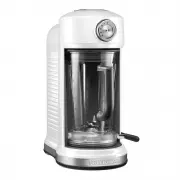
6 PARTS AND FEATURES Parts and accessories BPA Free pitcher with lid Function selection dial* Die-cast metal base Pitcher release lever Stainless steel blades Removable ingredient cap with measuring markings Removable funnel * See the “Blender function guide” section. Magnetic drive (not visible) AS...
Page 7 - Before first use; OPERATING THE BLENDER
English 7 PARTS AND FEATURES ASSEMBLING THE BLENDER Before using the Blender, plug into a grounded outlet. Before first use Before using your Blender for the first time, wipe Blender base with a warm damp cloth, then wipe clean with a damp cloth. Dry with a soft cloth. Wash pitcher, lid, and ingredi...
Page 10 - Blender function guide; TIPS FOR GREAT RESULTS
10 OPERATING THE BLENDER Blender function guide Setting Description Blending time (in min:sec) Items to blend Quick pulses of power to crush large amounts of hard foods, such as ice, frozen vegetables, or frozen fruits. 1:05 Blended ice drinksCrushed ice Frozen chopped fruit (defrost slightly until ...
Page 11 - Quick tips
English 11 OPERATING THE BLENDER TIPS FOR GREAT RESULTS Quick tips Using the Blender • Stop the Blender before using utensils in the pitcher. Use a rubber spatula to mix ingredients only when the Blender is off. Never use any utensil, including spatulas, in the pitcher while the motor is running. • ...
Page 12 - CARE AND CLEANING
12 TIPS FOR GREAT RESULTS Take lumps out of sauce: If sauce becomes lumpy, place in the pitcher. Cover and blend on MILKSHAKES setting until smooth.Combine flour and liquid for thickening: Pour liquid ingredients in pitcher first, then add flour on top. Cover, and blend on MILKSHAKES setting.Prepare...
Page 13 - Cleaning the Blender
English 13 TIPS FOR GREAT RESULTS Cleaning the Blender • Clean the Blender thoroughly after every use. Be sure to unplug before cleaning. • To avoid damaging the Blender, do not immerse the Blender base or cord in water. • To avoid scratching the Blender, do not use abrasive cleansers or scouring pa...
Page 14 - Understanding the Blender flash codes; TROUBLESHOOTING
14 TROUBLESHOOTING IMPORTANT: The Blender will not operate at any speed unless the START/PAUSE button is pressed first. Understanding the Blender flash codes LED is flashing slowly LED is flashing rapidly LED is not flashing Ready modeIf the LED slowly glows with increasing intensity and then is off...
Page 15 - Blender stops while blending
English 15 TROUBLESHOOTING TROUBLESHOOTING If the problem cannot be fixed with the steps provided in this section, contact an authorised service center. Blender stops while blending • Power Loss - Rotate selection dial to the “OFF/O” position and then rotate to desired selection setting and press ST...