Page 3 - Motorsports CAM; INSTRUCTION MANUAL; English; Contents
3 Motorsports CAM STZ-RF200WD INSTRUCTION MANUAL Read this manual thoroughly before installation wiring and use. Install and wire the unit correct-ly in accordance with the Safety Precautions ( p. 4 - p. 7). Please store this manual in a secure location and refer to it as needed. In the event of an ...
Page 4 - Safety Precautions; and prevent damage to property.; Warning; Installation and Wiring
4 Safety Precautions These symbols denote explanations to prevent injuring yourself and others, and prevent damage to property. ■ Safety icons used in this guide Warning Describes information that could result in death or serious injury if not followed. Caution Describes information that could resul...
Page 5 - Use
5 • Store SD cards, packing materials or unused accessories such as screws in a lo- cation away from small children. • Plug in the power cable correctly• Hold the in-line connectors when unplugging the power cable• Disconnect the in-line connector for power cable when not using the Motorsports CAM f...
Page 6 - Caution
6 Handling near electronic medical equipment If used near electronic medical equipment such as implantable pacemakers or implantable cardioverter-defibrillators, keep the unit at least 22 cm (8.664″) from such equipment. The radio waves may negatively affect the operations of medical devices. Contac...
Page 7 - Precautions for Use; Installation
7 Precautions for Use Installation • Only install the unit with the key removed from the vehicle’s ignition so that the engine does not start unexpectedly. • Install the unit in a location that will not interfere with vehicle operations. • Event recording may not work properly if a mistake is made d...
Page 8 - Recommended SD cards; Precautions when using SD cards
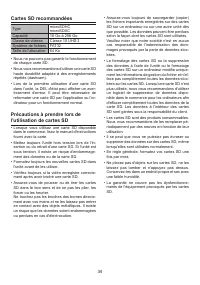
8 Recommended SD cards Type microSDHC microSDXC Capacity 16 GB to 256 GB Speed class Class 10 UHS-I File system FAT32 Allocation size 64 KB • We cannot guarantee the operations of every SD card. • We recommend using a high-durability SD that is suited for repeated recording (dashcam). • When using a...
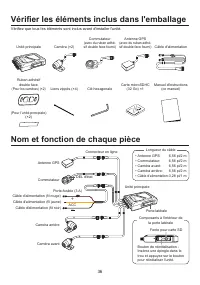
Page 10 - Check the Items Included in the Package; Name and Function of Each Part
10 Check the Items Included in the Package Check that all items are included before installing the unit. Main unit Camera (×2) Switch (with double-sided tape attached) GPS antenna (with double-sided tape attached) Power cable Double-sided tape (For cameras) (×2) Zip ties (×4) Hex key microSDHC card ...
Page 11 - Inserting and removing the SD card
11 Installation Inserting and removing the SD card Inserting an SD card1. Open the side door to access the SD card slot.2. Press the SD card into the SD card slot until you hear a click, then close the side door. Top Side door SD card Insert the SD card with the pins facing the top of the unit. • Al...
Page 12 - Installing the unit; Installation layout; • Main unit
12 Installing the unit Installation layout GPS antenna Switch Front camera Main unit In order to correctly display the orientation of the G sensor chart of the PC viewer software*, attach the main unit with the cable side facing the front of the vehicle. * Front and back (GX), left and right (GY), t...
Page 14 - • Securing cables
14 • Power cable Each wire in the power cable assembly connects to the bike battery. Unscrew the battery’s negative/ground terminal. Then unscrew the positive terminal. Place the round terminal on the power cable (red wire) on the battery’s positive terminal, then tight-en with the original term...
Page 15 - Powering the unit; Motorsports CAM Functions; Function settings; Continuous recording; Saving and overwriting recorded files
15 Powering the unit When the bike’s ignition is set to ACC or ON and the unit is switched on, the unit will start continuous recording after completing a system check. When the ignition is turned to OFF, the unit will automatically power off. * The LED lights may illuminate for approximately 30 sec...
Page 16 - LED status display
16 LED status display Blue Orange State LED display pattern System check at start-up (from startup to the start of recording) Blue Orange Blue lit and orange blinks once per second • Continuous recording (unsynchronized time) • Continuous recording (synchronized time) Blue Orange Blue lit, orange un...
Page 17 - Using the Cell Phone App; Installing the KENWOOD Motorsports CAM App
17 Using the Cell Phone App You can use the KENWOOD Motorsports CAM App to view and download videos recorded and saved to the SD card. You can also change the unit settings. Installing the KENWOOD Motorsports CAM App Minimum system requirements (cell phone) • Android 7.0 or later • iOS 11 or laterSe...
Page 18 - Adjusting the field of view
18 Adjusting the field of view 1. Open the KENWOOD Motorsports CAM and tap “Image angle adjustment” on the main menu. It will start with the live feed from the front camera. Guide lines • Tap “Rear” to switch to the live feed from the rear camera. • Tap “X” when you are finished with the screen. • I...
Page 19 - Using the Computer Viewing Program; Installing the software; Updating the Firmware; Operating environment
19 Using the Computer Viewing Program The KENWOOD Motorsports CAM Viewer is a computer program designed for viewing video re-corded by the unit.The program can be downloaded from our com-pany website.Check the product page for details. Installing the software Double-click the program installer downl...
Page 20 - Troubleshooting
20 Troubleshooting Issue Cause / Solution The indicator does not light up even though the vehicle ACC is ON. y Is the fuse blown? 3 Address the cause of the blown fuse and replace the fuse. (Always use fuses of the specified capacity) y Is the in-line connector for the power cable or switch cable di...
Page 22 - Appendix; Wireless Link Specifications
22 Appendix Wireless Link Specifications Standard IEEE802.11ac (Default Settings) IEEE802.11n (Optional Settings) Security WPA2 WPA2 Frequency Range 5735-5835 MHz 2400-2473 MHz Transfer Rate 433 Mbps (802.11ac) 150 Mbps (802.11n) Output Power 12 dBm ±2 dB (802.11ac) 12 dBm ±2 dB (802.11n) On Wireles...
Page 23 - Important trademarks and software notifications
23 Receiving positioning satellite (GPS, GLONASS) information • Positioning will begin when the unit powers on. Positioning may take 5 minutes to complete depending on the positioning status of satellites. • Satellite signals cannot pass through solid matter (except for glass). Positioning will not ...
Page 24 - File and folder organization; Recording time
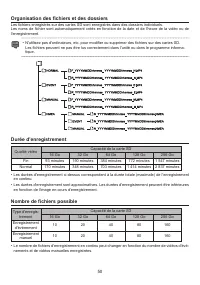
24 File and folder organization Files saved on SD cards are saved in individual folders.File names are automatically created based on the date and time of the video or recording. • Do not use computers, etc. to change or delete files on SD cards. Files may not play correctly in the unit or the compu...
Page 25 - The software license for this product
25 Important Software Notifications The software license for this product The software included in this product consists of multiple software components, each of which is copyrighted by JVCKENWOOD or a third party. This product uses software components (here- after, “Licensed Software”) based on sof...
Page 26 - Specifications
26 Specifications Water- proofing, Dustproofing Main unit IP55Cameras IP66/67 GPS IP66/67 Switch IP66/67 Front and rear cam- era units Image sensors 2 megapixels (effective pixels: 1.86 megapixels) Lens viewing angle 195° diagonal (effective angle: 181°) Frame rate 27.5 fps F-number 2.2 Recording re...
Page 29 - Motorsports CAM pour moto; MANUEL D'INSTRUCTIONS; Français; Contenu
29 Motorsports CAM pour moto STZ-RF200WD MANUEL D'INSTRUCTIONS Lisez attentivement ce manuel avant de procéder à l’installation et à l’utilisation. Installez et câblez correctement l’unité conformément aux Consignes de sécurité (p. 30 - p. 33).Veuillez conserver ce manuel dans un endroit sûr et vous...
Page 30 - Précautions de sécurité; et de blesser les autres, et pour prévenir tout dommage matériel.; Mise en garde; Avertissement; Installation et câblage
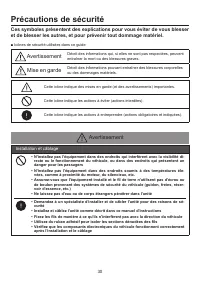
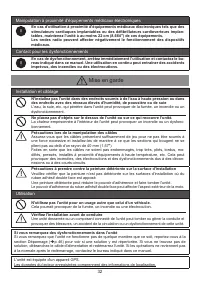
30 Précautions de sécurité Ces symboles présentent des explications pour vous éviter de vous blesser et de blesser les autres, et pour prévenir tout dommage matériel. ■ Icônes de sécurité utilisées dans ce guide Avertissement Décrit des informations qui, si elles ne sont pas respectées, peuvent entr...
Page 31 - Utilisation
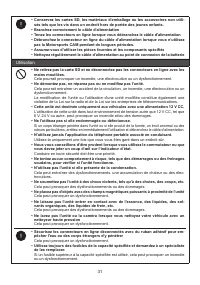
31 • Conservez les cartes SD, les matériaux d’emballage ou les accessoires non utili- sés tels que les vis dans un endroit hors de portée des jeunes enfants. • Branchez correctement le câble d'alimentation • Tenez les connecteurs en ligne lorsque vous débranchez le câble d'alimentation • Débranchez ...
Page 33 - Précautions à prendre pour l'utilisation
33 Précautions à prendre pour l'utilisation Installation • Installez l’unité uniquement lorsque la clé est reti- rée du contact du véhicule afin que le moteur ne démarre pas de façon inattendue. • Installez l'unité à un emplacement qui n'interfére- ra pas avec le fonctionnement du véhicule. • L'enre...
Page 37 - Insertion et retrait de la carte SD
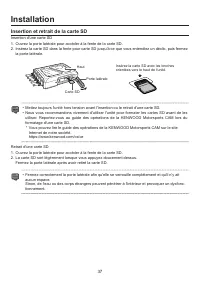
37 Installation Insertion et retrait de la carte SD Insertion d'une carte SD1. Ouvrez la porte latérale pour accéder à la fente de la carte SD.2. Insérez la carte SD dans la fente pour carte SD jusqu'à ce que vous entendiez un déclic, puis fermez la porte latérale. Haut Porte latérale Carte SD Insér...
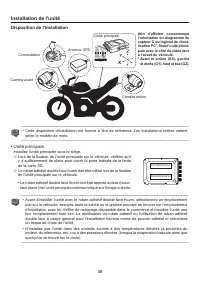
Page 38 - Installation de l'unité; Disposition de l'installation; • Unité principale
38 Installation de l'unité Disposition de l'installation Antenne GPS Commutateur Caméra avant Unité principale Afin d’afficher correctement l’orientation du diagramme du capteur G du logiciel de visua- lisation PC*, fixez l’unité princi - pale avec le côté du câble face à l’avant du véhicule. * Avan...
Page 39 - • Antenne GPS; • Commutateur; • Caméras avant et arrière
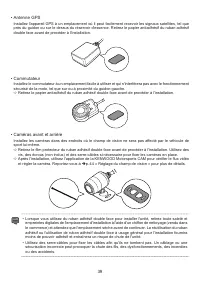
39 • Antenne GPS Installez l'appareil GPS à un emplacement où il peut facilement recevoir les signaux satellites, tel que près du guidon ou sur le dessus du réservoir d'essence. Retirez le papier antiadhésif du ruban adhésif double face avant de procéder à l'installation. • Commutateur Installez le ...
Page 40 - • Sécurisation des câbles
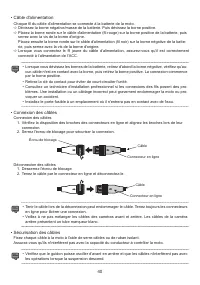
40 • Câble d'alimentation Chaque fil du câble d'alimentation se connecte à la batterie de la moto. Dévissez la borne négative/masse de la batterie. Puis dévissez la borne positive. Placez la borne ronde sur le câble d'alimentation (fil rouge) sur la borne positive de la batterie, puis serrez ave...
Page 41 - Alimentation de l'unité; Fonctions de la Motorsports CAM; Paramètres des fonctions; Enregistrement en continu; Enregistrement et écrasement des fichiers enregistrés; Paramètres audio
41 Alimentation de l'unité Lorsque le contact de la moto est réglé sur ACC ou ON et que l’unité est activée, l’appareil commence un enregistrement en continu après avoir terminé une vérification du système. Lorsque le contact est coupé, l'unité s'éteint automatiquement. * Les voyants DEL peuvent s'a...
Page 42 - Affichage de la DEL d'état
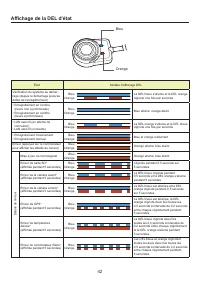
42 Affichage de la DEL d'état Bleu Orange État Modèle d'affichage DEL Vérification du système au démar - rage (depuis le démarrage jusqu'au début de l'enregistrement) Bleu Orange La DEL bleue s'allume et la DEL orange clignote une fois par seconde • Enregistrement en continu (heure non synchronisée)...
Page 43 - Installation de l'application Motorsports CAM; sans fil
43 Utilisation de l'application pour téléphone portable Vous pouvez utiliser l'application KENWOOD Motorsports CAM pour afficher et télécharger des vidéos sauvegardées et enregistrées sur la carte SD. Vous pouvez également changer les paramètres de l'unité. Installation de l'application Motorsports ...
Page 44 - Réglage du champ de vision
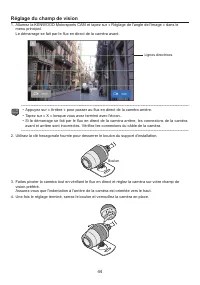
44 Réglage du champ de vision 1. Allumez la KENWOOD Motorsports CAM et tapez sur « Réglage de l'angle de l'image » dans le menu principal. Le démarrage se fait par le flux en direct de la caméra avant. Lignes directrices • Appuyez sur « Arrière » pour passer au flux en direct de la caméra arrière. •...
Page 45 - Utilisation du programme de visualisation de; Installation du logiciel; Mise à jour du micrologiciel; Environnement de fonctionnement
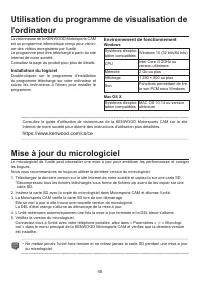
45 Utilisation du programme de visualisation de l'ordinateur La visionneuse de la KENWOOD Motorsports CAM est un programme informatique conçu pour vision- ner des vidéos enregistrées par l'unité. Le programme peut être téléchargé à partir du site Internet de notre société. Consultez la page du produ...
Page 46 - Dépannage
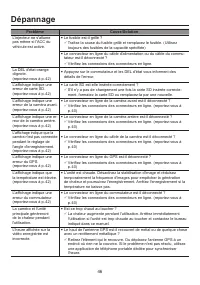
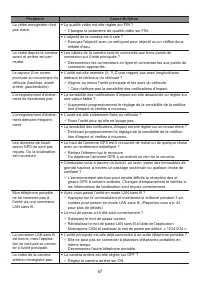
46 Dépannage Problème Cause/Solution L'injecteur ne s'allume pas même si l'ACC du véhicule est activé. y Le fusible est-il grillé ? 3 Traitez la cause du fusible grillé et remplacez le fusible. (Utilisez toujours des fusibles de la capacité spécifiée) y Le connecteur en ligne du câble d'alimentation...
Page 48 - Annexe; Spécifications de la liaison sans fil
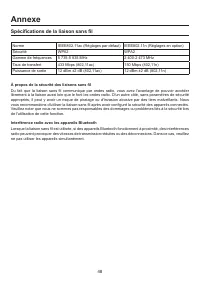
48 Annexe Spécifications de la liaison sans fil Norme IEEE802.11ac (Réglages par défaut) IEEE802.11n (Réglages en option) Sécurité WPA2 WPA2 Gamme de fréquences 5 735-5 835 MHz 2 400-2 473 MHz Taux de transfert 433 Mbps (802,11ac) 150 Mbps (802,11n) Puissance de sortie 12 dBm ±2 dB (802,11ac) 12 dBm...
Page 49 - Marques importantes et notifications de logiciels
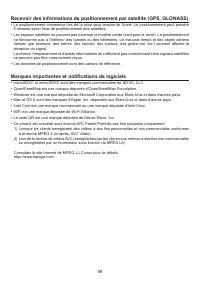
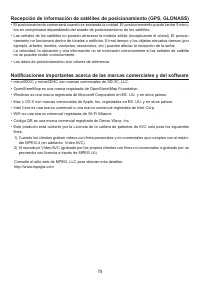
49 Recevoir des informations de positionnement par satellite (GPS, GLONASS) • Le positionnement commence lors de la mise sous tension de l'unité. Le positionnement peut prendre 5 minutes selon l'état de positionnement des satellites. • Les signaux satellites ne peuvent pas traverser la matière solid...
Page 51 - Notifications logicielles importantes; La licence du logiciel pour ce produit
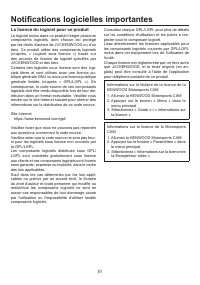
51 Notifications logicielles importantes La licence du logiciel pour ce produit Le logiciel inclus dans ce produit intègre plusieurs composants logiciels, dont chacun est protégé par les droits d'auteur de JVCKENWOOD ou d'un tiers. Ce produit utilise des composants logiciels (ci-après, « Logiciel so...
Page 52 - Spécifications
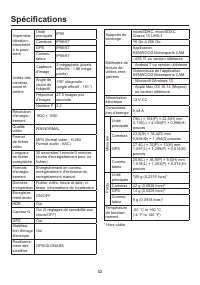
52 Spécifications Imperméa- bilisation, étanchéité à la pous- sière Unité principale IP55Caméras IP66/67 GPS IP66/67 Commu- tateur IP66/67 Unités des caméras avant et arrière Capteurs d'image 2 mégapixels (pixels effectifs : 1,86 méga - pixels) Angle de vision de l'objectif 195° diagonale (angle eff...
Page 55 - MANUAL DE INSTRUCCIONES; Español; Contenido
55 Motorsports CAM STZ-RF200WD MANUAL DE INSTRUCCIONES Lea detenidamente este manual antes de instalar el cableado y del uso. Instale y conecte la unidad correctamente de acuerdo con las Precauciones de seguridad (pág. 56 - pág. 59).Guarde este manual en un lugar seguro y consúltelo según sea necesa...
Page 56 - Precauciones de seguridad; a otras personas, y evitar daños a la propiedad.; Advertencia; Instalación y cableado
56 Precauciones de seguridad Estos símbolos denotan explicaciones para evitar lesionarse usted mismo y a otras personas, y evitar daños a la propiedad. ■ Iconos de seguridad utilizados en esta guía Advertencia Describe información que podría provocar la muerte o lesiones graves si no se respeta. Pre...
Page 57 - Uso
57 • Guarde las tarjetas SD, los materiales de embalaje o los accesorios no utilizados, como tornillos, en un lugar alejado de los niños pequeños. • Enchufe el cable de alimentación correctamente. • Sujete los conectores en línea al desenchufar el cable de alimentación. • Desconecte el conector en l...
Page 58 - Precaución
58 Manipulación cerca de equipos médicos electrónicos Si se utiliza cerca de equipos médicos electrónicos, como marcapasos implantables o desfibriladores automáticos implantables, mantenga la unidad al menos a 22 cm (8.664″) de dicho equipo. Las ondas de radio pueden afectar negativamente al funcion...
Page 59 - Precauciones de uso; Instalación; Derechos de autor
59 Precauciones de uso Instalación • Solo instale la unidad con la llave extraída del encendido del vehículo para que el motor no arranque inesperadamente. • Instale la unidad en un lugar que no interfiera con las operaciones del vehículo. • Es posible que el registro de eventos no funcio- ne correc...
Page 61 - ADVERTENCIA RELATIVA A LA FCC; NOTA RELATIVA A LA FCC
61 FCC/IC ADVERTENCIA RELATIVA A LA FCC Este equipo puede generar o utilizar energía de radiofrecuencia. Los cambios o modificaciones en este equipo pueden causar interferencias perjudiciales a menos que las modificaciones estén expresamente aprobadas en el manual de instrucciones. El usuario podría...
Page 63 - Insertar y quitar la tarjeta SD
63 Instalación Insertar y quitar la tarjeta SD Insertar una tarjeta SD1. Abra la puerta lateral para acceder a la ranura de la tarjeta SD.2. Presione la tarjeta SD en la ranura para tarjetas SD hasta que escuche un clic, luego cierre la puerta lateral. Parte superior Puerta lateral Tarjeta SD Insert...
Page 64 - Instalación de la unidad; Diseño de la instalación; • Unidad principal
64 Instalación de la unidad Diseño de la instalación Antena GPS Interruptor Cámara delantera Unidad principal Para mostrar correctamente la orientación del gráfico del sen - sor G del software visor de PC*, conecte la unidad principal con el lado del cable orientado hacia la parte delantera del vehí...
Page 65 - • Antena GPS; • Interruptor
65 • Antena GPS Instale el dispositivo GPS en un lugar donde pueda recibir fácilmente señales de satélite, como cerca del manillar o en la parte superior del depósito de gasolina. Retire el papel antiadhesivo de la cinta adhesiva de doble cara antes de realizar la instalación. • Interruptor Instale ...
Page 66 - • Fijación de los cables
66 • Cable de alimentación Cada cable del conjunto de cables de alimentación se conecta a la batería de la motocicleta. Desenrosque el terminal negativo/tierra de la batería. A continuación, desenrosque el terminal positivo. Coloque el terminal redondo en el cable de alimentación (cable rojo) en...
Page 67 - Alimentación de la unidad; Funciones de la Motorsports CAM; Ajustes de la función; Grabación continua; Guardar y sobrescribir archivos grabados
67 Alimentación de la unidad Cuando el encendido de la motocicleta está en ACC u ON y la unidad está encendida, la unidad co- menzará a grabar continuamente tras completar una verificación del sistema. Cuando se desconecta el encendido, la unidad se apagará automáticamente. * Las luces LED pueden il...
Page 68 - Pantalla de estado LED
68 Pantalla de estado LED Azul Naranja Estado Patrón de la pantalla LED Comprobación del sistema al inicio (desde el inicio hasta el inicio de la grabación) Azul Naranja Se ilumina en azul y parpadea en naranja una vez por segundo • Grabación continua (tiempo no sincronizado) • Grabación continua (t...
Page 69 - Uso de la aplicación del teléfono móvil; Instalación de la aplicación KENWOOD Motorsports CAM; Conecte su teléfono móvil a la unidad usando una conexión LAN
69 Uso de la aplicación del teléfono móvil Puede usar la aplicación KENWOOD Motorsports CAM para ver y descargar vídeos grabados y guarda- dos en la tarjeta SD. También puede cambiar los ajustes de la unidad. Instalación de la aplicación KENWOOD Motorsports CAM Requisitos mínimos del sistema (teléfo...
Page 70 - Ajuste del campo de visión
70 Ajuste del campo de visión 1. Abra la KENWOOD Motorsports CAM y toque “Ajuste del ángulo de imagen” en el menú principal. Comenzará con la transmisión en vivo de la cámara delantera. Líneas guía • Toque “Parte trasera” para cambiar a la transmisión en vivo desde la cámara trasera. • Toque “X” cua...
Page 71 - Uso del programa de visualización de la computadora; Instalación del software; Entorno de funcionamiento
71 Uso del programa de visualización de la computadora El Visor de la KENWOOD Motorsports CAM es un programa de computadora diseñado para ver vídeos grabados por la unidad. El programa se puede descargar desde el sitio web de nuestra empresa. Consulte la página del producto para obtener más detalles...
Page 72 - Solución de problemas
72 Solución de problemas Problema Causa/Solución El inyector no se enciende incluso cuando el ACC del vehículo está encendido. y ¿Está fundido el fusible? 3 Aborde la causa del fusible fundido y sustituya el fusible. (Utilice siem- pre fusibles de la capacidad especificada) y ¿Está desconectado el c...
Page 74 - Apéndice; Especificaciones del enlace inalámbrico
74 Apéndice Especificaciones del enlace inalámbrico Estándar IEEE802.11ac (ajustes predeterminados) IEEE802.11n (ajustes opcionales) Seguridad WPA2 WPA2 Rango de frecuencia 5735-5835 MHz 2400-2473 MHz Velocidad transferencia 433 Mbps (802.11ac) 150 Mbps (802.11n) Potencia de salida 12 dBm ±2 dB (802...
Page 77 - Notificaciones de software importantes; La licencia de software para este producto
77 Notificaciones de software importantes La licencia de software para este producto El software incluido en este producto consta de varios componentes de software, cada uno de los cuales está protegido por derechos de autor de JVCKENWOOD o de terceros. Este producto uti- liza componentes de softwar...
Page 78 - Especificaciones
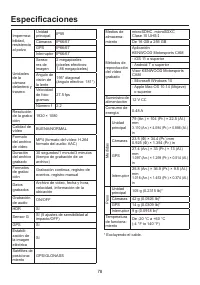
78 Especificaciones Impermea- bilidad, resistencia al polvo Unidad principal IP55 Cámaras IP66/67 GPS IP66/67 Interruptor IP66/67 Unidades de la cámara delantera y trasera Senso- res de imagen 2 megapíxeles (píxeles efectivos: 1.86 megapíxeles) Ángulo de visión de la lente 195° diagonal (ángulo efec...













 Kenwood 103AR Manual
 Kenwood 105VR Manual
 Kenwood 320 Manual
 Kenwood 350 Manual
 Kenwood 600 Manual
 Kenwood 1020 Manual
 Kenwood 1060VR Manual
 Kenwood 1070VR User Manual
 Kenwood 1080VR User Manual
 Kenwood 3100 Manual
 Kenwood AT-130 Manual
 Kenwood AT-200 Manual
 Kenwood AT265 Manual
 Kenwood AT312 User Manual
 Kenwood AT320A Manual
 Kenwood AT358 Manual
 Kenwood AT445 Manual