Page 2 - English; Contents
2 | English Contents What You Need to Get Started 3 Controllable iPod Connectable Control unit Characters may not be displayed on Control unit Cautions for Usage Connection and Setup 4 Playing a Song in iPod 6 Playing a song Forward search/reverse search for song selection Pausing a song Selecting a...
Page 3 - What You Need to Get Started; Cautions for Usage; Controllable iPod; iPod mini; Connectable Control unit
English | 3 What You Need to Get Started Characters may not be displayed on Control unit Only characters conforming to the ISO8859-1 character set can be displayed on Control unit via KCA-iP500. Other characters will be displayed as "?" or spaces.Displayable character types and number of cha...
Page 4 - • For instructions on how to connect KCA-iP500; Included parts for installation; Connection and Setup
4 | English iPod (commercially available) Rear side of Control unit KCA-iP500Conversion box CD changer input • For instructions on how to connect KCA-iP500 to Control unit, see the Instruction Manual for Control unit. Included parts for installation • Double-stick tape (45mm X 45mm) .................
Page 5 - Setting Browsing item selection; item; Setting Title Number Display Mode; For more details, access the following URL:
English | 5 Setting Browsing item selection When connecting KCA-iP500 to Control unit without the CD TEXT (disc title) display function, it is recommended that you slide the "1" of the "SELECT SWITCH" on the front panel of conversion box to the up position. Selected Browsing (page 7)...
Page 6 - Playing a song; Connect iPod to KCA-iP500; See instruction on page 4.; Play a song; About resume function; When you select Browsing item or; Playing a Song in iPod; Pausing a song
6 | English Playing a song 1 Connect iPod to KCA-iP500 See instruction on page 4. • iPod and Control unit may either be turned on or off when they are connected. 2 Play a song Select "EXT MEDIA" or " * MEDIA" source on Control unit. See the Instruction Manual for Control unit for how...
Page 7 - About displayed items; Spring Sea 04; Displayed in the track title display area.; Selecting a Song; Browsing items
English | 7 About displayed items Control unit displays the following items corresponding to the music menu items of iPod. ALB:KENWOOD 03 Spring Sea 04 2 5 3 1 4 Disc number display area Disc title display area Track number display area Track title display area 1 Browsing (Music menu) items: Display...
Page 8 - Selecting a song; If you search for a title
8 | English Selecting a title (title of Playlist or Album, for example) Press [FM] or [AM] button on Control unit. Operation differs depending on the type of Control unit used. See the Instruction Manual for the Disc Search of CD.Pressing [FM] button changes the title to the next one and [AM] button...
Page 9 - Shuffling and playing all your songs; Shuffling and playing songs by title; Setting Up iPod for Playing; Repeating a song
English | 9 Shuffling and playing all your songs You can set your iPod to play songs in random order. 1 Play a title number 1 in Playlist See <Selecting a Song> on page 7. 2 Turn on the shuffling function Press [RDM] button on Control unit. Operation differs depending on the type of Control un...
Page 10 - Currently selected Browsing (Music menu); Messages; Troubleshooting Guide
10 | English Use this guide for troubleshooting, when you have difficulty in operating the unit or you cannot play a song with an error message displayed on Control unit. ? Currently selected Browsing (Music menu) item cannot be identified or not displayed. ✔ Control unit does not support a CD TEXT ...
Page 11 - General; Cable Length; Specifications
English | 11 General Cable Length iPod I/F to Conversion box: 2.5 mConversion box to Control unit: 1.0 m Operating voltage (11 – 16V allowable) : 14.4 V Current consumption ( When Recharging) : 0.8 A Installation Size ( W x H x D) : 80 x 58 x 23 mm 3-1/8 x 2-5/16 x 7/8 inch Weight : 360 g (0.8 lbs) ...
Page 12 - Français; Contenu; Connexion et configuration
12 | Français Contenu Ce que vous devez savoir avantde commencer 13 iPod contrôlables Appareil de contrôle connectable Certains caractères peuvent ne pas s'afficher sur l'appareil de contrôle Précautions d'utilisation Connexion et configuration 14 Lire un morceau sur le iPod 16 Lire un morceau Avanc...
Page 13 - Ce que vous devez savoir avant de commencer; Précautions d'utilisation; iPod Contrôlables; iPod photo; Appareil de contrôle connectable
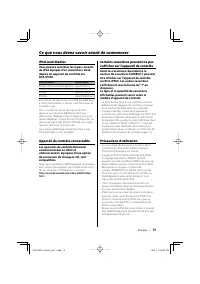
Français | 13 Ce que vous devez savoir avant de commencer Certains caractères peuvent ne pas s'afficher sur l'appareil de contrôle Seuls les caractères répondant à la normes de caractères ISO8859-1 peuvent être affichés sur l'appareil de contrôle via KCA-iP500. Les autres caractères s'afficheront so...
Page 14 - • Pour savoir comment connecter le KCA-iP500; Pièces fournies pour l'installation
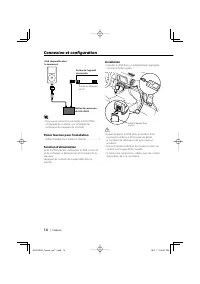
14 | Français iPod (disponible dans le commerce) Arrière de l'appareil de contrôle Boîtier de conversion du KCA-iP500 Entrée du changeur de CD • Pour savoir comment connecter le KCA-iP500 à l'appareil de contrôle, voir le Manuel de l'utilisateur de l'appareil de contrôle. Pièces fournies pour l'in...
Page 16 - Connecter le iPod au KCA-iP500; Voir les instructions page 14.; Lire un morceau; A propos de la fonction de reprise; Lire un morceau sur le iPod; Maintenez enfoncée la touche [; Mise en pause d'un morceau; Appuyez sur la touche [
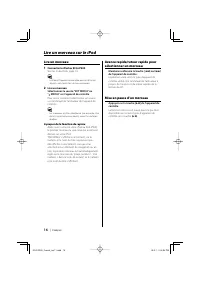
16 | Français Lire un morceau 1 Connecter le iPod au KCA-iP500 Voir les instructions page 14. • Le iPod et l'appareil de contrôle peuvent être soit allumés, soit éteints lors de leur connexion. 2 Lire un morceau Sélectionnez la source "EXT MEDIA" ou" * MEDIA" sur l'appareil de contrô...
Page 17 - A propos des éléments affichés; Sélectionner un morceau
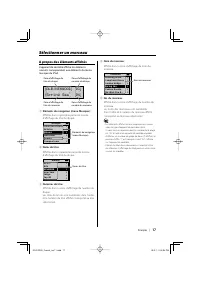
Français | 17 A propos des éléments affichés L'appareil de contrôle affiche les éléments suivants correspondant aux éléments du menu musique du iPod. ALB:KENWOOD 03 Spring Sea 04 2 5 3 1 4 Zone d'affichage du numéro du disque Zone d'affichage du titre du disque Zone d'affichage du numéro du morceau ...
Page 18 - Eléments de navigation; Recherche directe; Si vous cherchez un titre
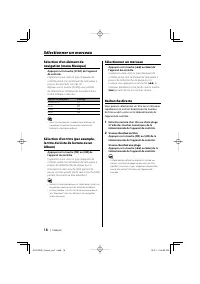
18 | Français Sélection d'un élément de navigation (menu Musique) Appuyez sur la touche [SCAN] de l'appareil de contrôle. L'opération varie selon le type d'appareil de contrôle utilisé. Voir le Manuel de l'utilisateur à propos de la lecture scan du CD.Appuyer sur la touche [SCAN], vous permet de sél...
Page 19 - Mixer et lire tous vos morceaux; Configuration du iPod pour la lecture; Mixer et lire des morceaux par titre; Répéter un morceau
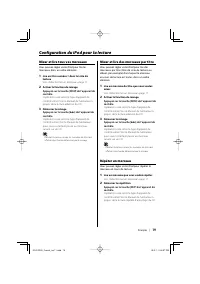
Français | 19 Mixer et lire tous vos morceaux Vous pouvez régler votre iPod pour lire les morceaux dans un ordre aléatoire. 1 Lire un titre numéro 1 dans la Liste de lecture Voir <Sélectionner un morceau> page 17. 2 Activer la fonction de mixage Appuyez sur la touche [RDM] de l'appareil de con...
Page 20 - Les éléments de navigation (menu; Guide des pannes
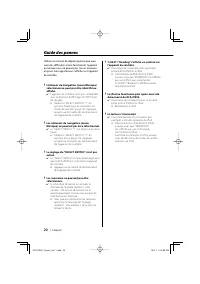
20 | Français Utilisez ce manuel de dépannage lorsque vous avez des difficultés à faire fonctionner l'appareil ou lorsque vous ne pouvez pas lire un morceau et qu'un message d'erreur s'affiche sur l'appareil de contrôle. ? L'élément de navigation (menu Musique) sélectionné ne peut pas être identifié...
Page 21 - Généralités; Caractéristiques
Français | 21 Généralités Longueur du câble iPod I/F au boîtier de conversion: 2,5 mBoîtier de conversion à l'appareil de contrôle:1,0 m Tension (11 – 16V tolérée) : 14,4 V consommation (Pendant la recharge) : 0,8 A Taille de l'ensemble (L x H x P) : 80 x 58 x 23 mm 3-1/8 x 2-5/16 x 7/8 pouce Poids ...
Page 22 - Deutsch; Inhalt; Anschluss und Setup
22 | Deutsch Inhalt Was Sie für den Beginnbenötigen 23 Steuerbare iPods Anzuschließende Steuergeräte Auf dem Steuergerät werden bestimmte Zeichen u. U. nicht angezeigt Sicherheitshinweise für die Verwendung Anschluss und Setup 24 Wiedergabe eines Musikstücksim iPod 26 Wiedergabe eines Musikstücks Vo...
Page 23 - Was Sie für den Beginn benötigen; Steuerbare iPods; Steuerbarer iPod; iPod Mini; Anzuschließende Steuergeräte
Deutsch | 23 Was Sie für den Beginn benötigen Auf dem Steuergerät werden bestimmte Zeichen u. U. nicht angezeigt Ausschließlich Zeichen, die dem Zeichensatz ISO8859-1 entsprechen, können auf dem Steuergerät über den KCA-iP500 angezeigt werden. Andere Zeichen werden als "?" oder Leerzeichen a...
Page 24 - • Hinsichtlich der Anweisungen zum Anschluss des; Stromversorgungsfunktion
24 | Deutsch iPod (im Handel erhältlich) Rückseite des Steuergerätes KCA-iP500-Konvertierungsbox CD-Wechslereingang • Hinsichtlich der Anweisungen zum Anschluss des KCA-iP500 an das Steuergerät lesen Sie bitte die Bedienungsanleitung des Steuergerätes. Im Lieferumfang enthaltene Teile für die Inst...
Page 25 - Einstellung der Suchpunkt-Auswahl; kann auf keinem Steuergerät
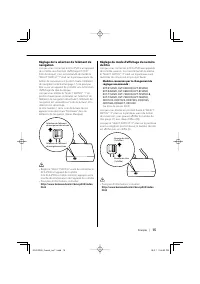
Deutsch | 25 Einstellung der Suchpunkt-Auswahl Beim Anschluss des KCA-iP500 an ein Steuergerät ohne CD-TEXT (Disc-Titel)-Anzeigefunktion empfehlen wir Ihnen, die "1" des "SELECT SWITCH" auf der Vorderseite der Konvertierungsbox in die obere Stellung zu schieben. Der ausgewählte Suchp...
Page 26 - Anschluss des iPods an den KCA-iP500; Siehe die Anweisungen auf Seite 24.; Wiedergabe eines Musikstücks; Wenn Sie einen; Wiedergabe eines Musikstücks im iPod; dem Steuergerät gedrückt.; Pausieren eines Titels
26 | Deutsch Wiedergabe eines Musikstücks 1 Anschluss des iPods an den KCA-iP500 Siehe die Anweisungen auf Seite 24. • Der iPod und das Steuergerät können beim Anschließen entweder ein- oder ausgeschaltet sein. 2 Wiedergabe eines Musikstücks Wählen Sie die Option "EXT MEDIA" oder" * MEDI...
Page 27 - Auswahl eines Titels; Dies wird im Spurtitel-Anzeigebereich angezeigt.
Deutsch | 27 Wissenswertes über die angezeigten Punkte Das Steuergerät zeigt die folgenden Punkte entsprechend den Musikpunkten des iPods an: ALB:KENWOOD 03 Spring Sea 04 2 5 3 1 4 Disc-Nummer-Anzeigebereich Disc-Titel-Anzeigebereich Spurnummer-Anzeigebereich Spurtitel-Anzeigebereich 1 Suchpunkt (Mu...
Page 28 - Suchpunkte; Auswahl eines Musikstücks; Musikstück wiedergegeben.; Direktsuche; der Fernbedienung des Steuergerätes.
28 | Deutsch Auswahl des Suchpunktes (Musikmenü) Drücken Sie die [SCAN]-Taste auf dem Steuergerät. Die Bedienung unterscheidet sich je nach verwendetem Steuergerät. Lesen Sie hinsichtlich der Scan-Wiedergabe einer CD die Bedienungsanleitung.Durch das Drücken der [SCAN]-Taste wird der Suchpunkt in de...
Page 29 - Einstellung des iPods für die Wiedergabe; Wiederholung eines Titels
Deutsch | 29 Zufallswiedergabe und Wiedergabe aller Ihrer Musikstücke Sie können Ihren iPod so einstellen, dass er alle Musikstücke in zufälliger Reihenfolge wiedergibt. 1 Wiedergabe der Titelnummer 1 aus der Wiedergabeliste Siehe dazu <Auswahl eines Titels> auf Seite 27. 2 Einschalten der Zuf...
Page 30 - Anweisungen zur Fehlersuche
30 | Deutsch Verwenden Sie diese Anweisungen zur Fehlersuche, wenn Sie Schwierigkeiten beim Bedienen des Gerätes haben oder wenn Sie nicht in der Lage sind, ein Musikstück wiedergeben zu lassen, da eine Fehlermeldung auf der Anzeige des Steuergerätes angezeigt wird. ? Der gegenwärtig ausgewählte Suc...
Page 31 - Allgemeines; Technische Daten; Meldungen
Deutsch | 31 Allgemeines Kabellänge iPod I/F zu Konvertierungsbox: 2,5 mKonvertierungsbox zu Steuergerät: 1,0 m Betriebsspannung (11- 16 V zulässig) : 14,4 V Stromaufnahme (beim Wiederaufladen) : 0,8 A Installationsabmessungen (B x H x T ) : 80 x 58 x 23 mm 3-1/8 x 2-5/16 x 7/8 Zoll Gewicht : 360 g ...
Page 32 - Nederlands; Inhoud
32 | Nederlands Inhoud Wat u nodig heeft 33 Een te bedienen iPod Basiseenheden die kunnen worden aangesloten Tekens die niet op basiseenheden kunnen worden weergegeven Voorzorgsmaatregelen voor gebruik Aansluiting en opstelling 34 Muziek afspelen met uw iPod 36 Muziek afspelen Een fragment zoeken in...
Page 33 - Wat u nodig heeft; Voorzorgsmaatregelen voor gebruik; Te bedienen iPod
Nederlands | 33 Wat u nodig heeft Tekens die niet op basiseenheden kunnen worden weergegeven Alleen tekens die aan de ISO-8859-1 tekenset voldoen kunnen via deKCA-iP500 op het display van de basiseenheid worden weergegeven. Andere tekens worden weergegeven als "?" of als spaties.Het soort en...
Page 34 - • Zie de gebruiksaanwijzing van de basiseenheid; Voedingsfunctie; Aansluiting en opstelling
34 | Nederlands iPod (in de handel verkrijgbaar) Achterkant van de basiseenheid KCA-iP500conversiebox CD-wisselaaraansluiting • Zie de gebruiksaanwijzing van de basiseenheid voor aanwijzingen over het aansluiten van de KCA-iP500 op de basiseenheid. Voor installatie meegeleverde onderdelen • Dubbel...
Page 36 - Muziek afspelen; Sluit de iPod aan op de KCA-iP500; Zie de aanwijzingen op pagina 34.; Speel een fragment af; Over de hervattingsfunctie; Wanneer u een; Muziek afspelen met uw iPod; basiseenheid ingedrukt.; Zie de gebruiksaanwijzing voor; Een fragment onderbreken
36 | Nederlands Muziek afspelen 1 Sluit de iPod aan op de KCA-iP500 Zie de aanwijzingen op pagina 34. • Tijdens aansluiting mogen zowel de iPod als de basiseenheid zijn in- of uitgeschakeld. 2 Speel een fragment af Kies de geluidsbron "EXT MEDIA" of" * MEDIA" van de basiseenheid. Raa...
Page 37 - Naam van de afspeellijst of het album:; Een fragment kiezen; Naam van het fragment:; Nummer van het fragment:
Nederlands | 37 Over de weergegeven menuonderdelen Op het display van de basiseenheid worden de volgende items weergegeven die overeenkomen met de menuonderdelen van het Muziek-menu van uw iPod. ALB:KENWOOD 03 Spring Sea 04 2 5 3 1 4 Displaygedeelte voor het disknummer Displaygedeelte voor de diskti...
Page 38 - Menuonderdeel; ] toets kiest u het vorige fragment; Direct zoeken; Wanneer u naar een titel zoekt
38 | Nederlands Kiezen van een menuonderdeel (Muziek-menu) Druk op de [SCAN] toets van de basiseenheid. De bediening is afhankelijk van de gebruikte basiseenheid. Zie de gebruiksaanwijzing voor het doorzoeken van een CD.Door herhaaldelijk op de [SCAN] toets te drukken kunnen de menuonderdelen in ond...
Page 39 - Uw iPod instellen voor het afspelen; Een fragment herhalen
Nederlands | 39 Al uw fragmenten in willekeurige volgorde afspelen Met uw iPod kunt u fragmenten in willekeurige volgorde afspelen. 1 Speel titelnummer 1 in de afspeellijst af Zie <Een fragment kiezen> op pagina 37. 2 Schakel de Shuffle functie in Druk op de [RDM] toets van de basiseenheid. De...
Page 40 - keuzeschakelaar is niet geactiveerd.; Probleemoplossing
40 | Nederlands Raadpleeg dit hoofdstuk wanneer u tijdens bediening moeilijkheden ondervindt en wanneer er geen fragmenten afgespeeld kunnen worden en er een foutmelding op het display van de basiseenheid verschijnt. ? Het gekozen menuonderdeel (Muziek- menu) wordt niet herkend en kan niet weergegev...
Page 41 - Algemeen; Technische gegevens; Meldingen
Nederlands | 41 Algemeen Kabellengte iPod I/F naar conversiebox: 2,5 mconversiebox naar basiseenheid: 1,0 m Voeding (11 – 16V toegestaan) : 14,4 V Stroomverbruik (tijdens opladen) : 0,8 A Afmetingen na installatie (B x H x D) : 80 x 58 x 23 mm 3-1/8 x 2-5/16 x 7/8 pouce Gewicht : 360 g (0,8 lbs) Ver...
Page 42 - Italiano; Sommario; Cosa occorre per iniziare
42 | Italiano Sommario Cosa occorre per iniziare 43 iPod controllabile Unità di controllo collegabile Nell'unità di controllo i caratteri potrebbero non essere visualizzati Avvertenze per l'uso Collegamento e configurazione 44 Riproduzione di un brano in iPod 46 Riproduzione di un brano Ricerca avan...
Page 43 - iPod controllabile; iPod con connettore Dock (3° generazione); Unità di controllo collegabile
Italiano | 43 Cosa occorre per iniziare Nell'unità di controllo i caratteri potrebbero non essere visualizzati Nell'unità di controllo è possibile visualizzare solo i caratteri conformi al set di caratteri ISO8859-1 tramite KCA-iP500. Gli altri caratteri verranno visualizzati come "?" o spaz...
Page 44 - • Per informazioni sulla modalità di collegamento di; Parti in dotazione per l'installazione; Collegamento e configurazione
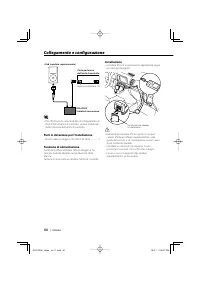
44 | Italiano iPod (venduto separatamente) Parte posteriore dell'unità di controllo KCA-iP500Scatola di conversione Ingresso multilettore CD • Per informazioni sulla modalità di collegamento di KCA-iP500 all'unità di controllo, vedere il Manuale delle istruzioni dell'unità di controllo. Parti in d...
Page 46 - Riproduzione di un brano; Vedere le istruzioni a pagina 44.; Riprodurre un brano; Informazioni sulla funzione di ripresa; Quando si seleziona la voce; Riproduzione di un brano in iPod; Tenere premuto il tasto [; Mettere in pausa un brano
46 | Italiano Riproduzione di un brano 1 Collegare l'iPod all'unità KCA-iP500 Vedere le istruzioni a pagina 44. • iPod e l'unità di controllo possono essere accesi o spenti quando sono collegati. 2 Riprodurre un brano Selezionare l'origine "EXT MEDIA" o" * MEDIA" nell'unità di contro...
Page 47 - Informazioni sulle voci visualizzate; Selezione di un brano
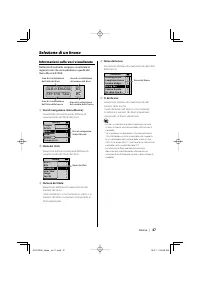
Italiano | 47 Informazioni sulle voci visualizzate Nell'unità di controllo vengono visualizzate le seguenti voci che corrispondono a quelle del menu Musica di iPod. ALB:KENWOOD 03 Spring Sea 04 2 5 3 1 4 Area di visualizzazione del numero del disco Area di visualizzazione del titolo del disco Area d...
Page 48 - Voci di navigazione; Se si esegue la ricerca di un titolo
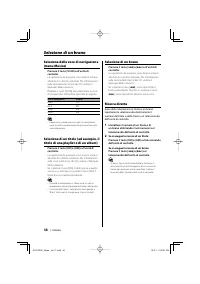
48 | Italiano Selezione della voce di navigazione (menu Musica) Premere il tasto [SCAN] sull'unità di controllo. Le operazioni da eseguire sono diverse in base all'unità di controllo utilizzata. Per informazioni sulla riproduzione veloce del CD, vedere il Manuale delle istruzioni.Premere il tasto [S...
Page 49 - Configurazione di iPod per la riproduzione; Ripetizione di un brano
Italiano | 49 Riproduzione casuale ed esecuzione di tutti i brani È possibile impostare iPod per riprodurre i brani in ordine casuale. 1 Riprodurre il numero del titolo 1 nella playlist Vedere <Selezione di un brano> a pagina 47. 2 Attivare la funzione di riproduzione casuale Premere il tasto ...
Page 50 - Impossibile identificare o visualizzare; Guida alla risoluzione dei problemi
50 | Italiano Utilizzare la guida alla risoluzione dei problemi in caso di problemi di funzionamento dell'unità o quando non è possibile riprodurre un brano e nell'unità di controllo viene visualizzato un messaggio di errore. ? Impossibile identificare o visualizzare la voce di navigazione (menu Mus...
Page 51 - Informazioni generali; Specifiche soggette a modifica senza preavviso.; Specifiche; Messaggi
Italiano | 51 Informazioni generali Lunghezza del cavo Da I/F iPod alla scatola di conversione: 2,5 mDalla scatola di conversione all'unità di controllo: 1,0 m Tensione di esercizio(da 11a 16 V massimo ammesso) : 14,4 V Consumo di corrente (durante la ricarica) : 0,8 A Dimensioni installazione (L x ...
Page 52 - Español; Contenido; Requisitos para comenzar
52 | Español Contenido Requisitos para comenzar 53 iPod controlable Unidad de control conectable Puede que no se visualicen los caracteres en la unidad de control Precauciones para el uso Conexión e instalación 54 Reproducción de cancionesen el iPod 56 Reproducción de canciones Búsqueda hacia adelan...
Page 53 - Precauciones para el uso; iPod controlable; Unidad de control conectable
Español | 53 Requisitos para comenzar Puede que no se visualicen los caracteres en la unidad de control Se pueden visualizar sólo los caracteres que cumplen con el ISO8859- se puede visualizar un conjunto de 1 caracter en la unidad de control mediante la interfaz KCA-iP500. Los caracteres que no sea...
Page 54 - • Para más instrucciones sobre cómo conectar la; Piezas incluidas para la instalación; Conexión e instalación
54 | Español iPod (disponible en el comercio) Parte trasera de la unidad de control InterfazKCA-iP500 Entrada del cambiador de CD • Para más instrucciones sobre cómo conectar la interfaz KCA-iP500 a la unidad de control, vea el manual de instrucciones para la unidad de control. Piezas incluidas pa...
Page 56 - Conexión del iPod a la interfaz KCA-iP500; Consulte las instrucciones de la página 54.; Reproducción de canciones; Acerca de la función de reanudación; Reproducción de canciones en el iPod; Pulse y mantega pulsado el botón [; Pausado de canciones
56 | Español Reproducción de canciones 1 Conexión del iPod a la interfaz KCA-iP500 Consulte las instrucciones de la página 54. • El iPod y la unidad de control puede que estén activados o desactivados cuando estén conectados. 2 Reproducción de canciones Seleccione la fuente "EXT MEDIA" o"...
Page 57 - Nombres de los títulos:; Selección de una canción; Nombre de las canciones:
Español | 57 Acerca de los elementos visualizados La unidad de control visualiza los siguientes elementos que corresponden a los elementos del menú de música del iPod. ALB:KENWOOD 03 Spring Sea 04 2 5 3 1 4 Área de visualización del número del disco Área de visualización del título del disco Área de...
Page 58 - Elementos de exploración; á la canción anterior, y al pulsar el botón [; Búsqueda directa; Si desea buscar un título
58 | Español Selección de elementos de exploración (menú Música) Pulse el botón [SCAN] en la unidad de control. El funcionamiento es distinto dependiendo del tipo de unidad de control utilizada. Consulte el manual de instrucciones para obtener información acerca de la reproducción de exploración de ...
Page 59 - Preparación del iPod para la reproducción; Repetición de una canción
Español | 59 Ajuste aleatorio y reproducción de las canciones Puede ajustar su iPod para reproducir canciones en orden aleatorio. 1 Reproduzca el número de título 1 en la lista de reproducción Consulte <Selección de una canción> en la página 57. 2 Active la función de ajuste aleatorio Pulse el...
Page 60 - Guía de solución de problemas
60 | Español Utilice esta guía de solución de problemas, cuando tenga dificultades en operar la unidad o no pueda reproducir una canción con un mensaje de error visualizado en la unidad de control. ? No es posible identificar o no se pudo visualizar un elemento de exploración (menú Música) seleccion...
Page 61 - Especificaciones; Mensajes
Español | 61 General Longitud del cable iPod I/F a inter faz: 2,5 mInter faz a unidad de control: 1,0 m Voltaje de régimen (11 – 16 V permisible) : 14,4 V Consumo de corriente (cuando se recarga) : 0,8 A TamaEspañolo de instalación (An x Al x Prof ) : 80 x 58 x 23 mm 3-1/8 x 2-5/16 x 7/8 pulgadas Pe...
Page 62 - 中文; 目錄
62 | 中文 目錄 用戶須知 63 可以控制的iPod可以連接的控制裝置關於控制裝置的顯示限制使用注意事項 連接和設定 64 播放iPod的歌曲 66 播放歌曲歌曲的快轉播放/倒轉播放暫停播放 選擇歌曲 67 關於顯示項目選擇瀏覽(音樂選單)項目選擇標題(播放列表的標題及專輯的標題等)選擇歌曲直接搜索 設定iPod的播放 69 亂序播放全部歌曲亂序播放標題中的歌曲重複播放歌曲 疑難排解指南 70 規格 71 KCA-iP500̲Taiwan̲ms1.1.indd 62 KCA-iP500̲Taiwan̲ms1.1.indd 62 05.2.1 2:12:52 PM 05.2.1 ...
Page 63 - 用戶須知; 使用注意事項; KCA-iP500 可以控制裝備有基座連接器的 iPod。; 可以連接的控制裝置
中文 | 63 用戶須知 使用注意事項 • 如果在接通 iPod 的 EQ 功能的狀態下與 KCA-iP500 連接,有時可能發生聲音失真。 • 在將 iPod 與 KCA-iP500 連接之前和中斷連接之 後,亂序播放以及重複播放等的設定有時可能改變。請根據需要重新設定。 • 在將 iPod 與 KCA-iP500 連接時和剛剛中斷連接 之 後 等, 當 iPod 顯 示“KENWOOD” 時, 無 法操作 iPod。 • 重複播放的“全部”設定無法完成。( 始終重複 播放標題內的歌曲 ) • 在將 iPod 與 KCA-iP500 連接之前,請將與 iPod 連接的耳機等所有裝置拆除。如果...
Page 64 - 連接和設定; 安裝用附件
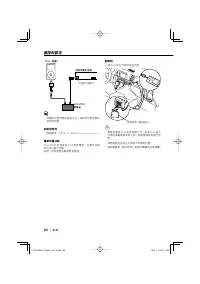
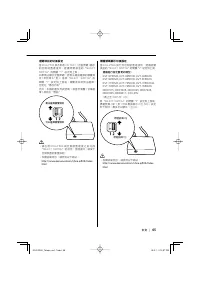
64 | 中文 連接和設定 iPod(選購) 控制裝置的背面 KCA-iP500變換盒 光盤換片機輸入 • 有關與控制裝置的連接方法,請參照控制裝置的 使用說明書。 安裝用附件 • 雙面膠帶(45mm × 45mm) ...................................... 1 電源供電功能 KCA-iP500 向 連 接 的 iPod 提 供 電 源, 在 播 放 音 樂時也可以進行充電。這時,控制裝置的電源需要接通。 配線例 • 將 iPod 放在汽車附件盒內等。 雙面膠帶(隨機提供) • 應避免使得 iPod 脫落到腳下等。如果 iPod 落入 汽車的操縱踏板等的下側...
Page 65 - 瀏覽項目的切換設定; 標題號碼顯示切換設定
中文 | 65 瀏覽項目的切換設定 當 KCA-iP500 與不對應 CD TEXT ( 光盤標題 ) 顯示的 控 制 裝 置 連 接 時, 建 議 將 變 換 盒 的“SELECT SWITCH”的開關“1”設定到上側。如果無法顯示光盤標題,將無法確認選擇的瀏覽項目 ( 參照第 67 頁 )。當將“SELECT SWITCH”的開 關“1” 設 定 到 上 側 後, 瀏 覽 項 目 將 無 法 選 擇,固定在“播放列表” 。 另外,本機的播放列表號碼 1 相當於瀏覽 ( 音樂選單 ) 項目的“歌曲”。 可以選擇瀏覽項目 無法選擇瀏覽項目 • 請 在 將 KCA-iP500 與 控 制 裝 置...
Page 66 - 連接 iPod; 播放歌曲; 關於恢復功能; 播放 iPod 的歌曲; 暫停播放
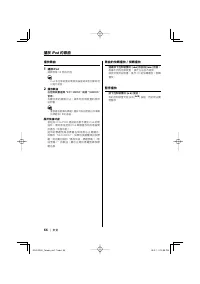
66 | 中文 播放歌曲 1 連接 iPod 請參照第 64 頁的內容。 • iPod 和 控 制 裝 置 的 電 源 無 論 接 通 或 者 切 斷 都 可 以進行連接。 2 播放歌曲 在控制裝置選擇“EXT MEDIA”或者“*MEDIA”音源。 有關音源的選擇方法,請參照控制裝置的使用說明書。 • 重複播放選擇的標題 ( 播放列表的標題以及專輯 的標題等 ) 中的歌曲。 關於恢復功能 當在與 KCA-iP500 連接的狀態下播放 iPod 的歌曲時,最初將從使用 iPod 單機播放時的歌曲開始播放 ( 恢復功能 )。這 時 的 標 題 號 碼 及 標 題 名 稱 等 無 法 正 確 顯 ...
Page 67 - 關於顯示項目; 選擇歌曲
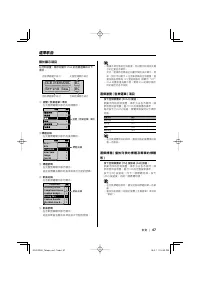
中文 | 67 關於顯示項目 在控制裝置,顯示相當於 iPod 的音樂選單的以下項目。 ALB:KENWOOD 03 Spring Sea 04 2 5 3 1 4 光盤號碼顯示部分 光盤標題顯示部分 音軌號碼顯示部分 音軌標題顯示部分 1 瀏覽 ( 音樂選單 ) 項目 在光盤標題顯示部分的前部顯示。 >> > >>> 瀏覽 (音樂選單) 項目 2 標題名稱 在光盤標題顯示部分的後部顯示。 BEST 1 >> > >>> Hits KENWOOD New YorkTokyoTop 40 標題名稱 3 標題號碼 在光盤號碼顯...
Page 68 - 直接搜索; 直接搜索標題時
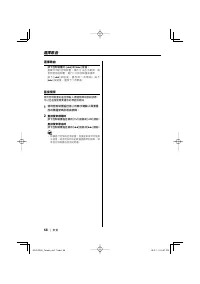
68 | 中文 選擇歌曲 按下控制裝置的 [ 4 ] 或 [ ¢ ] 按鈕。 根據不同的控制裝置,操作方法各不相同。請參照使用說明書,進行 CD 的音軌搜索操作。按 下 [ 4 ] 按 鈕 後, 播 放 前 一 首 歌 曲; 按 下 [ ¢ ] 按鈕後,播放下一首歌曲。 直接搜索 使用控制裝置的遙控器輸入標題號碼或歌曲號碼,可以迅速搜索需要播放的標題及歌曲。 1 使用控制裝置遙控器上的數字鍵輸入需要播放的標題號碼及歌曲號碼。 2 直接搜索標題時 按下控制裝置遙控器的 [FM] 按鈕或 [AM] 按鈕。 直接搜索歌曲時 按下控制裝置遙控器的 [ 4 ] 按鈕或 [ ¢ ] 按鈕。 • 根據進行控...
Page 69 - 亂序播放全部歌曲; 亂序播放標題中的歌曲; 設定 iPod 的播放; 重複播放歌曲
中文 | 69 亂序播放全部歌曲 可以設定在全部歌曲中以隨機的順序播放歌曲。 1 播放播放列表的標題號碼 1 有 關 操 作 方 法, 請 參 照〈 選 擇 歌 曲 〉( 第 67頁) 。 2 接通隨機播放 按下控制裝置的 [RDM] 按鈕。 根據不同的控制裝置,操作方法各不相同。參照使用說明書進行操作,將 CD 的隨機播放接通。 3 開始隨機播放 按下控制裝置的 [ ¢ ] 按鈕。 根據不同的控制裝置,操作方法各不相同。參照使用說明書,操作播放 CD 的下一首歌曲。 • 在隨機播放中顯示的歌曲號碼是隨機播放的播放 順序。 亂序播放標題中的歌曲 可以在包含播放的歌曲的標題 ( 播放列表的標題以...
Page 70 - 消息顯示; 疑難排解指南
70 | 中文 當無法實現需要的操作,或者當控制裝置顯示消息、無法播放歌曲時等,請參照本指南。 ? 當前選擇的瀏覽 ( 音樂選單 ) 項目不明確.不顯 示。 ✔ 控制裝置不對應 CD TEXT ( 光盤標題 ) 的顯示。 ☞ 將“SELECT SWITCH” 的 開 關“1” 設 定 為 上 側, 固 定 為“ 播 放 列 表 ” 使 用。( 第 65 頁 ) 設定後,請按下控制裝置的重置按鈕。 ? 瀏覽 ( 音樂選單 ) 項目無法切換。 ✔ “SELECT SWITCH”的開關“1”設定為上側。 ☞ 將“SELECT SWITCH”的開關“1”設定 為下側。( 第 65 頁 ) 設定後,請按...
Page 71 - 共同; 規格
中文 | 71 共同 電纜長度 iPod I/F 至變換盒:2.5m變換盒至控制裝置:1.0m 工作電壓 (允許11-16 V) : 14.4 V 電流消耗 : 0.8 A (充電時) 安裝尺寸 (寬×高×深) : 80 × 58 × 23 mm 重量 : 360 g 規格可能會變更,恕不另行通知。 規格 KCA-iP500̲Taiwan̲ms1.1.indd 71 KCA-iP500̲Taiwan̲ms1.1.indd 71 05.2.1 2:13:15 PM 05.2.1 2:13:15 PM