Page 3 - SAFETY PRECAUTIONS
EN 3 SAFETY PRECAUTIONS IMPORTANT (for owners in the U.K.) Connection to the mains supply in the United Kingdom.DO NOT cut off the mains plug from this equipment. If the plug fitted is not suitable for the power points in your home or the cable is too short to reach a power point, then obtain an app...
Page 6 - AUTO; Backlight Compensation; Simply pressing the; BACKLIGHT; button; Data Battery; DATA; Major Features of this Camcorder; BATTERY CONDITION
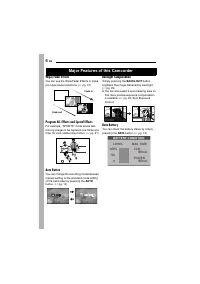
6 EN Wipe/Fader Effects You can use the Wipe/Fader Effects to make pro-style scene transitions. ( 墌 pg. 31) Program AE, Effects and Special Effects For example, “SPORTS” mode allows fast-moving images to be captured one frame at a time, for vivid, stable slow-motion. ( 墌 pg. 31) Auto Button You can ...
Page 7 - CONTENTS; GETTING STARTED
EN 7 CONTENTS GETTING STARTED 8 Index ................................................................. 8Provided Accessories ..................................... 11Power.............................................................. 12Operation Mode .............................................. 14...
Page 8 - Index
Page 9 - GETTING; Controls
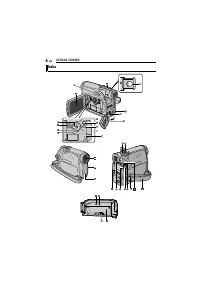
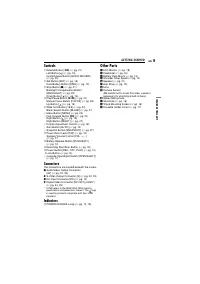
EN 9 GETTING STARTED GETTING ST AR TED Controls A Rewind Button [ 3 ] ( 墌 pg. 21) Left Button [ ] ( 墌 pg. 15) Quick Review Button [QUICK REVIEW] ( 墌 pg. 20) B Set Button [SET] ( 墌 pg. 15) Data Battery Button [DATA] ( 墌 pg. 13) C Stop Button [ 8 ] ( 墌 pg. 21) Backlight Compensation Button [BACKLIGHT]...
Page 10 - LCD Monitor/Viewfinder Indications; During Video Recording; q w; min; VOLUME; BLANK SEARCH
GETTING STARTED 10 EN LCD Monitor/Viewfinder Indications During Video Recording a Auto/Manual Mode Indicator A : Auto Mode M : Manual Mode B : Night-Scope Indicator ( 墌 pg. 27) : Gain Up Mode ( 墌 pg. 24) C Shutter Speed ( 墌 pg. 32) D White Balance Indicator ( 墌 pg. 30) E Effect Mode Indicator ( 墌 pg...
Page 11 - Before Using This Camcorder; Battery Pack BN-VF707U; Provided Accessories
EN 11 GETTING STARTED GETTING ST AR TED Before Using This Camcorder Make sure you only use cassettes with the Mini DV mark . This camcorder is designed exclusively for the digital video cassette. Only cassettes marked “ ” can be used with this unit. Remember that this camcorder is not compatible wit...
Page 12 - How To Attach The Lens Cap; Power
GETTING STARTED 12 EN How To Attach The Lens Cap To protect the lens, attach the provided lens cap to the camcorder as shown in the illustration. NOTE: To confirm the lens cap is on correctly make sure the cap is flush to the camcorder. How To Attach The Shoulder Strap Follow the illustration. 1 Thr...
Page 13 - Using The Battery Pack; Maximum continuous recording time; Data Battery System
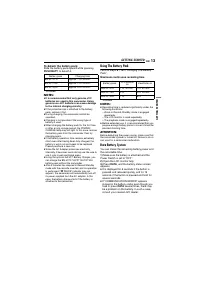
EN 13 GETTING STARTED GETTING ST AR TED To detach the battery pack Slide the battery pack upward while pressing PUSH BATT. to detach it. * Provided NOTES: ● It is recommended that only genuine JVC batteries are used in this camcorder. Using generic non-JVC batteries can cause damage to the internal ...
Page 14 - Using AC Power; Operation Mode; Power Switch Position; OFF
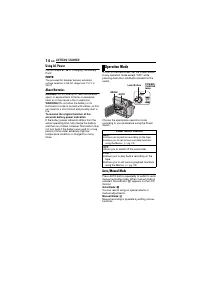
GETTING STARTED 14 EN Using AC Power Perform steps 4 – 6 in “Charging The Battery Pack”. NOTE: The provided AC Adapter features automatic voltage selection in the AC range from 110 V to 240 V. About Batteries DANGER! Do not attempt to take the batteries apart, or expose them to flame or excessive he...
Page 15 - Power-Linked Operation; Language Settings; Grip Adjustment
EN 15 GETTING STARTED GETTING ST AR TED Power-Linked Operation When the Power Switch is set to “REC”, you can also turn on/off the camcorder by opening/closing the LCD monitor or pulling out/pushing in the viewfinder. INFORMATION: The following explanations in this manual supposes the use of LCD mon...
Page 16 - Viewfinder Adjustment; Tripod Mounting
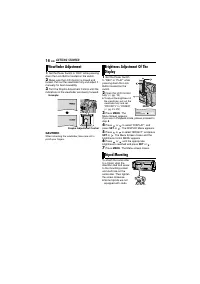
GETTING STARTED 16 EN 1 Set the Power Switch to “REC” while pressing down the Lock Button located on the switch. 2 Make sure the LCD monitor is closed and locked. Pull out the viewfinder fully and adjust it manually for best viewability. 3 Turn the Dioptre Adjustment Control until the indications in...
Page 17 - To protect valuable recordings; Loading/Unloading A Cassette
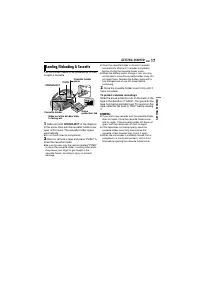
EN 17 GETTING STARTED GETTING ST AR TED The camcorder needs to be powered up to load or eject a cassette. 1 Slide and hold OPEN/EJECT in the direction of the arrow, then pull the cassette holder cover open until it locks. The cassette holder opens automatically. ● Do not touch internal components. 2...
Page 18 - VIDEO RECORDING; Approximate recording time; Tape Remaining Time; While using the LCD monitor:; Basic Recording
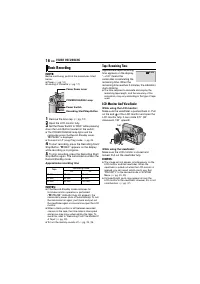
18 EN VIDEO RECORDING NOTE: Before continuing, perform the procedures listed below: ● Power ( 墌 pg. 12) ● Loading A Cassette ( 墌 pg. 17) 1 Remove the lens cap. ( 墌 pg. 12) 2 Open the LCD monitor fully. 3 Set the Power Switch to “REC” while pressing down the Lock Button located on the switch. ● The P...
Page 19 - DEO R; Zooming; Zoom In; Slide the Power Zoom Lever towards “T”.; Zoom Out; Slide the Power Zoom Lever towards “W”.; Journalistic Shooting
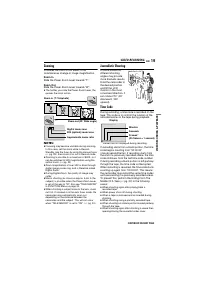
EN 19 VIDEO RECORDING VI DEO R E CO RD ING & PLA YBACK Zooming Produces the zoom in/out effect, or an instantaneous change in image magnification. Zoom In Slide the Power Zoom Lever towards “T”. Zoom Out Slide the Power Zoom Lever towards “W”. ● The further you slide the Power Zoom Lever, the qu...
Page 20 - Quick Review; QUICK REVIEW; Recording From The Middle Of A Tape
VIDEO RECORDING 20 EN NOTES: ● The time code cannot be reset. ● During fast-forwarding and rewinding, the time code indication does not move smoothly. ● The time code is displayed only when “TIME CODE” is set to “ON”. ( 墌 pg. 25) Quick Review Enables to check the end of the last recording. 1) Press ...
Page 21 - VIDEO PLAYBACK; To control the speaker volume; Still Playback; BLANK; Playback Snapshot; SNAPSHOT; Normal Playback
VI DEO R E CO RD ING & PLA YBACK EN 21 VIDEO PLAYBACK 1 Load a cassette. ( 墌 pg. 17) 2 Set the Power Switch to “PLAY” while pressing down the Lock Button located on the switch. 3 To start playback, press 4 / 9 . 4 To stop playback, press 8 . ● During Stop mode, press 3 to rewind, or 5 to fast-fo...
Page 22 - If using a VCR; Connections To A TV Or VCR
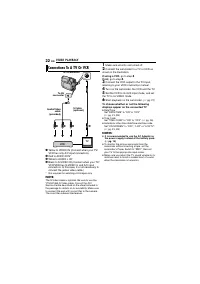
VIDEO PLAYBACK 22 EN A Yellow to VIDEO IN (Connect when your TV/VCR has only A/V input connectors). B Red to AUDIO R IN* C White to AUDIO L IN* D Black to S-VIDEO IN (Connect when your TV/VCR/VDR has S-VIDEO in and A/V input connectors. In this case, it is not necessary to connect the yellow video c...
Page 23 - MENUS FOR DETAILED ADJUSTMENT; Video Recording Menus; Changing The Menu Settings
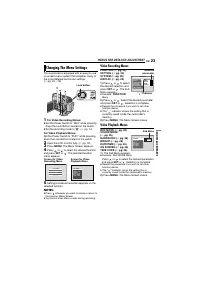
EN 23 ADV A N C ED F E A T UR ES MENUS FOR DETAILED ADJUSTMENT This camcorder is equipped with an easy-to-use, on-screen menu system that simplifies many of the more detailed camcorder settings. ( 墌 pg. 23 – 26) 1 For Video Recording Menus: ● Set the Power Switch to “REC” while pressing down the Loc...
Page 24 - ON; SETTING; LP; Recording Menus
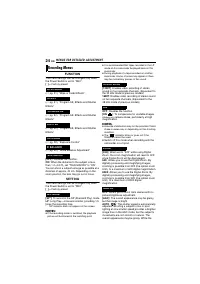
MENUS FOR DETAILED ADJUSTMENT 24 EN FUNCTION The menu settings can be changed only when the Power Switch is set to “REC”. [ ] = Factory-preset ( 墌 pg. 31), “Wipe or Fader Effects” ( 墌 pg. 31), “Program AE, Effects and Shutter Effects” ( 墌 pg. 32), “Program AE, Effects and Shutter Effects” ( 墌 pg. 32...
Page 25 - ADV; SYSTEM; DISPLAY; ITALIANO
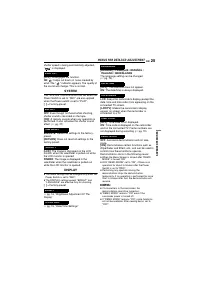
EN 25 MENUS FOR DETAILED ADJUSTMENT ADV A N C ED F E A T UR ES shutter speed is being automatically adjusted, “ ” is displayed. [OFF] : Disengages the function. ON : Helps cut down on noise created by wind. The “ ” indicator appears. The quality of the sound will change. This is normal. SYSTEM The “...
Page 26 - Playback Menus
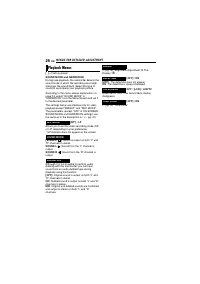
MENUS FOR DETAILED ADJUSTMENT 26 EN [ ] = Factory-preset SOUND MODE and NARRATION During tape playback, the camcorder detects the sound mode in which the recording was made, and plays the sound back. Select the type of sound to accompany your playback picture. According to the menu access explanatio...
Page 27 - FEATURES FOR RECORDING; NIGHT; Motor Drive Mode; Wide Mode
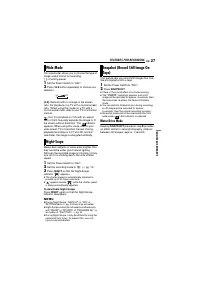
EN 27 ADV A N C ED F E A T UR ES FEATURES FOR RECORDING This camcorder allows you to choose the type of image output format for recording. [ ] = Factory-preset 1 Set the Power Switch to “REC” . 2 Press 16:9 button repeatedly to choose your selection. [4:3] : Records with no change in the screen rati...
Page 28 - Manual Focus; Exposure Control
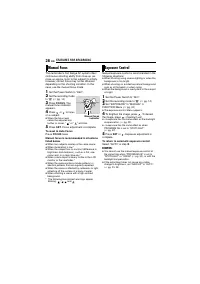
FEATURES FOR RECORDING 28 EN The camcorder’s Full Range AF system offers continuous shooting ability from close-up (as close as approx. 5 cm to the subject) to infinity.However, correct focus may not be obtained depending on the shooting condition. In this case, use the manual focus mode. 1 Set the ...
Page 29 - Iris Lock
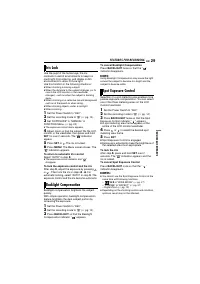
EN 29 FEATURES FOR RECORDING ADV A N C ED F E A T UR ES Like the pupil of the human eye, the iris contracts in well-lit environments to keep too much light from entering, and dilates in dim environments to allow in more light.Use this function in the following situations: ● When shooting a moving su...
Page 30 - White Balance Adjustment
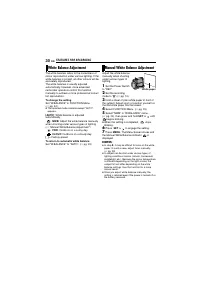
FEATURES FOR RECORDING 30 EN The white balance refers to the correctness of colour reproduction under various lighting. If the white balance is correct, all other colours will be accurately reproduced.The white balance is usually adjusted automatically. However, more advanced camcorder operators con...
Page 31 - EFFECT; Wipe Or Fader Effects
EN 31 FEATURES FOR RECORDING ADV A N C ED F E A T UR ES These effects let you make pro-style scene transitions. Use them to spice up the transition from one scene to the next.Wipe or Fader works when video recording is started or stopped. 1 Set the Power Switch to “REC”. 2 Set the recording mode to ...
Page 32 - PROGRAM AE
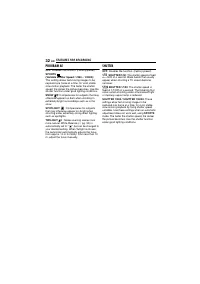
FEATURES FOR RECORDING 32 EN PROGRAM AE OFF : Disables the function. (Factory-preset) SPORTS (Variable Shutter Speed: 1/250 – 1/4000): This setting allows fast-moving images to be captured one frame at a time, for vivid, stable slow-motion playback. The faster the shutter speed, the darker the pictu...
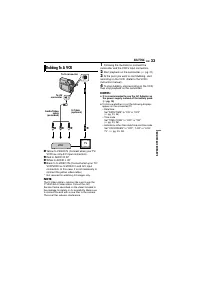
Page 33 - EDITING; Following the illustrations, connect the; Dubbing To A VCR
EN 33 ADV A N C ED F E A T UR ES EDITING A Yellow to VIDEO IN (Connect when your TV/VCR has only A/V input connectors). B Red to AUDIO R IN* C White to AUDIO L IN* D Black to S-VIDEO IN (Connect when your TV/VCR/VDR has S-VIDEO in and A/V input connectors. In this case, it is not necessary to connec...
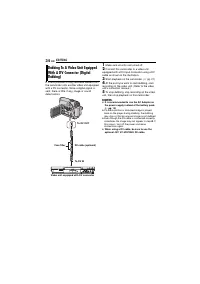
Page 34 - Make sure all units are turned off.
EDITING 34 EN It is also possible to copy recorded scenes from the camcorder onto another video unit equipped with a DV connector. Since a digital signal is sent, there is little, if any, image or sound deterioration. 1 Make sure all units are turned off. 2 Connect this camcorder to a video unit equ...
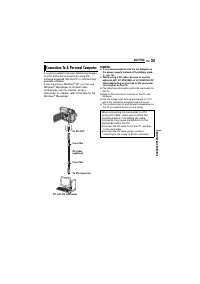
Page 35 - Windows; Connection To A Personal Computer
EN 35 EDITING ADV A N C ED F E A T UR ES It is also possible to transfer still/moving images to a PC with a DV connector by using the software equipped with the PC or commercially available software.If you are using a Windows ® XP, you can use Windows ® Messenger to conduct video conferences over th...
Page 36 - TROUBLESHOOTING
36 EN TROUBLESHOOTING If, after following the steps in the chart below, the problem still exists, please consult your nearest JVC dealer. Power ● The power is not connected properly. H Connect the AC Adapter securely. ( 墌 pg. 14) ● The battery pack is not attached firmly. H Detach the battery pack o...
Page 37 - RE; Other problems; The colour of Snapshot looks strange.
EN 37 TROUBLESHOOTING RE FE REN C ES ● The light source or the subject does not include white. Or there are various different light sources behind the subject. H Find a white subject and compose your shot so that it also appears in the frame. ( 墌 pg. 27) ● Shooting was performed under backlit condit...
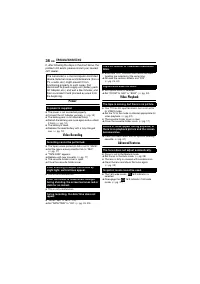
Page 38 - Warning Indications; Displays the battery remaining power.
TROUBLESHOOTING 38 EN ● The viewfinder is pulled out and “PRIORITY” is set to “FINDER”. H Push the viewfinder back in or set “PRIORITY” to “LCD”. ( 墌 pg. 23, 25) ● The LCD monitor’s brightness setting is too dark. H Adjust the brightness of the LCD monitor. ( 墌 pg. 16) H If the monitor is tilted upw...
Page 39 - USER MAINTENANCE; To clean the exterior; Cleaning The Camcorder
EN 39 RE FE REN C ES USER MAINTENANCE Before cleaning, turn off the camcorder and remove the battery pack and AC Adapter. To clean the exterior Wipe gently with a soft cloth. Put the cloth in diluted mild soap and wring it well to wipe off heavy dirt. Then wipe again with a dry cloth. To clean the L...
Page 40 - CAUTIONS; Battery Packs; To avoid hazards; Cassettes; During use; Store cassettes; LCD Monitor; To prolong service life; The Benefits Of Lithium-Ion Batteries
40 EN CAUTIONS Battery Packs The supplied battery pack is a lithium-ion battery. Before using the supplied battery pack or an optional battery pack, be sure to read the following cautions: ● To avoid hazards ... do not burn. ... do not short-circuit the terminals. When transporting, make sure the pr...
Page 41 - Main Unit; Avoid using the unit; Serious malfunctioning
EN 41 RE FE REN C ES CAUTIONS Main Unit ● For safety, DO NOT ... open the camcorder’s chassis. ... disassemble or modify the unit. ... short-circuit the terminals of the battery pack. Keep it away from metallic objects when not in use. ... allow inflammables, water or metallic objects to enter the u...
Page 42 - SPECIFICATIONS; Camcorder; AC Adapter; For General
42 EN SPECIFICATIONS Camcorder Power supply DC 11 V (Using AC Adapter)DC 7.2 V (Using battery pack) Power consumption Approx. 3.0 W (LCD monitor off, viewfinder on)Approx. 3.4 W (LCD monitor on, viewfinder off) Dimensions (W x H x D) 59 mm x 94 mm x 114mm (with the LCD monitor closed and the viewfin...
Page 43 - RMS; TERMS; Recording Capacity
EN 43 TE RMS TERMS A AC Adapter .................................................... 14Auto/Manual Mode ......................................... 14 B Backlight Compensation ................................ 29Battery Pack ...................................... 12, 14, 40Blank Search ...................