Page 4 - Contents
4 Contents Warnings 6 Characteristics 8 Dimensions 8 Pack dimensions 8 Standard equipment 8 Technical data 9 Standard equipment 9 Installation 10 Installation guidelines 10 - Warnings for installation 10 - Foreword 10 - Transport and handling 11 - Unpacking 11 - General safety guidelines 12 Installa...
Page 6 - Warnings
6 Warnings This booklet must be kept for consultation at any time. If the electrical appliance is sold, transferred or moved, ensure the booklet remains with the appliance. Read the instructions carefully: important information on installation, use and safety is given. To avoid risks arising from in...
Page 8 - Characteristics; Dimensions
8 Characteristics 392 564 380 330 295 200 dimensions in mm 554 33 Kg dimensions in mm 638 450 C A B Dimensions Pack dimensions Standard equipment
Page 10 - Installation; Installation guidelines
10 Installation Installation guidelines Warnings for installation This manual is an integral part of the product and provides all the information required for correct installation and maintenance of FRESCO. The user must read this manual carefully and refer to it at all times; it must also be kept i...
Page 16 - Warnings for the user
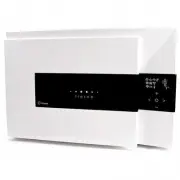
16 Start-up and use FRESCO is a professional-style electrical appliance designed to rapidly cool core product temperature, rapidly and gently freeze food and rapidly chill drinks. Products chilled rapidly by FRESCO age less quickly and, once placed in the fridge, keep their initial high quality for ...
Page 17 - Preliminary cleaning of the chamber
17 • The formation of water/condensation inside the chamber is entirely normal. Refer to the cleaning cycle (see page 38). • FRESCO must be used for its intended purpose: i.e. cooling/freezing, proofing, low temperature cooking and defrosting of food and drinks, for domestic use. Any other use is co...
Page 18 - Operating modes
18 Operating modes Operation The cycles can be run in “timed” mode. When the set time elapses, FRESCO switches to maintenance mode of the selected program. The preset time can be changed by the user depending on the type of food being handled. Containers and lids Oven pans and containers should be a...
Page 20 - Control panel
20 Control panel 1 3 4 11 10 2 8 9 5 7 6 1 Display 7 “-” key 2 Cycle icons 8 “Back” key 3 Cycle duration 9 “Forward” key 4 Internal air temperature 10 “Alert” symbol 5 “Enter” key 11 “Cycle parameters” symbol 6 “+” key
Page 21 - Use
21 Use The FRESCO display has “Soft-touch” controls and is completely free from protruding buttons. It is used by touching the screen-printed icons with the fingers; do not use other objects such as knives, forks, etc. At start-up, all the icons on the display light up. The home screen then displays...
Page 25 - Examples of use; Rapid cooling +3°C cycle
25 Examples of use Rapid cooling +3°C cycle Before inserting the hot food into the appliance, it is advisable to run a pre-cooling cycle (see chap. Pre-cooling on p. 23). Press keys and repeatedly until the RAPID COOLING +3°C cycle is selected. Press the key to confirm. (see chap. Description of cyc...
Page 26 - Gentle freezing -18°C cycle
26 Gentle freezing -18°C cycle Before inserting the hot food into the appliance, it is advisable to run a pre-cooling cycle (see chap. Pre-cooling on p. 23). Press keys and repeatedly until the GENTLE FREEZING -18°C cycle is selected Press the key to confirm. (see chap. Description of cycles on p. 2...
Page 28 - Low temperature cooking cycle
28 Low temperature cooking cycle Press keys and repeatedly until the LOW TEMPERATURE COOKING cycle is selected. Press the key to confirm. (see chap. Description of cycles on p. 22) The screen for setting the cooking time, default 5h, appears (max 12h). Press the keys to increase or decrease the time...
Page 30 - Proofing cycle
30 Proofing cycle Press keys and repeatedly until the PROOFING cycle is selected. Press the key to confirm. (see chap. Description of cycles on p. 22) The screen for setting the proofing time, default 2h, appears (max 24h). Press the keys to increase or decrease the time by 10 minutes at a time (hol...
Page 32 - Ready meal cycle
32 Ready meal cycle Press keys and repeatedly until the READY MEAL cycle is selected. Press the key to confirm. (see chap. Description of cycles on p. 23) The screen for setting the heating time, default 2h, appears (max 5h). Press the keys to increase or decrease the time by 10 minutes at a time (h...
Page 34 - Defrosting cycle
34 Defrosting cycle Press keys and repeatedly until the DEFROSTING cycle is selected. Press the key to confirm. (see chap. Description of cycles on p. 23) The screen for setting the defrosting time, default 1h, appears (max 5h). Press the keys to increase or decrease the time by 10 minutes at a time...
Page 36 - Customised preservation cycle
36 Customised preservation cycle Press keys and repeatedly until the CUSTOMISED PRESERVATION cycle is selected. Press the key to confirm. (see chap. Description of cycles on p. 23) The screen for setting the preservation air temperature, default -15°C, appears (from -20°C to 65°C). Use the keys to i...
Page 37 - Drinks cooling cycle
37 Drinks cooling cycle Before inserting the drinks into the appliance, it is advisable to run a pre-cooling cycle (see chap. Pre-cooling on p. 23). Press keys and repeatedly until the DRINKS COOLING cycle is selected. Press the key to confirm. (see chap. Description of cycles on p. 23) The screen f...
Page 38 - Cleaning cycle; Beeeep
38 Cleaning cycle Press keys and repeatedly until the CLEANING cycle is selected. Press the key to confirm. (see chap. Description of cycles on p. 23). The screen for setting the cleaning time, default 30 min, appears (from 20 min to 1h). Press the keys to increase or decrease the time by 10 minutes...
Page 39 - Storage of products
39 Storage of products Rapidly cooled and/or frozen food must NOT be left inside FRESCO, but covered and protected (with film, a sealed lid or, preferably, sous-vide) and then stored in the fridge or freezer. Rapidly frozen products, which can stay frozen from 6 to 12 months, should be labelled with...
Page 40 - Maintenance and faults; Routine maintenance
40 Maintenance and faults Routine maintenance The information and instructions given in this chapter are intended for all personnel working with the electrical appliance: user and maintenance technician. Elementary safety guidelines To clean and perform routine maintenance in safety, comply with the...
Page 44 - Disposing of Fresco
44 Disposing of Fresco INFORMATION FOR USERS In compliance with Directives 2002/95/EC, 2002/96/EC and 2003/108/EC on the reduction of hazardous substances in electrical and electronic equipment, and waste disposal. Disposal PACKING: the packing (bags, film) is potentially hazardous for children and ...
Page 45 - Troubleshooting
45 Troubleshooting The information and instructions given in this section are intended solely for specialised personnel authorised to work on FRESCO’s electrical and cooling components. Alarms Table Alarm AS1 Air probe faulty Contact technical support CE alarm Boards communication failure Contact te...
Page 48 - Info - Customer Service
48 Info - Customer Service If you require any information, contact your Fresco consultant or the IRINOX customer service centre tel. (+39) 0438.5844 Company address: IRINOX S.p.A. Via Madonna di Loreto, 6/B 31020 - Corbanese di Tarzo (TV) – Italy Your details To offer you a more efficient, faster se...
Page 49 - Wiring diagram
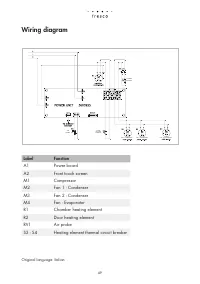
49 Original language: Italian Wiring diagram AIR PROBE DOOR HEATING ELEMENT FAN - CONDENSER FAN - CONDENSER FAN - EVAPORATOR COOKING ELEMENT Label Function A1 Power board A2 Front touch screen M1 Compressor M2 Fan 1 - Condenser M3 Fan 2 - Condenser M4 Fan - Evaporator R1 Chamber heating element R2 D...