Page 2 - CONTENTS
CONTENTS English 01-13 14-26 Deutsche 27-39 Español 40-52 Italiano 53-65 Français 66-78 Pусский 79-90 Chinese
Page 3 - Product Overview
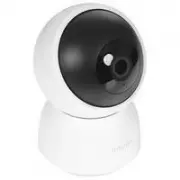
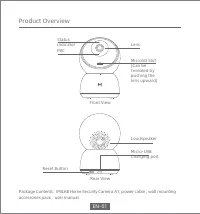
Product Overview Package Contents: IMILAB Home Security Camera A1, power cable , wall mounting accessories pack , user manual MicroSD Slot (Can be revealed by pushing the lens upward) Lens Status indicator Loudspeaker Micro-USB Charging port MIC Reset Button Front View Rear View EN-01
Page 4 - Mounted IMILAB Home Security Camera A1 on a Wall; Installation
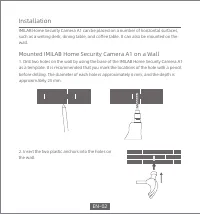
IMILAB Home Security Camera A1 can be placed on a number of horizontal surfaces, such as a writing desk, dining table, and coffee table. It can also be mounted on the wall. Mounted IMILAB Home Security Camera A1 on a Wall 1. Drill two holes on the wall by using the base of the IMILAB Home Security Ca...
Page 5 - When mounting the security camera on a wall:
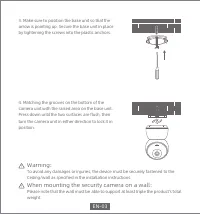
3. Make sure to position the base unit so that the arrow is pointing up. Secure the base unit in place by tightening the screws into the plastic anchors. 4. Matching the grooves on the bottom of the camera unit with the raised area on the base unit. Press down until the two surfaces are flush, then t...
Page 6 - Product Instructions; Turning the Device On
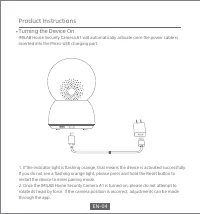
1. If the indicator light is flashing orange, that means the device is activated successfully.If you do not see a flashing orange light, please press and hold the Reset button to restart the device to enter pairing mode.2. Once the IMILAB Home Security Camera A1 is turned on, please do not attempt to ...
Page 7 - Indicator Light
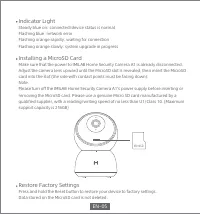
MicroSD Indicator Light Steady blue on: connected/device status is normalFlashing blue: network errorFlashing orange rapidly: waiting for connectionFlashing orange slowly: system upgrade in progress Installing a MicroSD Card Make sure that the power to IMILAB Home Security Camera A1 is already disco...
Page 8 - Install Mi Home app
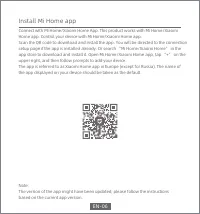
Install Mi Home app Connect with Mi Home/Xiaomi Home App. This product works with Mi Home/Xiaomi Home app. Control your device with Mi Home/Xiaomi Home app.Scan the QR code to download and install the app. You will be directed to the connection setup page if the app is installed already. Or search “...
Page 9 - Real-time Surveillance
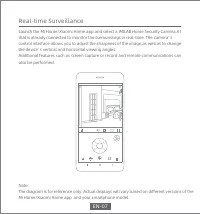
Real-time Surveillance Launch the Mi Home/Xiaomi Home app and select a IMILAB Home Security Camera A1 that is already connected to monitor the surroundings in real-time. The camera’ s control interface allows you to adjust the sharpness of the image,as well as to change the device’ s vertical and ho...
Page 10 - Supporting Infrared and Image-intensified Night Vision; Infrared night vision mode sample
Note:The diagram is for reference only. Actual displays will vary based on different versions of the Mi Home/Xiaomi Home app and your smartphone model. Supporting Infrared and Image-intensified Night Vision The camera will automatically switch to night-vision mode based on changing light conditions. T...
Page 11 - Playback
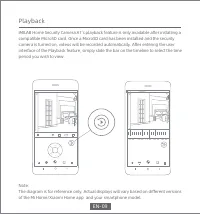
Playback IMILAB Home Security Camera A1’s playback feature is only available after installing a compatible MicroSD card. Once a MicroSD card has been installed and the security camera is turned on, videos will be recorded automatically. After entering the user interface of the Playback feature, simp...
Page 12 - Automatic Surveillance
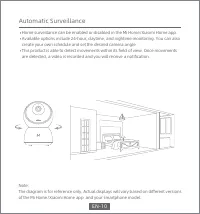
Note:The diagram is for reference only. Actual displays will vary based on different versions of the Mi Home/Xiaomi Home app and your smartphone model. Automatic Surveillance Home surveillance can be enabled or disabled in the Mi Home/Xiaomi Home app. Available options include 24-hour, daytime, and n...
Page 13 - Shared Remote Viewing
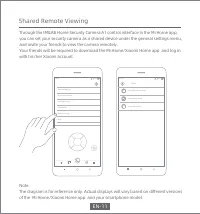
Note:The diagram is for reference only. Actual displays will vary based on different versions of the Mi Home/Xiaomi Home app and your smartphone model. Shared Remote Viewing Through the IMILAB Home Security Camera A1 control interface in the Mi Home app, you can set your security camera as a shared d...
Page 14 - FCC Statement; Specifications
This device complies with Part 15 of the FCC Rules. Operation is subject to the following two conditions:(1) This device may not cause harmful interference, and(2) This device must accept any interference received, including interference that may cause undesired operation.Attention that changes or m...
Page 15 - WEEE Disposal and Recycling Information
Hereby, Shanghai Imilab Technology Co., Ltd. declares that the radio equipment type IMILAB Home Security Camera A1 is in compliance with Directive 2014/53/EU. Correct Disposal of this product. This marking indicates that product should not be disposal with other household wastes throughout the EU. T...
Page 16 - Produktübersicht
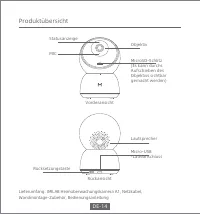
Produktübersicht Lieferumfang: IMILAB Heimüberwachungskamera A1, Netzkabel, Wandmontage-Zubehör, Bedienungsanleitung MicroSD-Schlitz (Es kann durchs Aufschieben des Objektivs sichtbar gemacht werden) Objektiv Statusanzeige Lautsprecher Micro-USB -Ladeanschluss MIC Rücksetzungstaste Vorderansicht Rüc...
Page 17 - An der Wand montierte IMILAB Heimüberwachungskamera A1
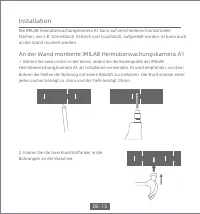
Die IMILAB Heimüberwachungskamera A1 kann auf verschiedenen horizontalen Flächen, wie z.B. Schreibtisch, Esstisch und Couchtisch, aufgestellt werden. Es kann auch an der Wand montiert werden. An der Wand montierte IMILAB Heimüberwachungskamera A1 1. Bohren Sie zwei Löcher in die Wand, indem Sie die ...
Page 18 - Für die Montage der Sicherheitskamera an einer Wand gilt:
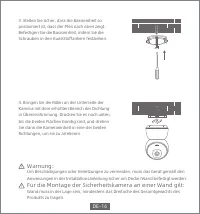
3. Stellen Sie sicher, dass die Basiseinheit so positioniert ist, dass der Pfeil nach oben zeigt. Befestigen Sie die Basiseinheit, indem Sie die Schrauben in den Kunststoffankern festziehen. 4. Bringen Sie die Rillen an der Unterseite der Kamera mit dem erhöhten Bereich der Dichtung in Übereinstimmun...
Page 19 - Produkteinführung; Einschalten des Geräts
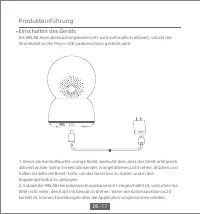
1. Wenn die Kontrollleuchte orange blinkt, bedeutet dies, dass das Gerät erfolgreich aktiviert wurde. Wenn Sie kein blinkendes orangefarbenes Licht sehen, drücken und halten Sie bitte die Reset-Taste, um das Gerät neu zu starten und in den Kopplungsmodus zu gelangen.2. Sobald die IMILAB Heimüberwach...
Page 20 - Anzeigelampe
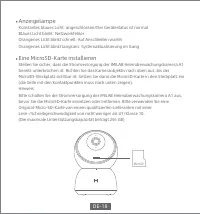
MicroSD Anzeigelampe Konstantes blaues Licht: angeschlossen/Der Gerätestatus ist normalBlaues Licht blinkt: NetzwerkfehlerOrangenes Licht blinkt schnell: Auf Anschließen wartetOrangenes Licht blinkt langsam: Systemaktualisierung im Gang Eine MicroSD-Karte installieren Stellen Sie sicher, dass die St...
Page 21 - Werkseinstellungen wiederherstellen; Mi Heim-Applikation installieren
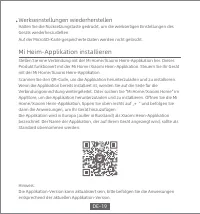
Werkseinstellungen wiederherstellen Halten Sie die Rücksetzungstaste gedrückt, um die werkseitigen Einstellungen des Geräts wiederherzustellen.Auf der MicroSD-Karte gespeicherte Daten werden nicht gelöscht. Mi Heim-Applikation installieren Stellen Sie eine Verbindung mit der Mi Home/Xiaomi Heim-Appl...
Page 22 - Echtzeitüberwachung
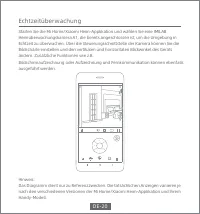
Echtzeitüberwachung Starten Sie die Mi Home/Xiaomi Heim-Applikation und wählen Sie eine IMILAB Heimüberwachungskamera A1, die bereits angeschlossen ist, um die Umgebung in Echtzeit zu überwachen. Über die Steuerungsschnittstelle der Kamera können Sie die Bildschärfe einstellen und den vertikalen und...
Page 23 - Unterstützung für Infrarot- und bildverstärkte Nachtsicht; Probe für den Infrarot-Nachtsichtmodus
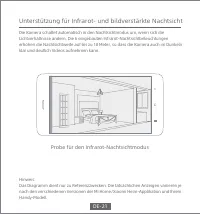
Hinweis:Das Diagramm dient nur zu Referenzzwecken. Die tatsächlichen Anzeigen variieren jenach den verschiedenen Versionen der Mi Home/Xiaomi Heim-Applikation und Ihrem Handy-Modell. Unterstützung für Infrarot- und bildverstärkte Nachtsicht Die Kamera schaltet automatisch in den Nachtsichtmodus um, ...
Page 24 - Abspielen
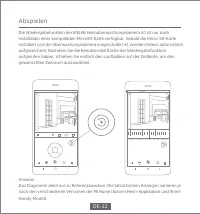
Abspielen Die Wiedergabefunktion der IMILAB Heimüberwachungskamera A1 ist nur nach Installation einer kompatiblen MicroSD-Karte verfügbar. Sobald die Micro-SD-Karte installiert und die Überwachungskamera eingeschaltet ist, werden Videos automatisch aufgezeichnet. Nachdem Sie die Benutzeroberfläche de...
Page 25 - Automatische Überwachung
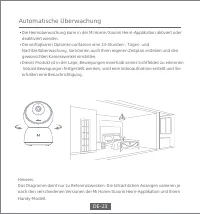
Hinweis:Das Diagramm dient nur zu Referenzzwecken. Die tatsächlichen Anzeigen variieren je nach den verschiedenen Versionen der Mi Home/Xiaomi Heim-Applikation und Ihrem Handy-Modell. Automatische Überwachung Die Heimüberwachung kann in der Mi Home/Xiaomi Heim-Applikation aktiviert oder deaktiviert ...
Page 26 - Gemeinsame Fernanzeige
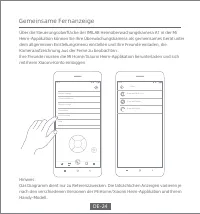
Hinweis:Das Diagramm dient nur zu Referenzzwecken. Die tatsächlichen Anzeigen variieren je nach den verschiedenen Versionen der Mi Home/Xiaomi Heim-Applikation und Ihrem Handy-Modell. Gemeinsame Fernanzeige Über die Steuerungsoberfläche der IMILAB Heimüberwachungskamera A1 in der Mi Heim-Applikation ...
Page 27 - Spezifikationen
Dieses Gerät entspricht Abschnitt 15 der FCC-Bestimmungen. Der Betrieb unterliegt den folgenden zwei Bedingungen:(1) Dieses Gerät darf keine schädlichen Interferenzen verursachen(2) Dieses Gerät muss alle empfangenen Interferenzen akzeptieren, einschließlich Es ist zu beachten, dass Änderungen oder ...
Page 29 - Descripción del producto
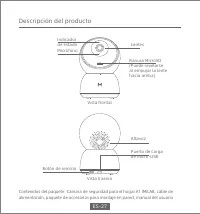
Descripción del producto Contenidos del paquete: Cámara de seguridad para el hogar A1 IMILAB, cable de alimentación, paquete de accesorios para montaje en pared, manual del usuario Ranura MicroSD (Puede revelarse al empujar la lente hacia arriba) Lentes Indicador de estado Altavoz Puerto de carga de...
Page 30 - Instalación
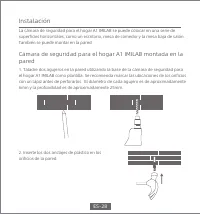
La cámara de seguridad para el hogar A1 IMILAB se puede colocar en una serie de superficies horizontales, como un escritorio, mesa de comedor y la mesa baja de salón. También se puede montar en la pared. Cámara de seguridad para el hogar A1 IMILAB montada en la pared 1. Taladre dos agujeros en la par...
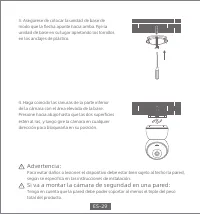
Page 31 - Si va a montar la cámara de seguridad en una pared:
3. Asegúrese de colocar la unidad de base de modo que la flecha apunte hacia arriba. Fije la unidad de base en su lugar apretando los tornillos en los anclajes de plástico. 4. Haga coincidir las ranuras de la parte inferior de la cámara con el área elevada de la base. Presione hacia abajo hasta que l...
Page 32 - Instrucciones del producto; Encender el dispositivo
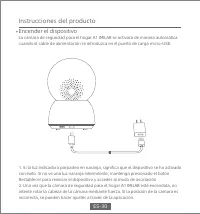
1. Si la luz indicadora parpadea en naranja, significa que el dispositivo se ha activado con éxito. Si no ve una luz naranja intermitente, mantenga presionado el botón Restablecer para reiniciar el dispositivo y acceder al modo de asociación.2. Una vez que la cámara de seguridad para el hogar A1 IMIL...
Page 33 - Luz indicadora
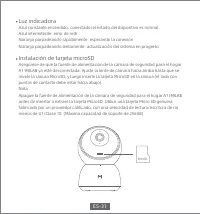
MicroSD Luz indicadora Azul constante encendido: conectado/el estado del dispositivo es normalAzul intermitente: error de redrNaranja parpadeando rápidamente: esperando la conexiónNaranja parpadeando lentamente: actualización del sistema en progreso Instalación de tarjeta microSD Asegúrese de que la...
Page 34 - Restaure la configuración de fábrica; Instalación de la aplicación Mi Home
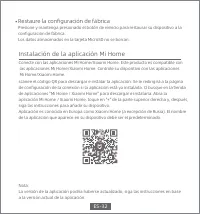
Restaure la configuración de fábrica Presione y mantenga presionado el botón de reinicio para restaurar su dispositivo a la configuración de fábrica.Los datos almacenados en la tarjeta MicroSD no se borran. Instalación de la aplicación Mi Home Conecte con las aplicaciones Mi Home/Xiaomi Home. Este pro...
Page 35 - Vigilancia en tiempo real
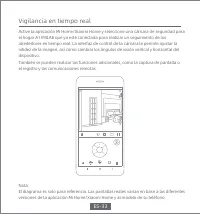
Vigilancia en tiempo real Active la aplicación Mi Home/Xiaomi Home y seleccione una cámara de seguridad para el hogar A1 IMILAB que ya esté conectada para realizar un seguimiento de los alrededores en tiempo real. La interfaz de control de la cámara le permite ajustar la nitidez de la imagen, así co...
Page 36 - Ejemplo de modo de visión nocturna por infrarrojos
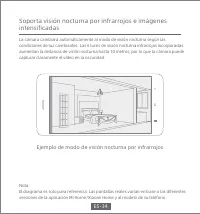
Nota:El diagrama es solo para referencia. Las pantallas reales varían en base a las diferentes versiones de la aplicación Mi Home/Xiaomi Home y al modelo de su teléfono. Soporta visión nocturna por infrarrojos e imágenes intensificadas La cámara cambiará automáticamente al modo de visión nocturna seg...
Page 37 - Reproducción
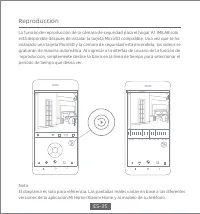
Reproducción La función de reproducción de la cámara de seguridad para el hogar A1 IMILAB solo está disponible después de instalar la tarjeta MicroSD compatible. Una vez que se ha instalado una tarjeta MicroSD y la cámara de seguridad está encendida, los vídeos se grabarán de manera automática. Al i...
Page 38 - Vigilancia automática
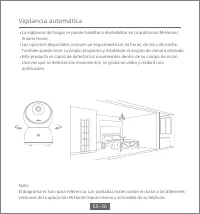
Nota:El diagrama es solo para referencia. Las pantallas reales varían en base a las diferentes versiones de la aplicación Mi Home/Xiaomi Home y al modelo de su teléfono. Vigilancia automática La vigilancia del hogar se puede habilitar o deshabilitar en la aplicación Mi Home/Xiaomi Home.Las opciones ...
Page 39 - Visualización remota compartida
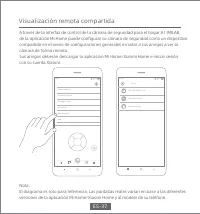
Nota:El diagrama es solo para referencia. Las pantallas reales varían en base a las diferentes versiones de la aplicación Mi Home/Xiaomi Home y al modelo de su teléfono. Visualización remota compartida A través de la interfaz de control de la cámara de seguridad para el hogar A1 IMILAB, de la aplica...
Page 40 - FCC Declaración; Especificaciones
Este dispositivo cumple con la Parte 15 de las Normas de la FCC. La operación está sujeta a las siguientes dos condiciones:(1) este dispositivo no podrá causar las interferencias perjudiciales, y(2) este dispositivo debe aceptar cualquier interferencia recibida, incluyendo las interferencias que pod...
Page 41 - WEEE Información de eliminación y reciclaje
Por este medio, Shanghai Imilab Technology Co., Ltd. declara que el tipo de equipo de radio de la Cámara de seguridad para el hogar A1 IMILAB cumple con la Directiva 2014/53/EU. Eliminación correcta de este producto. La marca indica que el producto no debe desecharse con otros residuos domésticos en...
Page 42 - Panoramica del Prodotto
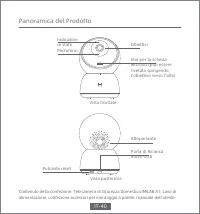
Panoramica del Prodotto Contenuto della confezione: Telecamera di Sicurezza Domestica IMILAB A1, cavo di alimentazione, confezione accessori per montaggio a parete, manuale dell'utente Slot per la scheda MicroSD (può essere rivelato spingendo l'obiettivo verso l'alto) Obiettivi Indicatore di stato A...
Page 43 - Installazione
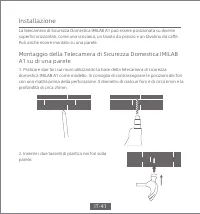
La telecamera di Sicurezza Domestica IMILAB A1 può essere posizionata su diverse superfici orizzontali, come una scrivania, un tavolo da pranzo e un tavolino da caffè. Può anche essere montato su una parete. Montaggio della Telecamera di Sicurezza Domestica IMILAB A1 su di una parete 1. Praticare due ...
Page 44 - Quando si monta la telecamera di sicurezza su una parete:
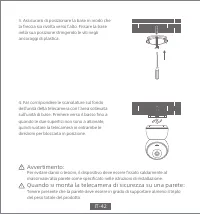
3. Assicurarsi di posizionare la base in modo che la freccia sia rivolta verso l'alto. Fissare la base nella sua posizione stringendo le viti negli ancoraggi di plastica. 4. Far corrispondere le scanalature sul fondo dell'unità della telecamera con l'area sollevata sull'unità di base. Premere verso ...
Page 45 - Istruzioni sul prodotto; Accensione del Dispositivo
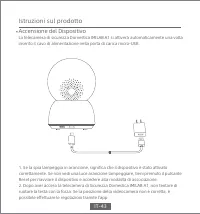
1. Se la spia lampeggia in arancione, significa che il dispositivo è stato attivato correttamente. Se non vedi una luce arancione lampeggiare, tieni premuto il pulsante Reset per riavviare il dispositivo e accedere alla modalità di associazione.2. Dopo aver acceso la telecamera di Sicurezza Domestica...
Page 46 - Spia Luminosa
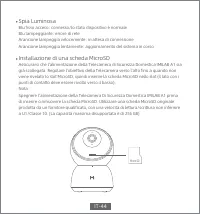
MicroSD Spia Luminosa Blu fisso acceso: connesso/lo stato dispositivo è normaleBlu lampeggiante: errore di reteArancione lampeggia velocemente: in attesa di connessioneArancione lampeggia lentamente: aggiornamento del sistema in corso Installazione di una scheda MicroSD Assicurarsi che l'alimentazion...
Page 47 - Ripristinare le impostazioni di fabbrica; Installa l'app Mi Home
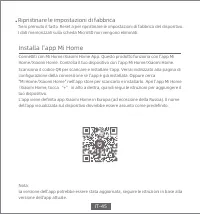
Ripristinare le impostazioni di fabbrica Tieni premuto il tasto Reset a per ripristinare le impostazioni di fabbrica del dispositivo.I dati memorizzati sulla scheda MicroSD non vengono eliminati. Installa l'app Mi Home Connettiti con Mi Home/Xiaomi Home App. Questo prodotto funziona con l'app Mi Hom...
Page 48 - Sorveglianza in tempo reale
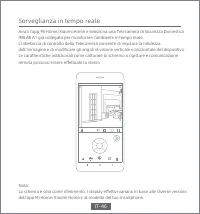
Sorveglianza in tempo reale Avvia l'app Mi Home/Xiaomi Home e seleziona una Telecamera di Sicurezza Domestica IMILAB A1 già collegata per monitorare l'ambiente in tempo reale. L'interfaccia di controllo della Telecamera consente di regolare la nitidezza dell'immagine e di modificare gli angoli di vis...
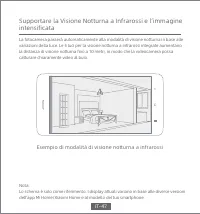
Page 49 - Esempio di modalità di visione notturna a infrarossi
Nota:Lo schema è solo come riferimento. I display attuali variano in base alle diverse versioni dell'app Mi Home/Xiaomi Home e al modello del tuo smartphone. Supportare la Visione Notturna a Infrarossi e l’immagine intensificata La fotocamera passerà automaticamente alla modalità di visione notturna ...
Page 50 - Riproduzione
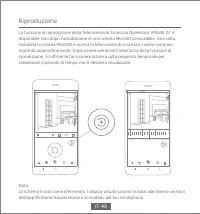
Riproduzione La funzione di riproduzione della Telecamera di Sicurezza Domestica IMILAB A1 è disponibile solo dopo l'installazione di una scheda MicroSD compatibile. Una volta installata la scheda MicroSD e accesa la telecamera di sicurezza, i video verranno registrati automaticamente. Dopo essere e...
Page 51 - Sorveglianza automatica
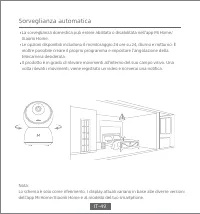
Nota:Lo schema è solo come riferimento. I display attuali variano in base alle diverse versioni dell'app Mi Home/Xiaomi Home e al modello del tuo smartphone. Sorveglianza automatica La sorveglianza domestica può essere abilitata o disabilitata nell'app Mi Home/Xiaomi Home.Le opzioni disponibili incl...
Page 52 - Visualizzazione remota condivisa
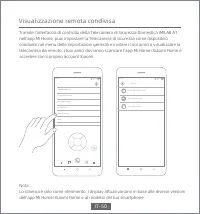
Nota:Lo schema è solo come riferimento. I display attuali variano in base alle diverse versioni dell'app Mi Home/Xiaomi Home e al modello del tuo smartphone. Visualizzazione remota condivisa Tramite l'interfaccia di controllo della Telecamera di Sicurezza Domestica IMILAB A1 nell'app Mi Home, puoi i...
Page 53 - Dichiarazione FCC; Specifiche
Questo dispositivo è conforme alla Parte 15 delle norme FCC. Il funzionamento è soggetto alle due seguenti condizioni:(1) Questo dispositivo potrebbe non causare interferenze dannose(2) Questo dispositivo deve accettare qualsiasi interferenza ricevuta, incluse le interferenze che potrebbero causare ...
Page 54 - Informazioni sullo smaltimento e sul riciclaggio RAEE
Con la presente, Shanghai Imilab Technology Co., Ltd. Dichiara che la IMI Telecamera per Sicurezza Domestica Base è conforme alla Direttiva 2014/53/EU. La disposizione corretta del prodotto. Il simobolo indica che il proodtto non deve essere disposto con altri rifiuti domestici fuori EU. Per preveder...
Page 55 - Présentation du produit
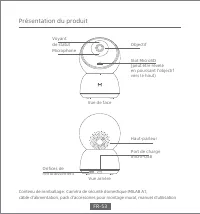
Présentation du produit Contenu de remballage: Caméra de sécurité domestique IMILAB A1,câble d'alimentation, pack d'accessoires pour montage mural, manuel d'utilisation Slot MicroSD (peut être révélé en poussant l'objectif vers le haut) Objectif Voyant de statut Haut-parleur Port de charge micro-USB...
Page 56 - Monter la caméra de sécurité domestique IMILAB A1 sur un mur
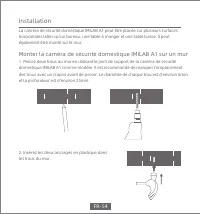
La caméra de sécurité domestique IMILAB A1 peut être placée sur plusieurs surfaces horizontales telles qu'un bureau, une table à manger et une table basse. Il peut également être monté sur le mur. Monter la caméra de sécurité domestique IMILAB A1 sur un mur 1. Percez deux trous au mur en utilisant l...
Page 57 - Lors du montage de la caméra de sécurité sur un mur:
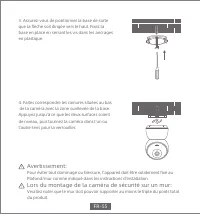
3. Assurez-vous de positionner la base de sorte que la flèche soit dirigée vers le haut. Fixez la base en place en serrant les vis dans les ancrages en plastique. 4. Faites correspondre les rainures situées au bas de la caméra avec la zone surélevée de la base. Appuyez jusqu'à ce que les deux surface...
Page 58 - Instructions du produit; Mise en marche de l'appareil
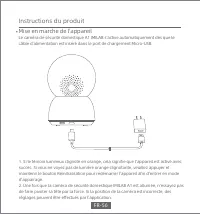
1. Si le témoin lumineux clignote en orange, cela signifie que l'appareil est activé avec succès. Si vous ne voyez pas de lumière orange clignotante, veuillez appuyer et maintenir le bouton Réinitialisation pour redémarrer l'appareil afin d'entrer en mode d'appairage.2. Une fois que la caméra de sécur...
Page 59 - Voyant lumineux
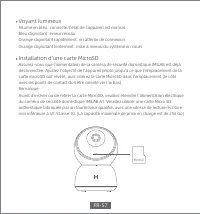
MicroSD Voyant lumineux Allumé en bleu: connecté/l'état de l'appareil est normalBleu clignotant: erreur réseauOrange clignotant rapidement: en attente de connexionOrange clignotant lentement: mise à niveau du système en cours Installation d'une carte MicroSD Assurez-vous que l'alimentation de la cam...
Page 60 - Rétablir les paramètres d'usine; Installer l'application Mi Home
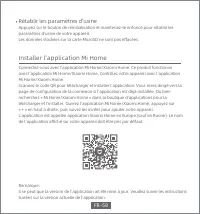
Rétablir les paramètres d'usine Appuyez sur le bouton de réinitialisation et maintenez-le enfoncé pour rétablir les paramètres d'usine de votre appareil.Les données stockées sur la carte MicroSD ne sont pas effacées. Installer l'application Mi Home Connectez-vous avec l’application Mi Home/Xiaomi Hom...
Page 61 - Surveillance en temps réel
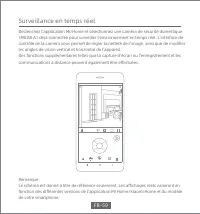
Surveillance en temps réel Déclenchez l'application Mi/Home et sélectionnez une caméra de sécurité domestique IMILAB A1 déjà connectée pour surveiller l'environnement en temps réel. L'interface de contrôle de la caméra vous permet de régler la netteté de l'image, ainsi que de modifierles angles de vi...
Page 62 - Exemple de mode de vision nocturne infrarouge
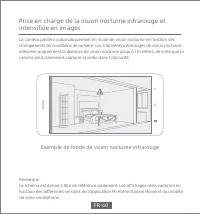
Remarque :Le schéma est donné à titre de référence seulement. Les affichages réels varieront en fonction des différentes versions de l'application Mi Home/Xiaomi Home et du modèle de votre smartphone. Prise en charge de la vision nocturne infrarouge et intensifiée en images La caméra passera automatique...
Page 63 - Lecture
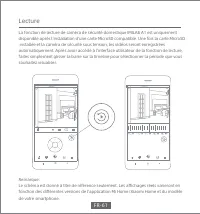
Lecture La fonction de lecture de caméra de sécurité domestique IMILAB A1 est uniquement disponible après l'installation d'une carte MicroSD compatible. Une fois la carte MicroSD installée et la caméra de sécurité sous tension, les vidéos seront enregistrées automatiquement. Après avoir accédé à l'i...
Page 64 - Surveillance automatique
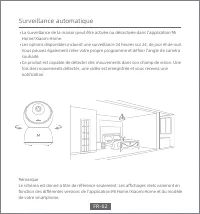
Remarque :Le schéma est donné à titre de référence seulement. Les affichages réels varieront en fonction des différentes versions de l'application Mi Home/Xiaomi Home et du modèle de votre smartphone. Surveillance automatique La surveillance de la maison peut être activée ou désactivée dans l'applicati...
Page 65 - Visualisation à distance partagée
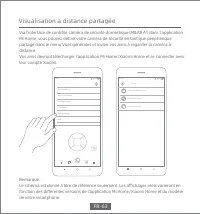
Remarque :Le schéma est donné à titre de référence seulement. Les affichages réels varieront en fonction des différentes versions de l'application Mi Home/Xiaomi Home et du modèle de votre smartphone. Visualisation à distance partagée Via l'interface de contrôle caméra de sécurité domestique IMILAB A1 ...
Page 66 - Déclaration de la FCC; Caractéristiques
Cet appareil est conforme à la section 15 de la réglementation de la FCC. Le fonctionnement est soumis aux deux conditions suivantes:(1) cet appareil ne doit pas causer d'interférences nuisibles, et(2) cet appareil doit accepter toutes les interférences reçues, y compris celles susceptibles de provo...
Page 67 - Informations d'élimination et de recyclage des DEEE
Par la présente, Shanghai Imilab Technology Co., Ltd. déclare que l'équipement radio de type de caméra de sécurité domestique IMILAB A1 est conforme à la directive 2014/53/UE. Élimination correcte de ce produit. Ce marquage indique que le produit ne doit pas être éliminé avec d'autres déchets ménage...
Page 68 - Обзор устройства
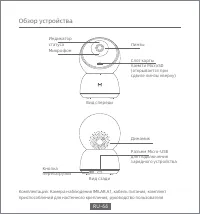
Обзор устройства Комплектация: Камера наблюдения IMILAB A1, кабель питания, комплект приспособлений для настенного крепления, руководство пользователя Слот карты памяти MicroSD (открывается при сдвиге линзы кверху) Линзы Индикатор статуса Динамик Разъем Micro-USB для подключения зарядного устройства...
Page 69 - Настенный монтаж камеры наблюдения IMILAB A1; Установка
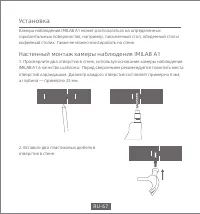
Камера наблюдения IMILAB A1 может располагаться на определенных горизонтальных поверхностях, например, письменный стол, обеденный стол и кофейный столик. Также ее можно монтировать на стене. Настенный монтаж камеры наблюдения IMILAB A1 1. Просверлите два отверстия в стене, используя основание камеры...
Page 70 - При монтаже камеры видеонаблюдения на стену:
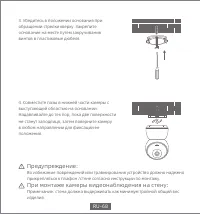
3. Убедитесь в положении основания при обращении стрелки кверху. Закрепите основание на месте путем закручивания винтов в пластиковые дюбеля. 4. Совместите пазы в нижней части камеры свыступающей областью на основании. Надавливайте до тех пор, пока две поверхности не станут заподлицо, затем повернит...
Page 71 - Инструкции по использованию изделия; Включение устройства
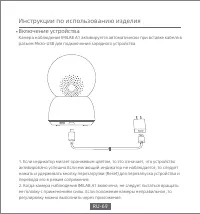
1. Если индикатор мигает оранжевым цветом, то это означает, что устройство активировано успешно.Если мигающий индикатор не наблюдается, то следует нажать и удерживать кнопку перезагрузки (Reset) для перезапуска устройства и перевода его в режим сопряжения.2. Когда камера наблюдения IMILAB A1 включен...
Page 72 - Световой индикатор
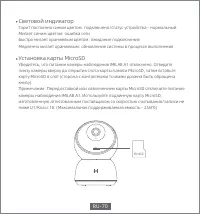
MicroSD Световой индикатор Горит постоянно синим цветом: подключено/статус устройства - нормальныйМигает синим цветом: ошибка сетиБыстро мигает оранжевым цветом: ожидание подключенияМедленно мигает оранжевым: обновление системы в процессе выполнения Установка карты MicroSD Убедитесь, что питание кам...
Page 73 - Восстановление заводских настроек; Установка приложения Mi Home
Восстановление заводских настроек Нажмите и удерживайте кнопку перезагрузки (Reset) для восстановления заводских настроек устройства.Данные сохраненные на карте MicroSD не удаляются. Установка приложения Mi Home Связь с приложением Mi Home/Xiaomi Home App. Данное изделие работает с приложением Mi Ho...
Page 74 - Наблюдение в режиме реального времени
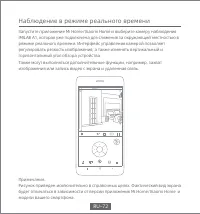
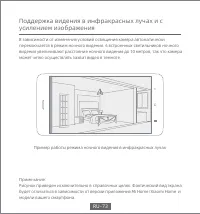
Наблюдение в режиме реального времени Запустите приложение Mi Home/Xiaomi Home и выберите камеру наблюдения IMILAB A1, которая уже подключена для слежения за окружающей местностью в режиме реального времени. Интерфейс управления камерой позволяет регулировать резкость изображения, а также изменять в...
Page 76 - Воспроизведение
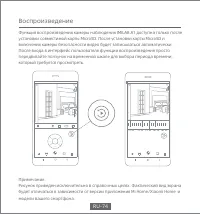
Воспроизведение Функция воспроизведения камеры наблюдения IMILAB A1 доступна только после установки совместимой карты MicroSD. После установки карты MicroSD и включения камеры безопасности видео будет записываться автоматически. После входа в интерфейс пользователя функции воспроизведения просто пер...
Page 77 - Автоматическое наблюдение
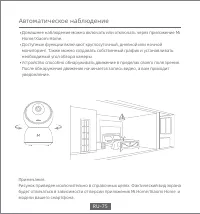
Примечание:Рисунок приведен исключительно в справочных целях. Фактический вид экрана будет отличаться в зависимости от версии приложения Mi Home/Xiaomi Home и модели вашего смартфона. Автоматическое наблюдение Домашнее наблюдение можно включать или отключать через приложение Mi Home/Xiaomi Home.Дост...
Page 78 - Общий удаленный просмотр
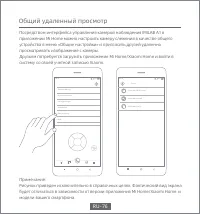
Примечание:Рисунок приведен исключительно в справочных целях. Фактический вид экранабудет отличаться в зависимости от версии приложения Mi Home/Xiaomi Home и модели вашего смартфона. Общий удаленный просмотр Посредством интерфейса управления камерой наблюдения IMILAB A1 в приложении Mi Home можно на...
Page 79 - Комментарий от Федеральной комиссии по связи (FCC); Характеристики
Данное устройство соответствует Части 15 правил Федеральной комиссии по связи. Работа попадает под действие двух следующих условий:(1) Данное устройство вызывает недопустимые помехи, и(2) Данное устройство должно воспринимать любые помехи, включая помехи, которые могут вызывать сбой в работе.Следует...
Page 81 - 產品介紹
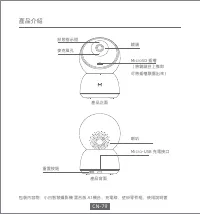
CN-79 產品介紹 MicroSD 插槽(將鏡頭往上推即可將插槽顯露出來) 鏡頭 狀態指示燈 喇叭 Micro-USB 充電接口 麥克風孔 重置按鈕 產品正面 產品背面 包裝內容物:小白智慧攝影機 雲台版 A1機台、充電線、壁掛零件組、使用說明書
Page 82 - 將小白智慧攝影機 雲台版 A1壁掛於牆上; 安裝說明
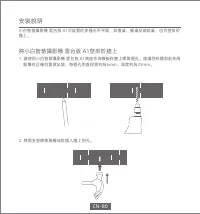
小白智慧攝影機 雲台版 A1可設置於多種水平平面,如書桌、餐桌及咖啡桌,也可壁掛於 牆上。 將小白智慧攝影機 雲台版 A1壁掛於牆上 1. 請使用小白智慧攝影機 雲台版 A1底座作為模板在牆上鑽兩個孔。建議您在鑽洞前先用 鉛筆在正確位置做記號,每個孔的直徑需約為6mm,深度約為25mm。 2. 將兩支塑膠膨脹螺母釘插入牆上的孔。 安裝說明 CN-80
Page 83 - 警告:; 當您要將攝影機安裝壁掛:
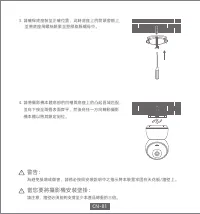
3. 請確保底座裝至正確位置,此時底座上的箭頭會朝上, 並將底座用螺絲鎖緊至塑膠膨脹螺母中。 4. 請將攝影機本體底部的凹槽與底座上的凸起區域匹配, 並向下按至兩個表面齊平,然後向任一方向轉動攝影機本體以將其鎖定到位。 警告: 為避免損壞或傷害,請務必按照安裝說明中之指示將本裝置牢固在天花板/牆壁上。 當您要將攝影機安裝壁掛: 請注意,牆壁必須能夠支撐至少本產品總重的三倍。 CN-81
Page 84 - 關於本產品; 開啟本裝置
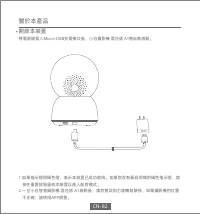
關於本產品 開啟本裝置 將電源線插入 Micro-USB 充電接口後,小白攝影機 雲台版 A1 將自動啟動。 1.如果指示燈閃橘色燈,表示本裝置已成功啟用。如果您沒有看到閃爍的橘色指示燈,請 按住重置按鈕重啟本裝置以進入配對模式。 2.一旦小白智慧攝影機 雲台版 A1啟動後,請勿嘗試用力旋轉其頭部,如果攝影機的位置 不正確,請使用APP調整。 CN-82
Page 85 - 指示燈
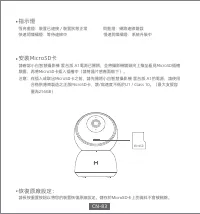
MicroSD 指示燈 恆亮藍燈:裝置已連接/裝置狀態正常 閃藍燈:網路連線錯誤 快速閃爍橘燈:等待連線中 慢速閃爍橘燈:系統升級中 安裝MicroSD卡 請確認小白智慧攝影機 雲台版 A1電源已關閉,並將攝影機鏡頭向上推至看見MicroSD插槽顯露,再將MicroSD卡插入插槽中(請將晶片感應面朝下)。注意:在插入或取出MicroSD卡之前,請先關閉小白智慧攝影機 雲台版 A1的電源,請使用 合格供應商製造之正版MicroSD卡,讀/寫速度不低於U1 / Class 10。(最大支援容量為256GB) 恢復原廠設定: 請長按重置按鈕以將您的裝置恢復原廠設定。儲存於 MicroSD 卡上的資料...
Page 86 - 安裝米家APP
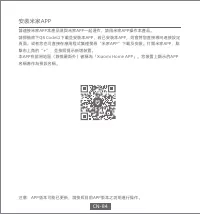
安裝米家APP 請連接米家APP本產品須與米家APP一起運作,請用米家APP操作本產品。請掃描底下QR Code以下載並安裝本APP,若已安裝本APP,則會將您直接導向連接設定頁面。或者您也可直接在應用程式集裡搜尋“米家APP”下載及安裝。打開米家APP,點擊右上角的“+”,並按照提示新增裝置。本APP在歐洲地區(除俄羅斯外)被稱為「Xiaomi Home APP」。您裝置上顯示的APP名稱應作為預設名稱。 注意:APP版本可能已更新,請按照目前APP版本之說明進行操作。 CN-84
Page 87 - 即時監控
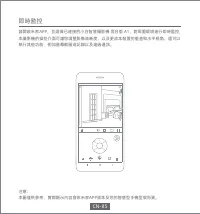
即時監控 請開啟米家APP,並選擇已連接的小白智慧攝影機 雲台版 A1,對周圍環境進行即時監控,本攝影機的操控介面可讓您調整影像清晰度,以及更改本裝置的垂直和水平視角。還可以執行其他功能,例如螢幕截圖或記錄以及遠端通訊。 注意:本圖僅供參考,實際顯示內容會依米家APP版本及您的智慧型手機型號而異。 HD CN-85
Page 88 - 支援紅外線及影像增強夜視功能
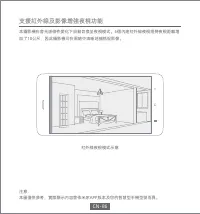
注意:本圖僅供參考,實際顯示內容會依米家APP版本及您的智慧型手機型號而異。 支援紅外線及影像增強夜視功能 本攝影機在會光源條件變化下自動切換至夜視模式。6個內建紅外線夜視燈將夜視距離增加了10公尺,因此攝影機可在黑暗中清晰地捕抓捉影像。 紅外線夜視模式示意 CN-86
Page 89 - 影像回放
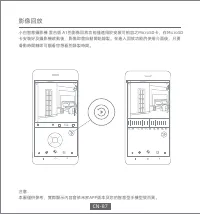
影像回放 小白智慧攝影機 雲台版 A1的影像回放功能僅適用於安裝可相容之MicroSD卡,在MicroSD卡安裝好及攝影機啟動後,影像即會自動開始錄製。在進入回放功能的使用介面後,只要滑動時間軸即可觀看您想看的錄製時間。 注意:本圖僅供參考,實際顯示內容會依米家APP版本及您的智慧型手機型號而異。 HD CN-87
Page 90 - 自動監控
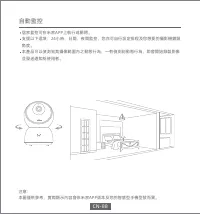
注意:本圖僅供參考,實際顯示內容會依米家APP版本及您的智慧型手機型號而異。 自動監控 居家監控可在米家APP上執行或關閉。支援以下選項:24小時、日間、夜間監控,您亦可自行設定排程及您想要的攝影機鏡頭角度。本產品可以偵測到其攝像範圍內之動態行為,一有偵測到動態行為,即會開始錄製影像並發送通知給使用者。 CN-88
Page 91 - 遠端共享觀看
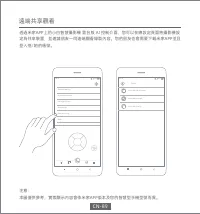
注意:本圖僅供參考,實際顯示內容會依米家APP版本及您的智慧型手機型號而異。 遠端共享觀看 透過米家APP上的小白智慧攝影機 雲台版 A1控制介面,您可以在總設定頁面將攝影機設定為共享裝置,並邀請朋友一同遠端觀看錄製內容。您的朋友也會需要下載米家APP並且登入他/她的帳號。 Share with Mi Account Share with friends Share with family Share... 4G 10:19 4G 10:15 General settings Home surveillance Manage storage Automation Device sharing ...