Page 2 - Table of contents; Installation; Operation; Control elements
2 3 Table of contents Table of contents Dear customer! Thank you for purchasing our product. For safety, it is strongly recommended to read this manual carefully before connecting, operating and/or adjusting the product and keep the manual for reference in the future. 1212121213131313131313131414141...
Page 3 - General information; Handling compact discs
ID3 tag informationUSB/SD/MMC notesInserting SD/MMC card/USB device System setup System setup Language setupAudio setupVideo setup General information Handling compact discs Cleaning discs Cleaning the unit body AccessoriesTroubleshooting guideSpecification 2 3 Table of contents Table of contents 18...
Page 4 - Before you start; Utilization of the product
4 Before you start If you want to dispose this product, do not mix it with general household waste. There is a separate collection system for used electronic products in accordance with legislation that requires proper treatment, recovery and recycling. Please contact your local authorities for the ...
Page 5 - Installation/Connection
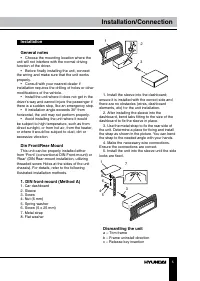
5 Installation/Connection Installation General notes • Choose the mounting location where the unit will not interfere with the normal driving function of the driver. • Before finally installing the unit, connect the wiring and make sure that the unit works properly. • Consult with your nearest deale...
Page 6 - Trim frame installation
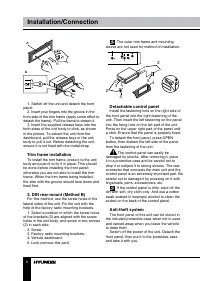
6 Installation/Connection в б а 1. Switch off the unit and detach the front panel. 2. Insert your fingers into the groove in the front side of the trim frame (apply some effort to detach the frame). Pull the frame to detach it. 3. Insert the supplied release keys into the both sides of the unit body...
Page 7 - Connection; ISO connection table; Location; Connector A
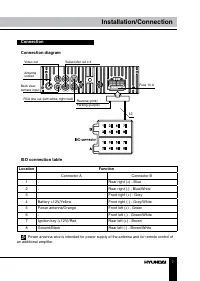
7 Installation/Connection Connection Connection diagram Fuse 10 A Parking (purple) Reverse (pink) RCA line out (left=white; right=red) Back view camera input Antenna socket Video out Subwoofer out x 2 12 ISO connection table Location Function Connector A Connector B 1 - Rear right (+) - Blue 2 - Rea...
Page 8 - Using the ISO Connector; If your car is equipped with the ISO; Parking wire connection
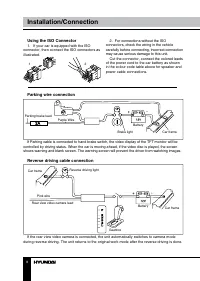
8 9 Installation/Connection Operation Using the ISO Connector 1. If your car is equipped with the ISO connector, then connect the ISO connectors as illustrated. 1 2 2. For connections without the ISO connectors, check the wiring in the vehicle carefully before connecting, incorrect connection may ca...
Page 9 - Pressing RESET hole will erase the clock
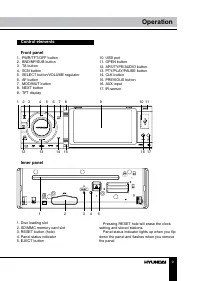
8 9 Installation/Connection Operation Control elements Front panel 1. PWR/TFT/OFF button2. BND/NP/SUB button3. TA button4. SCN button5. SELECT button/VOLUME regulator6. AF button7. MOD/MUT button8. NEXT button9. TFT display 1 2 3 4 5 6 7 8 9 10 11 12 13 14 15 16 17 10. USB port11. OPEN button12. APS...
Page 10 - Remote controller; Press the catch and at the same time pull
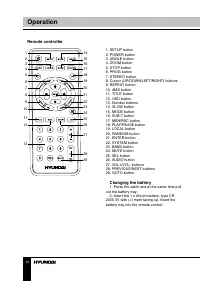
10 Operation Remote controller 1 2345 67 8 9 10 1112 13 14 1516171819 20 21 2223242526 27 2829 1. SETUP button2. POWER button3. ANGLE button4. ZOOM button5. STOP button6. PROG button7. STEREO button8. Cursor (UP/DOWN/LEFT/RIGHT) buttons9. REPEAT button10. AMS button11. TITLE button12. OSD button13. ...
Page 11 - General operations
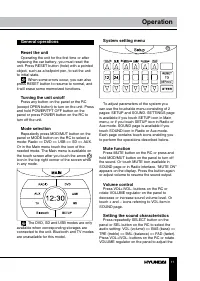
11 Operation System setting menu To adjust parameters of the system you can use the touchable menu consisting of 2 pages: SETUP and SOUND. SETTINGS page is available if you touch SETUP icon in Main menu, or if you touch SETUP icon in Radio or Aux mode. SOUND page is available if you touch SOUND icon...
Page 13 - AUX in jack
12 13 Operation Operation OFF. Or press and hold BND/NP/SUB button on the panel to switch on or off the subwoofer output. After you have reached your desired effect, leave the unit idle in order for the new setting to take effect. An external amplifier is required to operate the subwoofer. AUX in ja...
Page 14 - Local radio station search
14 Operation Local radio station search Press repeatedly SELECT button on the panel or SEL button on the RC until the display shows LOC ON (LOC OFF). Press VOL+/VOL- buttons on the RC or rotate VOLUME regulator on the panel to select between LOC ON/OFF. LOC ON means that only local stations are rece...
Page 15 - Touch screen; Icon
15 Operation the unit will seek for traffic announcement program; in TA ALARM mode, the alarm is set off. Or you can touch TASET icon on the screen to switch between TA ALARM/TA SEEK. • PI SOUND/MUTE: Choose either PI sound or PI mute. PI sound refers to the reception noise when the AF function trie...
Page 16 - Selecting tracks/chapters
16 Operation is not removed from the slot within several seconds, it will be automatically loaded into the slot again. When the disc is ejected and removed, the unit will automatically switch to another mode. MP3/DivX/JPEG file playback When you insert a storage containing MP3/ DivX/JPEG files, the ...
Page 18 - ID3 Tag function
18 Operation • When playing a DVD, press TITLE button on the RC or touch Title icon to go to the title list of the disc. Title and menu are only available if the disc has these functions. ID3 Tag function If an MP3 file has ID3-tag information in the supported format, such information will be displa...
Page 19 - Language setup; Audio setup; Video setup
19 Operation Language setup LANGUAGE SETUP OSD LANGUAGEAUDIO LANGUAGESUBTITLE LANGUAGEMENU LANGUAGE OSD language Select the language to be used for the on- screen display. Audio language Select the language to be used for the audio. You can select a preferred audio from those included on the DVD vid...
Page 21 - Troubleshooting; Symptom
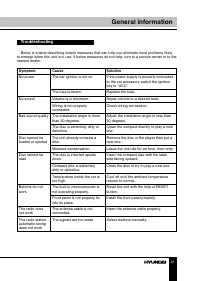
20 21 General information General information Troubleshooting Below is a table describing simple measures that can help you eliminate most problems likely to emerge when this unit is in use. If below measures do not help, turn to a service center or to the nearest dealer. Symptom Cause Solution No p...
Page 22 - Specifications; General
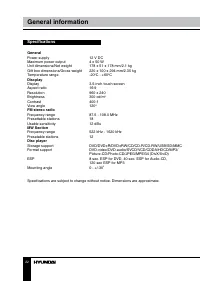
22 23 General information Содержание Specifications General Power supply 12 V DC Maximum power output 4 х 50 W Unit dimensions/Net weight 178 x 51 x 178 mm/2.1 kg Gift box dimensions/Gross weight 220 x 100 x 294 mm/2.35 kg Temperature range -20 0 C - +60 0 C Discplay Display 3.5-inch touch screen As...
Page 23 - Уважаемый покупатель!; Установка/Подключение
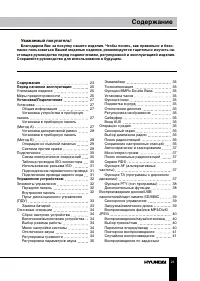
22 23 General information Содержание Уважаемый покупатель! Благодарим Вас за покупку нашего изделия. Чтобы понять, как правильно и безо- пасно пользоваться Вашей моделью изделия, рекомендуется тщательно изучить на-стоящее руководство перед подключением, регулировкой и эксплуатацией изделия. Сохраняй...
Page 24 - Общая информация
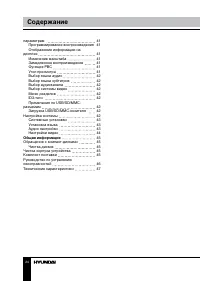
24 25 Содержание Перед началом эксплуатации параметрам Программирование воспроизведенияОтображение информации на дисплее Изменение масштабаЗамедленное воспроизведениеФункция PBCУгол просмотраВыбор языка аудиоВыбор языка субтитровВыбор аудиоканалаВыбор системы видеоМеню разделовID3-тегиПримечания по ...
Page 25 - Утилизация изделия
24 25 Содержание Перед началом эксплуатации Если вы желаете утилизировать данное изделие, не выбрасывайте его вместе с обычным бытовым мусором. Существует отдельная система сбора использованных электронных изделий в соответствии с законодательством, которая предполагает соответствующее обращение, во...
Page 26 - • Убедитесь, что источник питания и
26 27 Перед началом эксплуатации Установка/Подключение соприкасаться друг с другом или с корпу-сом автомобиля после включения устрой-ства. В противном случае усилитель может быть перегружен или выйти из строя. • Убедитесь, что источник питания и антенна отключены, если Вы не будете пользоваться устр...
Page 27 - Установка; Установка устройства
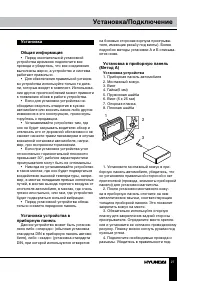
26 27 Перед началом эксплуатации Установка/Подключение Установка Общая информация • Перед окончательной установкой устройства временно подключите все провода и убедитесь, что все соединения выполнены верно, а устройство и система работают правильно. • Для обеспечения правильной установ- ки устройств...
Page 28 - Снятие устройства; Установка декоративной рамки
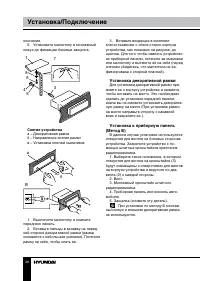
28 29 Установка/Подключение Установка/Подключение ключения. 5. Установите магнитолу в монтажный кожух до фиксации боковых защелок. 3 5 4 6 8 1 7 Снятие устройства а – Декоративная рамкаб – Направление снятия рамкив – Установка ключей съемников B б а 1. Выключите магнитолу и снимите переднюю панель. ...
Page 29 - Операции со съемной панелью
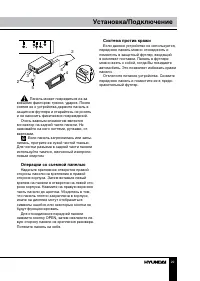
28 29 Установка/Подключение Установка/Подключение 2 2 5 5 4 3 Панель может повредиться из-за внешних факторов: тряски, ударов. После снятия ее с устройства держите панель в защитном футляре и старайтесь не ронять и не наносить физических повреждений. Очень важным элементом является коннектор на задн...
Page 30 - Подключение; Таблица проводов ISO-коннектора; Номер; Разъем A
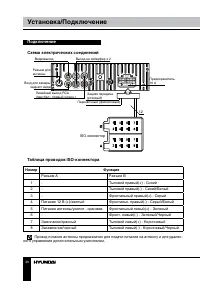
30 31 Установка/Подключение Установка/Подключение Подключение Схема электрических соединений Предохранитель 10 A Парковочный (фиолетовый) Задняя передача (розовый) Линейный выход RCA(лев=бел.; правый=красн.) Вход для камеры заднего вида Разъем для антенны Видеовыход Выход на сабвуфер х 2 12 Таблица ...
Page 31 - Использование разъема ISO; Для подключений без разъемов ISO; Подключение парковочного провода
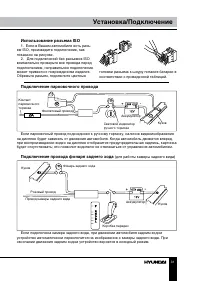
30 31 Установка/Подключение Установка/Подключение Использование разъема ISO 1. Если в Вашем автомобиле есть разъ- ем ISO, произведите подключение, как показано на рисунке. 2. Для подключений без разъемов ISO внимательно проверьте все провода перед подключением, неправильное подключение может привест...
Page 32 - Элементы управления; При нажатии кнопки RESET все выпол-
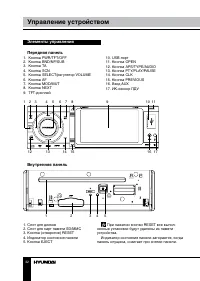
32 33 Управление устройством Управление устройством Элементы управления Передняя панель 1. Кнопка PWR/TFT/OFF2. Кнопка BND/NP/SUB3. Кнопка TA4. Кнопка SCN5. Кнопка SELECT/регулятор VOLUME6. Кнопка AF7. Кнопка MOD/MUT8. Кнопка NEXT9. TFT-дисплей 1 2 3 4 5 6 7 8 9 10 11 12 13 14 15 16 17 10. USB-порт1...
Page 33 - Пульт дистанционного управления; Извлеките лоток для батареи из
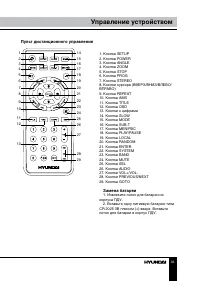
32 33 Управление устройством Управление устройством Пульт дистанционного управления 1 2345 67 8 9 10 1112 13 14 1516171819 20 21 2223242526 27 2829 1. Кнопка SETUP2. Кнопка POWER3. Кнопка ANGLE4. Кнопка ZOOM5. Кнопка STOP6. Кнопка PROG7. Кнопка STEREO8. Кнопки курсора (ВВЕРХ/ВНИЗ/ВЛЕВО/ВПРАВО)9. Кно...
Page 34 - Основные операции
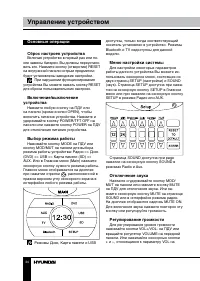
34 35 Управление устройством Управление устройством Основные операции Сброс настроек устройства Включая устройство в первый раз или по- сле замены батареи, Вы должны переустано-вить его. Нажмите кнопку (отверстие) RESET на внутренней панели острым предметом; будут установлены заводские настройки. Пр...
Page 36 - Операции с радио
36 37 Управление устройством Управление устройством на дисплее надписи COLOR1 (COLOR2). Вращайте регулятор VOLUME на панели или нажимайте кнопки VOL+/VOL- на ПДУ для переключения между COLOR1 (зеленая подсветка кнопок) и COLOR2 (красная под-светка кнопок). После выполнения настрой-ки не нажимайте ни...
Page 38 - Когда программа будет найдена, начнется; Дополнительные функции; Для выбора нужной функции нажмите и
38 39 Управление устройством Управление устройством движения вне зависимости от текущего режима. Когда программа будет найдена, начнется ее трансляция. Чтобы прервать трансляцию, нажмите кнопку TA; устройство вернется к предыдущему режиму; это не повлечет за собой отключения функции TA. Когда про-гр...
Page 39 - Воспроизведение дисков/USB; Операция; Загрузка/извлечение диска
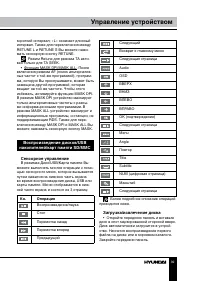
38 39 Управление устройством Управление устройством короткий интервал; «L» означает длинный интервал. Также для переключения между RETUNE L и RETUNE S Вы можете нажи-мать сенсорную кнопку RETUNE. Режим Retune для режима TA акти- вен только для TA SEEK. • Функция MASK DPI/MASK ALL: После включения ре...
Page 40 - Воспроизведение файлов MP3/
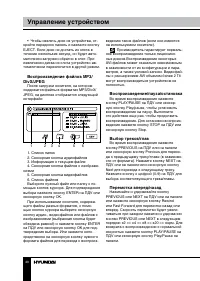
40 41 Управление устройством Управление устройством • Чтобы извлечь диск из устройства, от- кройте переднюю панель и нажмите кнопку EJECT. Если диск не достать из слота в течение нескольких секунд, он будет авто-матически загружен обратно в слот. При извлечении диска из слота устройство ав-томатичес...
Page 42 - Выбор аудиоканала
42 43 Управление устройством Управление устройством доступна только для дисков, содержащих эпизоды, снятые под несколькими углами. Выбор языка аудио (для DVD) Нажимайте кнопку AUDIO на ПДУ или сенсорную кнопку Audio для выбора нужно-го языка аудио. Данная функция доступна только для дисков, поддержи...
Page 43 - Системные настройки; Установка языка; Аудио настройки
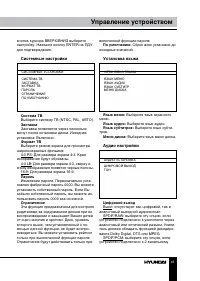
42 43 Управление устройством Управление устройством кнопок курсора ВВЕРХ/ВНИЗ выберите настройку. Нажмите кнопку ENTER на ПДУ для подтверждения. Системные настройки СИСТЕМНЫЕ УСТАНОВКИ СИСТЕМА ТВЗАСТАВКАФОРМАТ ТВПАРОЛЬОГРАНИЧЕНИЕ ПО УМОЛЧАНИЮ Система ТВ Выберите систему ТВ (NTSC, PAL, АВТО). Заставк...
Page 44 - Настройте данный параметр с по-; Настройки видео; Настройте нужный параметр изображе-
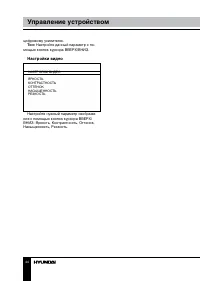
44 45 Управление устройством Общая информация цифровому усилителю. Тон: Настройте данный параметр с по- мощью кнопок курсора ВВЕРХ/ВНИЗ. Настройки видео НАСТРОЙКИ ВИДЕО ЯРКОСТЬКОНТРАСТНОСТЬОТТЕНОКНАСЫЩЕННОСТЬРЕЗКОСТЬ Настройте нужный параметр изображе- ния с помощью кнопок курсора ВВЕРХ/ВНИЗ: Яркост...
Page 45 - Обращение с компакт-дисками
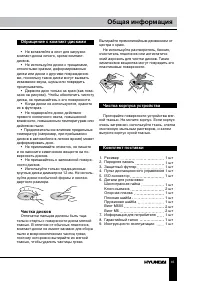
44 45 Управление устройством Общая информация Обращение с компакт-дисками • Не вставляйте в слот для загрузки компакт-диска ничего, кроме компакт-дисков. • Не используйте диски с трещинами, отколотыми краями, деформированные диски или диски с другими повреждения-ми, поскольку такие диски могут вызва...
Page 46 - Руководство по устранению; Неисправность
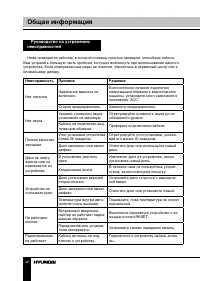
46 47 Общая информация Общая информация Руководство по устранению неисправностей Ниже приводится таблица, в которой описаны простые проверки, способные помочь Вам устранить большую часть проблем, могущих возникнуть при использовании данного устройства. Если нижеуказанные меры не помогли, обратитесь ...
Page 47 - Технические характеристики; Общие
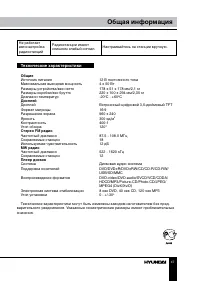
46 47 Общая информация Общая информация Не работает автонастройка радиостанций Радиостанции имеют слишком слабый сигнал. Настраивайтесь на станции вручную. Технические характеристики Общие Источник питания 12 В постоянного тока Максимальная выходная мощность 4 х 50 Вт Размеры устройства/вес нетто 17...