Page 2 - Table of contents
2 3 Table of contents Table of contents Dear customer! Thank you for purchasing our product. For safety, it is strongly recommended to read this manual carefully before connecting, operating and/or adjusting the product and keep the manual for reference in the future. 1515151515151616161616161616161...
Page 3 - USB/Memory card operation; General information; Handling compact discs
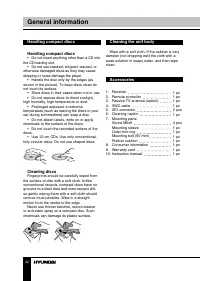
2 3 Table of contents Table of contents 19202020212122222222222324 USB/Memory card operation DVD setup SystemLanguageAudioVideo General information Handling compact discs Cleaning discs Cleaning the unit body AccessoriesTroubleshooting guideSpecification
Page 4 - Utilization of the product; Before you start; Important safeguards
If you want to dispose this product, do not mix it with general household waste. There is a separate collection system for used electronic products in accordance with legislation that requires proper treatment, recovery and recycling. Please contact your local authorities for the correct method of d...
Page 5 - Installation/Connection; Installation
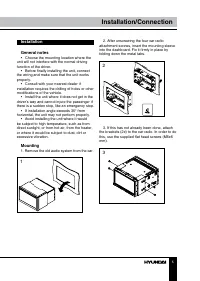
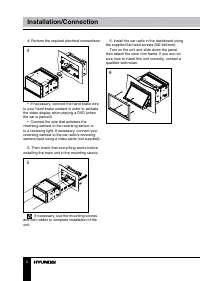
5 Installation/Connection Installation General notes • Choose the mounting location where the unit will not interfere with the normal driving function of the driver. • Before finally installing the unit, connect the wiring and make sure that the unit works properly. • Consult with your nearest deale...
Page 7 - Parking wire connection
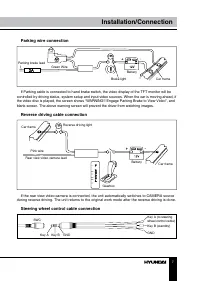
7 Installation/Connection Parking wire connection Parking brake lead Brake light Car frame Battery Green Wire If Parking cable is connected to hand brake switch, the video display of the TFT monitor will be controlled by driving status, system setup and input video sources. When the car is moving ah...
Page 8 - Connection; If your car is equipped with the ISO
8 9 Installation/Connection Installation/Connection Connection Connection diagram Using the ISO Connector 1. If your car is equipped with the ISO connector, then connect the ISO connectors as illustrated. 2. For connections without the ISO connectors, check the wiring in the vehicle carefully before...
Page 9 - Location; Connector A
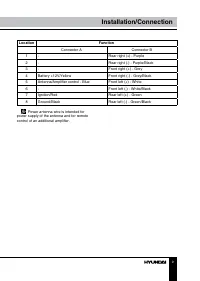
8 9 Installation/Connection Installation/Connection Location Function Connector A Connector B 1 - Rear right (+) - Purple 2 - Rear right (-) - Purple/Black 3 - Front right (+) - Grey 4 Battery +12V/Yellow Front right (-) - Grey/Black 5 Antenna/Amplifier control - Blue Front left (+) - White 6 - Fron...
Page 10 - Operation; Control elements; Pressing RESET hole will erase most of
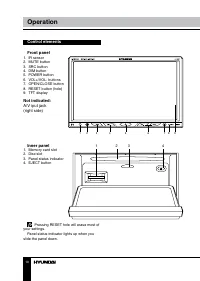
10 Operation Control elements Front panel 1. IR sensor2. MUTE button3. SRC button4. DIM button5. POWER button6. VOL+/VOL- buttons7. OPEN/CLOSE button8. RESET button (hole)9. TFT display Not indicated: A/V iput jack(right side) Inner panel 1. Memory card slot2. Disc slot3. Panel status indicator4. EJ...
Page 11 - Changing the battery
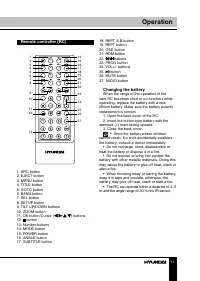
11 Operation Remote controller (RC) 1. SRC button2. EJECT button3. MENU button4. TITLE button5. GOTO button6. BAND button7. SEL button8. SETUP button9. TILT UP/DOWN buttons10. ZOOM button11. OK button/Cursor ( / / / ) buttons12. button13. Number buttons14. MODE button15. POWER button16. ANGLE button...
Page 12 - Specifications
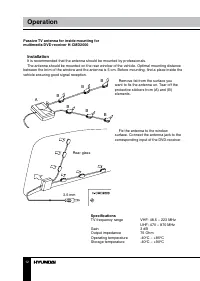
12 13 Operation Operation Passive TV antenna for inside mounting for multimedia DVD receiver H-CMD2000 A B B B B B B Rear glass 3.5 mm Installation It is recommended that the antenna should be mounted by professionals.The antenna should be mounted on the rear window of the vehicle. Optimal mounting ...
Page 13 - General operations
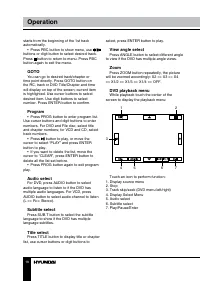
12 13 Operation Operation General operations Touch screen Due to the touch screen, you can fulfill most functions not only by pressing buttons but also by touching the options you desired. Turn on/off the power Press POWER button to turn on the unit. The unit goes back to the last status after power...
Page 14 - AUX in jack
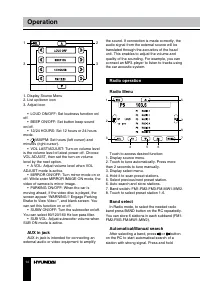
14 Operation 1 2 3 3 1. Display Source Menu2. List up/down icon3. Adjust icon • LOUD ON/OFF: Set loudness function on/ off. • BEEP ON/OFF: Set button beep sound on/off. • 12/24 HOURS: Set 12 hours or 24 hours mode. • /AM/PM: Set hours (left cursor) and minutes (right cursor). • VOL LAST/ADJUST: Turn...
Page 16 - TV tuner operation
16 Operation Change TV video format TV mode => SOURCE menu => SETTING menu => TV setting. Choose TV Video format. Disc/USB/SD/MMC card operations Insert a disc Press OPEN/CLOSE button on the panel to slide down the panel. Insert a disc into the slot, and the unit will change to disc mode au...
Page 19 - Video CD playback menu
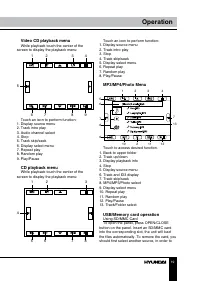
19 Operation Video CD playback menu While playback touch the center of the screen to display the playback menu: 1 2 3 4 5 6 7 8 9 Touch an icon to perform function: 1. Display source menu2. Track intro play3. Audio channel select4. Stop5. Track skip/seek6. Display select menu7. Repeat play8. Random ...
Page 20 - DVD setup
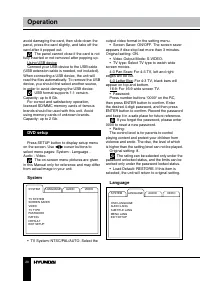
20 21 Operation Operation avoid damaging the card, then slide down the panel, press the card slightly, and take off the card after it popped out. The panel cannot close if the card is not fully inserted or not removed after popping up. Using USB deviceConnect your USB device to the USB cable (USB ex...
Page 21 - Audio
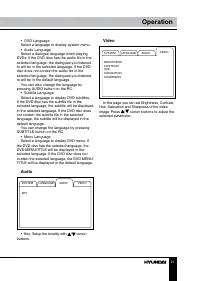
20 21 Operation Operation • OSD LanguageSelect a language to display system menu.• Audio LanguageSelect a dialogue language when playing DVDs. If the DVD disc has the audio file in the selected language, the dialogues you listened to will be in the selected language. If the DVD disc does not contain...
Page 23 - Troubleshooting; Symptom
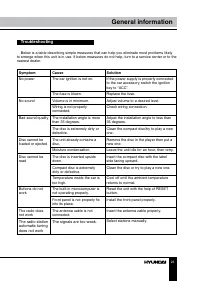
22 23 General information General information Troubleshooting Below is a table describing simple measures that can help you eliminate most problems likely to emerge when this unit is in use. If below measures do not help, turn to a service center or to the nearest dealer. Symptom Cause Solution No p...
Page 25 - Уважаемый покупатель!; Установка/Подключение
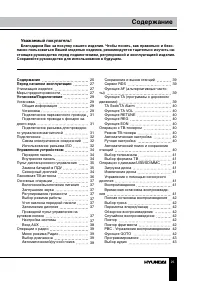
24 25 General information Содержание Уважаемый покупатель! Благодарим Вас за покупку нашего изделия. Чтобы понять, как правильно и безо- пасно пользоваться Вашей моделью изделия, рекомендуется тщательно изучить на-стоящее руководство перед подключением, регулировкой и эксплуатацией изделия. Сохраняй...
Page 26 - ков с изображениями; Общая информация; Обращение с компакт-дисками
26 27 Содержание Перед началом эксплуатации 43434343434344 444445454646464747474747 4849 Выбор субтитровВыбор раздела/главыВыбор угла просмотра эпизодаМасштабированиеМеню управления для DVDМеню управления для Video-CDМеню управления для CDМеню управления для MP3/MP4/дис- ков с изображениями Операции...
Page 27 - Утилизация изделия
26 27 Содержание Перед началом эксплуатации Если вы желаете утилизировать данное изделие, не выбрасывайте его вместе с обычным бытовым мусором. Существует отдельная система сбора использованных электронных изделий в соответствии с законодательством, которая предполагает соответствующее обращение, во...
Page 28 - • Убедитесь, что источник питания и
28 29 Перед началом эксплуатации Установка/Подключение соприкасаться друг с другом или с корпу-сом автомобиля после включения устрой-ства. В противном случае усилитель может быть перегружен или выйти из строя. • Убедитесь, что источник питания и антенна отключены, если Вы не будете пользоваться устр...
Page 29 - Установка
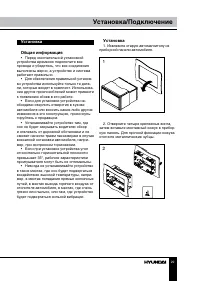
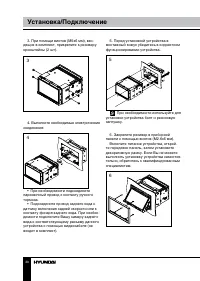
28 29 Перед началом эксплуатации Установка/Подключение Установка Общая информация • Перед окончательной установкой устройства временно подключите все провода и убедитесь, что все соединения выполнены верно, а устройство и система работают правильно. • Для обеспечения правильной установ- ки устройств...
Page 31 - Подключение парковочного провода
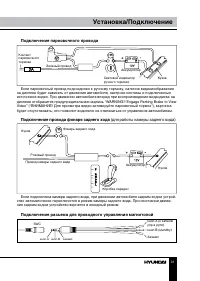
30 31 Установка/Подключение Установка/Подключение Подключение парковочного провода Контакт парковочного тормоза Световой индикатор ручного тормоза Кузов Аккумулятор Зеленый провод Если парковочный провод подсоединен к ручному тормозу, наличие видеоизображения на дисплее будет зависеть от движения ав...
Page 32 - Подключение; • Независимо от размера динамиков,; Использование разъема ISO; Для подключений без разъемов ISO
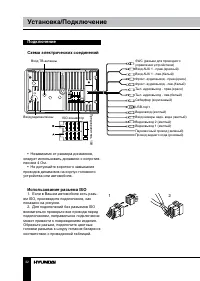
32 33 Установка/Подключение Установка/Подключение Подключение Схема электрических соединений Вход ТВ-антенны ISO-коннектор Вход AUX 1 - прав.(красный)Вход AUX 1 - лев.(белый)Фронт. аудиовыход - прав.(красн)Фронт. аудиовыход - лев.(белый)Тыл. аудиовыход - прав.(красн) Тыл. аудиовыход - лев.(белый)Саб...
Page 33 - Номер; Разъем A
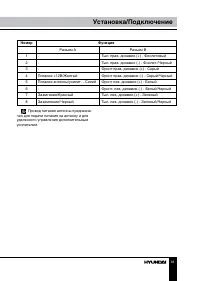
32 33 Установка/Подключение Установка/Подключение Номер Функция Разъем A Разъем B 1 - Тыл. прав. динамик (+) - Фиолетовый 2 - Тыл. прав. динамик (-) - Фиолет./Черный 3 - Фронт прав. динамик (+) - Серый 4 Питание +12В/Желтый Фронт прав. динамик (-) - Серый/Черный 5 Питание антенны/усилит. - Синий Фро...
Page 34 - Элементы управления; При нажатии кнопки RESET все
34 35 Управление устройством Управление устройством Элементы управления Передняя панель 1. ИК-сенсор2. Кнопка MUTE3. Кнопка SRC4. Кнопка DIM5. Кнопка POWER6. Кнопки VOL+/VOL-7. Кнопка OPEN/CLOSE8. Кнопка (отверстие) RESET9. TFT-дисплей Не показанона рисунке: A/V-вход (с правойстороны) Внутренняя пан...
Page 35 - Пульт дистанционного управления
34 35 Управление устройством Управление устройством Пульт дистанционного управления 1 23 4 5 67 8 9 10 1112 14 151617 18 19202122 23 24 2526 27 13 1. Кнопка SRC2. Кнопка EJECT3. Кнопка MENU4. Кнопка TITLE5. Кнопка GOTO6. Кнопка BAND7. Кнопка SEL8. Кнопка SETUP9. Кнопки TILT ВВЕРХ/ВНИЗ10. Кнопка ZOOM...
Page 36 - Внутрисалонная автомобильная пас-
36 37 Управление устройством Управление устройством Внутрисалонная автомобильная пас- сивная ТВ-антенна для мультимедийного DVD-ресивера H-CMD2000 A B B B B B B Заднее стекло 3.5 мм Установка Рекомендуется доверить установку антенны специалистам.Антенну следует крепить на заднее стекло автомобиля. О...
Page 37 - Основные операции
36 37 Управление устройством Управление устройством Основные операции Сенсорный дисплей Данное устройство оснащено сенсорным дисплеем, позволяющим выполнять многие операции путем прикосновения к сенсор-ным кнопкам дисплея. Включение/выключение питания Нажмите кнопку POWER, чтобы включить устройство....
Page 38 - Вход AUX
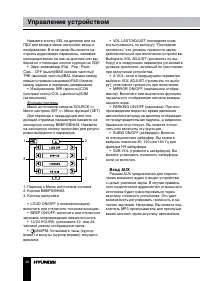
38 39 Управление устройством Управление устройством Нажмите кнопку SEL на дисплее или на ПДУ для входа в меню настройки звука и изображения. В этом меню Вы можете на-строить аудио/видео параметры, нажимая непосредственно на них на дисплее или вы-бирая их с помощью кнопок курсора на ПДУ: • Звук: эква...
Page 39 - Операции с радио
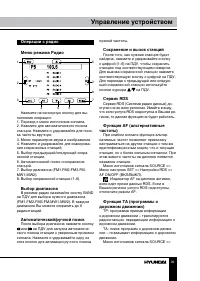
38 39 Управление устройством Управление устройством Операции с радио Меню режима Радио 1 2 3 4 5 6 7 8 2 5 Нажмите на сенсорную кнопку для вы- полнения операции:1. Переход к меню источников сигнала.2. Нажмите для автоматического поиска станции. Нажмите и удерживайте для поис-ка частоты вручную.3. Ме...
Page 40 - Операции с ТВ-тюнером
40 41 Управление устройством Управление устройством Меню настроек SET => Настройки RDS => TA ON/OFF (ВКЛ/ВЫКЛ). Когда режим TA активирован, на дисплее будет мигать индикатор TA. При получе-нии информации о дорожном движении индикатор TA будет отображаться статично. Устройство временно перейдет...
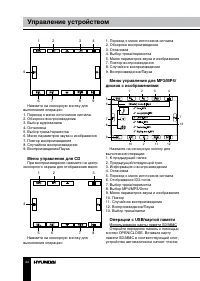
Page 44 - Меню управления для CD; При воспроизведении нажмите на центр; дисков с изображениями; Нажмите на сенсорную кнопку для; Операции с USB/картой памяти
44 45 Управление устройством Управление устройством 1 2 3 4 5 6 7 8 9 Нажмите на сенсорную кнопку для выполнения операции:1. Переход к меню источников сигнала2. Обзорное воспроизведение3. Выбор аудиоканала4. Остановка5. Выбор трека/перемотка6. Меню параметров звука и изображения7. Повтор воспроизвед...
Page 45 - Настройка DVD
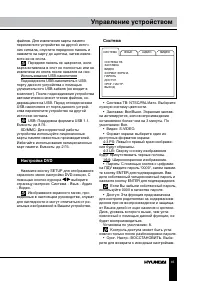
44 45 Управление устройством Управление устройством файлов. Для извлечения карты памяти переключите устройство на другой источ-ник сигнала, опустите переднюю панель и нажмите на карту до щелчка, затем извле-ките ее из слота. Передняя панель не закроется, если карта вставлена в слот не полностью или ...
Page 46 - Язык; • Язык. Выберите язык отображения; Аудио; настройте тональность.; Видео; На этой странице Вы можете отрегули-
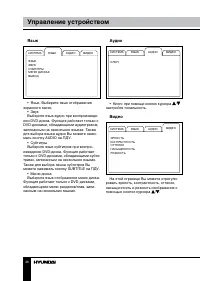
46 47 Управление устройством Общая информация Язык СИСТЕМА ЯЗЫКЗВУКСУБТИТРЫМЕНЮ ДИСКАКВЫХОД ЯЗЫК АУДИО ВИДЕО • Язык. Выберите язык отображения экранного меню. • ЗвукВыберите язык аудио при воспроизведе- нии DVD-диска. Функция работает только с DVD-дисками, обладающими аудиотреком, записанным на неск...
Page 48 - Руководство по устранению; Неисправность
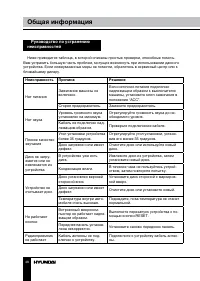
48 49 Общая информация Общая информация Руководство по устранению неисправностей Ниже приводится таблица, в которой описаны простые проверки, способные помочь Вам устранить большую часть проблем, могущих возникнуть при использовании данного устройства. Если нижеуказанные меры не помогли, обратитесь ...
Page 49 - Технические характеристики
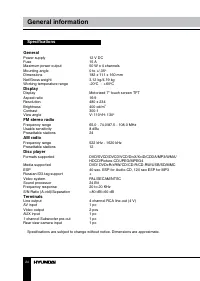
48 49 Общая информация Общая информация Технические характеристики Общие Источник питания 12 В, постоянное Предохранитель 15 A Максимальная выходная мощность 50 Вт х 4 канала Угол монтажа 0 - +/-35 0 Размеры 182 х 111 х 160 мм Вес нетто/брутто 3,12 кг/4,19 кг Диапазон температур -20 0 С - +60 0 С Ди...