Page 2 - Table of contents
2 Dear customer! Thank you for purchasing our product. For safety, it is strongly recommended to read this manual carefullybefore connecting, operating and/or adjusting the product and keep the manual for reference in the future. Table of contents Table of contents .....................................
Page 3 - Important safeguards; BEFORE USING
3 Important safeguards Using the device at temperature below -10º may cause the breakage of the device. BEFORE USING PLEASE HEAT UP THE PASSENGER COMPARTMENT TO THE RECOMMENDEDTEMPERATURE! Read carefully through this manual to familiarize yourself with this high-quality sound system.Disconnect the v...
Page 4 - Installation/ connection; Removing the unit
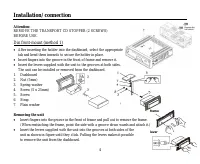
4 Installation/ connection Attention: REMOVE THE TRANSPORT CD STOPPER (2 SCREWS)BEFORE USE. Din front-mount (method 1) After inserting the holder into the dashboard, select the appropriatetab and bend them inwards to secure the holder in place.Insert fingers into the groove in the front of frame and...
Page 5 - Detachable control panel; Detaching the front panel
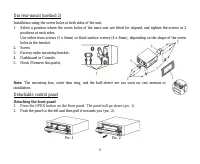
5 Din rear-mount (method 2) Installation using the screw holes at both sides of the unit.1. Select a position where the screw holes of the main unit are fitted for aligned, and tighten the screws at 2 positions at each sides.Use either truss screws (5 x 8mm) or flush surface screws (4 x 8mm), depend...
Page 6 - Attaching the control panel; Insert the right side of the control panel into the main unit
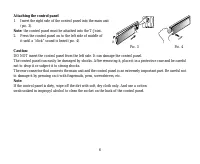
6 Attaching the control panel 1. Insert the right side of the control panel into the main unit (pic. 3). Note: the control panel must be attached into the T-Joint. 2. Press the control panel on to the left side of middle of it until a “click” sound is heard (pic. 4). Caution: DO NOT insert the contr...
Page 7 - Electrical connection
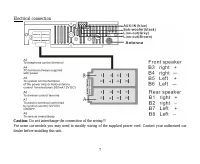
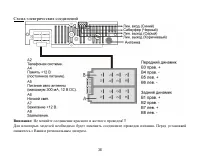
7 Electrical connection Caution: Do not interchange the connection of the wiring!!! For some car models you may need to modify wiring of the supplied power cord. Contact your authorized cardealer before installing this unit.
Page 8 - Panel controls; Front panel
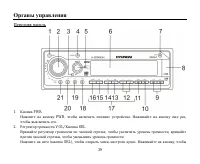
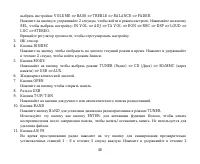
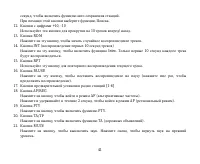
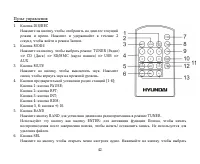
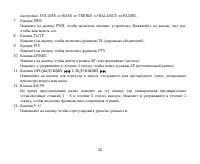
8 Panel controls Front panel 1. PWR button Press PWR button to turn the power on, press again to turn the power off. 2. VOL knob/ SEL button Rotate VOL knob clockwise to increase the volume level; rotate anticlockwise to decrease the volume level.Press SEL button once to enter the Audio select menu....
Page 11 - Remote control; Press to select the mode: TUNER
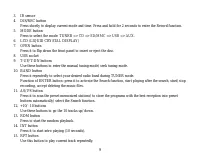
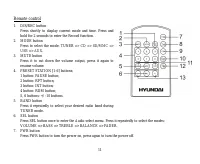
11 Remote control 1. DIS/REC button Press shortly to display current mode and time. Press andhold for 2 seconds to enter the Record function. 2. MODE button Press to select the mode: TUNER => CD => SD/MMC => USB => AUX . 3. MUTE button Press it to cut down the volume output, press it aga...
Page 13 - Changing the battery; Press the catch and at the same time pull out the battery tray.
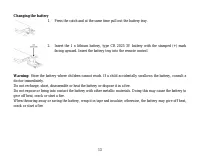
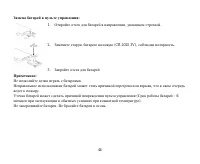
13 Changing the battery 1. Press the catch and at the same time pull out the battery tray. 2. Insert the 1 x lithium battery, type CR 2025 3V battery with the stamped (+) mark facing upward. Insert the battery tray into the remote control. Warning: Store the battery where children cannot reach. If a...
Page 14 - Back of the front panel; Press the OPEN button on the front panel to flip it down.
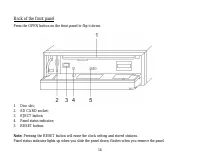
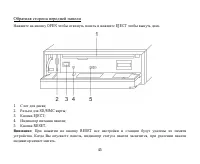
14 Back of the front panel Press the OPEN button on the front panel to flip it down. 1. Disc slot;2. SD CARD socket;3. EJECT button;4. Panel status indicator;5. RESET button. Note: Pressing the RESET button will erase the clock setting and stored stations. Panel status indicator lights up when you s...
Page 15 - General operation; Reset the unit; unit on it will resume the stored status which you set.; Volume control; Volume adjust; Rotate the VOL knob to regulate each setting.
15 General operation Reset the unit Operating the unit for the first time or after replacing the car battery, you must reset the unit.Press OPEN button on the panel to open the panel and press the RESET button to restore the unit to the originalfactory settings. Power button Press PWR button to turn...
Page 16 - Setting other characteristics; Turning the sound off; Press the MODE button repeatedly to select: TUNER
16 Setting other characteristics During FM mode, keep pressing SEL button for 2 seconds to enter another mode. Shortly and repeatedly press theSEL button to select the setting: IN VOL => ADJ => TA VOL => EON => REC => DSP => LOUD => LOC => STEREO.a. IN VOL mode: rotate the VO...
Page 17 - Display operations; Press and hold for 2 seconds to enter the RECORD mode.; Setting the time
17 Display operations 1. Press the DIS/ REC button to show the following current tuning information and time in any play mode: CT (Clock/ Time) => PTY => Radio frequency =>PS. 2. Press and hold for 2 seconds to enter the RECORD mode. Setting the time 1. Enter the ADJ mode (by pressing the S...
Page 18 - Digital tuner; Band selection
18 Digital tuner Note: RDS (Radio Data System) service availability varies with areas. Please understand if RDS service is not available in you area, the following service is not available, either. Band selection Press PWR to power on, then press the MODE button to select TUNER.Press BAND once or mo...
Page 21 - Loading a disc; mode will be changed into the mode of the latter one.
21 CD/ SD/ MMC/ USB operations Loading a disc 1. Turn the power on.2. Press the OPEN button on the panel.3. Insert the disc with the printed side facing upward into the slot.4. Press EJECT button on the inner side to eject the disc. Inserting the SD/ MMC card/ USB device Insert the MMC/ SD card or U...
Page 22 - Playing the previous/ next track
22 Note:USB format supports 2.0. Capacity: 8 MB ~ 1 GB. SD cards brands: Cannon, Fuji film, Palm, Motorola, Microsoft, IBM, HP, Compaq, Sharp, Samsung, etc. Capacity: 8 MB ~ 1 GB. MMC cards brands: Ericsson, Nokia, Motorola, HP, Palm, Sanyo, Microsystems, etc. Capacity: 16 MB ~ 1 GB. Playing/ pausin...
Page 23 - Scanning forward and backward; it resumes normal playback.; Repeat playback
23 Scanning forward and backward Press and hold for 2 seconds the T-DN or T-UP buttons to fast the playing in backward or forward direction. Note: During the disc playback when Fast/ Reverse Playback gets to the beginning of the playing another track, it resumes normal playback. Repeat playback Pres...
Page 24 - Search function; File number search; if there is no such file on SD/MMC/USB the display will show “NO MATCH”.; Folder search; SEL button to enter the folder.
24 Search function In CD/ MMC/ SD/ USB mode, press AS/PS button to enter the Music file search menu. Press again to select thesearch mode: FILE NUMBER SEARCH => FILE NAME SEARCH => FOLDER SEARCH => exit searchmode.Audio CD supports the FILE NUMBER SEARCH only. File number search 1. Press AS...
Page 25 - File managing; Recording at Audio CD mode; During recording sound is heard and blinking “R” is displayed on LCD.
25 File managing Encoding (recording) function Encoding (Recoding) function enables sound source from Tuner, CD, AUX-in to record directly to USB deviceor SD/MMC card. Recoding at Tuner/ AUX-in mode Press DIS/REC button for more than 2 seconds, the unit asks the location of recording device. Press D...
Page 26 - Recording at MP3 CD mode; File delete; Tuner
26 Recording at MP3 CD mode Press DIS/REC for more than 2 seconds and the unit asks the location of copy device in the followingsequence:MMC => USB.Press DIS/REC to select intended location.To exit recording, press DIS/REC more than 2 seconds.To start recording, press the BAND button. Press again...
Page 27 - MP3 overview; Notes on creating your own CD-R or CD-RW containing MP3 files:
27 MP3 overview Notes on MP3: MP3 is short for MPEG Audio Layer 3 and refers to an audio compression technology standard.This product allows playback of MP3 files on CD-ROM, CD-R or CD-RW discs.The unit can read MP3 files written in the format compliant with ISO 9660. However it does not support the...
Page 29 - Cleaning the cabinet
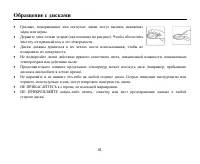
29 Handling discs Dirty, scratched or warped discs may cause skip ping or noise.Handle the disc only by the edges. To keep clean do not touch its surface.Discs should be stored in their cases after use to avoid scratches.Do not expose discs to direct sunlight, high humidity, high temperature or dust...
Page 30 - Troubleshooting guide; Symptom
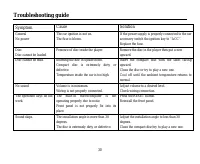
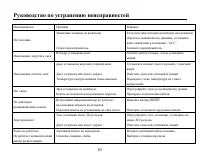
30 Troubleshooting guide Symptom Cause Solution GeneralNo power The car ignition is not on. The fuse is blown. If the power supply is properly connected to the car accessory switch the ignition key to “ACC”. Replace the fuse. DiscDisc cannot be loaded. Presence of disc inside the player. Remove the ...
Page 32 - Specification; General; Maximum power output:; FM Stereo Radio; MW section; Preset memory stations:; Audio specification
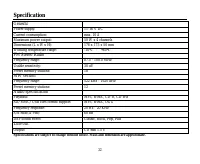
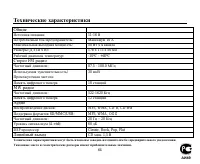
32 Specification Specifications are subject to change without notice. Mass and dimension are approximate. General Power supply: 11-16 V DC Current consumption: max. 10 A Maximum power output: 50 W x 4 channels Dimensions (L x W x H): 178 x 175 x 50 mm Working temperature range: -10º - +60º FM Stereo...
Page 35 - CD
35 . / : CD . , , , . 1. 2. (5 ) 3. 4. (5 x 25 ) 5. 6. 7. . ( .) , , , , .
Page 37 - OPEN
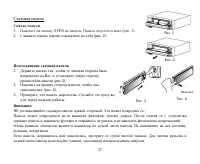
37 1. OPEN . ( . 1). 2. ( . 2). 1. , , ( .3). 2. , ( . 4). 3. , . , . : . . : , . . . , , . , . , . . 3 . 4 . 1 . 2
Page 49 - RDS
49 : RDS ( ) . , RDS , . PWR, . MOD , - TUNER. B ND, : FM 1, FM 2, FM 3, MW 1, MW 2. / : T-UP T-DN, . T-UP/ T-DN, . : T-UP T-DN, . , . , . 6 5 . : - ( ). - T-UP/ T-DN. - 1~6, . : - ( ). - 1~6.
Page 54 - Intro
54 6 (+10). , 32, 6 (+10), 42. 2. T-DN T-UP / , 1 . T-DN T-UP, . : , , . R , . , . RDM, . , . Intro 10 . INT, . , .
Page 56 - USB
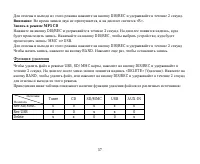
56 SD/ MMC/ USB : (TUNER), CD, AUX-in. / AUX-in DIS/REC 2 . , . DIS/REC, , : SD/MMC => USB. 2 DIS/REC. BAND, . «R». , BAND. CD DIS/REC 2 . , . DIS/REC, , : MMC ALL* => USB ALL* => MMC ONE* => USB ONE*. * , SD/MMC USB . MMC ALL: SD/MMC. USB ALL: USB. MMC ONE: SD/MMC. USB ONE: USB. DIS/REC...
Page 57 - MP3 CD
57 DIS/REC 2 . : , «R». MP3 CD DIS/REC 2 . , . DIS/REC, , : MMC => USB. DIS/REC 2 , BAND. , . USB, SD/ MMC , DIS/REC 2 . «DELETE» ( ). BAND, , DIS/REC 2 . : Tuner CD SD/MMC USB AUX-IN Rec SD/MMC 0 0 x x 0 Rec USB 0 0 x x 0 Delete x x 0 0 x
Page 60 - PWR
Page 64 - DSP
64 . . : 11-16 : 10 : 50 4 ( ): 178 175 50 : -10º - +60º FM : 87.5 - 108.0 / : 30 18 MW : 522-1620 12 : MP3, WMA, CD-R, CD-RW SD/MMC/USB: MP3, WMA, OGG : 20 – 20 (A-vtd): 60 DSP Classic, Rock, Pop, Flat CD . 1,5