Page 2 - Table of contents
2 Dear customer! Thank you for purchasing our product. For safety, it is strongly recommended to read this manual carefullybefore connecting, operating and/or adjusting the product and keep the manual for reference in the future. Table of contents Table of contents .....................................
Page 3 - Important safeguards; Do not install the detachable panel before connecting the wire.
3 Important safeguards Using the device at temperature below -10º may cause the breakage of the device. BEFORE USINGPLEASE HEAT UP THE PASSENGER COMPARTMENT TO THE RECOMMENDED TEMPERATURE! Read carefully through this manual to familiarize yourself with this high-quality sound system. Disconnect the ...
Page 4 - Installation/ connection; Installation way
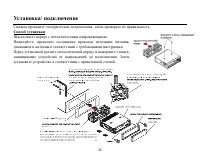
4 Installation/ connection First complete the electrical connections, and then check them for correctness. Installation way It is an anti-theft installation way. The chassis wear a metal sliding housing.Please have the wiring connection of the power supply, speakers and antennaas for the requirement...
Page 5 - Detachable control panel; Detaching the front panel; Press the OPEN button on the front panel. The panel will go down.; Attaching the control panel; the control panel must be attached into the T-Joint.
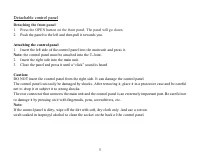
5 Detachable control panel Detaching the front panel 1. Press the OPEN button on the front panel. The panel will go down. 2. Push the panel to the left and then pull it towards you. Attaching the control panel 1. Insert the left side of the control panel into the main unit and press it. Note: the co...
Page 6 - Electrical connection
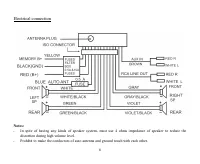
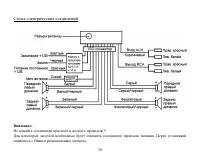
6 Electrical connection Notes: In spite of having any kinds of speaker system, must use 4 ohms impedance of speaker to reduce thedistortion during high volume level. Prohibit to make the conductors of auto antenna and ground touch with each other.
Page 7 - Using the ISO Connector; Location; Connector A
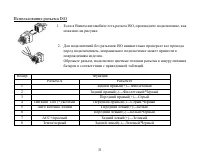
7 Using the ISO Connector 1. If your car is equipped with the ISO connector, then connect the ISOconnectors as illustrated. 2. For connections without the ISO connectors, check the wiring in thevehicle carefully before connecting, incorrect connection may cause seriousdamage to this unit.Cut the con...
Page 8 - Panel controls; Front panel; buttons
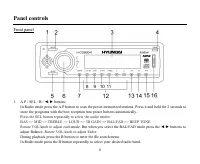
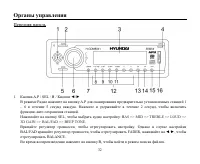
8 Panel controls Front panel 1. A.P / SEL / B / buttons In Radio mode press the A.P button to scan the preset memorized stations. Press it and hold for 2 seconds tostore the programs with the best reception into preset buttons automatically. Press the SEL button repeatedly to select the audio modes:...
Page 9 - Rotate VOL knob to adjust each
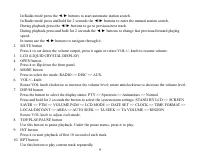
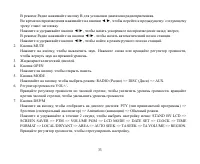
9 In Radio mode press the buttons to start automatic station search. In Radio mode press and hold for 2 seconds the buttons to enter the manual station search. During playback press the buttons to go to previous/next track. During playback press and hold for 2 seconds the buttons to change fast prev...
Page 10 - Press to start random playback.
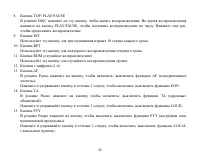
10 11. RDM button Press to start random playback. 12. PRESET STATION [1-6] buttons13. AF button Press it to enter the AF mode.Press and hold for 2 seconds to turn the EON function on/off. 14. TA button Press it to activate/ deactivate the TA function.Press and hold for 2 seconds to turn the LOUD fun...
Page 11 - Back of the front panel; Press the RELEASE button on the front panel to flip it down.
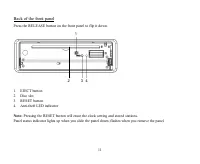
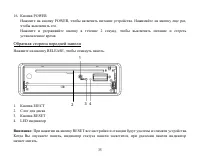
11 Back of the front panel Press the RELEASE button on the front panel to flip it down. 1. EJECT button2. Disc slot3. RESET button4. Anti-theft LED indicator Note: Pressing the RESET button will erase the clock setting and stored stations. Panel status indicator lights up when you slide the panel do...
Page 12 - General operations; Reset the unit; unit on it will resume the stored status which you set.; Volume control; buttons to adjust BALANCE and rotate VOL knob to
12 General operations Reset the unit Operating the unit for the first time or after replacing the car battery, you must reset the unit.Press OPEN button on the panel to open the panel and press the RESET button with thin hard object to restore theunit to the original factory settings. Power button P...
Page 13 - Adjusting the system menu; button to move cursor. Press
13 Adjusting the system menu Press and hold for 2 seconds the DSP/M button, press it or the button repeatedly to select the system menusettings: STAND BY LCD => SCREEN SAVER => PTM => VOLUME PGM => LCD MODE => DATE SET=> CLOCK => TIME FORMAT => LOCAL/DISYANT => AREA => ...
Page 14 - - set the region code function ON or OFF.; Turning the sound off
14 TA volume - the value define the minimum value of the TA Volume can be adjusted down. The adjustable range is 0~40. The default one is 18. Region - set the region code function ON or OFF. Note: during setting up press A.P button to exit. Turning the sound off Press the MUTE button to turn the sou...
Page 15 - Digital tuner operations; Band selection; Manual tuning: press; Programming tuner stations
15 Digital tuner operations Note: RDS (Radio Data System) service availability varies with areas. Please understand if RDS service is not available in you area, the following service is not available, either. Band selection Press the MODE button to select RADIO.Press BAND once or more to select: FM1...
Page 16 - Press the TA button shortly to turn on or turn off the TA function.
16 Preset scan Select a band. Press A.P button to scan all preset stations in the memories of the current band and stay on eachmemory stations for about 7 seconds. To stop preset scan, press the button again. Local/ Distant mode Press PTY button and hold for 2 seconds to turn the LOCAL function On o...
Page 17 - according to the table:
17 AF (Alternative Frequencies) function Press the AF button on the panel to turn on or turn off the AF function. If the AF function is on the display willshow AF . The RDS program will be automatically searched and received. After turning on, if the RDS signal isweek or even no signal, the unit wil...
Page 18 - CD operations; Discs for playback; During playback press the button to go to the next track.; Selecting the previous/ next folder
18 CD operations Discs for playback This unit can play disc types: CD/CD-R/-RW.Compatible with formats: MP3/WMA/CDDA. Loading a disc 1. Turn the power on.2. Press the OPEN button on the panel.3. Insert the disc with the printed side facing upward into the slot.4. Press EJECT button on the inner side...
Page 19 - Fast forward and backward playback; Press and hold for 2 seconds the; Repeat playback
19 Fast forward and backward playback Press and hold for 2 seconds the buttons to fast the playing in backward or forward direction. Release the button when the desired location is found. Scanning (intro) You can play the beginning of every track for 10 seconds in sequence. Press the INT button shor...
Page 20 - Press SEL to start the selected file playback.; Displaying the ID3 information
20 6. Press SEL to start the selected file playback. Displaying the ID3 information Under MP3 mode press the A.P button repeatedly, the folder name, file name, title, artist and album informationwill be scrolling on the LCD display.As long as the current playing MP3 music contains relevant ID3 tag i...
Page 21 - MP3 overview; The unit may not play tracks in the order of Track numbers.; Notes on creating your own CD-R or CD-RW containing MP3 files:; DO NOT store more than 256 MP3 files per disc.
21 MP3 overview Notes on MP3: MP3 is short for MPEG Audio Layer 3 and refers to an audio compression technology standard. This product allows playback of MP3 files on CD-ROM, CD-R or CD-RW discs. The unit can read MP3 files written in the format compliant with ISO 9660. However it does not support t...
Page 23 - Handling discs; Dirty, scratched or warped discs may cause skip ping or noise.; Cleaning; Cleaning the cabinet
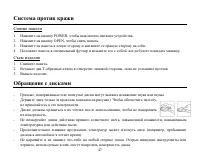
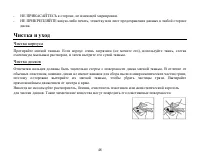
23 Handling discs Dirty, scratched or warped discs may cause skip ping or noise. Handle the disc only by the edges. To keep clean do not touch its surface. Discs should be stored in their cases after use to avoid scratches. Do not expose discs to direct sunlight, high humidity, high temperature or d...
Page 24 - Troubleshooting guide; Symptom
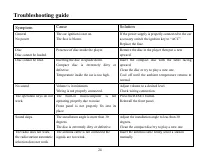
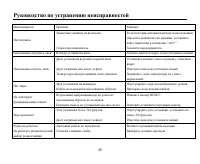
24 Troubleshooting guide Symptom Cause Solution GeneralNo power The car ignition is not on.The fuse is blown. If the power supply is properly connected to the caraccessory switch the ignition key to ACC .Replace the fuse. DiscDisc cannot be loaded. Presence of disc inside the player. Remove the disc...
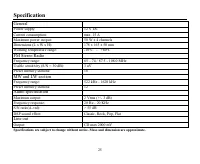
Page 25 - Specification; General; Current consumption:; FM Stereo Radio; MW and LW section; Preset memory stations:; Audio specification
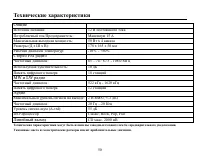
25 Specification Specifications are subject to change without notice. Mass and dimension are approximate. General Power supply: 12 V DC Current consumption: max. 15 A Maximum power output: 50 W x 4 channels Dimensions (L x W x H): 178 x 165 x 50 mm Working temperature range: -10º - +60º FM Stereo Ra...
Page 29 - OPEN
29 1. OPEN . . 2. . 1. , . . 2. , . 2. . , . : . . : , . . . , , . : , . , .
Page 31 - ISO
31 ISO 1. ISO, , . 2. ISO , . , . A B 1 (+)--- 2 (-)--- 3 (+)--- 4 12 (+)/ (-)--- 5 / (+)--- 6 ((-)--- 7 ACC+/ (+)--- 8 (-)---
Page 37 - LOCAL
37 : BAL/FAD , FADER, , BALANCE. 2 DSP/M, : STAND BY LCD => SCREEN SAVER => PTM => VOLUME PGM => LCD MODE => DATE SET => CLOCK => TIMEFORMAT => LOCAL/DISTANT => AREA => AUTO SEEK => TA SEEK => TA VOLUME => REGION. , . Stand by LCD: , : DEMO, TIME ( ), PTM, OFF ...
Page 38 - MU
38 Region: . : A.P. MU , . , . MOD , : RADIO( ) => DISC ( ) => AUX. , : PTY ( ) => Spectrum ) => Animations ( ) => . (LOUD) 2 TA, (LOUD).
Page 39 - RDS
39 : RDS ( ) . , RDS , . MOD , - RADIO. B ND, : FM1, FM2, FM3, AM1, AM2. / : 2 , . , . : , . , . 30 (18 FM, 12 ). : - ( ). - . - 1~6, . : - ( ). - 1~6.
Page 40 - EON; CD
40 . 2 , 6 1~6. , . . , 7 . . , . EON CD , , . , , . . 2 F, EON. TA ( ) 1. (ON) (OFF). 2. , , ( 2 DSP/M, TA VOLUME. , 0 40).
Page 43 - Intro
43 MP3/WMA 5 6, . , . , , . Intro 10 . INT, . . MP3/WMA 2 INT, . R , . . MP3/WMA 2 RPT, . RDM, . .
Page 50 - DSP
50 . . : 12 : 15 : 50 4 ( ): 178 165 50 : -10º - +60º FM : 65 74 / 87.5 - 108.0 : 10 18 MW LW : 522 - 1620 12 : 2 RMS (+/-3 ) : 20 20 (A-vtd): 55 DSP Classic, Rock, Pop, FlatCD . 2000