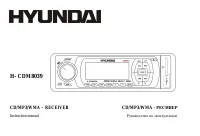
Page 2 - Table of contents
2 Dear customer! Thank you for purchasing our product. For safety, it is strongly recommended to read this manual carefully beforeconnecting, operating and/or adjusting the product and keep the manual for reference in the future. Table of contents Table of contents .....................................
Page 3 - Important safeguards
3 Important safeguards Read carefully through this manual to familiarize yourself with this high-quality sound system.Disconnect the vehicle's negative battery terminal while mounting and connecting the unit.When replacing the fuse, be sure to use one with an identical amperage rating. Using a fuse ...
Page 4 - Accessories
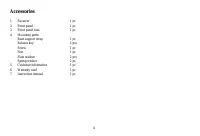
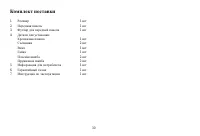
4 Accessories 1. Receiver 1 pc 2. Front panel 1 pc 3. Front panel case 1 pc 4. Mounting parts: Rear support strap 1 pc Release key 2 pcs Screw 1 pc Nut 1 pc Plain washer 2 pcs Spring washer 2 pc 5. Customer information 1 pc 6. Warranty card 1 pc 7. Instruction manual 1 pc

Page 5 - Installation/Connections; Mounting angle adjustment; Adjust the mounting angle to less than 20°.; Installation in the dashboard
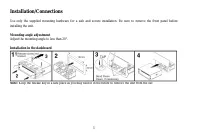
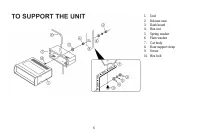
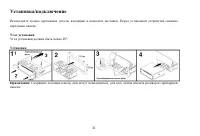
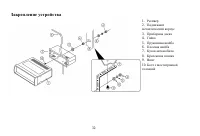
5 Installation/Connections Use only the supplied mounting hardware for a safe and secure installation. Be sure to remove the front panel beforeinstalling the unit. Mounting angle adjustment Adjust the mounting angle to less than 20°. Installation in the dashboard Note: Keep the release key in a safe...
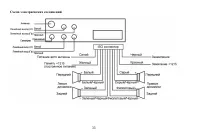
Page 7 - Electrical connections
Page 8 - Connector A
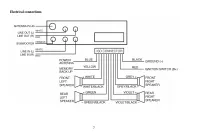
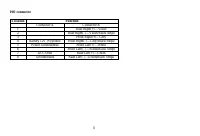
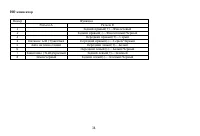
8 ISO connector Location Function Connector A Connector B 1 Rear Right(+)---Violet 2 Rear Right(-)---Violet/Black stripe 3 Front Right(+)---Grey 4 Battery 12V (+)/yellow Front Right(-)---Grey/Black Stripe 5 Power Antenna/blue Front Left(+)---White 6 Front Left((-)---White/Black Stripe 7 ACC+/red Rea...
Page 9 - Panel controls; Front panel
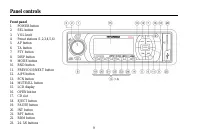
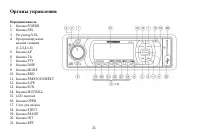
9 Panel controls Front panel 1. POWER button 2. SEL button 3. VOL knob 4. Preset stations (1,2,3,4,5,6)5. AF button 6. TA button 7. PTY button 8. DISP button 9. MODE button 10. BND button11. PREVIOUS/NEXT button12. A/PS button13. SCN button14. MUTE/ILL button15. LCD display16. OPEN button17. CD slot...
Page 10 - slide the panel down flashes when you remove the panel.
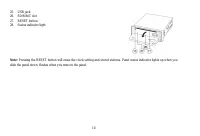
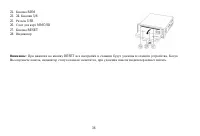
10 25. USB jack26. SD/MMC slot27. RESET button28. Status indicator light Note: Pressing the RESET button will erase the clock setting and stored stations. Panel status indicator lights up when you slide the panel down; flashes when you remove the panel.
Page 11 - General operations; Reset the unit; will resume the stored status, which you set.; Mode
11 General operations Reset the unit Operating the unit for the first time or after replacing the car battery, you must reset the unit.Press OPEN button on the panel to open the panel and press the RESET button with thin hard object to restore the unit tothe original factory settings. Power ON/OFF P...
Page 14 - Note; MULTI CD SELECTION
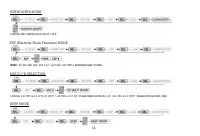
14 SUBWOOFER MODE Choose the Subwoofer On or OFF. ESP (Electronic Shock Protection) MODE Note : 10 sec./40 sec. for CD, 120 sec. for MP3 automatically works. MULTI CD SELECTION Choose CD MULTI ON or OFF. CD MULTI ON: Read multi section CD. CD MULTI OFF: Read first section only. BEEP MODE
Page 15 - SEEK MODE
15 BEEP ON: BEEP sound can be heard from speaker when the buttons are pressed. SEEK MODE SEEK 1: When SEEK 1 mode is activated, AUTO SEEK SCAN is stopped when station is detected even user still pushSEEK button.SEEK 2: Auto SEEK SCAN is not stopped even station is detected if user pushes SEEK button...
Page 16 - Digital tuner operations; MODE; Press MODE button to turn on tuner mode.; AUTOMATIC OR MANUAL TUNING
16 Digital tuner operations Note: RDS (Radio Data System) service availability varies with areas. Please understand if RDS service is not available in you area, the following service is not available, either. MODE Press MODE button to turn on tuner mode. BAND (BND) Press BND button. Each band is tog...
Page 17 - station is stored in preset memory bank.
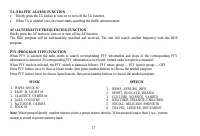
17 TA (TRAFFIC ALARM) FUNCTION Briefly press the TA button to turn on or turn off the TA function.When TA is enabled (on), the tuner starts searching the traffic announcement. AF (ALTERNATIVE FREQUENCIES) FUNCTION Briefly press the AF button to turn on or turn off the AF function.The RDS program wil...
Page 23 - Notes on creating your own CD-R or CD-RW containing MP3 files:
23 Notes on creating your own CD-R or CD-RW containing MP3 files: To enjoy high quality sound, we recommend converting to MP3 files with a sampling frequency of 44.1 kHz and afixed bit rate o f 128 kbps.DO NOT store more than 256 MP3 files per disc.For ISO 9660 - compliant format, the maximum allowa...
Page 24 - Remove the panel; Press and hold POWER button to switch off the power of; Remove the unit; Handling discs
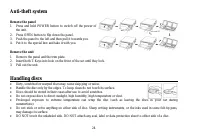
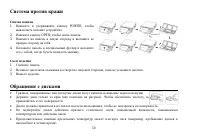
24 Anti-theft system Remove the panel 1. Press and hold POWER button to switch off the power of the unit. 2. Press OPEN button to flip down the panel.3. Push the panel to the left and then pull it towards you.4. Put it to the special box and take it with you. Remove the unit 1. Remove the panel and ...
Page 25 - Cleaning; Cleaning the cabinet
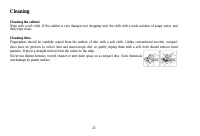
25 Cleaning Cleaning the cabinet Wipe with a soft cloth. If the cabinet is very dampen (not dropping wet) the cloth with a weak solution of soapy water, andthen wipe clean. Cleaning discs Fingerprints should be carefully wiped from the surface of disc with a soft cloth. Unlike conventional records, ...
Page 26 - Troubleshooting guide; Symptom
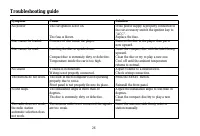
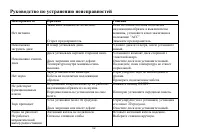
26 Troubleshooting guide Symptom Cause Solution No power The car ignition is not on. The fuse is blown. If the power supply is properly connected tothe car accessory switch the ignition key to“ACC”.Replace the fuse. Disc cannot be loaded. Presence of disc inside the player. Remove the disc in the pl...
Page 27 - Specification; General
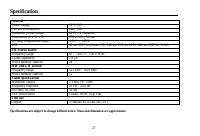
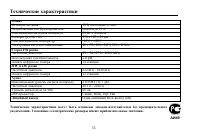
27 Specification General Power supply 12 V DC Current consumption max. 10A Maximum power output 50 W x 4 channels Dimensions (L x W x H) 178 x 165 x 50 mm Working temperature range -10º - +60º ESP 40 sec. ESP for Audio-CD, 120 sec ESP for MP3, 300 sec ESP for WMA FM Stereo Radio Frequency range 65 –...
Page 34 - ISO
34 ISO A B 1 (+)--- 2 (-)--- 3 (+)--- 4 12 (+)/ (-)--- 5 / (+)--- 6 ((-)--- 7 (+12 )/ (+)--- 8 (-)---
Page 40 - ESP (Electronic Shock Protection –
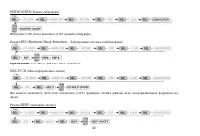
40 SUBWOOFER ( ) (ON) (OFF) . ESP (Electronic Shock Protection – ) : 10 ./40 . CD, 120 . MP3. MULTI CD ( ) (ON) (OFF) . BEEP ( )
Page 43 - PTY; — PTY
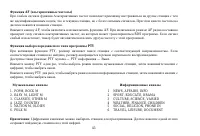
43 AF ( ) , , . . AF, AF. AF , RDS . , . PTY PTY, . , . : PTY — PTY — . PTY , , , . PTY , , , . : . . 1. POPM, ROCK M2. EASY M, LIGHT M3. CLASSICS, OTHER M4. JAZZ, COUNTRY5. NATION M, OLDIES6. FOLK M 123456 NEWS, AFFAIRS, INFOSPORT, EDUCATE, DRAMACULTURE, SCIENCE, VARIEDWEATHER, FINANCE, CHILDRENSOC...
Page 44 - USB
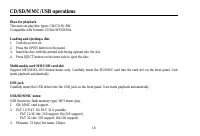
44 CD/SD/MMC/USB : CD/CD-R/-RW. : CDDA/MP3/WMA. . OPEN, . . , EJECT. SD/MMC . SD/MMC . . SD/MMC. . USB USB USB , . . USB/ SD/ MMC : MP3 USB ( ). 1. SD/ MMC. 2. FAT 12/ FAT 16/ FAT 32 - FAT 12/ 16 ( 200 , 500 ), - FAT 32 ( 200 , 500 ). 3. : 32 / : 32 . 4. (id3tag ver 2.0)
Page 47 - SEL
47 VOL, . SEL, . 3. : A/PS 3 , . SEL, “A”. VOL, . SEL 2 . , , . VOL, . SEL, .
Page 48 - WMA
48 3 WMA 3 MPEG 3 . 3 CD-ROM, CD-R CD-RW. 3, , ISO 9660. 3, . 3, , “.mp3”. 3 , “.mp3”, . , “ MP3” “ ”, PC ” “ ” . 8, . 256. . , , 3. 8 VBR, , . VBR: . WMA . ID3 WMA , . WMA (Windows Media Audio) – , Microsoft Corporation. , , , ( , 64 ) ( ). , , .
Page 53 - DSP
53 12 10 50 4 ( ) 178 165 50 -10º - +60º40 CD, 120 c MP3, 300 WMA FM 65 – 74 / 87.5 - 108.0 2.8 µ24 MW LW 522 - 1620 12 2 RMS (+/-3 ) 20 – 20 (A-vtd) 50 DSP Classic, Rock, Pop, Flat RCA- (2 ) . .