Page 2 - Table of contents
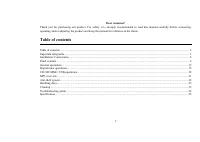
2 Dear customer! Thank you for purchasing our product. For safety, it is strongly recommended to read this manual carefully before connecting, operating and/or adjusting the product and keep the manual for reference in the future. Table of contents Table of contents ....................................
Page 3 - Important safeguards; Do not install the detachable panel before connecting the wire.
3 Important safeguards • Read carefully through this manual to familiarize yourself with this high-quality sound system. • Disconnect the vehicle's negative battery terminal while mounting and connecting the unit. • When replacing the fuse, be sure to use one with an identical amperage rating. Using...
Page 4 - Installation/ Connections; Insert fingers into the groove in the front of frame and remove it.; Removing the unit
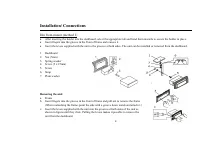
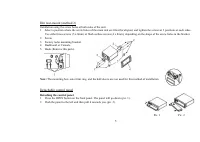
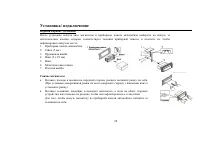
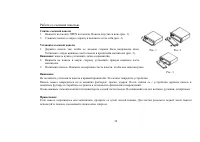
4 Installation/ Connections Din front-mount (method 1) • After inserting the holder into the dashboard, select the appropriate tab and bend them inwards to secure the holder in place. • Insert fingers into the groove in the front of frame and remove it. • Insert the levers supplied with the unit to ...
Page 5 - Detaching the control panel
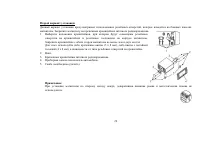
5 Din rear-mount (method 2) Installation using the screw holes at both sides of the unit. 1. Select a position where the screw holes of the main unit are fitted for aligned, and tighten the screws at 2 positions at each sides. Use either truss screws (5 x 8mm) or flush surface screws (4 x 8mm), depe...
Page 6 - Attaching the control panel; the control panel must be attached into the T-Joint.
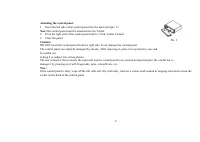
6 Attaching the control panel 1. Insert the left side of the control panel into the main unit (pic. 3). Note: the control panel must be attached into the T-Joint. 2. Press the right side of the control panel until a “click” sound is heard. 3. Close the panel. Caution: DO NOT insert the control panel...
Page 7 - Electrical connections; Do not interchange the connection of the wiring!
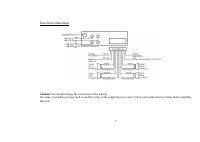
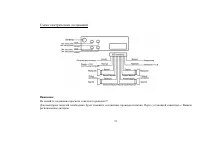
7 Electrical connections Caution: Do not interchange the connection of the wiring! For some car models you may need to modify wiring of the supplied power cord. Contact your authorized car dealer before installing this unit.
Page 8 - Using the ISO Connector; Location Function; Connector A
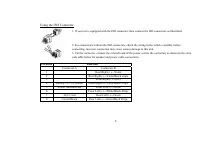
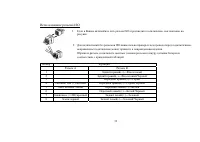
8 Using the ISO Connector 1. If your car is equipped with the ISO connector, then connect the ISO connectors as illustrated. 2. For connections without the ISO connectors, check the wiring in the vehicle carefully before connecting, incorrect connection may cause serious damage to this unit. 3. Cut ...
Page 9 - Panel controls
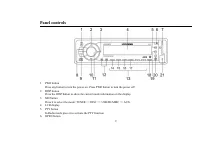
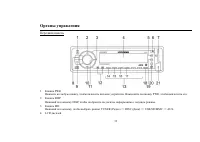
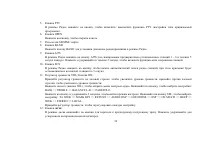
9 Panel controls 1. PWR button Press any button to turn the power on. Press PWR button to turn the power off. 2. DISP button Press the DISP button to show the current mode information on the display. 3. MD button Press it to select the mode: TUNER => DISC => USB/SD/MMC => AUX. 4. LCD displa...
Page 11 - Inner panel
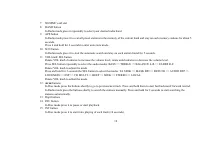
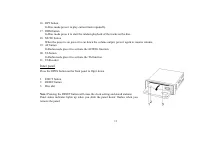
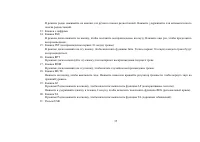
11 16. RPT button In Disc mode press it to play current track repeatedly. 17. RDM button In Disc mode press it to start the random playback of the tracks on the disc. 18. MUTE button When the power is on press it to cut down the volume output, press it again to resume volume. 19. AF button In Radio ...
Page 12 - General operations; Reset the unit; the stored status which you set.; Volume control
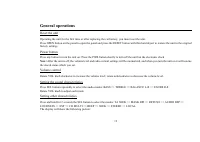
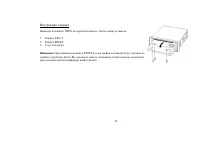
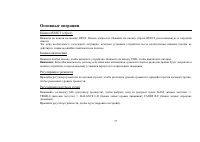
12 General operations Reset the unit Operating the unit for the first time or after replacing the car battery, you must reset the unit. Press OPEN button on the panel to open the panel and press the RESET button with thin hard object to restore the unit to the original factory settings. Power button...
Page 15 - Digital tuner operations; the following service is not available, either.; Band selection; Manual tuning: press the
15 Turning the sound off Press the MUTE button to turn the sound off. Press it again to turn the sound on. Mode setting Press the MD button repeatedly to select TUNER => DISC => USB/SD/MMC => AUX. Display status Press the DISP button to show the current mode information on the display. Digi...
Page 16 - Programming tuner stations; To store a station:; Auto memory store
16 Programming tuner stations You can store up to a total of 36 radio stations in the memory (24 FM, 12 AM), manually or automatically. • To store a station: - Select a band (if needed) - Select a station - Hold a Preset button (1-6) you want store the station for at least 2 seconds. • To recall a s...
Page 17 - Region function
17 AF (Alternative Frequencies) function Press the AF button on the panel to turn on or turn off the AF function. If the AF function is on the display will show “AF”. The RDS program will be automatically searched and received. After turning on, if the RDS signal is week or even no signal, the unit ...
Page 18 - into the mode of the latter one.
18 CD/ SD/ MMC/ USB operations Discs for playback This unit can play disc types: CD/CD-R/-RW. Compatible with formats: MP3/WMA/CDDA. Loading a disc 1. Turn the power on. 2. Press the OPEN button on the panel. 3. Insert the disc with the printed side facing upward into the slot. 4. Press EJECT button...
Page 19 - Playing the previous/ next track; During playback press the; Fast forward and backward playback; Press and hold for 2 seconds the
19 5. Tag (id3tag ver2.0) - Title/ Artist/ Album: 32 byte support. 6. Multi card reader not support. 7. USB 2.0 support. Note: USB format supports 2.0. Capacity: 8 MB ~ 1 GB. SD cards brands: Cannon, Fuji film, Palm, Motorola, Microsoft, IBM, HP, Compaq, Sharp, Samsung, etc. Capacity: 8 MB ~ 1 GB. M...
Page 20 - Track number search
20 Selecting 10 tracks down/up Press the 5 or 6 digit button to go 10 track down or up. Scanning (intro) You can play the beginning of every track for 10 seconds in sequence. Press the INT button shortly to start intro playback of tracks. Repeat playback Press the RPT button shortly to repeat curren...
Page 21 - Character search; letter of the desired track name.; MP3 overview; The unit may not play tracks in the order of Track numbers.
21 5. Rotate the VOL knob to select the desired track. 6. Press the VOL knob to play the desired track. Character search 1. Press the A/PS button for 3 times to enter the character search function. 2. Press the SEL button, the A letter will start blinking. 3. Rotate the VOL knob to select the 1 st l...
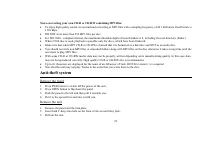
Page 22 - Notes on creating your own CD-R or CD-RW containing MP3 files:; DO NOT store more than 256 MP3 files per disc.; Remove the panel
22 Notes on creating your own CD-R or CD-RW containing MP3 files: • To enjoy high quality sound, we recommend converting to MP3 files with a sampling frequency of 44.1 kHz and a fixed bit rate o f 128 kbps. • DO NOT store more than 256 MP3 files per disc. • For ISO 9660 - compliant format, the maxim...
Page 23 - Handling discs; Dirty, scratched or warped discs may cause skip ping or noise.; Cleaning; Cleaning the cabinet
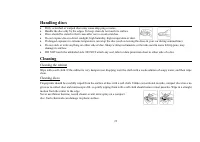
23 Handling discs • Dirty, scratched or warped discs may cause skip ping or noise. • Handle the disc only by the edges. To keep clean do not touch its surface. • Discs should be stored in their cases after use to avoid scratches. • Do not expose discs to direct sunlight, high humidity, high temperat...
Page 24 - Troubleshooting guide; Symptom
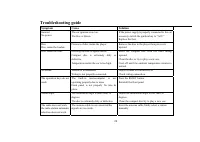
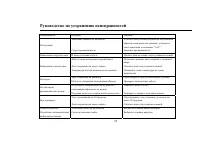
24 Troubleshooting guide Symptom Cause Solution General No power The car ignition is not on. The fuse is blown. If the power supply is properly connected to the car accessory switch the ignition key to “ACC”. Replace the fuse. Disc Disc cannot be loaded. Presence of disc inside the player. Remove th...
Page 25 - Specification; General; μV; MW and LW section
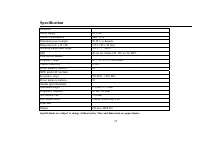
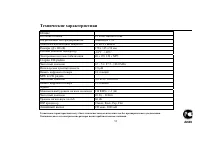
25 Specification Specifications are subject to change without notice. Mass and dimension are approximate. General Power supply 12 V DC Current consumption max. 15 A Maximum power output 50 W x 4 channels Dimensions (L x W x H) 178 x 165 x 50 mm Working temperature range -10º - +60º ESP 40 sec for Au...
Page 30 - OPEN
30 1. OPEN . ( . 1). 2. ( . 2). 1. , . ( . 3). В : . 2. , . 2. . , . В : . . - : , . . . , , . : , . , . . 3 . 1 . 2
Page 32 - ISO
32 ISO 1. ISO, , . 2. ISO , . , . A B 1 (+)--- 2 (-)--- / 3 (+)--- 4 12 (+)/ (-)--- / 5 / (+)--- 6 ((-)--- / 7 (+12 )/ (+)--- 8 / (-)--- /
Page 40 - MU
40 - BEEP ON: , . - BEEP OFF: . . SEEK ( ) , : SEEK 1 SEEK 2. - SEEK 1: ( / ), , . - SEEK 2: ( / ), . , . . STEREO ( ) , : STEREO ( ) MONO ( ). . . LOCAL ( / ) , : LOCAL ( ) DISTANT (DX) ( ). SEL. ( ) 5 , . MU , . , . MD, : TUNER ( ) => DISC ( ) => USB/SD/MMC ( ) =>...
Page 41 - RDS
41 В : RDS ( ) . , RDS , . MD, - TUNER. B ND, : FM1, FM2, FM3, FM4 (OIRT), AM1, AM2. / • : ; / < , . • : 2 ; / < , . , . 36 (24 FM, 12 ). • : - ( ). - . - 1~6, . • : - ( ). - 1~6.
Page 46 - Intro
46 ; / < , . , , . 10 / 10 5 6. Intro 10 . INT, . . R , . . RDM, . . CD/ SD/ MMC/ USB A/PS, : TRACK NUMBER SEARCH ( ) => TRACK SEARCH ( ) => CHARACTER SEARCH ( ) => .
Page 47 - VOL
47 1. A/PS, . 2. SEL, . 3. VOL, (0-9). 4. SEL, . 5. 2-4, . 6. . 1. A/PS, . 2. SEL, . 3. VOL, . 4. SEL, / . 5. VOL, . 6. SEL, . 1. A/PS, . 2. SEL, - . 3. VOL, . 4. 2 SEL, , . 5. VOL . 6. SEL, .
Page 53 - DSP
53 - . . 12 / 15 50 4 ( ) 178 165 50 -10º - +60º 40 CD, 120 c MP3 FM 65 – 74 / 87.5 - 108.0 2.8 µ 24 MW LW 522 - 1620 12 2 RMS (+/-3 ) 20 – 20 - (A-vtd) 60 DSP Classic, Rock, Pop, Flat CD . 2000