Page 2 - Table of contents
2 3 Table of contents Before you start Dear customer! Thank you for purchasing our product. For safety, it is strongly recommended to read this manual carefully before connecting, operating and/or adjusting the product and keep the manual for reference in the future. 1313131314 14141414151515 151515...
Page 3 - Utilization of the product
2 3 Table of contents Before you start If you want to dispose this product, do not mix it with general household waste. There is a separate collection system for used electronic products in accordance with legislation that requires proper treatment, recovery and recycling. Please contact your local ...
Page 4 - Installation/Connection; Installation
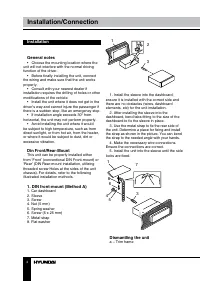
4 Installation/Connection Installation General notes • Choose the mounting location where the unit will not interfere with the normal driving function of the driver. • Before finally installing the unit, connect the wiring and make sure that the unit works properly. • Consult with your nearest deale...
Page 5 - Installation/Connections; Trim frame installation
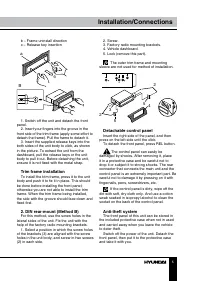
5 Installation/Connections b – Frame uninstall directionc – Release key insertion B б а 1. Switch off the unit and detach the front panel. 2. Insert your fingers into the groove in the front side of the trim frame (apply some effort to detach the frame). Pull the frame to detach it. 3. Insert the su...
Page 6 - Connection; If your car is equipped with the ISO
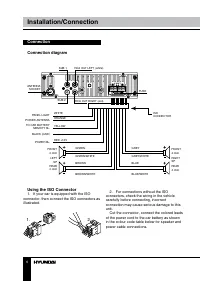
6 Installation/Connection Connection Connection diagram SUB 1 ISO CONNECTOR ANTENNA SOCKET SUB 2 WHITE PANEL LIGHT POWER ANTENNA BLACK (GND) POWER B+ FRONT 4 ohm FRONT4 ohm REAR4 ohm RIGHTSP REAR 4 ohm LEFT SP TO CAR BATTERY MEMOTY B+ ORANGE YELLOW RED +12V FUSE GREEN GREY GREEN/WHITE GREY/WHITE BRO...
Page 7 - Location; Connector A; Function
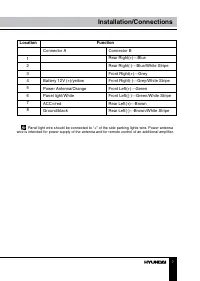
7 Installation/Connections Panel light wire should be connected to “+” of the side parking lights wire. Power antenna wire is intended for power supply of the antenna and for remote control of an additional amplifier. Location 1 2 3 4 5 6 7 8 Connector A Battery 12V (+)/yellow Power Antenna/Orange P...
Page 8 - Control elements
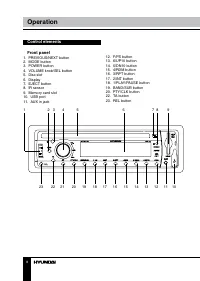
8 9 Operation Operation Control elements Front panel 1. PREVIOUS/NEXT button2. MODE button3. POWER button4. VOLUME knob/SEL button5. Disc slot6. Display7. EJECT button8. IR sensor9. Memory card slot10. USB port11. AUX in jack 1 2 3 4 5 6 7 8 9 10 11 12 13 14 15 16 17 18 19 20 21 22 23 12. F/PS butto...
Page 9 - Back of the front panel; Pressing RESET hole will erase the
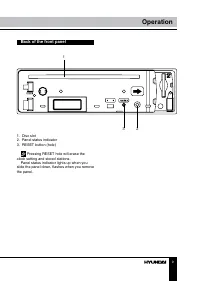
8 9 Operation Operation Back of the front panel 1 2 3 1. Disc slot2. Panel status indicator3. RESET button (hole) Pressing RESET hole will erase the clock setting and stored stations. Panel status indicator lights up when you slide the panel down, flashes when you remove the panel.
Page 10 - Operation; LCD layout
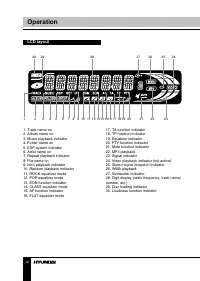
10 Operation LCD layout 1 2 3 4 5 6 7 8 9 10 11 12 13 14 1516 17 18 19 20 21 22 23 24 25 26 27 28 29 30 1. Track name on 2. Album name on3. Music playback indicator4. Folder name on5. ESP system indicator6. Artist name on7. Repeat playback indicator8. File name on9. Intro playback indicator10. Rando...
Page 11 - Remote controller
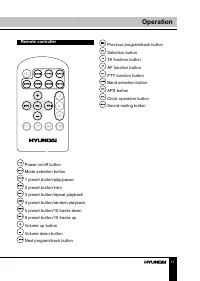
11 Operation Remote controller Power on/off button Mode selection button 1 preset button/play/pause 2 preset button/intro 3 preset button/repeat playback 4 preset button/random playback 5 preset button/10 tracks down 6 preset button/10 tracks up Volume up button Volume down button Next program/track...
Page 12 - General operations
12 13 Operation Operation General operations Turning on/off Press any button on the RC or on the unit (except REL and EJECT buttons) to switch the unit on. The display will show a message WELCOME to indicate it is ready to use. Press and hold POWER button on the unit or button on the RC to turn the ...
Page 13 - Radio operations
12 13 Operation Operation the time indication will blink on the display. Rotate VOLUME knob or press / buttons on the RC to adjust hours. Press SEL/ button to go to setting minutes. Rotate VOLUME knob or press / buttons on the RC to adjust minutes. Press button on the RC or PTY/CLK button on the uni...
Page 14 - RDS function; Button; Other parameter setting
14 Operation RDS function RDS (Radio Data System) service availability varies with areas. Please understand if RDS service is not available in you area, the following service is not available, either. AF (alternative frequencies) function Press AF/ button on the panel to turn the AF function on or o...
Page 15 - device
15 Operation TA SEEK/TA ALARMIn TA SEEK mode, the unit will seek for traffic announcement program when TA button is pressed; in TA ALARM the unit does not retune to TA information. MASK DPI/MASK ALLDuring MASK DPI mode, the unit will mask only the AF which has different PI, this is the default mode;...
Page 16 - Scanning tracks
16 Operation Fast Forward/rewind Press and hold NEXT button on the panel or button on the RC to fast forward. Press and hold PREVIOUS button on the panel or button on the RC to fast reverse. Release the button when the desired location is found. Scanning tracks Press 2/INT button on the unit or butt...
Page 17 - Notes on creating your own CD-Rs
17 Operation • If you play a non- MP3 file that has the “.mp3” extension, you may hear some noise. • In this manual, we refer to what are called “MP3 file” and “folder” in PC terminology as “track” and “album”, respectively. • Maximum number of directory level is 8, including the root directory. Max...
Page 18 - General information; Handling compact discs
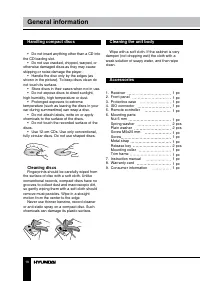
18 General information Handling compact discs • Do not insert anything other than a CD into the CD loading slot. • Do not use cracked, chipped, warped, or otherwise damaged discs as they may cause skipping or noise damage the player. • Handle the disc only by the edges (as shown in the picture). To ...
Page 19 - Troubleshooting; Symptom
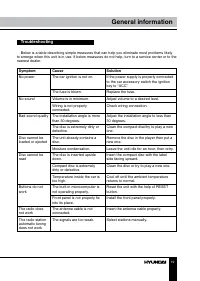
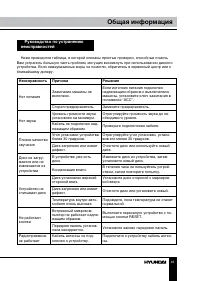
19 General information Troubleshooting Below is a table describing simple measures that can help you eliminate most problems likely to emerge when this unit is in use. If below measures do not help, turn to a service center or to the nearest dealer. Symptom Cause Solution No power The car ignition i...
Page 20 - Specifications; General
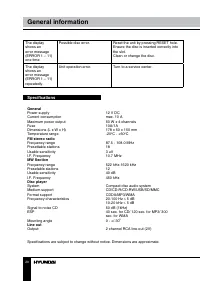
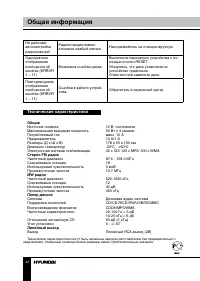
Specifications General Power supply 12 V DC Current consumption max. 10 A Maximum power output 50 W x 4 channels Fuse 10A/1A Dimensions (L x W x H) 178 x 50 x 150 mm Temperature range -20 0 C - +60 0 C FM stereo radio Frequency range 87.5 - 108.0 MHz Presettable stations 18 Usable sensitivity 3 uV I...
Page 21 - Уважаемый покупатель!; Установка/Подключение
20 21 General information Содержание Уважаемый покупатель! Благодарим Вас за покупку нашего изделия. Чтобы понять, как правильно и безо- пасно пользоваться Вашей моделью изделия, рекомендуется тщательно изучить на-стоящее руководство перед подключением, регулировкой и эксплуатацией изделия. Сохраняй...
Page 22 - Общая информация; Обращение с компакт-дисками
22 23 Содержание Перед началом эксплуатации Общая информация Обращение с компакт-дисками Чистка дисков Чистка корпуса устройстваКомплект поставкиРуководство по исправлению неисправностейТехнические характеристики 4242424242 4344
Page 23 - Утилизация изделия
22 23 Содержание Перед началом эксплуатации Если вы желаете утилизировать данное изделие, не выбрасывайте его вместе с обычным бытовым мусором. Существует отдельная система сбора использованных электронных изделий в соответствии с законодательством, которая предполагает соответствующее обращение, во...
Page 24 - • Убедитесь, что источник питания и
24 25 Перед началом эксплуатации Установка/Подключение соприкасаться друг с другом или с корпу-сом автомобиля после включения устрой-ства. В противном случае усилитель может быть перегружен или выйти из строя. • Убедитесь, что источник питания и антенна отключены, если Вы не будете пользоваться устр...
Page 25 - Установка; Установка устройства
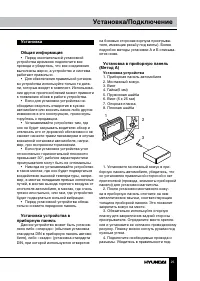
24 25 Перед началом эксплуатации Установка/Подключение Установка Общая информация • Перед окончательной установкой устройства временно подключите все провода и убедитесь, что все соединения выполнены верно, а устройство и система работают правильно. • Для обеспечения правильной установ- ки устройств...
Page 26 - Снятие устройства; Установка декоративной рамки
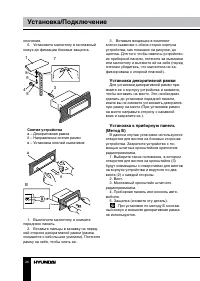
26 27 Установка/Подключение Установка/Подключение ключения. 5. Установите магнитолу в монтажный кожух до фиксации боковых защелок. 3 5 4 6 8 1 7 Снятие устройства а – Декоративная рамкаб – Направление снятия рамкив – Установка ключей съемников B б а 1. Выключите магнитолу и снимите переднюю панель. ...
Page 27 - Операции со съемной панелью
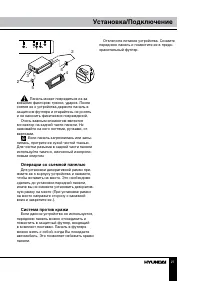
26 27 Установка/Подключение Установка/Подключение 2 2 5 5 4 3 Панель может повредиться из-за внешних факторов: тряски, ударов. После снятия ее с устройства держите панель в защитном футляре и старайтесь не ронять и не наносить физических повреждений. Очень важным элементом является коннектор на задн...
Page 28 - Подключение; • Независимо от размера динамиков; • Не допускайте короткого замыкания
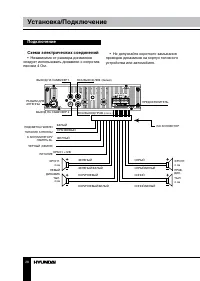
28 29 Установка/Подключение Установка/Подключение Подключение Схема электрических соединений • Независимо от размера динамиков следует использовать динамики с сопротив-лением 4 Ом. ВЫхОД НА САБВУФЕР 1 ISO КОННЕКТОР РАЗъЕМ ДЛяАНТЕННЫ ВЫхОД НА САБВУФЕР 2 БЕЛЫЙ ПОДСВЕТКА ПАНЕЛИ ПИТАНИЕ АНТЕННЫ ЧЕРНЫЙ (...
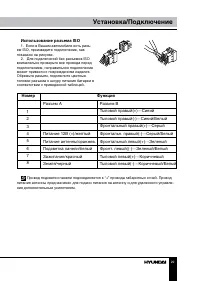
Page 29 - Использование разъема ISO; Для подключений без разъемов ISO; Номер; Разъем A; Функция
28 29 Установка/Подключение Установка/Подключение Использование разъема ISO 1. Если в Вашем автомобиле есть разъ- ем ISO, произведите подключение, как показано на рисунке. 2. Для подключений без разъемов ISO внимательно проверьте все провода перед подключением, неправильное подключение может привест...
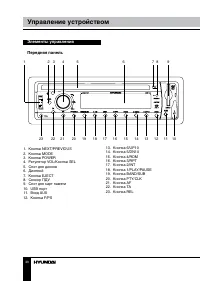
Page 30 - Элементы управления
30 31 Управление устройством Управление устройством Элементы управления Передняя панель 1 2 3 4 5 6 7 8 9 10 11 12 13 14 15 16 17 18 19 20 21 22 23 1. Кнопка NEXT/PREVIOUS2. Кнопка MODE3. Кнопка POWER4. Регулятор VOL/Кнопка SEL 5. Слот для дисков6. Дисплей7. Кнопка EJECT8. Сенсор ПДУ9. Слот для карт...
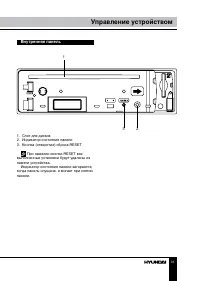
Page 31 - Внутренняя панель; При нажатии кнопки RESET все
30 31 Управление устройством Управление устройством Внутренняя панель 1 2 3 1. Слот для дисков2. Индикатор состояния панели3. Кнопка (отверстие) сброса RESET При нажатии кнопки RESET все выполненные установки будут удалены из памяти устройства. Индикатор состояния панели загорается, когда панель опу...
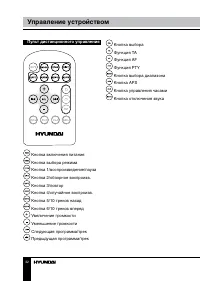
Page 32 - Пульт дистанционного управления
32 33 Управление устройством Управление устройством Кнопка выбора Функция TA Функция AF Функция PTY Кнопка выбора диапазона Кнопка APS Кнопка управления часами Кнопка отключения звука Пульт дистанционного управления Кнопка включения питания Кнопка выбора режима Кнопка 1/воспроизведение/пауза Кнопка ...
Page 33 - Символы ЖК дисплея
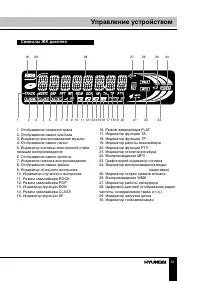
32 33 Управление устройством Управление устройством Символы ЖК дисплея 1. Отображение названия трека 2. Отображение имени альбома3. Индикатор воспроизведения музыки4. Отображение имени папки5. Индикатор системы электронной стаби-лизации воспроизведения6. Отображение имени артиста7. Индикатор повтора...
Page 34 - Основные операции
34 35 Управление устройством Управление устройством Основные операции Включение/выключение устройства Нажмите любую кнопку на ПДУ или на панели (кроме кнопок REL и EJECT), чтобы включить устройство. На дисплее появится надпись «WELCOME». Нажмите и удерживайте кнопку POWER на устройстве или кнопку на...
Page 35 - Операции с радио
34 35 Управление устройством Управление устройством настройки сохранились. Подсветка панели Нажимайте кнопку SEL/ , пока на дисплее не отобразится надпись COLOR1 (COLOR2). Вращайте регулятор VOLUME или нажимайте кнопки / на ПДУ для переключения между зеленой и красной под-светкой кнопок передней пан...
Page 36 - Поиск локальных радиостанций
36 37 Управление устройством Управление устройством те и удерживайте кнопку F/PS на панели или кнопку на ПДУ; 6 самых сильных доступных станций будут автоматически со-хранены в памяти под цифрами 1~6. Чтобы остановить автоматическое сохранение, снова нажмите эту кнопку. • Нажмите кнопку F/PS на пане...
Page 37 - Дополнительные функции
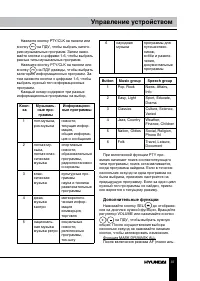
36 37 Управление устройством Управление устройством Нажмите кнопку PTY/CLK на панели или кнопку на ПДУ, чтобы выбрать катего- рию музыкальных программ. Затем нажи-майте кнопки с цифрами 1-6, чтобы выбрать разные типы музыкальных программ. Нажмите кнопку PTY/CLK на панели или кнопку на ПДУ дважды, чт...
Page 38 - Воспроизведение дисков/USB
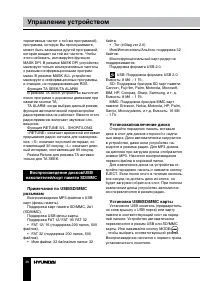
38 39 Управление устройством Управление устройством тернативных частот с той же программой), программа, которую Вы прослушиваете, может быть замещена другой программой, которая вещает на той же частоте. Чтобы этого избежать, активируйте функцию MASK DPI. В режиме MASK DPI устройство маскирует только...
Page 40 - Случайное воспроизведение
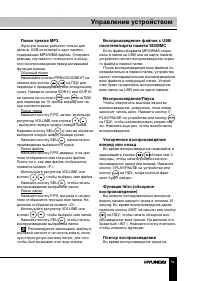
40 41 Управление устройством Управление устройством жмите кнопку 3/RРТ на панели или кнопку на ПДУ, чтобы начать его повторное воспроизведение. На дисплее отобразится «RPT». Нажмите еще раз, чтобы отменить функцию повтора. Во время воспроизведения файла в фор- мате MP3/WMA с носителей USB/SD нажи-ма...
Page 41 - • Не рекомендуется записывать не-МР3
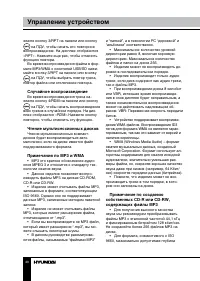
40 41 Управление устройством Управление устройством вложенных папок равняется 8, включая корневую директорию (папку). • При использовании диска CD-R вос- произведение возможно только для дисков, на которых закрыта сессия. Убедитесь, что при записи MP3 CD-R или CD-RW были от-форматированы как диски д...
Page 43 - Руководство по устранению; Неисправность
42 43 Общая информация Общая информация Руководство по устранению неисправностей Ниже приводится таблица, в которой описаны простые проверки, способные помочь Вам устранить большую часть проблем, могущих возникнуть при использовании данного устройства. Если нижеуказанные меры не помогли, обратитесь ...
Page 44 - Технические характеристики; Общие
44 45 Общая информация Не работает автонастройка радиостанций Радиостанции имеют слишком слабый сигнал. Настраивайтесь на станции вручную. Однократное отображение сообщения об ошибке (ERROR 1 – 11) Возможна ошибка диска. Выполните перезапуск устройства с по- мощью кнопки RESET. Убедитесь, что диск у...