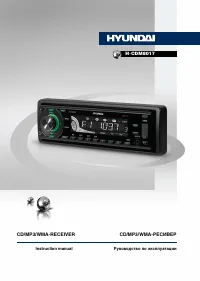
Page 2 - Table of contents
2 3 Table of contents Before you start Dear customer! Thank you for purchasing our product. For safety, it is strongly recommended to read this manual carefully before connecting, operating and/or adjusting the product and keep the manual for reference in the future. 11111111111112121212131313131313...
Page 3 - Utilization of the product
2 3 Table of contents Before you start If you want to dispose this product, do not mix it with general household waste. There is a separate collection system for used electronic products in accordance with legislation that requires proper treatment, recovery and recycling. Please contact your local ...
Page 4 - Installation/Connection; Installation
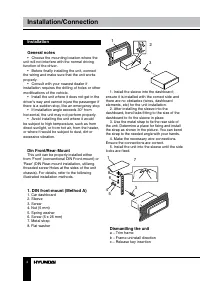
4 Installation/Connection Installation General notes • Choose the mounting location where the unit will not interfere with the normal driving function of the driver. • Before finally installing the unit, connect the wiring and make sure that the unit works properly. • Consult with your nearest deale...
Page 5 - Trim frame installation
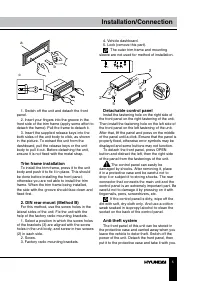
5 Installation/Connection c b а 1. Switch off the unit and detach the front panel. 2. Insert your fingers into the groove in the front side of the trim frame (apply some effort to detach the frame). Pull the frame to detach it. 3. Insert the supplied release keys into the both sides of the unit body...
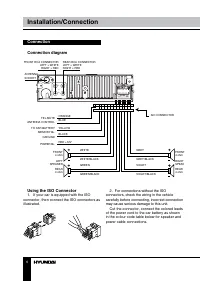
Page 6 - Connection; Using the ISO Connector; If your car is equipped with the ISO
6 Installation/Connection Connection Connection diagram ISO CONNECTOR ANTENNA SOCKET ORANGE TEL.MUTE ANTENNA CONTROL GROUND POWER B+ FRONT 4 ohm FRONT4 ohm REAR4 ohm RIGHTSPEAK REAR 4 ohm LEFT SPEAKER TO CAR BATTERY MEMORY B+ BLUE YELLOW BLACK RED +12V WHITE GREY WHITE/BLACK GREY/BLACK GREEN VIOLET ...
Page 7 - Location; Connector A
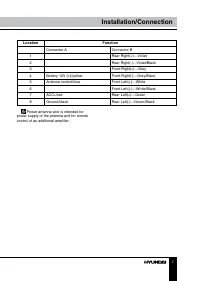
7 Installation/Connection Location Function Connector A Connector B 1 Rear Right(+)---Violet 2 Rear Right(-)---Violet/Black 3 Front Right(+)---Grey 4 Battery 12V (+)/yellow Front Right(-)---Grey/Black 5 Antenna control/blue Front Left(+)---White 6 Front Left((-)---White/Black 7 ACC+/red Rear Left(+)...
Page 8 - Inner panel; Operation; Control elements; Pressing RESET hole will erase the
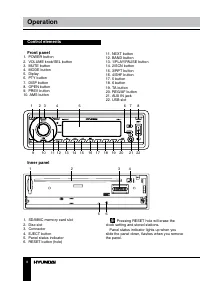
Inner panel 1. SD/MMC memory card slot2. Disc slot3. Connector4. EJECT button5. Panel status indicator6. RESET button (hole) 8 9 Operation Operation Control elements Front panel 1. POWER button 2. VOLUME knob/SEL button 3. MUTE button 4. MODE button 5. Diplay 6. PTY button 7. DISP button 8. OPEN but...
Page 9 - LCD layout
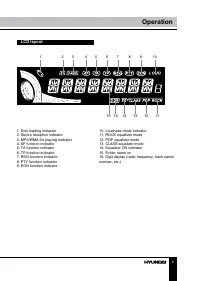
8 9 Operation Operation LCD layout 1 2 3 4 5 6 7 8 9 10 11 12 13 14 15 16 1. Disc loading indicator 2. Stereo reception indicator3. MP3/WMA file playing indicator4. AF function indicator5. TA function indicator6. TP function indicator7. REG function indicator8. PTY function indicator9. EON function ...
Page 10 - General operations; Caution
10 Operation General operations Turning on/off Press any button (except OPEN) or insert disc to switch the unit on. Press POWER button to switch the unit off. Volume control Rotate VOL knob on the front panel to adjust volume level. Audio parameter setting Press SEL button shortly and repeatedly to ...
Page 11 - Radio operations
11 Operation is completed. • All the function buttons do not operate.• Error symbol on the display. AUX in jack AUX-in jack is intended for connecting an external audio or video equipment to amplify the sound. If connection is made correctly, the audio signal from the external source will be transla...
Page 12 - Button; Local/distant stations
12 13 Operation Operation of PI code is ignored when AF switching or PI SEEK is implemented. (PI CODE and COVERAGE AREA is not checked when AF CHECK in progress) TA (Traffic Alarm) function Press TA button to turn TA function on or off.In TA mode traffic program will be automatically searched, until...
Page 13 - Disc operations
12 13 Operation Operation interrupted. “S” represents a short time period of 30 seconds, and “L” represents a long time period of 90 seconds. MASK DPI/MASK ALLDuring AF search, PI stations and non-RDS (Radio Data Station) stations with strong signal will be masked, in the latter case, the non-RDS st...
Page 14 - Mixed CD operations
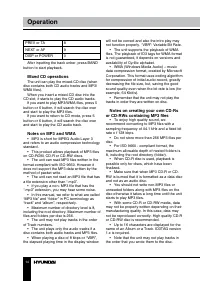
14 Operation PREV or TA 8 NEXT or AF 9 DISP or POWER 0 After inputting the track unber, press BAND button to start playback. Mixed CD operations The unit can play the mixed-CD disc (when disc contains both CD audio tracks and MP3/WMA files). When you insert a mixed-CD disc into the CD slot, it start...
Page 15 - Memory card operation
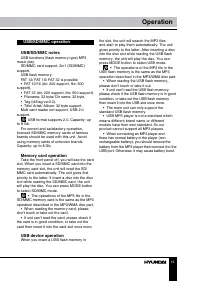
15 Operation USB/SD/MMC operation USB/SD/MMC notes USB functions (flash memory type) MP3 music play. SD/MMC card support, 2in1 (SD/MMC) support. USB flash memory.FAT 12/ FAT 16/ FAT 32 is possible• FAT 12/16 (dir: 200 support, file: 500 support), • FAT 32 (dir: 200 support, file: 500 support).• File...
Page 16 - General information; Handling compact discs
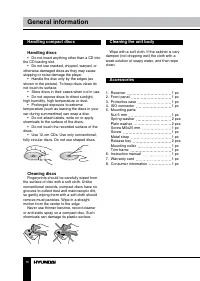
16 General information Handling compact discs Handling discs • Do not insert anything other than a CD into the CD loading slot. • Do not use cracked, chipped, warped, or otherwise damaged discs as they may cause skipping or noise damage the player. • Handle the disc only by the edges (as shown in th...
Page 17 - Troubleshooting; Symptom
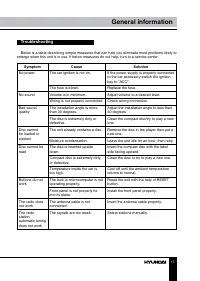
17 General information Troubleshooting Below is a table describing simple measures that can help you eliminate most problems likely to emerge when this unit is in use. If below measures do not help, turn to a service center. Symptom Cause Solution No power The car ignition is not on. If the power su...
Page 18 - Turn to a service center.; Specifications
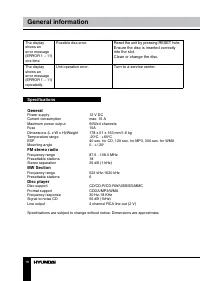
The display shows an error message (ERROR 1 – 11) one time. Possible disc error. Reset the unit by pressing RESET hole.Ensure the disc is inserted correctly into the slot.Clean or change the disc. The display shows an error message (ERROR 1 – 11) repeatedly. Unit operation error. Turn to a service c...
Page 19 - Уважаемый покупатель!; Содержание
19 Содержание Уважаемый покупатель! Благодарим Вас за покупку нашего изделия. Чтобы понять, как правильно и безо- пасно пользоваться Вашей моделью изделия, рекомендуется тщательно изучить на-стоящее руководство перед подключением, регулировкой и эксплуатацией изделия. Сохраняйте руководство для испо...
Page 20 - Утилизация изделия
20 21 Перед началом эксплуатации Перед началом эксплуатации Если вы желаете утилизировать данное изделие, не выбрасывайте его вместе с обычным бытовым мусором. Существует отдельная система сбора использованных электронных изделий в соответствии с законодательством, которая предполагает соответствующ...
Page 21 - • Убедитесь, что источник питания и
20 21 Перед началом эксплуатации Перед началом эксплуатации • Убедитесь, что источник питания и антенна отключены, если Вы не будете пользоваться устройством в течение дли-тельного времени или во время грозы. • Убедитесь, что источник питания от- ключен, если обнаружена неправильная работа устройств...
Page 22 - Установка
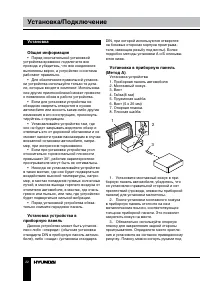
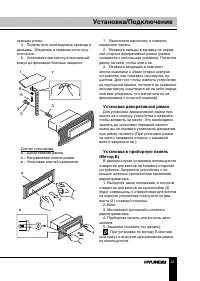
22 23 Установка/Подключение Установка/Подключение Установка Общая информация • Перед окончательной установкой устройства временно подключите все провода и убедитесь, что все соединения выполнены верно, а устройство и система работают правильно. • Для обеспечения правильной установ- ки устройства исп...
Page 23 - Установка декоративной рамки
22 23 Установка/Подключение Установка/Подключение нужным углом. 4. Подключите необходимые провода и разъемы. Убедитесь в правильности под-ключения. 5. Установите магнитолу в монтажный кожух до фиксации боковых защелок. 3 5 4 6 8 1 7 Снятие устройстваа – Декоративная рамкаб – Направление снятия рамки...
Page 24 - Операции со съемной панелью
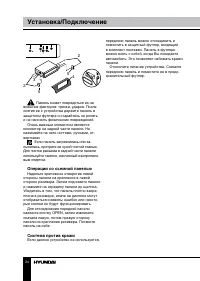
24 25 Установка/Подключение Установка/Подключение 2 2 5 5 4 3 Панель может повредиться из-за внешних факторов: тряски, ударов. После снятия ее с устройства держите панель в защитном футляре и старайтесь не ронять и не наносить физических повреждений. Очень важным элементом является коннектор на задн...
Page 25 - Подключение; • Независимо от размера динамиков; • Не допускайте короткого замыкания
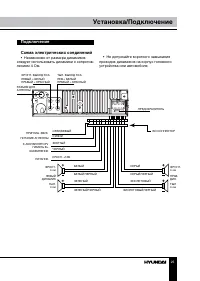
24 25 Установка/Подключение Установка/Подключение Подключение Схема электрических соединений • Независимо от размера динамиков следует использовать динамики с сопротив-лением 4 Ом. L R FUS E ISO КОННЕКТОР РАЗъЕМ ДЛяАНТЕННЫ ПРЕДОХРАНИТЕЛЬ ОРАНЖЕВЫЙ ПРИГЛУш. ЗВУК. ПИТАНИЕ АНТЕННЫ ЗАЗЕМЛЕНИЕ ПИТАНИЕ ФР...
Page 26 - Использование разъема ISO; Для подключений без разъемов ISO; Номер; Разъем A
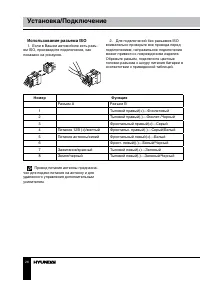
26 27 Установка/Подключение Управление устройством Использование разъема ISO 1. Если в Вашем автомобиле есть разъ- ем ISO, произведите подключение, как показано на рисаунке. 2. Для подключений без разъемов ISO внимательно проверьте все провода перед подключением, неправильное подключение может приве...
Page 27 - Элементы управления; При нажатии кнопки RESET все
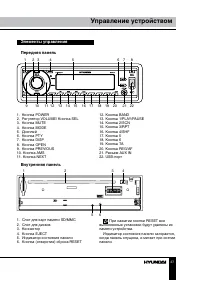
26 27 Установка/Подключение Управление устройством Элементы управления Передняя панель 1 2 3 4 5 6 7 8 9 10 11 12 13 14 15 16 17 18 19 20 21 22 1. Кнопка POWER 2. Регулятор VOLUME/ Кнопка SEL 3. Кнопка MUTE 4. Кнопка MODE 5. Дисплей 6. Кнопка PTY 7. Кнопка DISP 8. Кнопка OPEN 9. Кнопка PREVIOUS 10. ...
Page 28 - Символы ЖК дисплея
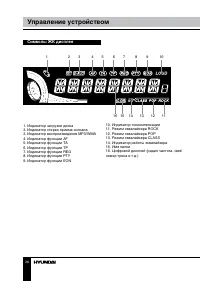
28 29 Управление устройством Управление устройством Символы ЖК дисплея 1 2 3 4 5 6 7 8 9 10 11 12 13 14 15 16 1. Индикатор загрузки диска 3. Индикатор стерео приема сигнала3. Индикатор воспроизведения MP3/WMA4. Индикатор функции AF5. Индикатор функции TA6. Индикатор функции TP7. Индикатор функции RE...
Page 29 - Основные операции
28 29 Управление устройством Управление устройством означающая что функция компенсации низких и высоких частот включена. Данная функция полезна, если вы хотите умень-шить уровень звука без потери четкости звучания. Для отключения функции повтор-но нажмите и удерживайте эту кнопку. Отображение информ...
Page 30 - Операции с радио
30 31 Управление устройством Управление устройством CALL» пропадает с дисплея. Устройство возвращается в предыдущий режим работы; восстанавливается предыдущий уровень громкости. Функция сброса Кнопку (отверстие) RESET следует на- жимать тонким металлическим предметом (например, шариковой ручкой). Фу...
Page 31 - Режим REGIONAL
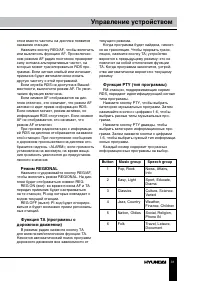
30 31 Управление устройством Управление устройством текущего режима. Когда программа будет найдена, начнет- ся ее трансляция. Чтобы прервать транс-ляцию, нажмите кнопку TA; устройство вернется к предыдущему режиму; это не повлечет за собой отключения функции TA. Когда программа закончится, устрой-ст...
Page 32 - ка; При включенной функции PTY при-; Местные/удаленные радиостанции; Нажмите и удерживайте кнопку TA для; Дополнительные функции; Нажимайте и удерживайте кнопку SEL до
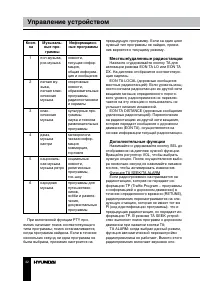
32 33 Управление устройством Управление устройством Кноп- ка Музыкаль- ные про- граммы Информацион- ные программы 1 поп-музыка, рок-музыка новости,текущая инфор-мация,общая информа-ция и сообщения 2 легкая му-зыка,легкая клас-сическая музыка спортивные новости,образовательные программы,радиопостанов...
Page 33 - Воспроизведение дисков
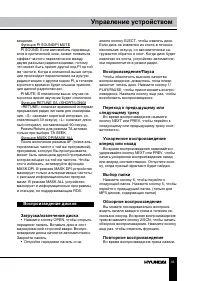
32 33 Управление устройством Управление устройством жмите кнопку EJECT, чтобы извлечь диск. Если диск не извлечен из слота в течение нескольких секунд, он автоматически за-гружается обратно в слот. Когда диск будет извлечен из слота, устройство автоматиче-ски переключится в режим радио. Воспроизведе...
Page 34 - Кнопка
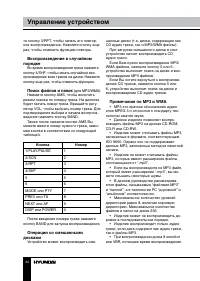
34 35 Управление устройством Управление устройством те кнопку 3/RРТ, чтобы начать его повтор-ное воспроизведение. Нажмите кнопку еще раз, чтобы отменить функцию повтора. Воспроизведение в случайном порядке Во время воспроизведения трека нажмите кнопку 4/SHF, чтобы начать случайное вос-произведение в...
Page 35 - Примечание по созданию
34 35 Управление устройством Управление устройством в окне дисплея будет неправильным, а также ознакомительное воспроизведение может не действовать надлежащим образом. VBR: Переменная скорость передачи битов. • Устройство поддерживает воспроиз- ведение WMA файлов. Воспроизведение ID3 тегов для форма...
Page 36 - Загрузка карты памяти в
36 37 Управление устройством Общая информация Загрузка карты памяти в устройство Снимите переднюю панель для доступа к слоту для карт памяти. После загрузки SD/MMC карты памяти в слот устройство начнет считывать информацию с карты автоматически. Устройство считывает информацию с последнего загруженн...
Page 37 - Обращение с компакт-дисками
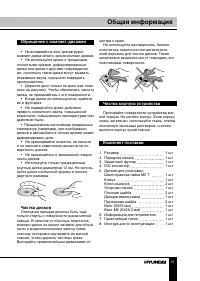
36 37 Управление устройством Общая информация Обращение с компакт-дисками • Не вставляйте в слот для загрузки компакт-диска ничего, кроме компакт-дисков. • Не используйте диски с трещинами, отколотыми краями, деформированные диски или диски с другими повреждения- ми, поскольку такие диски могут вызв...
Page 38 - Устранение неисправностей
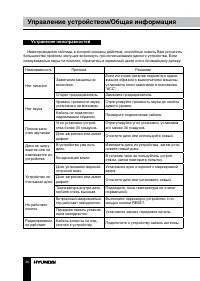
38 39 Управление устройством/Общая информация Общая информация Устранение неисправностей Ниже приводится таблица, в которой описаны действия, способные помочь Вам устранить большинство проблем, могущих возникнуть при использовании данного устройства. Если нижеуказанные меры не помогли, обратитесь в ...
Page 39 - Технические характеристики
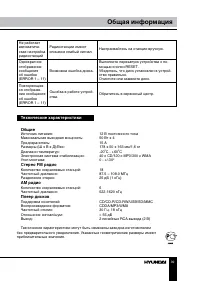
38 39 Управление устройством/Общая информация Общая информация Не работает автоматиче- ская настройка радиостанций Радиостанции имеют слишком слабый сигнал. Настраивайтесь на станции вручную. Однократное отображение сообщения об ошибке (ERROR 1 – 11) Возможна ошибка диска. Выполните перезапуск устро...