Page 2 - Table of contents
2 Dear customer! Thank you for purchasing our product. For safety, it is strongly recommended to read this manual carefully before connecting,operating and/or adjusting the product and keep the manual for reference in the future. Table of contents Table of contents .....................................
Page 3 - Important safeguards; Do not install the detachable panel before connecting the wire.
3 Important safeguards · Read carefully through the manual to familiarize yours with this high-quality sound system. · Disconnect the vehicle's negative battery terminal while mounting and connecting the unit. · When replacing the fuse, be sure to use one with an identical amperage rating. Using a f...
Page 4 - Installation/ Connections; Insert fingers into the groove in the front of frame and remove it.; Removing the unit
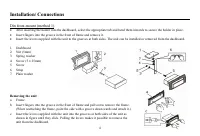
4 Installation/ Connections Din front-mount (method 1) · After inserting the holder into the dashboard, select the appropriate tab and bend them inwards to secure the holder in place. · Insert fingers into the groove in the front of frame and remove it. · Insert the levers supplied with the unit to ...
Page 5 - Detachable control panel; Detaching the control panel
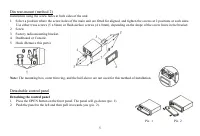
5 Din rear-mount (method 2) Installation using the screw holes at both sides of the unit.1. Select a position where the screw holes of the main unit are fitted for aligned, and tighten the screws at 2 positions at each sides. Use either truss screws (5 x 8mm) or flush surface screws (4 x 8mm), depen...
Page 6 - Attaching the control panel; the control panel must be attached into the T-Joint.
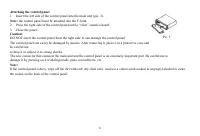
6 Attaching the control panel 1. Insert the left side of the control panel into the main unit (pic. 3). Note: the control panel must be attached into the T-Joint. 2. Press the right side of the control panel until a “click” sound is heard.3. Close the panel. Caution: DO NOT insert the control panel ...
Page 7 - Electrical connections; Contact your authorized car dealer before installing this unit.; Location; Connector A
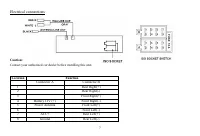
7 Electrical connections Caution: Contact your authorized car dealer before installing this unit. Location Function Connector A Connector B 1 Rear Right(+) 2 Rear Right(-) 3 Front Right(+) 4 Battery 12V (+) Front Right(-) 5 Power Antenna Front Left(+) 6 Front Left(-) 7 ACC+ Rear Left(+) 8 Ground Rea...
Page 8 - Panel controls; In Radio mode press it to activate the PTY function.
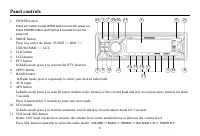
8 1 2 3 4 5 6 7 8 9 10 11 12 13 14 15 16 17 18 19 20 21 Panel controls 1. POWER button Press any button except OPEN button to turn the power on.Press POWER button and hold for 2 seconds to turn thepower off. 2. MODE button. Press it to select the mode: TUNER => DISC =>USB/SD/MMC => AUX. 3. ...
Page 9 - buttons
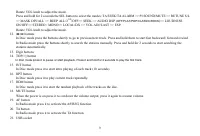
9 Rotate VOL knob to adjust the mode.Press and hold for 2 seconds the SEL button to select the modes: TA SEEK/TA ALARM => PI SOUND/MUTE => RETUNE S/L=> MASK DPI/ALL => BEEP ALL/2 ND /OFF=> SEEK => AUDIO DSP ( OFF/FLAT/POP/CLASSIC/ROCK )=> LOUDNESS ON/OFF=> STEREO / MONO=> ...
Page 10 - Inner panel; Press the OPEN button on the front panel to flip it down.
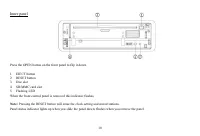
10 Inner panel Press the OPEN button on the front panel to flip it down. 1. EJECT button2. RESET button3. Disc slot4. SD/MMC card slot5. Flashing LEDWhen the front control panel is removed this indicator flashes. Note: Pressing the RESET button will erase the clock setting and stored stations. Panel...
Page 11 - General operations; Reset the unit; with thin hard object to restore the; Power button; the stored status which you set.; Volume control; Press SEL button repeatedly to select the audio modes:; Clock setting
11 General operations Reset the unit Operating the unit for the first time or after replacing the car battery, you must reset the unit. Press OPEN button on the panel to open the panel and remove the panel, then press the RESET button with thin hard object to restore the unit to the original factory...
Page 12 - Press CLK button anytime to view the time display.; Setting other characteristics; Retune mode is active for TA SEEK mode only.
12 Press CLK button anytime to view the time display. Setting other characteristics Press and hold for 2 seconds the SEL button to select the modes: TA SEEK/TA ALARM => PI SOUND/MUTE => RETUNE S/L =>MASK DPI/ALL => BEEP ALL/2 ND /OFF=> SEEK => AUDIO DSP ( POP/FLAT/POP/CLASSIC/ROCK ...
Page 14 - ESP 25 second: for road condition extremely unusual.; Turning the sound off
14 k Volume mode Select the mode: VOL ADJUST to adjust the volume level (10-50).l ESP MODE (Electronic Shock Protection) Rotate the VOL knob to select the desired mode: ESP 6 or ESP 25.- ESP 6 second: for normal road condition. - ESP 25 second: for road condition extremely unusual. Turning the sound...
Page 15 - Digital tuner operations; Band selection
15 Digital tuner operations Note: RDS (Radio Data System) service availability varies with areas. Please understand if RDS service is not available in you area, the following service is not available, either. Band selection Press the MODE button to select TUNER. Press BAND once or more to select: FM...
Page 18 - into the mode of the latter one.
18 CD/ SD/ MMC/ USB operations Discs for playback This unit can play disc types: CD/CD-R/-RW.Compatible with formats: MP3/WMA/CDDA. Loading a disc 1. Turn the power on.2. Press the OPEN button on the panel.3. Insert the disc with the printed side facing upward into the slot.4. Press EJECT button on ...
Page 19 - Playing the previous/ next track
19 5. Tag (id3tag ver2.0) - Title/ Artist/ Album: 32 byte support. 6. Multi card reader not support.7. USB 2.0 support. Note:USB format supports 2.0. Capacity: 8 MB ~ 1 GB. SD cards brands: Cannon, Fuji film, Palm, Motorola, Microsoft, IBM, HP, Compaq, Sharp, Samsung, etc. Capacity: 8 MB ~ 1 GB. MMC...
Page 20 - Track number search; Character search
20 Selecting 10 tracks down/up Press the 5 or 6 digit button to go 10 track down or up. Scanning (intro) You can play the beginning of every track for 10 seconds in sequence. Press the INT button shortly to start intro playback of tracks. Repeat playback Press the RPT button shortly to repeat curren...
Page 21 - Track name search
21 Track name search 1. Press the APS button for 3 times to enter the track name search function. 2. Rotate the SEL knob to select the desired directory.3. Press the >>| or |<< button to select the desired track. 4. Press the SEL button to play the desired track.
Page 22 - MP3 overview; The unit may not play tracks in the order of Track numbers.; Notes on creating your own CD-R or CD-RW containing MP3 files:; DO NOT store more than 256 MP3 files per disc.
22 MP3 overview Notes on MP3: · MP3 is short for MPEG Audio Layer 3 and refers to an audio compression technology standard. · This product allows playback of MP3 files on CD-ROM, CD-R or CD-RW discs. · The unit can read MP3 files written in the format compliant with ISO 9660. However it does not sup...
Page 24 - Handling discs; Dirty, scratched or warped discs may cause skip ping or noise.; Cleaning; Cleaning the cabinet
24 Handling discs · Dirty, scratched or warped discs may cause skip ping or noise. · Handle the disc only by the edges. To keep clean do not touch its surface. · Discs should be stored in their cases after use to avoid scratches. · Do not expose discs to direct sunlight, high humidity, high temperat...
Page 25 - Troubleshooting guide; Symptom
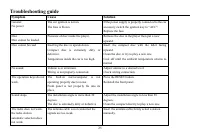
25 Troubleshooting guide Symptom Cause Solution GeneralNo power The car ignition is not on.The fuse is blown. If the power supply is properly connected to the caraccessory switch the ignition key to “ACC”.Replace the fuse. DiscDisc cannot be loaded. Presence of disc inside the player. Remove the dis...
Page 26 - Specification; General; μV; MW and LW section
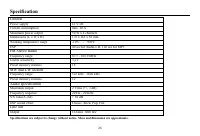
26 Specification Specifications are subject to change without notice. Mass and dimension are approximate. General Power supply 12 V DC Current consumption max. 10 A Maximum power output 50 W x 4 channels Dimensions (L x W x H) 178 x 165 x 50 mm Working temperature range -10ºС - +60ºС ESP 40 sec for ...
Page 27 - Уважаемый покупатель!; Содержание
27 Уважаемый покупатель! Благодарим Вас за покупку нашего изделия. Для обеспечения безопасности рекомендуется тщательно изучить настоящееруководство перед подключением, эксплуатацией и/или регулировкой изделия, и сохраняйте руководство дляиспользования в будущем. Содержание Содержание .................
Page 28 - Меры предосторожности; Не устанавливайте съемную панель перед подключением кабеля.
28 Меры предосторожности · Тщательно изучите настоящую инструкцию, чтобы ознакомиться с высококачественной аудиосистемой. · При установке и подключении изделия отключите отрицательную клемму аккумулятора автомобиля. · При замене предохранителя убедитесь, что вы устанавливаете предохранитель с тем же...
Page 29 - Установка/ подключение; Первый вариант установки
29 Установка/ подключение Первый вариант установки После установки кожуха авто магнитолы в приборную панель автомобиля выберите на кожухе теметаллические язычки, которые соответствуют толщине приборной панели, и отогните их, чтобызафиксировать кожух на месте.1. Приборная панель автомобиля2. Гайка (5...
Page 30 - Второй вариант установки
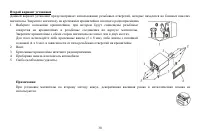
30 Второй вариант установки Данный вариант установки предусматривает использование резьбовых отверстий, которые находятся на боковых панеляхмагнитолы. Закрепите магнитолу на крепежных кронштейнах штатного радиоприемника.1. Выберите положение кронштейнов, при котором будут совмещены резьбовые отверст...
Page 31 - Работа со съемной панелью; Снятие съемной панели; панель нужно установить точно в кронштейн.
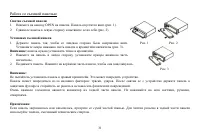
31 Работа со съемной панелью Снятие съемной панели 1. Нажмите на кнопку OPEN на панели. Панель опустится вниз (рис. 1).2. Сдвиньте панель в левую сторону и вытяните ее на себя (рис. 2). Установка съемной панели 1. Держите панель так, чтобы ее лицевая сторона была направлена вниз. Установите левую ни...
Page 32 - Схема электрических соединений
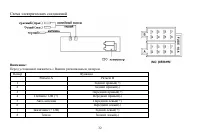
32 Схема электрических соединений Внимание: Перед установкой свяжитесь с Вашим региональным дилером. Номер Функция Разъем A Разъем B 1 Задний правый(+) 2 Задний правый(-) 3 Передний правый(+) 4 Питание 12В (+) Передний правый(-) 5 Авто антенна Передний левый(+) 6 Передний левый(-) 7 Зажигание (+12В)...
Page 33 - Органы управления; Передняя панель
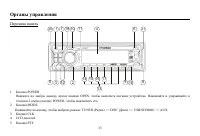
33 Органы управления Передняя панель 1. Кнопка POWER Нажмите на любую кнопку, кроме кнопки OPEN, чтобы включить питание устройства. Нажимайте и удерживайте втечении 2 секунд кнопку POWER, чтобы выключить его. 2. Кнопка MODE Нажимайте на кнопку, чтобы выбрать режим: TUNER (Радио) => DISC (Диск) =&...
Page 36 - Внутренняя сторона; Нажмите на кнопку OPEN на передней панели, чтобы откинуть панель.
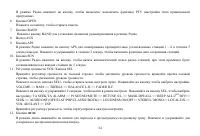
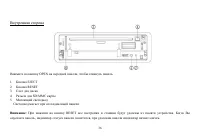
36 Внутренняя сторона Нажмите на кнопку OPEN на передней панели, чтобы откинуть панель. 1. Кнопка EJECT2. Кнопка RESET3. Слот для диска4. Разъем для SD/MMC карты5. Мигающий светодиод Светодиод мигает при отсоединенной панели. Внимание: При нажатии на кнопку RESET все настройки и станции будут удален...
Page 37 - Основные операции; Кнопка включения
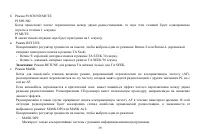
37 Основные операции Кнопка RESET (сброс) Нажмите на панели на кнопку OPEN. Панель откроется. Снимите панель и нажмите на кнопку сброса RESET,расположенную за передней панелью.Эта мера необходима в следующих ситуациях: исходная установка устройства после подключения, никакие кнопки недействуют, симв...
Page 41 - Выключение звука
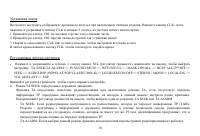
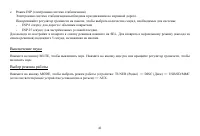
41 е. Режим ESP (электронная система стабилизации) Электронная система стабилизации необходима при движении по неровной дороге.Поворачивайте регулятор громкости на панели, чтобы выбрать количество секунд, необходимых для системы:- ESP 6 секунд: для дороги с обычным покрытием. - ESP 25 секунд: для эк...
Page 42 - Цифровой тюнер; доступна в Вашем регионе, то данная функция не будет работать.; Выбор диапазона; Ручной поиск: Нажимайте на кнопки; Программирование радио станций; Чтобы сохранить станцию:
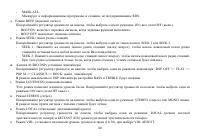
42 Цифровой тюнер Внимание: Сервис RDS (Система радио данных) доступен не во всех регионах. Имейте ввиду, что если услуга RDS не доступна в Вашем регионе, то данная функция не будет работать. Выбор диапазона Нажмите на кнопку MODE, чтобы выбрать режим радио - TUNER.Нажимайте на кнопку BАND, чтобы вы...
Page 46 - Нажмите во время воспроизведения на кнопку
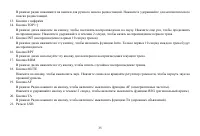
46 4. Имя файла: 32 байта/ имя папки: 32 байта.5. Тэг (id3tag ver 2.0) - Имя/ Исполнитель/ Альбом: поддержка 32 байтов. 6. Многофукциональный карт-ридер не поддерживается.7. Поддержка формата USB 2.0. Примечание:USB: Поддержка формата USB 2.0. Емкость: 8 Mб ~ 1 Гб. SD: Поддержка брендов SD карт памя...
Page 48 - Поиск по директориям; выберите нужный трек.
48 Поиск по номеру трека 1. Нажмите на кнопку APS, чтобы активировать этот режим поиска.2. Вращайте регулятор громкости VOL, чтобы выставить необходимую цифру (0-9).3. Нажмите на кнопку SEL, чтобы перейти к следующей цифре.4. Повторяйте шаги 2-4, чтобы ввести трехзначный номер.5. Воспроизведение иск...
Page 49 - Обзор МР3
49 Обзор МР3 Замечания по МР3: · МР3 это краткое обозначение аудио слоя MPEG 3 и относится к стандарту технологии сжатия звука. · Данное изделие позволяет воспроизводить файлы МР3 на дисках CD-ROM, CD-R или CD-RW. · Изделие может считывать файлы МР3, записанные в формате, соответствующем ISO 9660. О...
Page 50 - НЕ сохраняйте более 256 файлов МР3 на диске.
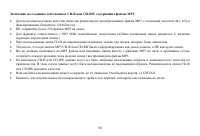
50 Замечание по созданию собственных CD-R или CD-RW, содержащих файлы MP3 : · Для получения высокого качества звука мы рекомендуем преобразовывать файлы МР3 с эталонной частотой 44,1 кГц ификсированным битрейтом 128 Кбит/сек. · НЕ сохраняйте более 256 файлов МР3 на диске. · Для формата, совместимого...
Page 51 - Система против кражи; Снятие панели; Обращение с дисками
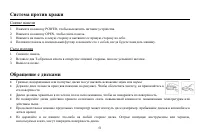
51 Система против кражи Снятие панели 1. Нажмите на кнопку POWER, чтобы выключить питание устройства.2. Нажмите на кнопку OPEN, чтобы снять панель.3. Нажмите на панель в левую сторону и вытяните ее правую сторону на себя.4. Положите панель в специальный футляр и возьмите его с собой, когда будете по...
Page 52 - НЕ ПРИКАСАЙТЕСЬ к стороне, не имеющей маркировки.; Чистка и уход; Чистка корпуса
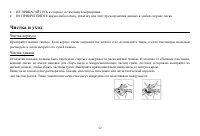
52 · НЕ ПРИКАСАЙТЕСЬ к стороне, не имеющей маркировки. · НЕ ПРИКРЕПЛЯЙТЕ какую-либо печать, этикетку или лист предохранения данных к любой стороне диска. Чистка и уход Чистка корпуса Протирайте мягкой тканью. Если корпус очень загрязнен (не мочите его), используйте ткань, слегка смоченную мыльнымрас...
Page 53 - Руководство по устранению неисправностей
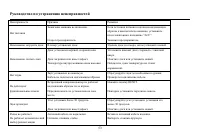
53 Руководство по устранению неисправностей Неисправность Причина Решение Нет питания Зажигание машины не включено. Сгорел предохранитель. Если источник питания подключен надлежащимобразом к выключателю машины, установитеключ зажигания в положение “АСС”.Замените предохранитель. Невозможно загрузить ...
Page 54 - Технические характеристики; Общие
54 Технические характеристики Технические характеристики могут быть изменены заводом-изготовителем без предварительного уведомления.Указанные масса и геометрические размеры имеют приблизительные значения. Общие Источник питания 12 В постоянного тока Потребляемый ток/Предохранитель Максимум 10 А Макс...