Page 2 - Contents
Contents 2 Dear customer! Thank you for purchasing our product. For safety, it is strongly recommended to read this manual carefully before connecting, operating and/or adjusting the product and keep the manual for reference in the future. 1212121213131313131414141414151515151515151616161617 Table o...
Page 3 - Before you start; Utilization of the product
Before you start 3 If you want to dispose this product, do not mix it with general household waste. There is a separate collection system for used electronic products in accordance with legislation that requires proper treatment, recovery and recycling. Please contact your local authorities for the ...
Page 4 - Installation/Connection; Installation
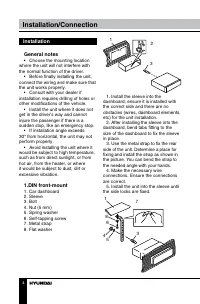
Installation/Connection 4 Installation General notes • Choose the mounting location where the unit will not interfere with the normal function of the driver. • Before finally installing the unit, connect the wiring and make sure that the unit works properly. • Consult with your dealer if installatio...
Page 5 - Dismantling the unit
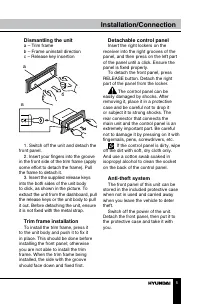
Installation/Connection 5 Dismantling the unit a – Trim frameb – Frame uninstall directionc – Release key insertion в б а 1. Switch off the unit and detach the front panel. 2. Insert your fingers into the groove in the front side of the trim frame (apply some effort to detach the frame). Pull the fr...
Page 6 - Connection; If your car is equipped with the
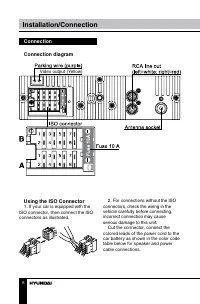
Installation/Connection 6 Connection Connection diagram Video output (Yellow) Using the ISO Connector 1. If your car is equipped with the ISO connector, then connect the ISO connectors as illustrated. 2. For connections without the ISO connectors, check the wiring in the vehicle carefully before con...
Page 7 - Location; Connector B; Parking wire connection
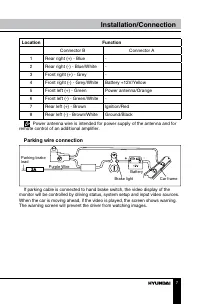
Installation/Connection 7 Location Function Connector B Connector A 1 Rear right (+) - Blue - 2 Rear right (-) - Blue/White - 3 Front right (+) - Grey - 4 Front right (-) - Grey/White Battery +12V/Yellow 5 Front left (+) - Green Power antenna/Orange 6 Front left (-) - Green/White - 7 Rear left (+) -...
Page 8 - Operation; Control elements; buttons; Inner panel
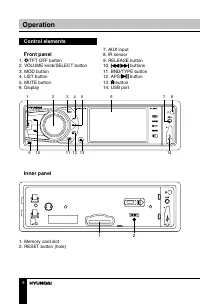
Operation 8 Control elements Front panel 1. /TFT OFF button2. VOLUME knob/SELECT button3. MOD button4. LIST button5. MUTE button6. Display 1 2 3 4 5 6 7 8 9 10 11 12 13 14 7. AUX input8. IR sensor9. RELEASE button10. / buttons 11. BND/TYPE button12. APS/ button 13. button14. USB port Inner panel 1 2...
Page 9 - Changing the battery
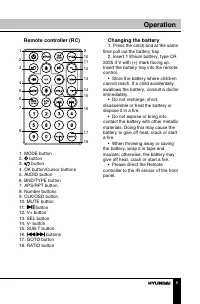
Operation 9 Remote controller (RC) 1 2 3 4 5 6 7 8 9 11 10 12 13 1415 16 17 18 1. MODE button2. button3. button 4. OK button/Cursor buttons5. AUDIO button6. BND/TYPE button7. APS/RPT button8. Number buttons9. CLK/OSD button10. MUTE button11. button 12. V+ button13. SEL button14. V- button15. SUB-T b...
Page 10 - General operations
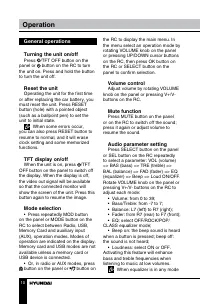
Operation 10 General operations Turning the unit on/off Press /TFT OFF button on the panel or button on the RC to turn the unit on. Press and hold the button to turn the unit off. Reset the unit Operating the unit for the first time or after replacing the car battery, you must reset the unit. Press ...
Page 11 - Clock
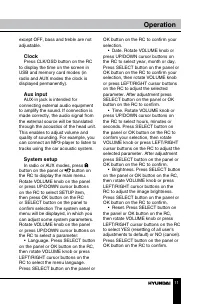
Operation 11 except OFF, bass and treble are not adjustable. Clock Press CLK/OSD button on the RC to display the time on the screen in USB and memory card modes (in radio and AUX modes the clock is displayed permanently). Aux input AUX-in jack is intended for connecting external audio equipment to a...
Page 12 - Radio operations
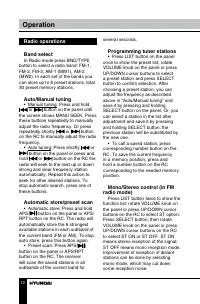
Operation 12 Radio operations Band select In Radio mode press BND/TYPE button to select a radio band: FM-1, FM-2, FM-3, AM-1 (MW1), AM-2 (MW2). In each set of the bands you can store up to 6 preset stations, total 30 preset memory stations. Auto/Manual tuning • Manual tuning: Press and hold or butto...
Page 13 - Local radio station search
Operation 13 Local radio station search Press LIST button twice to show the function list; rotate VOLUME knob on the panel or press UP/DOWN cursor buttons on the RC to select LOC option. Press SELECT button, then rotate VOLUME knob on the panel or press UP/DOWN cursor buttons on the RC to select LOC...
Page 14 - Connecting a USB/Memory
Operation 14 selected PTY is searched. During 1 loop, if desired PTY is not found, the unit will return to previous mode. USB/SD/MMC operations Connecting a USB/Memory card Insert a USB device into the USB port of this unit (remove the rubber cover first). Detach the front panel and insert an SD/MMC...
Page 16 - General information; Troubleshooting; Symptom; Cleaning the unit body
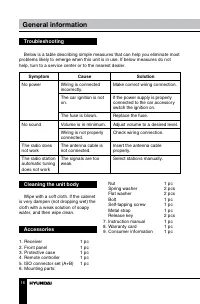
General information 16 Troubleshooting Below is a table describing simple measures that can help you eliminate most problems likely to emerge when this unit is in use. If below measures do not help, turn to a service center or to the nearest dealer. Symptom Cause Solution No power Wiring is connecte...
Page 17 - Specifications; General
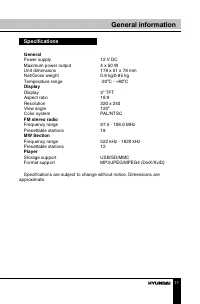
General information 17 Specifications General Power supply 12 V DC Maximum power output 4 х 50 W Unit dimensions 178 x 51 x 78 mm Net/Gross weight 0.8 kg/0.85 kg Temperature range -20 0 C - +60 0 C Display Display 3” TFT Aspect ratio 16:9 Resolution 320 х 240 View angle 120 0 Color system PAL/NTSC F...
Page 18 - Содержание; Уважаемый покупатель!; Благодарим Вас за покупку нашего изделия. Чтобы понять, как
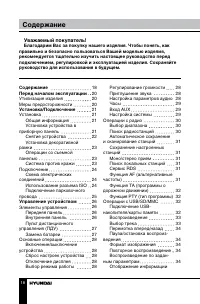
Содержание 18 Уважаемый покупатель! Благодарим Вас за покупку нашего изделия. Чтобы понять, как правильно и безопасно пользоваться Вашей моделью изделия, рекомендуется тщательно изучить настоящее руководство перед подключением, регулировкой и эксплуатацией изделия. Сохраняйте руководство для использ...
Page 19 - на дисплее; Общая информация; Чистка корпуса устройства
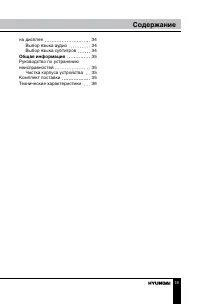
на дисплее Выбор языка аудиоВыбор языка субтитров Общая информация Руководство по устранению неисправностей Чистка корпуса устройства Комплект поставкиТехнические характеристики Содержание 19 34343435 35353536
Page 20 - Перед началом эксплуатации; Если вы желаете утилизировать данное изделие, не выбрасывайте; Утилизация изделия
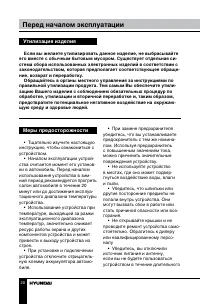
Перед началом эксплуатации 20 Если вы желаете утилизировать данное изделие, не выбрасывайте его вместе с обычным бытовым мусором. Существует отдельная си-стема сбора использованных электронных изделий в соответствии с законодательством, которая предполагает соответствующее обраще-ние, возврат и пере...
Page 21 - Установка/Подключение; Установка
Установка/Подключение 21 времени или во время грозы. • Убедитесь, что вы отключили источник питания, если обнаруже-на неправильная работа системы, система издает необычные звуки, запах, выделяет дым или внутрь ее попала жидкость. Проведите квалифицированный технический осмотр системы. • Устройство р...
Page 22 - Снятие устройства
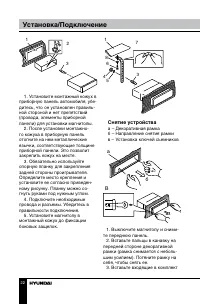
Установка/Подключение 22 3 2 1 182 53 1. Установите монтажный кожух в приборную панель автомобиля, убе-дитесь, что он установлен правиль-ной стороной и нет препятствий (провода, элементы приборной панели) для установки магнитолы. 2. После установки монтажно- го кожуха в приборную панель отогните на ...
Page 23 - Установка декоративной
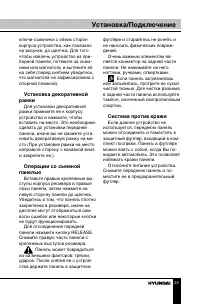
Установка/Подключение 23 ключи-съемники с обеих сторон корпуса устройства, как показано на рисунке, до щелчка. Для того чтобы извлечь устройство из при-борной панели, потяните за съем-ники или магнитолу и вытяните её на себя (перед снятием убедитесь, что магнитола не зафиксирована с опорной планкой)...
Page 24 - Подключение; • Независимо от размера; Использование разъема; Если в Вашем автомобиле
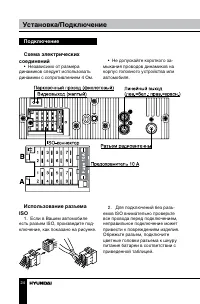
Установка/Подключение 24 Подключение Схема электрических соединений • Независимо от размера динамиков следует использовать динамики с сопротивлением 4 Ом. • Не допускайте короткого за- мыкания проводов динамиков на корпус головного устройства или автомобиля. Использование разъема ISO 1. Если в Вашем...
Page 25 - Номер; Разъем В; Подключение парковочного провода; Если парковочный провод подсоединен к ручному тормозу, наличие
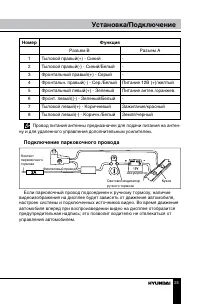
Установка/Подключение 25 Номер Функция Разъем В Разъем А 1 Тыловой правый(+) - Синий - 2 Тыловой правый(-) - Синий/Белый - 3 Фронтальный правый(+) - Серый - 4 Фронтальн. правый(-) - Сер./Белый Питание 12В (+)/желтый 5 Фронтальный левый(+) - Зеленый Питание антен./оранжев. 6 Фронт. левый((-) - Зелены...
Page 26 - Управление устройством; Элементы управления
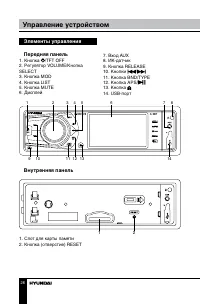
Управление устройством 26 Элементы управления Передняя панель 1. Кнопка /TFT OFF2. Регулятор VOLUME/Кнопка SELECT3. Кнопка MOD4. Кнопка LIST5. Кнопка MUTE6. Дисплей 1 2 3 4 5 6 7 8 9 10 11 12 13 14 7. Вход AUX8. ИК-датчик9. Кнопка RELEASE10. Кнопки / 11. Кнопка BND/TYPE12. Кнопка APS/13. Кнопка 14. ...
Page 27 - Пульт дистанционного
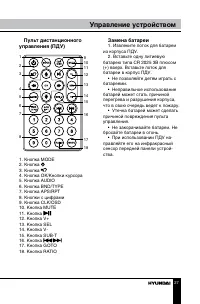
Управление устройством 27 Пульт дистанционного управления (ПДУ) 1 2 3 4 5 6 7 8 9 11 10 12 13 1415 16 17 18 1. Кнопка MODE2. Кнопка 3. Кнопка 4. Кнопка OK/Кнопки курсора5. Кнопка AUDIO6. Кнопка BND/TYPE7. Кнопка APS/RPT8. Кнопки с цифрами9. Кнопка CLK/OSD10. Кнопка MUTE11. Кнопка 12. Кнопка V+13. Кн...
Page 28 - Основные операции
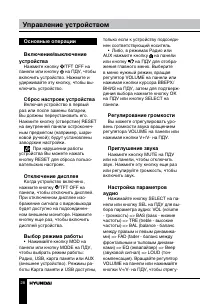
Управление устройством 28 Основные операции Включение/выключение устройства Нажмите кнопку /TFT OFF на панели или кнопку на ПДУ, чтобы включить устройство. Нажмите и удерживайте эту кнопку, чтобы вы-ключить устройство. Сброс настроек устройства Включая устройство в первый раз или после замены батаре...
Page 29 - Часы
Управление устройством 29 лировать выбранный параметр: • Volume: от 0 до 39;• Bass/Treble: от -7 до 7;• Balance: от L7 (левый) до R7 (правый); • Fader: от R7 (тыл) до F7 (фронт).• Эквалайзер: выберите режим эквалайзера CLASS, ROCK, POP или OFF (эквалайзер отключен). • Beep on: нажатия кнопок со- про...
Page 30 - Операции с радио
Управление устройством 30 кнопки курсора ВЛЕВО/ВПРАВО на ПДУ, чтобы выбрать часы, мину-ты или секунды. Нажмите кнопку SELECT на панели или кнопку OK на ПДУ для подтверждения выбора, затем вращайте регулятор VOLUME на панели или нажимайте кнопки курсора ВЛЕВО/ВПРАВО на ПДУ, чтобы отрегулировать выбра...
Page 31 - • Нажмите один раз кнопку LIST
Управление устройством 31 скольких секунд. Сохранение настроенных станций • Нажмите один раз кнопку LIST на панели для отображения списка радиостанций; вращайте регулятор VOLUME на панели или нажимайте кнопки курсора ВВЕРХ/ВНИЗ на ПДУ, чтобы выбрать сохраненную станцию, и подтвердите выбор станции н...
Page 32 - Функция TA (программы о; Нажмите дважды кнопку LIST; накопителя/карты памяти
Управление устройством 32 но с более сильным сигналом. При этом вместо частоты на дисплее появится название станции. Нажмите дважды кнопку LIST для отображения меню функций режима радио; вращайте регулятор VOLUME на панели или нажимайте кнопки курсора ВВЕРХ/ВНИЗ на ПДУ, чтобы выбрать опцию AF. Нажми...
Page 33 - Воспроизведение
Управление устройством 33 в слот для карт памяти до щелчка. Для извлечения карты из слота снимите переднюю панель, на-жмите на карту до щелчка, затем вытяните ее. Перед извлечением USB или карты памяти из разъема всегда переключайте устройство в другой режим. Устройство поддерживает USB/SD/MMC-накоп...
Page 35 - Руководство по устранению; Причина; Комплект поставки
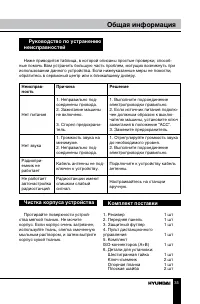
Общая информация 35 Руководство по устранению неисправностей Ниже приводится таблица, в которой описаны простые проверки, способ- ные помочь Вам устранить большую часть проблем, могущих возникнуть при использовании данного устройства. Если нижеуказанные меры не помогли, обратитесь в сервисный центр ...
Page 36 - Технические характеристики; Общие
Общая информация 36 Пружинная шайба 2 шт Винт-саморез 1 шт Болт 1 шт 7. Информация для потребителя 1 шт 8. Гарантийный талон 1 шт 9. Инструкция по эксплуатации 1 шт Технические характеристики Общие Источник питания 12 В постоянного тока Максимальная выходная мощность 4 х 50 ВтРазмеры устройства 178 ...