Page 2 - Contents; Installation
Contents 2 Dear customer! Thank you for purchasing our product. For safety, it is strongly recommended to read this manual carefully before connecting, operating and/or adjusting the product and keep the manual for reference in the future. 121212121213131314141414141415151515151616161617 Table of co...
Page 3 - Before you start; Utilization of the product
Before you start 3 If you want to dispose this product, do not mix it with general household waste. There is a separate collection system for used electronic products in accordance with legislation that requires proper treatment, recovery and recycling. Please contact your local authorities for the ...
Page 4 - Installation/Connection
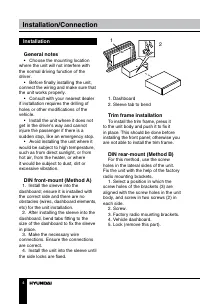
Installation/Connection 4 Installation General notes • Choose the mounting location where the unit will not interfere with the normal driving function of the driver. • Before finally installing the unit, connect the wiring and make sure that the unit works properly. • Consult with your nearest deale...
Page 5 - Dismantling the unit
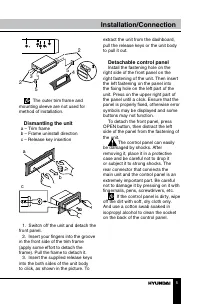
Installation/Connection 5 2 2 5 5 4 3 The outer trim frame and mounting sleeve are not used for method of installation. Dismantling the unit a – Trim frameb – Frame uninstall directionc – Release key insertion c b a 1. Switch off the unit and detach the front panel. 2. Insert your fingers into the g...
Page 6 - Connection; ISO connector; Using the ISO Connector; If your car is equipped with the
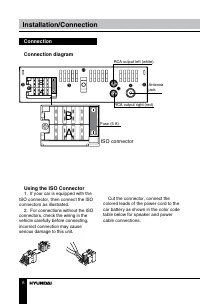
Installation/Connection 6 Connection Connection diagram RCA output left (white) Antennajack RCA output right (red) ISO connector Fuse (5 A) Using the ISO Connector 1. If your car is equipped with the ISO connector, then connect the ISO connectors as illustrated. 2. For connections without the ISO co...
Page 7 - Location; Connector A
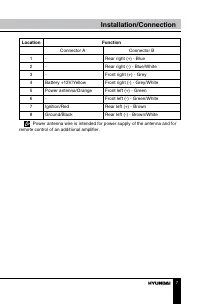
Installation/Connection 7 Location Function Connector A Connector B 1 - Rear right (+) - Blue 2 - Rear right (-) - Blue/White 3 - Front right (+) - Grey 4 Battery +12V/Yellow Front right (-) - Grey/White 5 Power antenna/Orange Front left (+) - Green 6 - Front left (-) - Green/White 7 Ignition/Red Re...
Page 8 - Operation; Control elements; button; Inner panel; Pressing RESET hole will erase
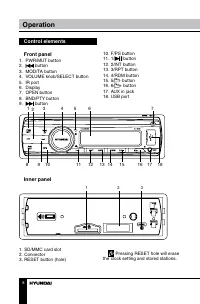
Operation 8 Control elements Front panel 1. PWR/MUT button2. button 3. MOD/TA button4. VOLUME knob/SELECT button5. IR port6. Display7. OPEN button8. BND/PTY button9. button 1 2 3 4 5 6 8 9 10 11 12 13 14 15 16 17 18 7 10. F/PS button11. 1/ button 12. 2/INT button13. 3/RPT button14. 4/RDM button15. 5...
Page 9 - Changing the battery
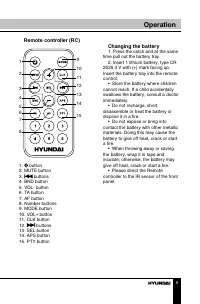
Operation 9 Remote controller (RC) 1 2 3 4 567 8 9 10 11 12 13 14 15 1. button2. MUTE button3. buttons 4. BND button5. VOL- button6. TA button7. AF button8. Number buttons9. MODE button10. VOL+ button11. CLK button12. buttons 13. SEL button14. APS button15. PTY button Changing the battery 1. Press t...
Page 10 - LCD layout
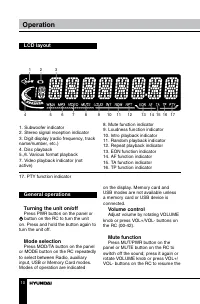
Operation 10 LCD layout 1 2 3 4 5 6 7 8 9 10 11 12 13 14 15 16 17 1. Subwoofer indicator2. Stereo signal reception indicator3. Digit display (radio frequency, track name/number, etc.)4. Disc playback5.,6. Various format playback7. Video playback indicator (not active) 8. Mute function indicator9. Lo...
Page 11 - Radio operations
Operation 11 sound. Loudness Press SELECT button on the panel or SEL button on the RC repeatedly until LOUD ON (OFF) is displayed. Rotate VOLUME knob or press VOL+/VOL- buttons on the RC to select loudness ON or OFF. Activating this feature will enhance bass and treble frequencies when listening to ...
Page 12 - Manual/automatical tuning
Operation 12 Manual/automatical tuning • Press and hold / buttons to display MANUAL. Now you can press these buttons repeatedly to adjust the needed frequency manually. • To adjust the needed frequency automatically, press / buttons. The radio will seek to the next down or up strong and clear freque...
Page 13 - This radio will allow you to select; When PTY is selected, the radio; Other parameter setting; To choose the corresponding option,
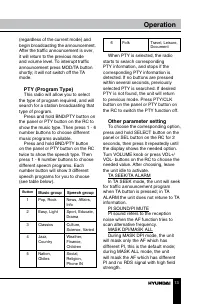
Operation 13 (regardless of the current mode) and begin broadcasting the announcement. After the traffic announcement is over, it will return to the previous mode and volume level. To interrupt traffic announcement press MOD/TA button shortly; it will not switch off the TA mode. PTY (Program Type) T...
Page 15 - Press 2/INT button to play first 10; Repeat; Press 3/RPT button to continuously; Random; Press 4/RDM button to play all the
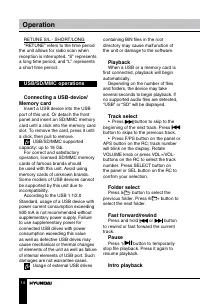
Operation 15 Press 2/INT button to play first 10 seconds of each track consequently. Press again to cancel. Repeat Press 3/RPT button to continuously repeat the current track. Press again to cancel. Random Press 4/RDM button to play all the tracks in the current folder in random order. Press again t...
Page 16 - General information; Troubleshooting; Symptom; Cleaning the unit body
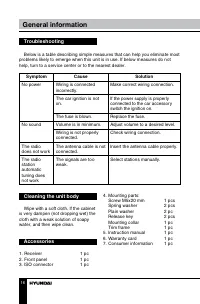
General information 16 Troubleshooting Below is a table describing simple measures that can help you eliminate most problems likely to emerge when this unit is in use. If below measures do not help, turn to a service center or to the nearest dealer. Symptom Cause Solution No power Wiring is connecte...
Page 17 - Specifications; General
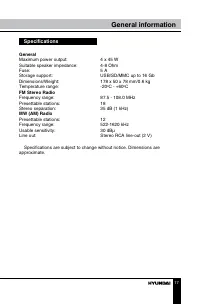
General information 17 Specifications General Maximum power output: 4 x 45 W Suitable speaker impedance: 4-8 Ohm Fuse: 5 A Storage support: USB/SD/MMC up to 16 Gb Dimensions/Weight: 178 х 50 х 78 mm/0.6 kg Temperature range: -20 0 C - +60 0 C FM Stereo Radio Frequency range: 87.5 - 108.0 MHz Presett...
Page 18 - Содержание; Уважаемый покупатель!; Благодарим Вас за покупку нашего изделия. Чтобы понять, как
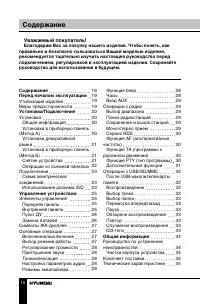
Содержание 18 Уважаемый покупатель! Благодарим Вас за покупку нашего изделия. Чтобы понять, как правильно и безопасно пользоваться Вашей моделью изделия, рекомендуется тщательно изучить настоящее руководство перед подключением, регулировкой и эксплуатацией изделия. Сохраняйте руководство для использ...
Page 19 - Перед началом эксплуатации; Если вы желаете утилизировать данное изделие, не выбрасывайте; Утилизация изделия
Перед началом эксплуатации 19 Если вы желаете утилизировать данное изделие, не выбрасывайте его вместе с обычным бытовым мусором. Существует отдельная си-стема сбора использованных электронных изделий в соответствии с законодательством, которая предполагает соответствующее обраще-ние, возврат и пере...
Page 20 - Установка/Подключение; Установка
Установка/Подключение 20 • Убедитесь, что вы отключили источник питания, если обнаруже-на неправильная работа системы, система издает необычные звуки, запах, выделяет дым или внутрь ее попала жидкость. Проведите квалифицированный технический осмотр системы. • Устройство разработано таким образом, чт...
Page 21 - Установка декоративной
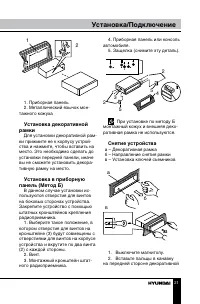
Установка/Подключение 21 2 1 182 53 1. Приборная панель2. Металлический язычок мон- тажного кожуха Установка декоративной рамки Для установки декоративной рам- ки прижмите ее к корпусу устрой-ства и нажмите, чтобы вставить на место. Это необходимо сделать до установки передней панели, иначе вы не см...
Page 22 - Операции со съемной; Наденьте крепежное отверстие
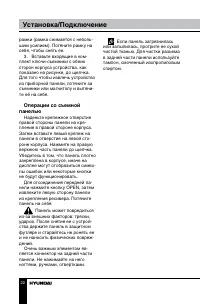
Установка/Подключение 22 рамки (рамка снимается с неболь-шим усилием). Потяните рамку на себя, чтобы снять ее. 3. Вставьте входящие в ком- плект ключи-съемники с обеих сторон корпуса устройства, как показано на рисунке, до щелчка. Для того чтобы извлечь устройство из приборной панели, потяните за съ...
Page 23 - Подключение; • Независимо от размера; Использование разъема; Если в Вашем автомобиле
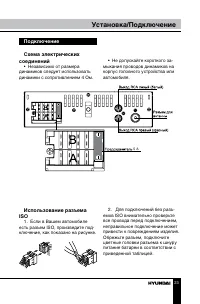
Установка/Подключение 23 Подключение Схема электрических соединений • Независимо от размера динамиков следует использовать динамики с сопротивлением 4 Ом. 5 A • Не допускайте короткого за- мыкания проводов динамиков на корпус головного устройства или автомобиля. Использование разъема ISO 1. Если в В...
Page 24 - Номер; Разъем A
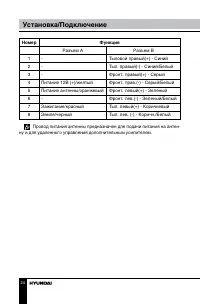
Установка/Подключение 24 Номер Функция Разъем A Разъем B 1 - Тыловой правый(+) - Синий 2 - Тыл. правый(-) - Синий/Белый 3 - Фронт. правый(+) - Серый 4 Питание 12В (+)/желтый Фронт. прав.(-) - Серый/Белый 5 Питание антенны/оранжевый Фронт. левый(+) - Зеленый 6 - Фронт. лев.(-) - Зеленый/Белый 7 Зажиг...
Page 25 - Элементы управления; При нажатии кнопки RESET
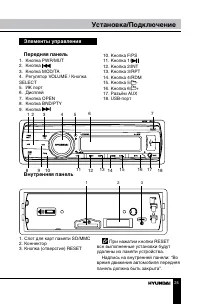
Установка/Подключение 25 Элементы управления Передняя панель 1. Кнопка PWR/MUT2. Кнопка 3. Кнопка MOD/TA4. Регулятор VOLUME / Кнопка SELECT5. ИК порт6. Дисплей7. Кнопка OPEN8. Кнопка BND/PTY9. Кнопка 1 2 3 4 5 6 8 9 10 11 12 13 14 15 16 17 18 7 10. Кнопка F/PS11. Кнопка 1/12. Кнопка 2/INT13. Кнопка ...
Page 26 - Управление устройством; Пульт дистанционного
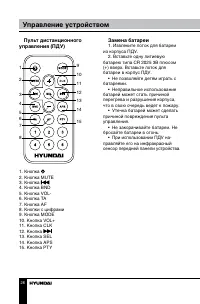
Управление устройством 26 Пульт дистанционного управления (ПДУ) 1 2 3 4 567 8 9 10 11 12 13 14 15 1. Кнопка 2. Кнопка MUTE3. Кнопка 4. Кнопка BND5. Кнопка VOL-6. Кнопка TA7. Кнопка AF8. Кнопки с цифрами9. Кнопка MODE10. Кнопка VOL+11. Кнопка CLK12. Кнопка 13. Кнопка SEL14. Кнопка APS15. Кнопка PTY З...
Page 27 - Основные операции; Нажмите кнопку PWR/MUT на; Выбор режима работы; Нажимайте кнопку MOD на пане-; Регулирование громкости; Вы можете отрегулировать уро-; Приглушение звука
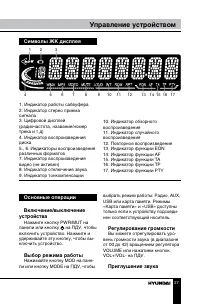
Управление устройством 27 Основные операции Включение/выключение устройства Нажмите кнопку PWR/MUT на панели или кнопку на ПДУ, чтобы включить устройство. Нажмите и удерживайте эту кнопку, чтобы вы-ключить устройство. Выбор режима работы Нажимайте кнопку MOD на пане- ли или кнопку MODE на ПДУ, чтобы...
Page 29 - Операции с радио
Управление устройством 29 В случае правильного подключения аудиосигнал от внешнего источ-ника будет транслироваться через акустику головного устройства. Это дает возможность регулировать громкость и качество звучания. Например, Вы можете подключить MP3-проигрыватель для прослу-шивания записей через ...
Page 30 - Функция TA (программы о
Управление устройством 30 альтернативных частот позволяет приемнику настраиваться на другие станции с тем же идентификацион-ным кодом, что и текущая станция, но с более сильным сигналом. При этом вместо частоты на дисплее появится название станции. Нажмите и удерживайте кнопку SEL, чтобы включить ил...
Page 31 - При включенной функции PTY; Дополнительные функции; Для выбора нужной функции
Управление устройством 31 2 легкая музыка,легкая клас-сическая музыка спортивные новости,образователь-ные программы,радиопостанов-ки и сериалы 3 клас-сическая музыка культурные про-граммынаука и техникаразвлекатель-ные программы 4 джаз,музыка кантри метеорологи-ческая инфор-мациякоммерция, торговля ...
Page 32 - накопителя/карты памяти
Управление устройством 32 которую Вы прослушиваете, может быть замещена другой программой, которая вещает на той же частоте. Чтобы этого избежать, активируй-те функцию MASK DPI. В режиме MASK DPI устройство маскирует только альтернативные частоты с разными информационными про-граммами. В режиме MASK...
Page 34 - Причина; Чистка корпуса устройства
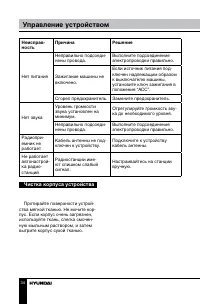
Управление устройством 34 Неисправ-ность Причина Решение Нет питания Неправильно подсоеди- нены провода. Выполните подсоединение электропроводки правильно. Зажигание машины не включено. Если источник питания под- ключен надлежащим образом к выключателю машины, установите ключ зажигания в положение “...
Page 35 - Общая информация; Комплект поставки; Технические характеристики; Общие
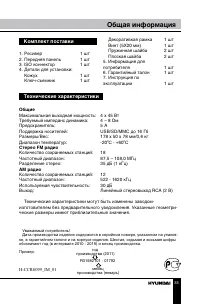
Общая информация 35 Комплект поставки 1. Ресивер 1 шт 2. Передняя панель 1 шт 3. ISO коннектор 1 шт 4. Детали для установки: Кожух 1 шт Ключ-съемник 1 шт Уважаемый потребитель! Дата производства изделия содержится в серийном номере, указанном на упаков- ке, в гарантийном талоне и на корпусе изделия....