Page 3 - Utilization of the product
2 3 Table of contents Before you start If you want to dispose this product, do not mix it with general household waste. There is a separate collection system for used electronic products in accordance with legislation that requires proper treatment, recovery and recycling. Please contact your local ...
Page 4 - Installation/Connection; Installation
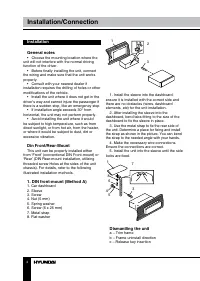
4 Installation/Connection Installation General notes • Choose the mounting location where the unit will not interfere with the normal driving function of the driver. • Before finally installing the unit, connect the wiring and make sure that the unit works properly. • Consult with your nearest deale...
Page 5 - Trim frame installation
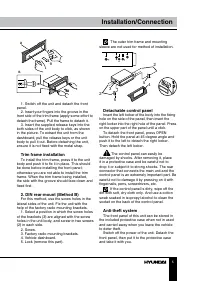
5 Installation/Connection в б а 1. Switch off the unit and detach the front panel. 2. Insert your fingers into the groove in the front side of the trim frame (apply some effort to detach the frame). Pull the frame to detach it. 3. Insert the supplied release keys into the both sides of the unit body...
Page 6 - Connection; ISO connection table; Location; Connector A
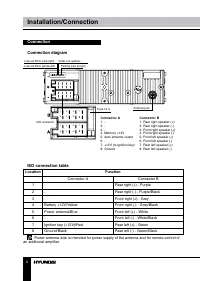
6 Installation/Connection Connection Connection diagram 1 1 3 3 5 5 7 7 2 2 4 4 6 6 8 8 Parking wire (brown) Video out (yellow) ISO connector Line out RCA (red=right) Antenna jack Fuse 15 A Line out RCA (white=left) Connector A 1. -2. -3. -4. Memory +12V5. Auto antenna output6. -7. +12V (to ignition...
Page 7 - Using the ISO Connector; If your car is equipped with the ISO; Parking wire connection
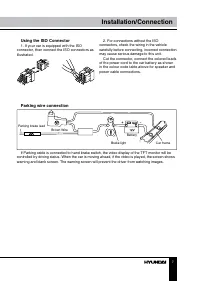
7 Installation/Connection Using the ISO Connector 1. If your car is equipped with the ISO connector, then connect the ISO connectors as illustrated. 2. For connections without the ISO connectors, check the wiring in the vehicle carefully before connecting, incorrect connection may cause serious dama...
Page 8 - Control elements; button; Inner panel; Pressing RESET hole will erase the
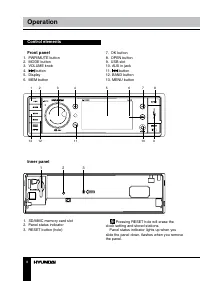
8 9 Operation Operation Control elements Front panel 1. PWR/MUTE button2. MODE button3. VOLUME knob4. button 5. Display6. MEM button 1 2 3 4 5 6 7 8 13 12 11 10 9 7. OK button8. OPEN button9. USB slot10. AUX in jack11. button 12. BAND button13. MENU button Inner panel 1 2 3 1. SD/MMC memory card slo...
Page 9 - Remote controller
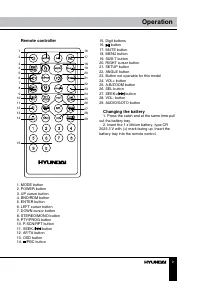
8 9 Operation Operation Remote controller 1 2 345678 9 10 16 17 181920212223242526272829 11121314 15 1. MODE button2. POWER button3. UP cursor button4. BND/RDM button5. ENTER button6. LEFT cursor button7. DOWN cursor button8. STEREO/MONO button9. PTY/PROG button10. P.SCN/RPT button11. SEEK-/ button ...
Page 10 - Operation; General operations
10 Operation ST: Set radio reception at STEREO or MONO mode. Improvement of reception of distant stations can be done by selecting mono mode, which may cut down some reception noise. To select stereo or mono you can also press STEREO/MONO button on the RC. Time: Set the current time.Time: Select 12-...
Page 11 - Radio operations
11 Operation Sub-w: not functional for this model. Mode setting Press MODE button to select between unit operation modes: TUNER => USB => Card => AV IN. AV IN jack AV input jack is intended for connecting an external audio or video equipment to amplify the sound. If connection is made corre...
Page 13 - Stop playback
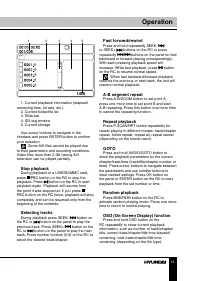
12 13 Operation Operation 1 2 3 4 5 1. Current playback information (elapsed/ remaining time, bit rate, etc.) 2. Current folder/file list3. Slide bar4. ID3-tag window5. Current storage Use cursor buttons to navigate in the interface and press ENTER button to confirm your selection. Some AVI files ca...
Page 14 - Changing angle
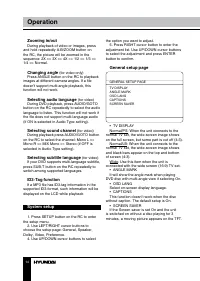
14 Operation Zooming in/out During playback of video or images, press and hold repeatedly A-B/ZOOM button on the RC, the picture will be zoomed in the sequence: 2X => 3X => 4X => 1/2 => 1/3 => 1/4 => Normal. Changing angle (for video only) Press ANGLE button on the RC to playback i...
Page 15 - Speaker setup
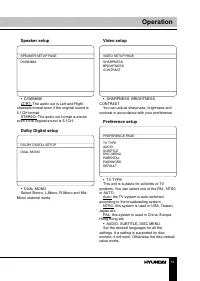
15 Operation Speaker setup SPEAKER SETUP PAGE DOWNMIX • DOWNMIXLT/RT: The audio out is Left and Right channels format even if the original sound is 5.1CH format. STEREO: The audio out format is stereo even if the original sound is 5.1CH. Dolby Digital setup DOLBY DIGITAL SETUP DUAL MONO • DUAL MONOS...
Page 16 - The rating can be selected only under the; In order to make the Parental feature works,
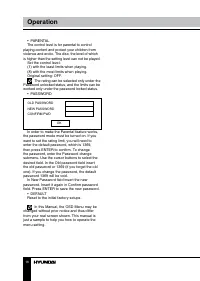
16 Operation • PARENTALThe control level is for parental to control playing content and protect your children from violence and erotic. The disc, the level of which is higher than the setting level can not be played. Set the control level:(1) with the least limits when playing.(8) with the most limi...
Page 17 - General information; Accessories; Symptom
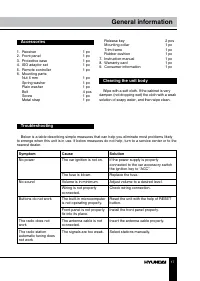
17 General information Accessories 1. Receiver 1 pc 2. Front panel 1 pc 3. Protective case 1 pc 4. ISO adaptor set 1 pc 5. Remote controller 1 pc 6. Mounting parts: Nut 5 mm 1 pc Spring washer 1 pc Plain washer 1 pc Bolt 4 pcs Screw 1 pc Metal strap 1 pc Release key 2 pcs Mounting collar 1 pc Trim f...
Page 18 - Specifications; General
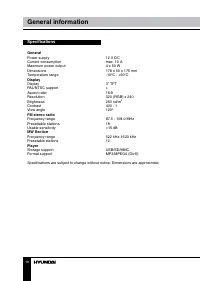
18 General information Specifications General Power supply 12 V DC Current consumption max. 10 A Maximum power output 4 x 50 W Dimensions 178 x 50 x 175 mm Temperature range -10 0 C - +60 0 C Display Display 3” TFT PAL/NTSC support + Aspect ratio 16:9 Resolution 320 (RGB) x 240 Brightness 250 cd/m 2...
Page 19 - Содержание; Уважаемый покупатель!; Установка/Подключение
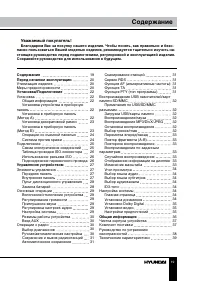
19 Содержание Уважаемый покупатель! Благодарим Вас за покупку нашего изделия. Чтобы понять, как правильно и безо- пасно пользоваться Вашей моделью изделия, рекомендуется тщательно изучить на-стоящее руководство перед подключением, регулировкой и эксплуатацией изделия. Сохраняйте руководство для испо...
Page 20 - Утилизация изделия
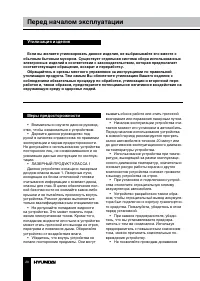
20 21 Перед началом эксплуатации Перед началом эксплуатации Если вы желаете утилизировать данное изделие, не выбрасывайте его вместе с обычным бытовым мусором. Существует отдельная система сбора использованных электронных изделий в соответствии с законодательством, которая предполагает соответствующ...
Page 21 - • Убедитесь, что источник питания и
20 21 Перед началом эксплуатации Перед началом эксплуатации соприкасаться друг с другом или с корпу-сом автомобиля после включения устрой-ства. В противном случае усилитель может быть перегружен или выйти из строя. • Убедитесь, что источник питания и антенна отключены, если Вы не будете пользоваться...
Page 22 - Установка; Установка устройства
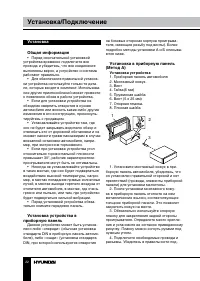
22 23 Установка/Подключение Установка/Подключение Установка Общая информация • Перед окончательной установкой устройства временно подключите все провода и убедитесь, что все соединения выполнены верно, а устройство и система работают правильно. • Для обеспечения правильной установ- ки устройства исп...
Page 23 - Снятие устройства; Установка декоративной рамки
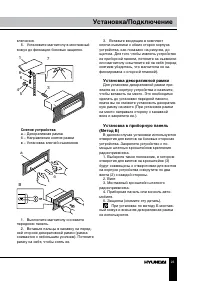
22 23 Установка/Подключение Установка/Подключение ключения. 5. Установите магнитолу в монтажный кожух до фиксации боковых защелок. 3 5 4 6 8 1 7 Снятие устройства а – Декоративная рамкаб – Направление снятия рамкив – Установка ключей съемников B б а 1. Выключите магнитолу и снимите переднюю панель. ...
Page 24 - Операции со съемной панелью
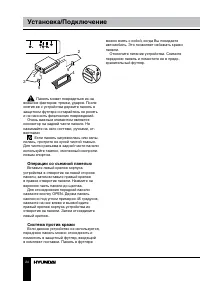
24 25 Установка/Подключение Установка/Подключение 2 2 5 5 4 3 Панель может повредиться из-за внешних факторов: тряски, ударов. После снятия ее с устройства держите панель в защитном футляре и старайтесь не ронять и не наносить физических повреждений. Очень важным элементом является коннектор на задн...
Page 25 - Подключение
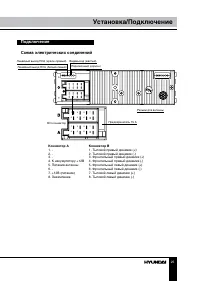
24 25 Установка/Подключение Установка/Подключение Подключение Схема электрических соединений Парковочный (коричн.) Видевыход (желтый) ISO-коннектор Линейный выход RCA (красн=правый) Разъем для антенны Предохранитель 15 A Линейный выход RCA (белый=левый) 1 1 3 3 5 5 7 7 2 2 4 4 6 6 8 8 Коннектор A 1....
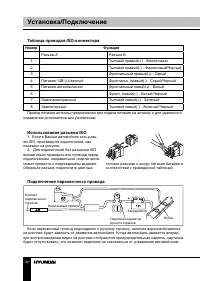
Page 26 - Таблица проводов ISO-коннектора; Номер; Разъем A; Использование разъема ISO; Для подключений без разъемов ISO; Подключение парковочного провода
26 27 Установка/Подключение Управление устройством Таблица проводов ISO-коннектора Номер Функция Разъем A Разъем B 1 - Тыловой правый(+) - Фиолетовый 2 - Тыловой правый(-) - Фиолетовый/Черный 3 - Фронтальный правый(+) - Серый 4 Питание 12В (+)/желтый Фронтальн. правый(-) - Серый/Черный 5 Питание ант...
Page 27 - Элементы управления; При нажатии кнопки RESET все
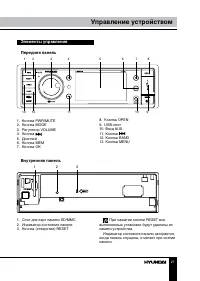
26 27 Установка/Подключение Управление устройством Элементы управления Передняя панель 1 2 3 4 5 6 7 8 13 12 11 10 9 1. Кнопка PWR/MUTE2. Кнопка MODE3. Регулятор VOLUME4. Кнопка 5. Дисплей6. Кнопка MEM7. Кнопка OK 8. Кнопка OPEN9. USB-слот10. Вход AUX11. Кнопка 12. Кнопка BAND13. Кнопка MENU Внутрен...
Page 28 - Пульт дистанционного управления; Извлеките лоток для батареи из
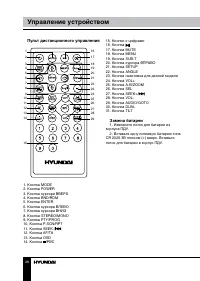
28 29 Управление устройством Управление устройством Пульт дистанционного управления 1 2 345678 9 10 16 17 181920212223242526272829 11121314 15 1. Кнопка MODE2. Кнопка POWER3. Кнопка курсора ВВЕРХ4. Кнопка BND/RDM5. Кнопка ENTER6. Кнопка курсора ВЛЕВО7. Кнопка курсора ВНИЗ8. Кнопка STEREO/MONO9. Кноп...
Page 29 - Основные операции
28 29 Управление устройством Управление устройством Основные операции Включение/выключение устройства Нажмите кнопку POWER/MUTE на передней панели или кнопку POWER на ПДУ, чтобы включить устройство. Нажмите и удерживайте эту кнопку, чтобы отключить питание устройства. Регулирование громкости Вращайт...
Page 30 - Режимы работы устройства
30 31 Управление устройством Управление устройством вируйте функцию ALL. TA: SEEK/ALARM. В режиме TA SEEK, устройство будет искать станции передаю-щие информацию о дорожном движении; в режиме TA ALARM, поиск не идет, но когда произойдет происшествие или чрезвычай-ная ситуация на дорогах, то устройст...
Page 32 - Воспроизведение USB
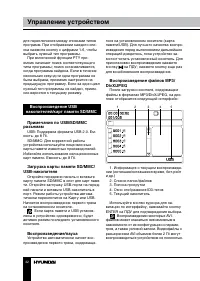
32 33 Управление устройством Управление устройством для переключения между списками типов программ. При отображении каждого спи-ска нажмите кнопку с цифрами 1-6, чтобы выбрать нужный тип программы. При включенной функции PTY при- емник начинает поиск соответствующего типа программы; поиск останавлив...
Page 34 - Настройка системы
34 35 Управление устройством Управление устройством функция доступна только для файлов, со-держащих эпизоды, снятые под нескольки-ми углами. Выбор языка аудио (для видео) Нажимайте кнопку AUDIO/GOTO на ПДУ для выбора нужного языка аудио. Данная функция доступна только для файлов, поддерживающих неск...
Page 35 - Установка динамиков; КОНТРАСТНОСТЬ; Настройки предпочтений; Эти параметры могут быть изначально
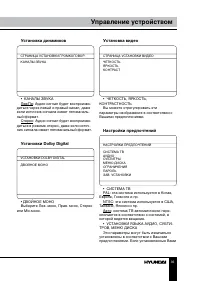
34 35 Управление устройством Управление устройством Установка динамиков СТРАНИЦА УСТАНОВКИ ГРОМКОГОВОР. КАНАЛЫ ЗВУКА • КАНАЛЫ ЗВУКАЛев/Пр: Аудио сигнал будет воспроизво- диться через левый и правый канал, даже если источник сигнала имеет пятиканаль-ный формат. Стерео: Аудио сигнал будет воспроизво- ...
Page 36 - Если установлен пароль, при выборе; Сначала введите старый пароль или 1369
36 37 Управление устройством Общая информация параметры поддерживаются содержанием файла, то воспроизведение будет проис-ходить с учетом Ваших настроек. Иначе будут использоваться установки, заданные по умолчанию. • ОГРАНИЧЕНИЯЭта функция предназначена для контроля родителями содержимого видеофайлов...
Page 37 - Чистка корпуса устройства
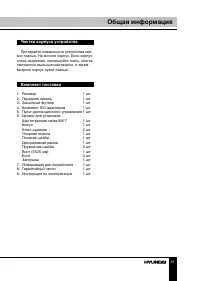
36 37 Управление устройством Общая информация Чистка корпуса устройства Протирайте поверхности устройства мяг- кой тканью. Не мочите корпус. Если корпус очень загрязнен, используйте ткань, слегка смоченную мыльным раствором, и затем вытрите корпус сухой тканью. Комплект поставки 1. Ресивер 1 шт 2. П...
Page 38 - Руководство по устранению; Неисправность Причина
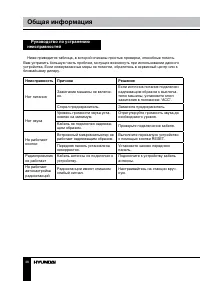
38 39 Общая информация Общая информация Руководство по устранению неисправностей Ниже приводится таблица, в которой описаны простые проверки, способные помочь Вам устранить большую часть проблем, могущих возникнуть при использовании данного устройства. Если нижеуказанные меры не помогли, обратитесь ...
Page 39 - Технические характеристики; Общие
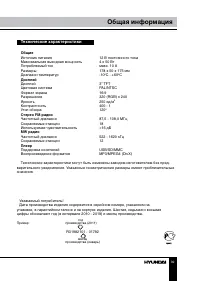
38 39 Общая информация Общая информация Технические характеристики Общие Источник питания 12 В постоянного тока Максимальная выходная мощность 4 х 50 Вт Потребляемый ток макс. 10 А Размеры 178 х 50 х 175 мм Диапазон температур -10 0 С - +60 0 С Дисплей Дисплей 3” TFT Цветовая система PAL/NTSC Формат...