Page 2 - Table of contents
2 Table of contents Dear customer! Thank you for purchasing our product. For safety, it is strongly recommended to read this manual carefully before connecting, operating and/or adjusting the product and keep the manual for reference in the future. 1313131313131313141414141414141414141415 Table of c...
Page 3 - Utilization of the product
3 Table of contents If you want to dispose this product, do not mix it with general household waste. There is a separate collection system for used electronic products in accordance with legislation that requires proper treatment, recovery and recycling. Please contact your local authorities for the...
Page 4 - Before you start; Installation
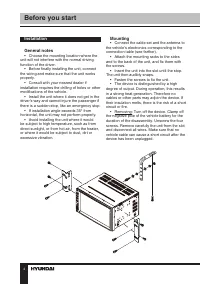
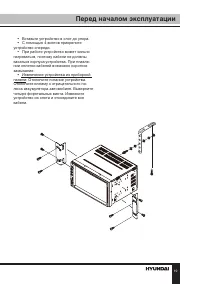
4 Before you start Installation General notes • Choose the mounting location where the unit will not interfere with the normal driving function of the driver. • Before finally installing the unit, connect the wiring and make sure that the unit works properly. • Consult with your nearest dealer if in...
Page 5 - Installation/Connection; Detachable control panel
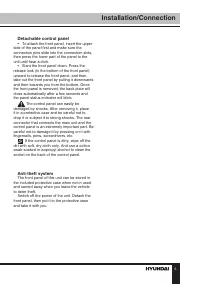
5 Installation/Connection Detachable control panel • To attach the front panel, insert the upper side of the panel first and make sure the connection pins slide into the connection slots, then press the lower part of the panel to the unit until hear a click. • Slant the front panel down. Press the r...
Page 6 - Connection
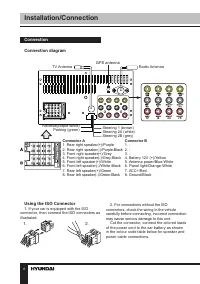
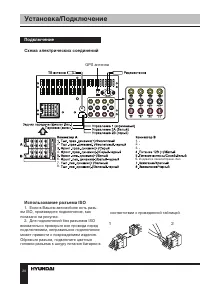
6 Installation/Connection Connection Connection diagram Using the ISO Connector 1. If your car is equipped with the ISO connector, then connect the ISO connectors as illustrated. 2. For connections without the ISO connectors, check the wiring in the vehicle carefully before connecting, incorrect con...
Page 7 - ISO connection table; Location
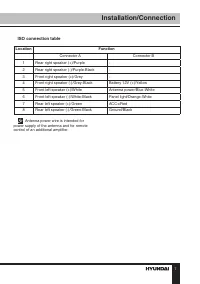
7 Installation/Connection ISO connection table Location Function Connector A Connector B 1 Rear right speaker (+)/Purple - 2 Rear right speaker (-)/Purple-Black - 3 Front right speaker (+)/Grey - 4 Front right speaker (-)/Grey-Black Battery 12V (+)/Yellow 5 Front left speaker (+)/White Antenna power...
Page 8 - Parking wire connection
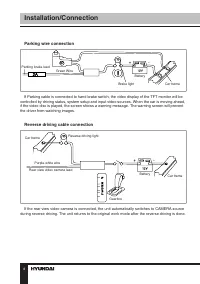
8 Installation/Connection Parking wire connection Parking brake lead Brake light Car frame Battery Green Wire If Parking cable is connected to hand brake switch, the video display of the TFT monitor will be controlled by driving status, system setup and input video sources. When the car is moving ah...
Page 9 - Control elements
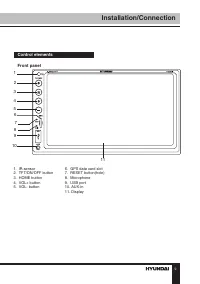
9 Installation/Connection Control elements Front panel 1. IR-sensor 6. GPS data card slot 2. TFT/ON/OFF button 7. RESET button(hole) 3. HOME button 8. Microphone 4. VOL+ button 9. USB port 5. VOL- button 10. AUX-in 11. Display 1 2 3 4 5 6 7 9 8 10 11 G
Page 10 - Operation; Changing the battery
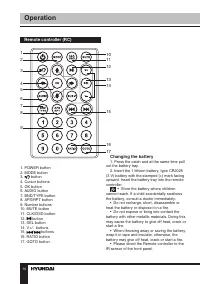
10 Operation Remote controller (RC) 1. POWER button2. MODE button3. button 4. Cursor buttons5. OK button6. AUDIO button7. BND/TYPE button8. APS/RPT button9. Number buttons10. MUTE button11. CLK/OSD button12. button 13. SEL button14. V+/- buttons15. / buttons 16. RATIO button17. GOTO button Changing ...
Page 11 - General operations
11 Operation General operations Touch screen Due to the touch screen, you can fulfill most functions not only by pressing buttons but also by touching the options you need. Turning the unit on/off Press the POWER Button to turn the unit on. When the unit is on, press the POWER Button once to turn th...
Page 12 - Radio operation
12 Operation Rear view camera function The rear view camera input is on the back of the unit. (refer to wiring diagram). This input (in yellow) is for connecting backup camera for parking. You must connect the VCC wire (in pink color) to the reverse gear switch in order to activate this video input ...
Page 13 - USB/micro SD operations
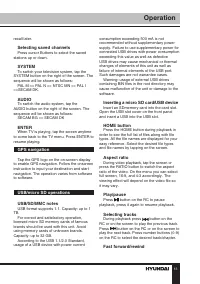
13 Operation recall later. Selecting saved channels Press cursor Buttons to select the saved stations up or down. SYSTEM To switch your television system, tap the SYSTEM button on the right of the screen. The sequence will be shown as follows: PAL M => PAL N => NTSC MN => PAL I =>SECAM D...
Page 14 - Other settings; Accessories
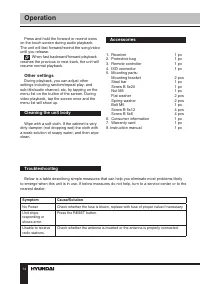
14 Operation Press and hold the forward or rewind icons on the touch screen during audio playback. The unit will fast forward/rewind the song/video until you release. When fast backward/forward playback reaches the previous or next track, the unit will resume normal playback. Other settings During p...
Page 15 - Specifications
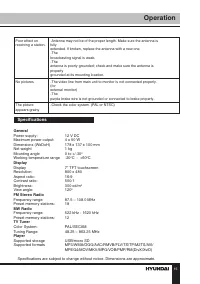
15 Operation Poor effect on receiving a station. -Antenna may not be of the proper length. Make sure the antenna isfullyextended. If broken, replace the antenna with a new one.-Thebroadcasting signal is weak.-Theantenna is poorly grounded; check and make sure the antenna isproperlygrounded at its mo...
Page 16 - Уважаемый покупатель!; Установка/Подключение; Содержание
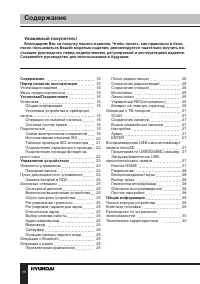
25 Уважаемый покупатель! Благодарим Вас за покупку нашего изделия. Чтобы понять, как правильно и безо- пасно пользоваться Вашей моделью изделия, рекомендуется тщательно изучить на-стоящее руководство перед подключением, регулировкой и эксплуатацией изделия. Сохраняйте руководство для использования в...
Page 17 - Утилизация изделия
Содержание 26 17 Если вы желаете утилизировать данное изделие, не выбрасывайте его вместе с обычным бытовым мусором. Существует отдельная система сбора использованных электронных изделий в соответствии с законодательством, которая предполагает соответствующее обращение, возврат и переработку. Обраща...
Page 18 - Перед началом эксплуатации; Установка
27 Перед началом эксплуатации соприкасаться друг с другом или с корпу-сом автомобиля после включения устрой-ства. В противном случае усилитель может быть перегружен или выйти из строя. • Убедитесь, что источник питания и антенна отключены, если Вы не будете пользоваться устройством в течение дли-тел...
Page 20 - Подключение
29 Установка/Подключение 20 Подключение Схема электрических соединений Использование разъема ISO 1. Если в Вашем автомобиле есть разъ- ем ISO, произведите подключение, как показано на рисунке. 2. Для подключений без разъемов ISO внимательно проверьте все провода перед подключением, неправильное подк...
Page 21 - Таблица проводов ISO-коннектора; жение
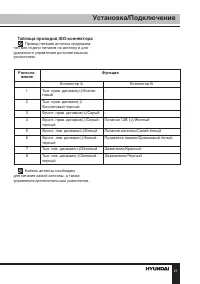
Установка/Подключение 30 21 Таблица проводов ISO-коннектора Провод питания антенны предназна- чен для подачи питания на антенну и для удаленного управления дополнительным усилителем. Располо- жение Функция Коннектор A Коннектор B 1 Тыл. прав. динамик(+)/Фиоле- товый - 2 Тыл. прав. динамик(-)/ Фиолет...
Page 22 - Подключение парковочного провода
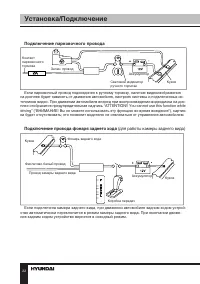
31 Установка/Подключение Подключение парковочного провода Контакт парковочного тормоза Световой индикатор ручного тормоза Кузов Аккумулятор Зелен. провод Если парковочный провод подсоединен к ручному тормозу, наличие видеоизображения на дисплее будет зависеть от движения автомобиля, настроек системы...
Page 23 - Элементы управления
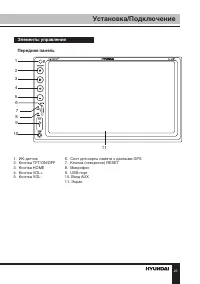
Установка/Подключение 32 23 Элементы управления Передняя панель 1. ИК-датчик 6. Слот для карты памяти c данными GPS 2. Кнопка TFT/ON/OFF 7. Кнопка (отверстие) RESET 3. Кнопка HOME 8. Микрофон 4. Кнопка VOL+ 9. USB-порт 5. Кнопка VOL- 10. Вход AUX 11. Экран 1 2 3 4 5 6 7 9 8 10 11 G
Page 24 - Управление устройством; Пульт дистанционного управления
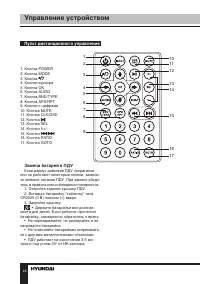
33 Управление устройством Пульт дистанционного управления 1. Кнопка POWER2. Кнопка MODE3. Кнопка 4. Кнопки курсора5. Кнопка OK6. Кнопка AUDIO7. Кнопка BND/TYPE8. Кнопка APS/RPT9. Кнопки с цифрами10. Кнопка MUTE11. Кнопка CLK/OSD 12. Кнопка 13. Кнопка SEL14. Кнопки V+/- 15. Кнопки / 16. Кнопка RATIO1...
Page 25 - Основные операции
Установка/Подключение 34 25 Основные операции Сенсорный дисплей Данное устройство оснащено сенсорным дисплеем, позволяющим выполнять многие операции путем прикосновения к сенсор-ным кнопкам дисплея. Включение/выключение Нажмите кнопку POWER, чтобы включить устройство. Когда устройство включено, нажм...
Page 26 - Операции с радио
35 Управление устройством устройства. (см. схему подключения) Этот разъём (жёлтый) служит для подключения дополнительного монитора(мониторов). По-советуйтесь с продавцом о совместимости моделей мониторов и Вашего автомобиля.. Нажимайте кнопку “BND/TYPE ” для пере-ключения между режимами PAL и NTSC. ...
Page 27 - Операции с ТВ-тюнером
Управление устройством 36 27 удерживая кнопку SEL. Перезаписанные станции будут отображены в списке на месте старых. Mono/Stereo Для включения/отключения режима стерео в режиме радио нажмите на кнопку ST на сенсорном дисплее. Линия связи Чтобы переключаться межу локальными и удалёнными станциями, на...
Page 28 - Чистка корпуса устройства
37 Управление устройством лей. Избегайте использования нелицензи-онных карт памяти. Емкость: до 32 ГБ. Согласно стандарту USB 1.1/2.0 исполь- зование USB-устройства с током потребле-ния более 500 мА не рекомендуется без использования дополнительного источника питания. Подключение без дополнительно-г...
Page 29 - Комплект поставки; Признаки
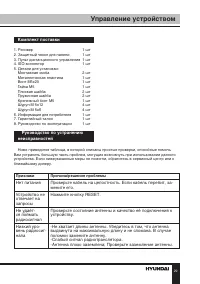
Управление устройством 38 29 Комплект поставки 1. Ресивер 1 шт 2. Защитный чехол для панели 1 шт 3. Пульт дистанционного управления 1 шт4. ISO-коннектор 1 шт 5. Детали для установки: Монтажная скоба 2 шт Металлическая пластина 1 шт Винт M5х20 1 шт Гайка M5 1 шт Плоская шайба 2 шт Пружинная шайба 2 ш...
Page 30 - ния; Технические характеристики; Общие
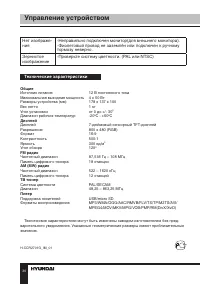
39 Управление устройством Нет изображе- ния -Неправильно подключен монитор(для внешнего монитора). -Фиолетовый провод не заземлён или подключен к ручному тормозу неверно. Зернистое изображение -Проверьте систему цветности. (PAL или NTSC) Технические характеристики Общие Источник питания 12 В постоян...