Page 2 - HyperX Pulsefire Core; TM; Part numbers
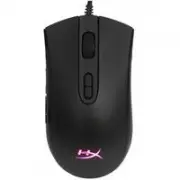
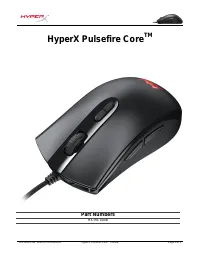
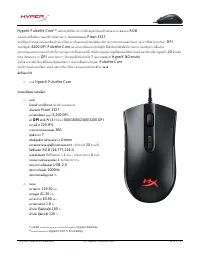
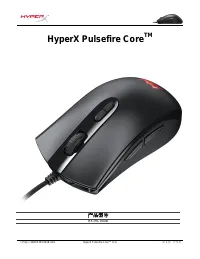
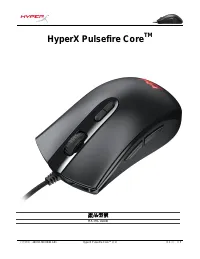
Document No. 480HX-MC004B.A01 HyperX Pulsefire Core TM Mouse Page 1 of 5 HyperX Pulsefire Core TM Part numbers HX-MC004B
Page 5 - Preset 1
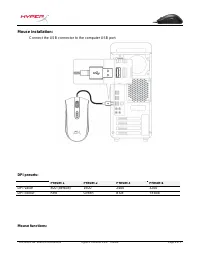
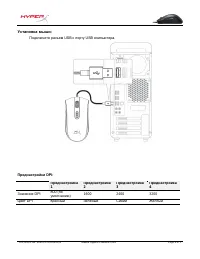
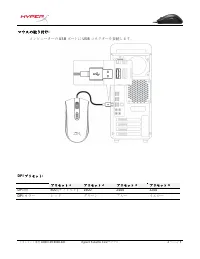
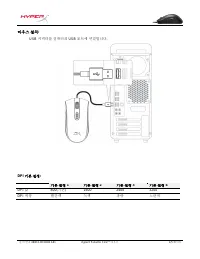
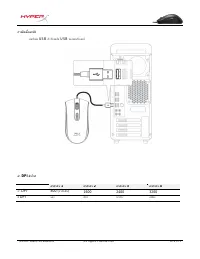
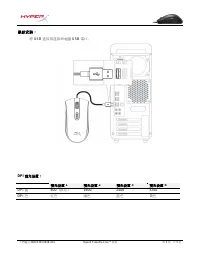
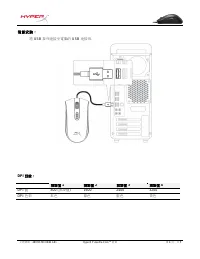
Document No. 480HX-MC004B.A01 HyperX Pulsefire Core TM Mouse Page 4 of 5 Mouse installation: Connect the USB connector to the computer USB port. DPI presets: Preset 1 Preset 2 Preset 3 Preset 4 DPI value 800 (default) 1600 2400 3200 DPI colour Red Green Blue Yellow Mouse functions:
Page 6 - Change between DPI presets. Default values are:
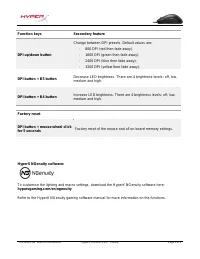
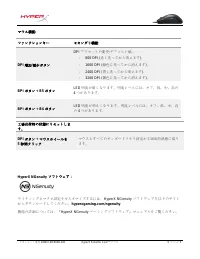
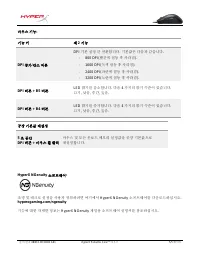
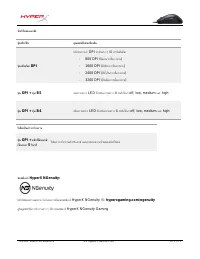
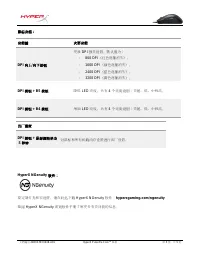
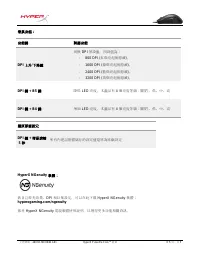
Document No. 480HX-MC004B.A01 HyperX Pulsefire Core TM Mouse Page 5 of 5 Function keys Secondary feature DPI up/down button Change between DPI presets. Default values are: - 800 DPI (red then fade away). - 1600 DPI (green then fade away). - 2400 DPI (blue then fade away). - 3200 DPI (yellow then fad...
Page 7 - Códigos de artículo
N.º de documento 480HX-MC004B.A01 Ratón HyperX Pulsefire Core TM Mouse Página 1 de 5 HyperX Pulsefire Core TM Códigos de artículo HX-MC004B
Page 8 - Durabilidad de los botones izquierdo/derecho:
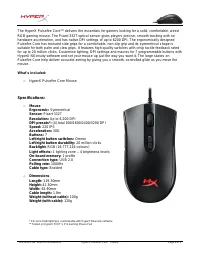
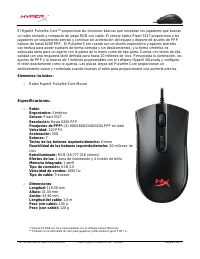
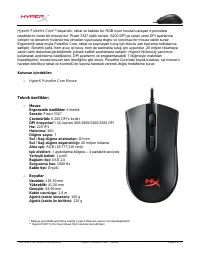
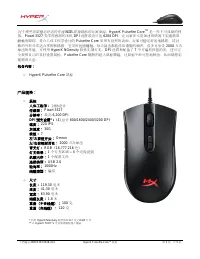
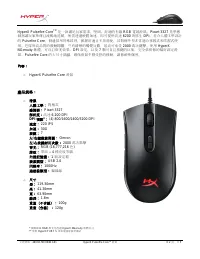
N.º de documento 480HX-MC004B.A01 Ratón HyperX Pulsefire Core TM Mouse Página 2 de 5 Elementos incluidos: o Ratón HyperX Pulsefire Core Mouse Especificaciones: o Ratón Ergonómico: Simétrico Sensor: Pixart 3327 Resolución: Hasta 6200 PPP Preajustes de PPP*: (4) 800/1600/2400/3200 PPP en total Velocid...
Page 9 - Resumen
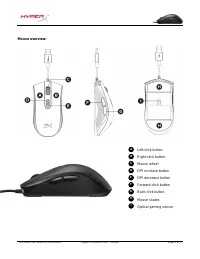
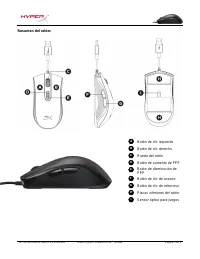
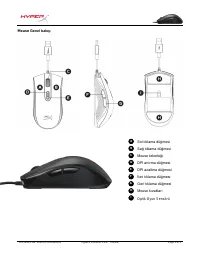
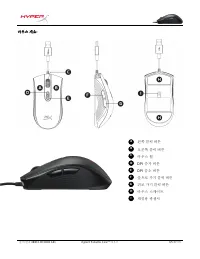
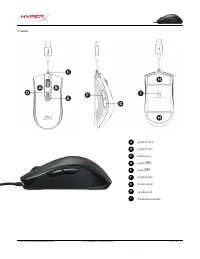
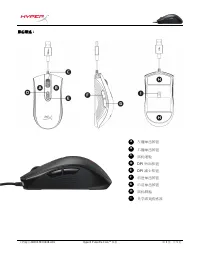
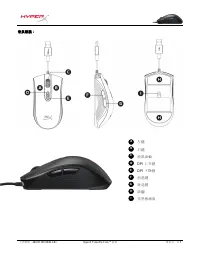
N.º de documento 480HX-MC004B.A01 Ratón HyperX Pulsefire Core TM Mouse Página 3 de 5 Resumen del ratón: Botón de clic izquierdo Botón de clic derecho Rueda del ratón Botón de aumento de PPP Botón de disminución de PPP Botón de clic de avance Botón de clic de retroceso Placas inferiores del ratón Sen...
Page 10 - Instalación del ratón:; Preajuste 1
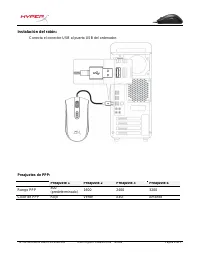
N.º de documento 480HX-MC004B.A01 Ratón HyperX Pulsefire Core TM Mouse Página 4 de 5 Instalación del ratón: Conecta el conector USB al puerto USB del ordenador. Preajustes de PPP: Preajuste 1 Preajuste 2 Preajuste 3 Preajuste 4 Rango PPP 800 (predeterminado) 1600 2400 3200 Color de PPP Rojo Verde Az...
Page 12 - Artikelnummern
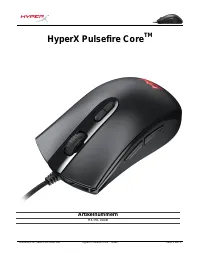
Dokument Nr. 480HX-MC004B.A01 HyperX Pulsefire Core TM Maus Seite 1 von 5 HyperX Pulsefire Core TM Artikelnummern HX-MC004B
Page 13 - Geschwindigkeit
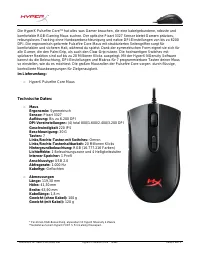
Dokument Nr. 480HX-MC004B.A01 HyperX Pulsefire Core TM Maus Seite 2 von 5 Im Lieferumfang: o HyperX Pulsefire Core Maus Technische Daten: o Maus Ergonomie: Symmetrisch Sensor: Pixart 3327 Auflösung: Bis zu 6.200 DPI DPI-Voreinstellungen: (4) total 800/1.600/2.400/3.200 DPI Geschwindigkeit 220 IPS Be...
Page 14 - Die Maus
Dokument Nr. 480HX-MC004B.A01 HyperX Pulsefire Core TM Maus Seite 3 von 5 Die Maus im Überblick: Linke Maustaste Rechte Maustaste Mausrad DPI-Plus-Taste DPI-Minus-Taste Vorwärtstaste Rückwärtstaste Mausrollen Optischer Gaming-Sensor I H G F E D C - B A
Page 15 - Verbinde den USB-Stecker mit dem USB-Anschluss des Computers.; Voreinstellung 1; Rot
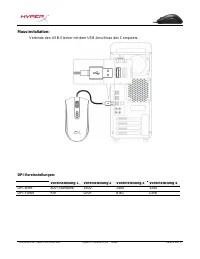
Dokument Nr. 480HX-MC004B.A01 HyperX Pulsefire Core TM Maus Seite 4 von 5 Mausinstallation: Verbinde den USB-Stecker mit dem USB-Anschluss des Computers. DPI-Voreinstellungen: Voreinstellung 1 Voreinstellung 2 Voreinstellung 3 Voreinstellung 4 DPI-Wert 800 (Standard) 1600 2400 3200 DPI-Farbe Rot Grü...
Page 16 - Funktionstasten
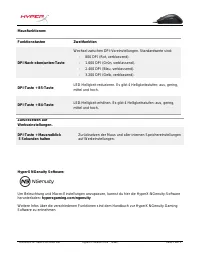
Dokument Nr. 480HX-MC004B.A01 HyperX Pulsefire Core TM Maus Seite 5 von 5 Mausfunktionen: Funktionstasten Zweitfunktion DPI Nach-oben/unten-Taste Wechsel zwischen DPI-Voreinstellungen. Standardwerte sind: - 800 DPI (Rot, verblassend). - 1.600 DPI (Grün, verblassend). - 2.400 DPI (Blau, verblassend)....
Page 17 - Références produits
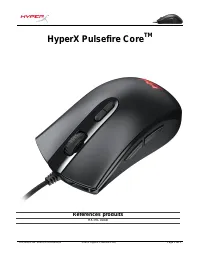
Document No. 480HX-MC004B.A01 Souris HyperX Pulsefire Core TM Page 1 de 5 HyperX Pulsefire Core TM Références produits HX-MC004B
Page 18 - Interrupteurs des boutons gauche/ droit :
Document No. 480HX-MC004B.A01 Souris HyperX Pulsefire Core TM Page 2 de 5 Le produit inclut : o Souris HyperX Pulsefire Core Spécifications : o Souris Ergonomie : Symétrique Capteur : Pixart 3327 Résolution : jusqu'à 6 200 PPP Profils* PPP : (4) total 800/1600/2400/3200 PPP Vitesse : 220 IPS Accélér...
Page 19 - Souris
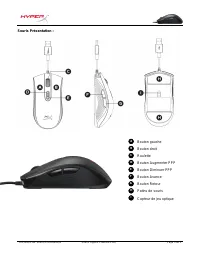
Document No. 480HX-MC004B.A01 Souris HyperX Pulsefire Core TM Page 3 de 5 Souris Présentation : Bouton gauche Bouton droit Roulette Bouton Augmenter PPP Bouton Diminuer PPP Bouton Avance Bouton Retour Patins de souris Capteur de jeu optique I H G F E D C B A
Page 20 - Installation de la souris :; Profil 1
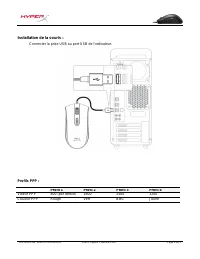
Document No. 480HX-MC004B.A01 Souris HyperX Pulsefire Core TM Page 4 de 5 Installation de la souris : Connecter la prise USB au port USB de l'ordinateur. Profils PPP : Profil 1 Profil 2 Profil 3 Profil 4 Valeur PPP 800 (par défaut) 1600 2400 3200 Couleur PPP Rouge Vert Bleu Jaune
Page 21 - Changement de profil PPP Valeurs par défaut :
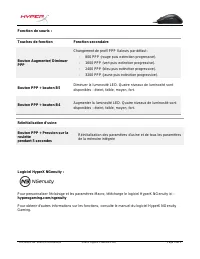
Document No. 480HX-MC004B.A01 Souris HyperX Pulsefire Core TM Page 5 de 5 Fonction de souris : Touches de fonction Fonction secondaire Bouton Augmenter/ Diminuer PPP Changement de profil PPP Valeurs par défaut : - 800 PPP (rouge puis extinction progressive). - 1600 PPP (vert puis extinction progress...
Page 22 - Numeri di parte
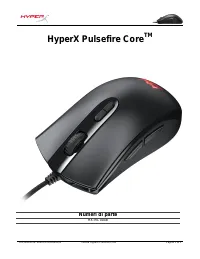
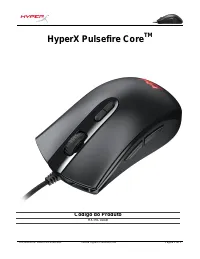
Documento N. 480HX-MC004B.A01 Mouse HyperX Pulsefire Core TM Pagina 1 di 5 HyperX Pulsefire Core TM Numeri di parte HX-MC004B
Page 23 - Contenuto della confezione:; Specifiche tecniche:; Switch dei pulsanti sinistro e destro:
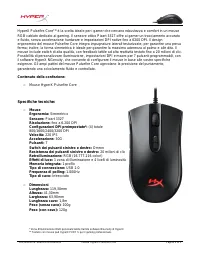
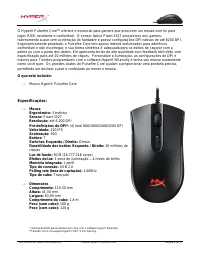
Documento N. 480HX-MC004B.A01 Mouse HyperX Pulsefire Core TM Pagina 2 di 5 Contenuto della confezione: o Mouse HyperX Pulsefire Core Specifiche tecniche: o Mouse Ergonomia: Simmetrico Sensore: Pixart 3327 Risoluzione: fino a 6.200 DPI Configurazioni DPI preimpostate*: (4) totale 800/1600/2400/3200 D...
Page 24 - Descrizione generale del mouse:
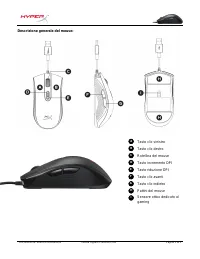
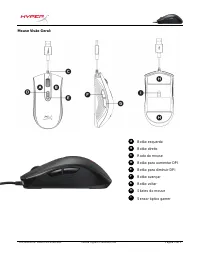
Documento N. 480HX-MC004B.A01 Mouse HyperX Pulsefire Core TM Pagina 3 di 5 Descrizione generale del mouse: Tasto clic sinistro Tasto clic destro Rotellina del mouse Tasto incremento DPI Tasto riduzione DPI Tasto clic avanti Tasto clic indietro Pattini del mouse Sensore ottico dedicato al gaming I H ...
Page 26 - Tasti funzione; Alterna i profili DPI predefiniti. I valori di default sono:; Pulsante DPI + pulsante B5
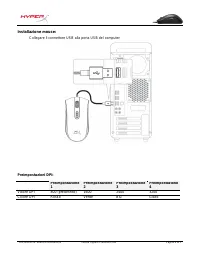
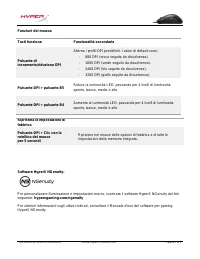
Documento N. 480HX-MC004B.A01 Mouse HyperX Pulsefire Core TM Pagina 5 di 5 Funzioni del mouse: Tasti funzione Funzionalità secondaria Pulsante di incremento/riduzione DPI Alterna i profili DPI predefiniti. I valori di default sono: - 800 DPI (rosso seguito da dissolvenza). - 1600 DPI (verde seguito ...
Page 27 - Código do Produto
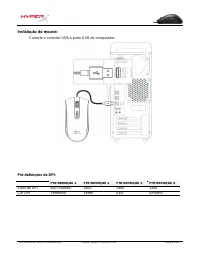
Documento Nº 480HX-MC004B.A01 Mouse HyperX Pulsefire Core TM Página 1 do 5 HyperX Pulsefire Core TM Código do Produto HX-MC004B
Page 28 - Durabilidade dos botões Esquerdo / Direito:
Documento Nº 480HX-MC004B.A01 Mouse HyperX Pulsefire Core TM Página 2 do 5 O que está incluído: o Mouse HyperX Pulsefire Core Especificações: o Mouse Ergonômico: Simétrico Sensor: Pixart 3327 Resolução: até 6.200 DPI Pré-definições de DPI*: (4) total 800/1600/2400/3200 DPI Velocidade: 220 IPS Aceler...
Page 31 - Teclas de função; Alterne entre DPIs predefinidos. Os valores padrão são:; Botão DPI + botão B5
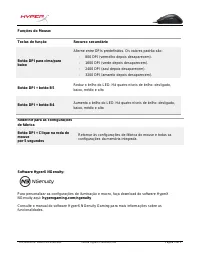
Documento Nº 480HX-MC004B.A01 Mouse HyperX Pulsefire Core TM Página 5 do 5 Funções do Mouse: Teclas de função Recurso secundário Botão DPI para cima/para baixo Alterne entre DPIs predefinidos. Os valores padrão são: - 800 DPI (vermelho depois desaparecem). - 1600 DPI (verde depois desaparecem). - 24...
Page 32 - Mysz HyperX Pulsefire Core; Numery katalogowe
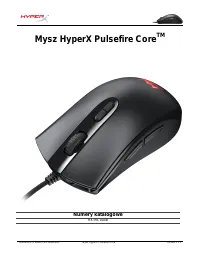
Dokument nr 480HX-MC004B.A01 Mysz HyperX Pulsefire Core TM Strona 1 z 5 Mysz HyperX Pulsefire Core TM Numery katalogowe HX-MC004B
Page 33 - Przełączniki prawego i lewego przycisku:
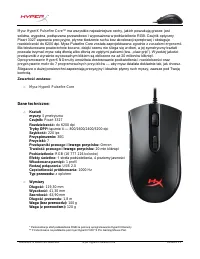
Dokument nr 480HX-MC004B.A01 Mysz HyperX Pulsefire Core TM Strona 2 z 5 Zawartość zestawu: o Mysz HyperX Pulsefire Core Dane techniczne: o Kształt myszy: Symetryczna Czujnik: Pixart 3327 Rozdzielczość: do 6200 dpi Tryby DPI*: łącznie 4 — 800/1600/2400/3200 dpi Szybkość: 220 ips Przyspieszenie: 30G P...
Page 34 - Prezentacja
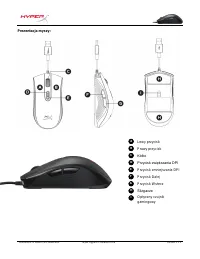
Dokument nr 480HX-MC004B.A01 Mysz HyperX Pulsefire Core TM Strona 3 z 5 Prezentacja myszy: Lewy przycisk Prawy przycisk Kółko Przycisk zwiększania DPI Przycisk zmniejszania DPI Przycisk Dalej Przycisk Wstecz Ślizgacze Optyczny czujnik gamingowy I H G F E D C B A
Page 35 - Tryb 1
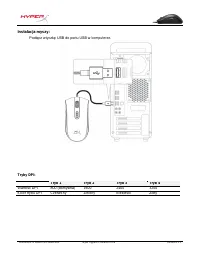
Dokument nr 480HX-MC004B.A01 Mysz HyperX Pulsefire Core TM Strona 4 z 5 Instalacja myszy: Podłącz wtyczkę USB do portu USB w komputerze. Tryby DPI: Tryb 1 Tryb 2 Tryb 3 Tryb 4 Wartość DPI 800 (domyślna) 1600 2400 3200 Kolor trybu DPI Czerwony Zielony Niebieski Żółty
Page 36 - Klawisze; Zmiana tryb; Przycisk DPI + przycisk B5; podręczniku użytkownika tego programu.
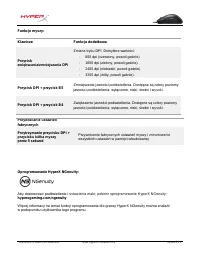
Dokument nr 480HX-MC004B.A01 Mysz HyperX Pulsefire Core TM Strona 5 z 5 Funkcje myszy: Klawisze Funkcja dodatkowa Przycisk zwiększania/zmniejszania DPI Zmiana tryb u DPI. Domyślne wartości: - 800 dpi (czerwony, powoli gaśnie). - 1600 dpi (zielony, powoli gaśnie). - 2400 dpi (niebieski, powoli gaśnie...
Page 37 - Номера артикулов
Document No. 480HX-MC004B.A01 Мышь HyperX Pulsefire Core TM Page 1 of 5 HyperX Pulsefire Core TM Номера артикулов HX-MC004B
Page 39 - Обзор
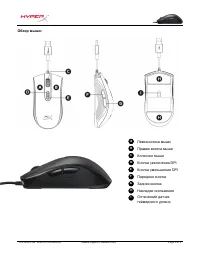
Document No. 480HX-MC004B.A01 Мышь HyperX Pulsefire Core TM Page 3 of 5 Обзор мыши: Левая кнопка мыши Правая кнопка мыши Колесико мыши Кнопка увеличения DPI Кнопка уменьшения DPI Передняя кнопка Задняя кнопка Накладки скольжения Оптический датчик геймерского уровня I H G F E D C B A
Page 41 - Переключение преднастроек DPI. Значения по умолчанию:
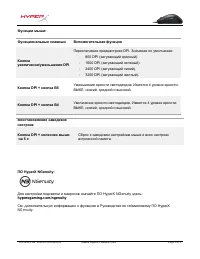
Document No. 480HX-MC004B.A01 Мышь HyperX Pulsefire Core TM Page 5 of 5 Функции мыши: Функциональные клавиши Вспомогательная функция Кнопка увеличения/уменьшения DPI Переключение преднастроек DPI. Значения по умолчанию: - 800 DPI (затухающий красный). - 1600 DPI (затухающий зеленый). - 2400 DPI (зат...
Page 42 - Part Numbers
Document No. 480HX-MC004B.A01 HyperX Pulsefire Core TM Mouse Page 1 of 5 HyperX Pulsefire Core TM Part Numbers HX-MC004B
Page 45 - Önayar 1
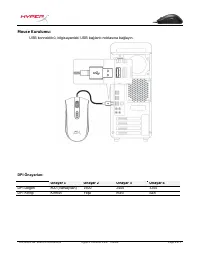
Document No. 480HX-MC004B.A01 HyperX Pulsefire Core TM Mouse Page 4 of 5 Mouse Kurulumu: USB konnektörü, bilgisayardaki USB bağlantı noktasına bağlayın. DPI Önayarları: Önayar 1 Önayar 2 Önayar 3 Önayar 4 DPI Değeri 800 (Varsayılan) 1600 2400 3200 DPI Rengi Kırmızı Yeşil Mavi Sarı
Page 46 - DPI önayarlarını değiştirir. Varsayılan değerler:
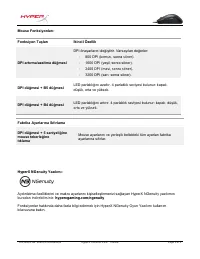
Document No. 480HX-MC004B.A01 HyperX Pulsefire Core TM Mouse Page 5 of 5 Mouse Fonksiyonları: Fonksiyon Tuşları İkincil Özellik DPI artırma/azaltma düğmesi DPI önayarlarını değiştirir. Varsayılan değerler: - 800 DPI (kırmızı, sonra söner). - 1600 DPI (yeşil, sonra söner). - 2400 DPI (mavi, sonra sön...
Page 47 - 製品番
ドキュメント番 号 480HX-MC004B.A01 HyperX Pulsefire Core TM マウス 1 ペ ー ジ / 5 HyperX Pulsefire Core TM 製品番 号 HX-MC004B
Page 48 - DPI; 対称
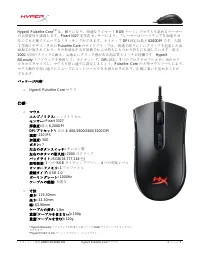
ドキュメント番 号 480HX-MC004B.A01 HyperX Pulsefire Core TM マウス 2 ペ ー ジ / 5 パッケ ー ジ 内 容 : o HyperX Pulsefire Core マウス 仕 様 : o マウス エルゴノミクス : シンメトリカル センサ ー : Pixart 3327 解像度 : 最大 6,200DPI DPI プリセット *: 合計 4: 800/1600/2400/3200 DPI 速度 : 220 IPS 加速度 : 30G ボタン : 7 左右のボタンスイッチ : オムロン製 左右のボタンの耐久性 : 2000 万クリック バックライト...
Page 50 - マウスの取り付け; USB
ドキュメント番 号 480HX-MC004B.A01 HyperX Pulsefire Core TM マウス 4 ペ ー ジ / 5 マウスの取り付け : コンピュ ー タ ー の USB ポ ー トに USB コネクタ ー を接 続 します。 DPI プリセット : プリセット 1 プリセット 2 プリセット 3 プリセット 4 DPI 値 800 ( デフォルト ) 1600 2400 3200 DPI カラ ー レッド グリ ー ン ブル ー イエロ ー
Page 51 - LED; LED; HyperX NGenuity
ドキュメント番 号 480HX-MC004B.A01 HyperX Pulsefire Core TM マウス 5 ペ ー ジ / 5 マウス機能 : ファンクションキ ー セカンダリ機能 DPI 増 加 / 減少ボタン DPI プリセットの 変 更 : デフォルト値 : - 800 DPI ( 赤く光ってから消えます ) 。 - 1600 DPI ( 緑 色に光ってから消えます ) 。 - 2400 DPI ( 青 く光ってから消えます ) 。 - 3200 DPI ( 黄 色に光ってから消えます ) 。 BPI ボタン + B5 ボタン LED 明度が暗くなります。明度レベルには、オフ、低...
Page 52 - 부품
문서 번호 480HX-MC004B.A01 HyperX Pulsefire Core TM 마우스 1/5 페이지 HyperX Pulsefire Core TM 부품 번호 HX-MC004B
Page 53 - 규격
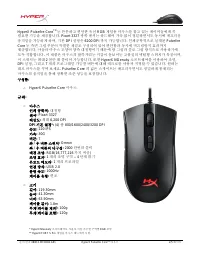
문서 번호 480HX-MC004B.A01 HyperX Pulsefire Core TM 마우스 2/5 페이지 구성품 : o HyperX Pulsefire Core 마우스 규격 : o 마우스 인체 공학적 : 대칭형 센서 : Pixart 3327 해상도 : 최대 6,200 DPI DPI 기본 설정 *: (4) 총 800/1600/2400/3200 DPI 속도 : 220 IPS 가속 : 30G 버튼 : 7 좌 / 우 버튼 스위치 : Omron 좌 / 우 버튼의 내구성 : 2000 만번의 클릭 배경 조명 : RGB(16,777,216 가지 ...
Page 57 - หมายเลขชิ ้นส่วน
เอกสารเลขที่ 480HX-MC004B.A01 เมาส์ HyperX Pulsefire Core TM หน้า 1 จาก 5 HyperX Pulsefire Core TM หมายเลขชิ ้นส่วน HX-MC004B
Page 58 - รายละเอียดทางเทคนิค
เอกสารเลขที่ 480HX-MC004B.A01 เมาส์ HyperX Pulsefire Core TM หน้า 2 จาก 5 สิ่งที่จัดมาให้ : o เมาส์ HyperX Pulsefire Core รายละเอียดทางเทคนิค : o เมาส์ โครงสร้างการใช้งาน : โครงสร้างแบบสมมาตร เซ็นเซอร์ : Pixart 3327 ความละเอียด : สูงสุด 6,200 DPI ค่า DPI ส าเร็จ *: (4) ทั ้งหมด 800/1600/2400/3200 DP...
Page 59 - ภาพรวม
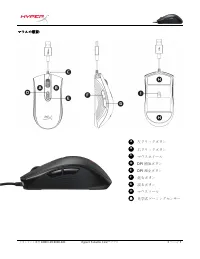
เอกสารเลขที่ 480HX-MC004B.A01 เมาส์ HyperX Pulsefire Core TM หน้า 3 จาก 5 ภาพรวม : ปุ่มคลิกด้านซ้าย ปุ่มคลิกด้านขวา ล้อเลื่อนเมาส์ ปุ่มเพิ่ม DPI ปุ่มลด DPI ปุ่มคลิกเดินหน้า ปุ่มคลิกถอยหลัง แผ่นเลื่อนเมาส์ เซ็นเซอร์เล่นเกมออพติค I H G F E D C B A
Page 60 - การติดตั ้งเมาส์
เอกสารเลขที่ 480HX-MC004B.A01 เมาส์ HyperX Pulsefire Core TM หน้า 4 จาก 5 การติดตั ้งเมาส์ : ต่อหัวต่อ USB เข้ากับพอร์ต USB ของคอมพิวเตอร์ ค่า DPI ส าเร็จ : ค่าส าเร็จ 1 ค่าส าเร็จ 2 ค่าส าเร็จ 3 ค่าส าเร็จ 4 ค่า DPI 800 ( ค่าเริ่มต้น ) 1600 2400 3200 สี DPI แดง เขียว น ้าเงิน เหลือง
Page 62 - Mã s
Tài li ệu số 480HX-MC004B.A01 Chu ột HyperX Pulsefire Core TM Trang 1 / 5 HyperX Pulsefire Core TM Mã s ản phẩm HX-MC004B
Page 63 - Thông s
Tài li ệu số 480HX-MC004B.A01 Chu ột HyperX Pulsefire Core TM Trang 2 / 5 B ộ sản phẩm gồm có: o Chu ột HyperX Pulsefire Core Thông s ố kỹ thuật: o Chu ột Thi ết kế công thái học: Đối xứng C ảm biến: Pixart 3327 Độ phân giải: lên đến 6.200 DPI DPI đặt sẵn*: T ổng số (4) 800/1600/2400/3200 DPI T ốc ...
Page 64 - chu
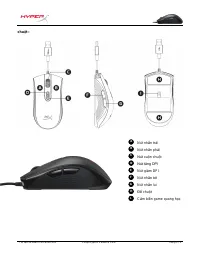
Tài li ệu số 480HX-MC004B.A01 Chu ột HyperX Pulsefire Core TM Trang 3 / 5 chu ột :
Nút nhấn trái Nút nhấn phải Nút cuộn chuột Nút tăng DPI Nút giảm DPI Nút nhấn tới Nút nhấn lui Đế chuột Cảm biến game quang học L H G F E D C B A
Page 65 - ắp đặt chuột; ấu hình sẵn cho DPI:
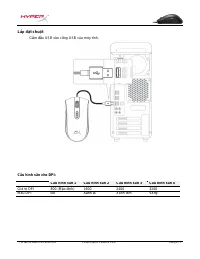
Tài li ệu số 480HX-MC004B.A01 Chu ột HyperX Pulsefire Core TM Trang 4 / 5 L ắp đặt chuột Cắm đầu USB vào cổng USB của máy tính. C ấu hình sẵn cho DPI: C ấu hình sẵn 1
C ấu hình sẵn 2
C ấu hình sẵn 3
C ấu hình sẵn 4
Giá tr ị DPI 800 (M ặc định) 1600 2400 3200 Màu DPI Đỏ Xanh lá Xanh lam Vàng
Page 66 - Thay đổi giữa các cấu hình DPI đặt sẵn.
Tài li ệu số 480HX-MC004B.A01 Chu ột HyperX Pulsefire Core TM Trang 5 / 5 Ch ức năng chuột: Các phím ch ức năng Tính năng phụ Nút tăng/giảm DPI Thay đổi giữa các cấu hình DPI đặt sẵn.
Các giá tr ị mặc định là: - 800 DPI (đỏ sau đó mờ dần). - 1600 DPI (xanh lá sau đó mờ dần). - 2400 DPI (xanh lam s...
Page 67 - 品型
文 档 编号 480HX-MC004B.A01 HyperX Pulsefire Core TM 鼠 标 第 1 页 ,共 5 页 HyperX Pulsefire Core TM 产 品型 号 HX-MC004B
Page 68 - 于那些需要; 的玩家; 响声
文 档 编号 480HX-MC004B.A01 HyperX Pulsefire Core TM 鼠 标 第 2 页 ,共 5 页 包含 内 容: o HyperX Pulsefire Core 鼠 标 产 品 规 格: o 鼠 标 人体工程 学 : 对称设计 传 感器: Pixart 3327 分辨率: 最高 6,200 DPI DPI 预 先 设 置 * : (4) 总计 800/1600/2400/3200 DPI 速度: 220 IPS 加速度: 30G 按 钮 : 7 左 / 右按 钮开关 : Omron 左 / 右按 钮 耐用性: 2000 万次 单击 背光灯: RGB ( 16,...
Page 70 - 安装:
文 档 编号 480HX-MC004B.A01 HyperX Pulsefire Core TM 鼠 标 第 4 页 ,共 5 页 鼠 标 安装: 将 USB 连 接器 连 接到 电脑 USB 端口。 DPI 预 先 设 置: 预 先 设 置 1 预 先 设 置 2 预 先 设 置 3 预 先 设 置 4 DPI 值 800 (默 认 ) 1600 2400 3200 DPI 色 红 色 绿 色 蓝 色 黄 色
Page 72 - 品型號
文件號碼: 480HX-MC004B.A01 HyperX Pulsefire Core TM 滑鼠 第 1 頁,共 5 HyperX Pulsefire Core TM 產 品型號 HX-MC004B
Page 73 - 品規格:
文件號碼: 480HX-MC004B.A01 HyperX Pulsefire Core TM 滑鼠 第 2 頁,共 5 內容: o HyperX Pulsefire Core 滑鼠 產 品規格: o 滑鼠 人體工學: 對稱式 感測器: Pixart 3327 解析度:高達 6,200 DPI DPI 預設 * : (4) 800/1600/2400/3200 DPI 速度: 220 IPS 加速: 30G 按鍵: 7 左 / 右鍵微動開關: Omron 左 / 右按鍵耐用次數: 2000 萬次點擊 背光: RGB (16,777,216 色 ) 燈效: 單區 – 4 種亮度等級 內建記憶體:...
Page 75 - 滑鼠安裝:
文件號碼: 480HX-MC004B.A01 HyperX Pulsefire Core TM 滑鼠 第 4 頁,共 5 滑鼠安裝: 將 USB 接頭連接至電腦的 USB 連接埠。 DPI 預設: 預設 值 1 預設 值 2 預設 值 3 預設 值 4 DPI 值 800 ( 預設 值 ) 1600 2400 3200 DPI 色彩 紅色 綠色 藍色 黃色
Page 76 - 值為
文件號碼: 480HX-MC004B.A01 HyperX Pulsefire Core TM 滑鼠 第 5 頁,共 5 滑鼠功能: 功能鍵 對應功能 DPI 上升 / 下降鍵 切換 DPI 預設 值 。預設 值為 : - 800 DPI ( 紅燈亮起後熄滅 ) 。 - 1600 DPI ( 綠燈亮起後熄滅 ) 。 - 2400 DPI ( 藍燈亮起後熄滅 ) 。 - 3200 DPI ( 黃燈亮起後熄滅 ) 。 DPI 鍵 + B5 鍵 降低 LED 亮度。本 產 品有 4 個亮度等級:關閉 、低、中、高 DPI 鍵 + B4 鍵 增加 LED 亮度。本 產 品有 4 個亮度等級:關閉 、低...