Page 3 - Contents
Contents English (United Kingdom)................................................................ 1 Français............................................................................................10 Deutsch.............................................................................................
Page 5 - Know Your Device; Tips
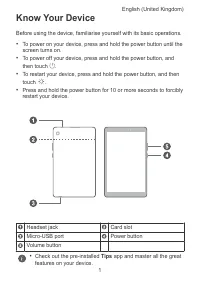
Know Your Device Before using the device, familiarise yourself with its basic operations. • To power on your device, press and hold the power button until thescreen turns on. • To power off your device, press and hold the power button, andthen touch . • To restart your device, press and hold the pow...
Page 6 - Settings
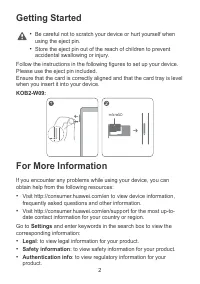
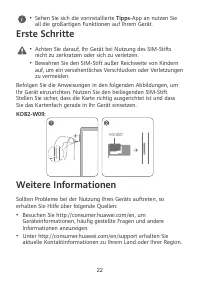
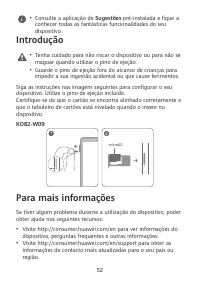
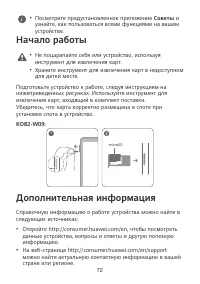
Getting Started • Be careful not to scratch your device or hurt yourself whenusing the eject pin. • Store the eject pin out of the reach of children to preventaccidental swallowing or injury. Follow the instructions in the following figures to set up your device.Please use the eject pin included.Ens...
Page 7 - Certification logos
• Certification logos : to view more information on certification logos for your product. 3
Page 8 - Safety Information; Operation and Safety
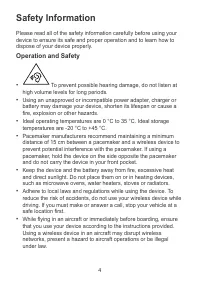
Safety Information Please read all of the safety information carefully before using yourdevice to ensure its safe and proper operation and to learn how todispose of your device properly. Operation and Safety • To prevent possible hearing damage, do not listen at high volume levels for long periods. ...
Page 9 - Potentially Explosive Atmosphere
• To prevent damage to your device's parts or internal circuits, donot use it in dusty, smoky, damp or dirty environments or nearmagnetic fields. • When charging the device, make sure the power adapter isplugged into a socket near the device and is easily accessible. • Unplug the charger from the el...
Page 11 - EU Regulatory Conformance; Body worn operation; Restrictions in the 5 GHz band:
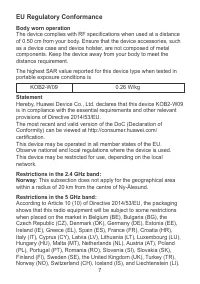
EU Regulatory Conformance Body worn operation The device complies with RF specifications when used at a distanceof 0.50 cm from your body. Ensure that the device accessories, suchas a device case and device holster, are not composed of metalcomponents. Keep the device away from your body to meet the...
Page 13 - Legal Notice; Trademarks and Permissions; Copyright © Huawei 2020. All rights reserved.
Legal Notice Trademarks and Permissions Android is a trademark of Google LLC. The Bluetooth ® word mark and logos are registered trademarks owned by Bluetooth SIG, Inc. and any use of such marks by Huawei Technologies Co., Ltd. is under license. Huawei Device Co., Ltd. is anaffiliate of Huawei Techn...
Page 14 - Familiarisation avec l'appareil
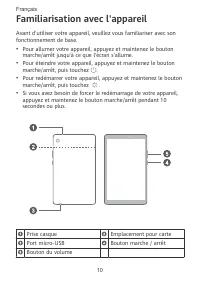
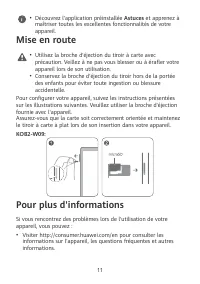
Familiarisation avec l'appareil Avant d'utiliser votre appareil, veuillez vous familiariser avec son fonctionnement de base. • Pour allumer votre appareil, appuyez et maintenez le bouton marche/arrêt jusqu'à ce que l'écran s'allume. • Pour éteindre votre appareil, appuyez et maintenez le bouton marc...
Page 16 - Légal : pour consulter les informations légales relatives à votre; Informations d'authentification : pour consulter les; Logos de certification : pour obtenir plus d'informations sur les
• Visiter http://consumer.huawei.com/en/support pour connaître les informations de contact les plus récentes pour votre pays/ région. Dans Paramètres, saisissez les mots clés dans la barre de recherche pour consulter les informations correspondantes : • Légal : pour consulter les informations légale...
Page 17 - Informations relatives à la sécurité; Utilisation et sécurité
Informations relatives à la sécurité Cette section contient des informations importantes relatives à l'utilisation de votre appareil. Elle contient également des informations sur la manière d'utiliser votre appareil en toute sécurité. Veuillez lire attentivement ces informations avant d'utiliser vot...
Page 19 - Atmosphères potentiellement explosives
• Pour mettre au rebut cet appareil, la batterie et les accessoires, conformez-vous aux réglementations locales. Ne les mettez pas au rebut avec les ordures ménagères. L’utilisation d’une batterie inappropriée risque de provoquer un incendie, une explosion ou d’autres accidents. • Consultez un médec...
Page 21 - Déclaration
de conformité REACH et RoHS, allez sur notre site web http:// consumer.huawei.com/certification. Informations sur l'exposition aux RF L'Organisation mondiale de la Santé a indiqué qu'il est possible de réduire l'exposition en limitant votre utilisation ou en utilisant simplement un kit mains libres ...
Page 24 - Mention légale; Marques de commerce et autorisations
Mention légale Marques de commerce et autorisations Android est une marque déposée de Google LLC. Le nom et les logos Bluetooth ® sont des marques déposées de Bluetooth SIG, Inc. Ils sont utilisés sous licence par Huawei Technologies Co., Ltd. Huawei Device Co., Ltd. est une société affiliée à Huawe...
Page 25 - Lernen Sie Ihr Gerät kennen
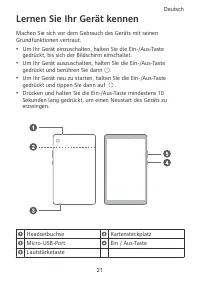
Lernen Sie Ihr Gerät kennen Machen Sie sich vor dem Gebrauch des Geräts mit seinen Grundfunktionen vertraut. • Um Ihr Gerät einzuschalten, halten Sie die Ein-/Aus-Taste gedrückt, bis sich der Bildschirm einschaltet. • Um Ihr Gerät auszuschalten, halten Sie die Ein-/Aus-Taste gedrückt und berühren Si...
Page 27 - Rechtliche Hinweise: um rechtliche Hinweise für Ihr Produkt; Zertifizierungslogos: um weitere Informationen zu
Navigieren Sie zu Einstellungen und geben Sie Schlüsselwörter in das Suchfeld ein, um die entsprechenden Informationen anzuzeigen: • Rechtliche Hinweise: um rechtliche Hinweise für Ihr Produkt anzuzeigen. • Sicherheitsinformationen: um Sicherheitsinformationen für Ihr Produkt anzuzeigen. • Authentif...
Page 28 - Sicherheitsinformationen; Betrieb und Sicherheit
Sicherheitsinformationen Lesen Sie sich bitte die vollständigen Sicherheitsinformationen durch, bevor Sie Ihr Gerät verwenden, um dessen sicheren und korrekten Betrieb sicherzustellen, und um zu erfahren, wie Sie Ihr Gerät ordnungsgemäß anwenden. Betrieb und Sicherheit • Um Ihr Gehör zu schützen, Mu...
Page 31 - Benutzung am Körper
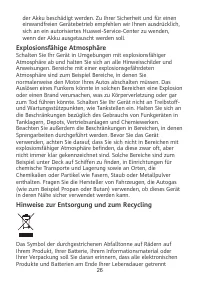
entsorgt werden müssen; sie dürfen nicht über den normalen Fluss des Haushaltsmülls entsorgt werden. Es unterliegt der Verantwortlichkeit des Benutzers, die Ausrüstung unter Verwendung einer ausgewiesenen Sammelstelle oder eines Dienstes für getrenntes Recycling von elektrischen oder elektronischen ...
Page 32 - Erklärung
Der höchste SAR-Wert, der für diesen Gerätetyp bei Tests unter Strahlungsbedingungen während des Tragens gemeldet wurde, beträgt KOB2-W09 0,26 W/kg Erklärung Huawei Device Co., Ltd. erklärt hiermit, dass dieses Gerät KOB2- W09 den wesentlichen Anforderungen und anderen relevanten Bestimmungen der Ri...
Page 34 - Rechtliche Hinweise; Marken und Genehmigungen
Rechtliche Hinweise Marken und Genehmigungen Android ist eine Marke von Google LLC. Die Wortmarke Bluetooth ® und die Logos sind eingetragene Marken von Bluetooth SIG, Inc. und jegliche Verwendung solcher Marken durch Huawei Technologies Co., Ltd. erfolgt unter Lizenz. Huawei Device Co., Ltd. ist ei...
Page 35 - Conoscere il dispositivo
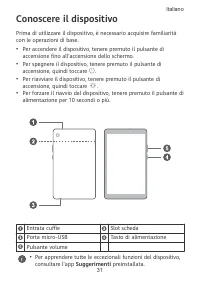
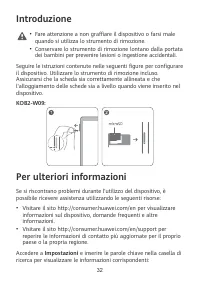
Conoscere il dispositivo Prima di utilizzare il dispositivo, è necessario acquisire familiarità con le operazioni di base. • Per accendere il dispositivo, tenere premuto il pulsante di accensione fino all'accensione dello schermo. • Per spegnere il dispositivo, tenere premuto il pulsante di accensio...
Page 37 - Informazioni legali: per visualizzare le informazioni legali; Informazioni sulla sicurezza: per visualizzare le informazioni; Logo certificato: per informazioni sui loghi di certificazione
• Informazioni legali: per visualizzare le informazioni legali relative al prodotto. • Informazioni sulla sicurezza: per visualizzare le informazioni sulla sicurezza relative al prodotto. • Info autenticazione: per visualizzare le informazioni di carattere normativo relative al prodotto. • Logo cert...
Page 38 - Informazioni sulla sicurezza; Procedure e sicurezza
Informazioni sulla sicurezza Leggere attentamente tutte le informazioni di sicurezza prima di utilizzare il dispositivo per assicurare il funzionamento sicuro e corretto e per lo smaltimento secondo le regole previste. Procedure e sicurezza • Per evitare eventuali danni all'udito, evitare l’ascolto ...
Page 39 - Ambiente a rischio di esplosione
• Per evitare danni a parti del dispositivo o circuiti interni, non utilizzarlo in ambienti polverosi, umidi o sporchi, esposti al fumo o vicino a campi magnetici. • Durante la fase di carica, accertarsi che l'alimentatore sia inserito in una presa di corrente vicina ai dispositivi e facilmente ragg...
Page 40 - Informazioni sullo smaltimento e sul riciclo
conseguenti lesioni fisiche anche mortali. Non accendere il dispositivo nelle aree di rifornimento carburante, come le stazioni di servizio. Attenersi alle restrizioni sull'uso delle apparecchiature radio nelle aree di deposito, stoccaggio e distribuzione di carburante e negli impianti chimici. Inol...
Page 41 - Utilizzo a contatto con il corpo
Riduzione delle sostanze pericolose Questo dispositivo e gli accessori elettrici sono conformi alle norme applicabili locali sulla restrizione e uso di determinate sostanze pericolose nelle apparecchiature elettriche ed elettroniche, come UE REACH, RoHS e batterie (se incluse) i regolamenti, ecc. Pe...
Page 44 - Note legali; Marchi e autorizzazioni
Note legali Marchi e autorizzazioni Android è un marchio di Google LLC. Il marchio e i loghi Bluetooth ® sono marchi registrati di proprietà di Bluetooth SIG, Inc. e ogni uso di tali marchi da parte di Huawei Technologies Co., Ltd. avviene in conformità con quanto previsto dalla licenza. Huawei Devi...
Page 45 - Conozca el dispositivo
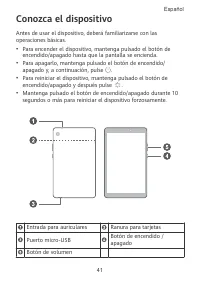
Conozca el dispositivo Antes de usar el dispositivo, deberá familiarizarse con las operaciones básicas. • Para encender el dispositivo, mantenga pulsado el botón de encendido/apagado hasta que la pantalla se encienda. • Para apagarlo, mantenga pulsado el botón de encendido/ apagado y, a continuación...
Page 47 - Acceda a Ajustes e introduzca palabras clave en el cuadro de; Aviso legal: para ver la información legal de su producto.; Información de certificación: para ver la información; Logotipos de certificación: para ver más información sobre los
Acceda a Ajustes e introduzca palabras clave en el cuadro de búsqueda para ver la información correspondiente: • Aviso legal: para ver la información legal de su producto. • Información de seguridad: para ver la información de seguridad del producto. • Información de certificación: para ver la infor...
Page 48 - Información de seguridad; Condiciones de uso y seguridad
Información de seguridad Lea cuidadosamente toda la información de seguridad antes de utilizar el dispositivo a fin de garantizar un funcionamiento seguro y adecuado, y saber cómo desechar correctamente el dispositivo. Condiciones de uso y seguridad • Para evitar daños al oído, no escuche música a u...
Page 49 - Ambientes con riesgo de explosión
inalámbricas y resultar peligroso para el funcionamiento de este. Además, puede ser ilegal. • Para evitar daños en las piezas o circuitos internos del dispositivo, no lo utilice en entornos que presenten polvo, humo, humedad o suciedad ni próximos a campos magnéticos. • Cuando cargue el dispositivo,...
Page 50 - Información sobre eliminación de residuos y reciclaje
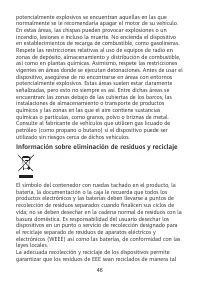
potencialmente explosivos se encuentran aquellas en las que normalmente se le recomendaría apagar el motor de su vehículo. En estas áreas, las chispas pueden provocar explosiones o un incendio, lesiones e incluso la muerte. No encienda el dispositivo en establecimientos de recarga de combustible, co...
Page 51 - Utilización del teléfono cerca del cuerpo
de conservar los materiales de valor y proteger la salud humana y el medioambiente; el manejo inadecuado, la ruptura accidental, el daño y/o el reciclaje inadecuado al término de su vida útil puede ocasionar daño a la salud y al medioambiente. Para obtener más información sobre dónde y cómo desechar...
Page 52 - Noruega: este inciso no es aplicable a las áreas geográficas; Bandas de frecuencia y potencia
Cumpla con las reglas nacionales y locales del lugar donde se utilice el dispositivo. El uso de este dispositivo puede estar restringido dependiendo de la red local.Restricciones de la banda de 2.4 GHz Noruega: este inciso no es aplicable a las áreas geográficas ubicadas dentro de un radio de 20 kil...
Page 53 - Información de software y accesorios
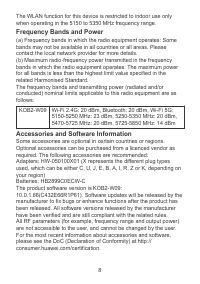
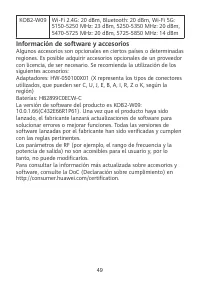
KOB2-W09 Wi-Fi 2.4G: 20 dBm, Bluetooth: 20 dBm, Wi-Fi 5G: 5150-5250 MHz: 23 dBm, 5250-5350 MHz: 20 dBm, 5470-5725 MHz: 20 dBm, 5725-5850 MHz: 14 dBm Información de software y accesorios Algunos accesorios son opcionales en ciertos países o determinadas regiones. Es posible adquirir accesorios opcion...
Page 54 - Aviso legal; Marcas comerciales y permisos
Aviso legal Marcas comerciales y permisos Android es una marca comercial de Google LLC. La marca y el logotipo Bluetooth ® son marcas registradas propiedad de Bluetooth SIG, Inc., y el uso de dichas marcas por parte de Huawei Technologies Co., Ltd. está regido por la licencia correspondiente. Huawei...
Page 55 - Conheça o seu dispositivo
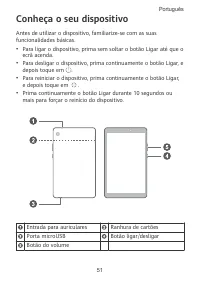
Conheça o seu dispositivo Antes de utilizar o dispositivo, familiarize-se com as suas funcionalidades básicas. • Para ligar o dispositivo, prima sem soltar o botão Ligar até que o ecrã acenda. • Para desligar o dispositivo, prima continuamente o botão Ligar, e depois toque em . • Para reiniciar o di...
Page 57 - Aceda a Definições e introduza as palavras-chave na caixa de; Informações legais: para ver as informações legais do seu; Informação de autenticação: para ver as informações; Logótipos de certificação: para ver mais informações sobre
Aceda a Definições e introduza as palavras-chave na caixa de pesquisa para ver as informações correspondentes: • Informações legais: para ver as informações legais do seu produto. • Informações de segurança: para ver as informações de segurança do seu produto. • Informação de autenticação: para ver ...
Page 58 - Informações de segurança; Operação e segurança
Informações de segurança Leia toda a informação de segurança atentamente antes de utilizar o seu dispositivo para assegurar o seu funcionamento seguro e adequado e para aprender como se desfazer do seu dispositivo corretamente. Operação e segurança • Para prevenir possíveis danos de audição, não col...
Page 61 - Utilização junto ao corpo
ou serviço de reciclagem de resíduos de equipamentos elétricos e eletrónicos (REEE) e baterias de acordo com a legislação local. A recolha correta e reciclagem do seu equipamento asseguram que os resíduos EEE sejam reciclados de modo a conservar os materiais valiosos e protegendo a saúde humana e o ...
Page 62 - Noruega: Esta subsecção não se aplica à área geográfica num raio; Bandas de frequência e Potência
A versão mais atualizada e válida da DdC (Declaração de Conformidade) pode ser visualizada em http:// consumer.huawei.com/certification. Este dispositivo pode ser operado em todos os estados membros da UE. Cumpra com os regulamentos nacionais e locais onde o dispositivo for utilizado. Este dispositi...
Page 63 - Acessórios e Informação do software
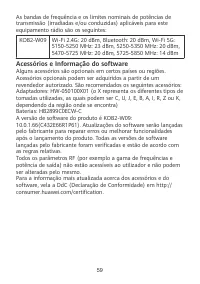
As bandas de frequência e os limites nominais de potências de transmissão (irradiadas e/ou conduzidas) aplicáveis para este equipamento rádio são os seguintes: KOB2-W09 Wi-Fi 2.4G: 20 dBm, Bluetooth: 20 dBm, Wi-Fi 5G: 5150-5250 MHz: 23 dBm, 5250-5350 MHz: 20 dBm, 5470-5725 MHz: 20 dBm, 5725-5850 MHz...
Page 64 - Marcas comerciais e autorizações
Aviso legal Marcas comerciais e autorizações Android é uma marca registada da Google LLC. A palavra e logótipos da marca Bluetooth ® são marcas registadas da Bluetooth SIG, Inc. e qualquer uso de tais marcas pela Huawei Technologies Co., Ltd. é realizado sob licença. Huawei Device Co., Ltd. é uma af...
Page 65 - Ken uw apparaat
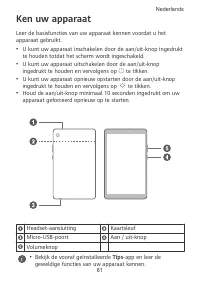
Ken uw apparaat Leer de basisfuncties van uw apparaat kennen voordat u het apparaat gebruikt. • U kunt uw apparaat inschakelen door de aan/uit-knop ingedrukt te houden totdat het scherm wordt ingeschakeld. • U kunt uw apparaat uitschakelen door de aan/uit-knop ingedrukt te houden en vervolgens op te...
Page 66 - Juridische informatie: om juridische informatie over uw product
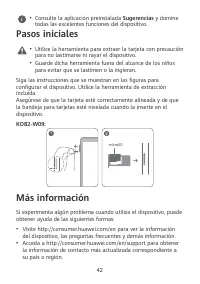
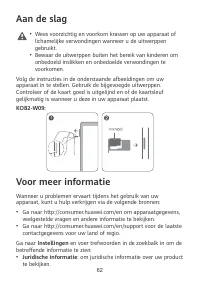
Aan de slag • Wees voorzichtig en voorkom krassen op uw apparaat of lichamelijke verwondingen wanneer u de uitwerppen gebruikt. • Bewaar de uitwerppen buiten het bereik van kinderen om onbedoeld inslikken en onbedoelde verwondingen te voorkomen. Volg de instructies in de onderstaande afbeeldingen om...
Page 68 - Veiligheidsinformatie; Bediening en veiligheid
Veiligheidsinformatie Lees alle veiligheidsinformatie zorgvuldig door voordat u uw apparaat in gebruik neemt, om een veilige en correcte werking te waarborgen en meer te leren over hoe u uw apparaat op gepaste wijze kunt afvoeren. Bediening en veiligheid • Voorkom mogelijke gehoorschade door niet la...
Page 71 - Gebruik op het lichaam
apparatuur en batterijen, in overeenstemming met de plaatselijke wetgeving. Een juiste inzameling en recycling van uw apparatuur helpt ervoor te zorgen dat afval van elektrische en elektronische apparatuur wordt gerecycled op een manier waarbij waardevolle materialen worden teruggewonnen en bescherm...
Page 72 - Noorwegen: Dit hoofdstuk is niet van toepassing op het; Frequentieband en vermogen
Huawei Device Co., Ltd. verklaart hierbij dat dit apparaat KOB2- W09 voldoet aan de essentiële eisen en andere relevante bepalingen van Richtlijn 2014/53/EU. De meest recente en geldige versie van de DoC (Verklaring van overeenstemming) kan worden bekeken op http:// consumer.huawei.com/certification...
Page 73 - Informatie over accessoires en software
(b) Maximaal radiofrequentievermogen uitgezonden in de frequentieband waarbinnen de radioapparatuur functioneert: Het maximale vermogen voor alle frequentieband is minder dan de limietwaarde voor de van toepassing zijnde geharmoniseerde standaard. De nominale limieten van de frequentiebanden en van ...
Page 74 - Juridische kennisgeving; Handelsmerken en vergunningen
Juridische kennisgeving Handelsmerken en vergunningen Android is een handelsmerk van Google LLC. Het woordmerk Bluetooth ® en de logo's zijn gedeponeerde handelsmerken en eigendom van Bluetooth SIG, Inc. en elk gebruik van deze merken door Huawei Technologies Co., Ltd. is gebaseerd op een licentie. ...
Page 75 - Знакомство с устройством
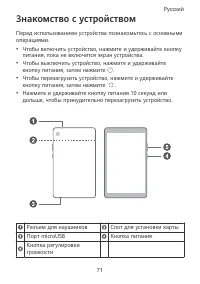
Знакомство с устройством Перед использованием устройства познакомьтесь с основными операциями. • Чтобы включить устройство, нажмите и удерживайте кнопку питания, пока не включится экран устройства. • Чтобы выключить устройство, нажмите и удерживайте кнопку питания, затем нажмите . • Чтобы перезагруз...
Page 77 - Перейдите в раздел Настройки и введите в строку поиска; Правовая информация: для поиска правовой информации; Аутентификационные данные: для поиска нормативной; Логотипы сертификатов: для поиска информации о
Перейдите в раздел Настройки и введите в строку поиска ключевые слова, чтобы найти нужную информацию. • Правовая информация: для поиска правовой информации по продукту. • Сведения о безопасности: для поиска сведений о технике безопасности при использовании продукта. • Аутентификационные данные: для ...
Page 78 - Безопасная эксплуатация
Руководство по технике безопасности Перед использованием устройства внимательно прочтите инструкции по технике безопасности и надлежащей утилизации вашего устройства. Безопасная эксплуатация • Во избежание повреждения органов слуха не слушайте музыку на высокой громкости в течение длительного времен...
Page 81 - Сокращение выбросов вредных веществ
Значок перечеркнутого мусорного бака на устройстве, его аккумуляторной батарее, в документации и на упаковочных материалах означает, что все электронные устройства и аккумуляторные батареи по завершении срока эксплуатации должны передаваться в специальные пункты сбора и утилизации и не должны уничто...
Page 82 - Декларация соответствия ЕС; Ношение на теле
регламента REACH и директивы RoHS посетите веб-сайт http:// consumer.huawei.com/certification. Декларация соответствия ЕС Ношение на теле Данное устройство отвечает требованиям по радиочастотной безопасности, если используется на расстоянии 0,50 см от тела. Аксессуары устройства, например чехол, не ...
Page 85 - Уведомления; Товарные знаки
Уведомления Товарные знаки Android является товарным знаком компании Google LLC. Словесный знак и логотип Bluetooth ® являются зарегистрированными товарными знаками Bluetooth SIG, Inc. и используются компанией Huawei Technologies Co., Ltd. в рамках лицензии. Huawei Device Co., Ltd. является аффилиро...
Page 94 - Инструкция по утилизации
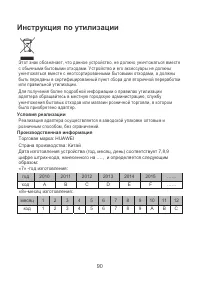
90 Инструкция по утилизации Этот знак обозначает, что данное устройство, не должно уничтожаться вместе с обычными бытовыми отходами. Устройство и его аксессуары не должны уничтожаться вместе с неотсортированными бытовыми отходами, а должны быть переданы в сертифицированный пункт сбора для вторичной ...