HORI Split - User Manual
A user manual for the Hori Split Pad Compact controller for Nintendo Switch outlines its core functionality and customization options. The guide covers essential setup requirements, including ensuring the Nintendo Switch system is updated to the latest firmware before use. It also details physical components, button layouts, and safety precautions, such as avoiding direct contact with buttons during operation. Customizable features include assigning modes to FL/FR buttons, configuring Turbo Mode (with both press-and-hold and continuous activation options), and adjusting Turbo speed via analog stick inputs. The manual highlights LED indicators for active functions and provides regulatory compliance details, including disposal guidelines and technical specifications like dimensions and connection method (via rail connector).
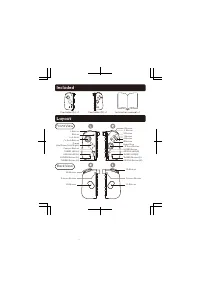
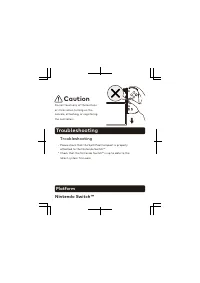
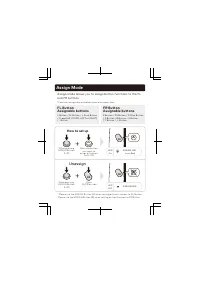
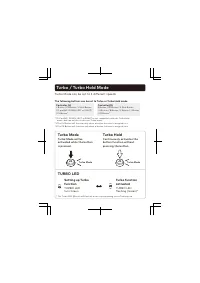
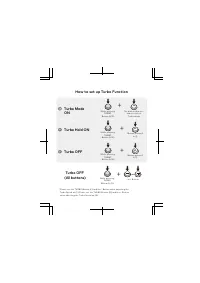
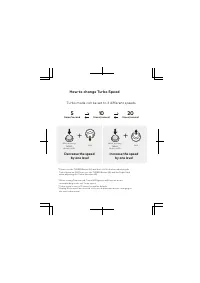
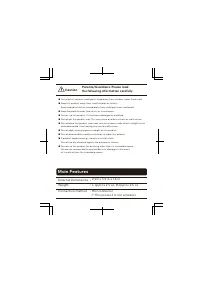
Table of Contents:
- Page 1 – Initial Setup and Firmware Update Procedure
- Page 2 – Controller Component Layout Diagram
- Page 3 – Safety Guidelines and Troubleshooting
- Page 4 – Button Function Assignment Customization
- Page 5 – Turbo Mode and Turbo Hold Setup
- Page 6 – Turbo Function Modes and Speed Adjustment
- Page 7 – Turbo Speed Control and Indicators
- Page 8 – Product Specifications and Physical Safety
- Page 9 – Regulatory Compliance and Disposal Information
- Page 10 – Legal Notices and Warranty Details
Instruction Manual
Thank you for purchasing this product.
Before using this product please read the instructions carefully.
After reading the instruction manual, please keep it for reference.
2101-39US
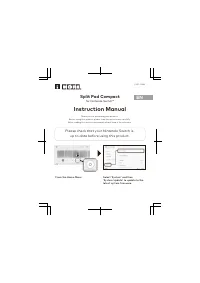
From the Home Menu
Please check that your Nintendo Switch is
up to date before using this product.
Split Pad Compact
for Nintendo Switch™
Select ‘System’ and then
‘System Update’ to update to the
latest system firmware.
EN
"Loading the manual" means you need to wait until the file loads and becomes available for online reading. Some manuals are very large, and the time they take to appear depends on your internet speed.
Was this manual helpful?
About this manual
- Brand
- HORI
- Model
- Split
- Document type
- User Manual
- Category
- Gamepad
- Language(s)
- English
- Pages
- 10
- File size
- 392.7 KB
- Format
Summary
Instructions for updating the Nintendo Switch system firmware before using the controller, including navigation to System Settings > System Update.
Contents of the package and a diagram detailing the front and back layouts, identifying all buttons and components of the controller.
Safety precautions for setup, warnings against touching controller parts during configuration, and troubleshooting steps for attachment verification and firmware updates on the Nintendo Switch system.