Page 2 - Max View; ENG; By
Max View 5.5” Split Screen ENG FRA ITA 02-24 25-46 69-90 47-68 91-112 SPA GER By European Authorised Representative OBELIS s.a | [email protected] Boulevard Général Wahis 53, 1030 Brussels, Belgium Tel +(32) 2.732.59.54 | Fax +(32) 2.732.60.03 United Kingdom Authorised Representative OBELIS UK | [em...
Page 3 - Warnings and Safety Instructions
3 ENG 1. Warnings and Safety Instructions Follow these safety precautions to prevent fire, injury or damage to the product. Read and keep instructions: It is very important that you read all the safety and operating instructions before the Babysense Video Monitor is operated. Please retain your purc...
Page 4 - Safety Instructions for AC Power Adapter
4 ENG • VENTILATION : This product should not be used on a bed, sofa, rug or similar surface that may block the ventilation or speaker openings, or be placed in an enclosed area, such as a bookcase or drawer that may impede air flow. Never cover the product with clothes, towels, blankets or any othe...
Page 5 - Information on disposal of product
5 ENG • Do not replace the plugs or cable on your power adapter. This product should only be used with the AC power adapters supplied by the manufacturer, as included in this package. • Never cut, damage or bend the power cord. • Do not put any objects on top of the power cord, which could cause ove...
Page 6 - Parent Unit Overview
6 ENG 2. Overview 2.1 Pack Contents • Parent Unit x 1 • Baby Unit (Camera) x 1 (x2 in Max View 2 camera model) • AC Power Adapter x 2 (x3 in Max View 2 camera model) • Wall mounting screw set x 1 (x2 in Max View 2 camera model) • User Manual x 1 2.2 Parent Unit Overview 1. Power ON/OFF/SLEEP Button ...
Page 7 - Baby Unit Overview
7 ENG 2.3 Baby Unit Overview 3. Getting Started 3.1 Powering the Baby Unit (Camera) • Connect the Camera Power Adapter to the Charging Port (28) on the back bottom of the Baby Unit. • Plug the AC power adapter into the wall outlet. • Ensure the ON/OFF switch (27) is in the ON position. • The unit wi...
Page 8 - Powering the Parent Unit
8 ENG 3.2 Powering the Parent Unit • The adapter should not be exposed to direct heat sources such as a candle, stove, radiator, heat register or other appliance that emit heat. • Connect the Parent Unit Power Adapter to the Charging Port (18) on the left side of the Parent Unit. • Plug the AC power...
Page 9 - Operating the Monitor; Menu Icon Overview
9 ENG 3.4 Set Up • Once both the Baby and Parent Units are switched on, the display on the Parent Unit will show the video captured by the Baby Unit(s). • Baby Unit(s) are paired to the Parent Unit when supplied. There is no need to pair the units again unless the Baby Unit loses its link with the P...
Page 12 - Brightness Adjustment
12 ENG 4.4 Brightness Adjustment 1. Press to access the menu, choose and press 2. Navigate with to select the desired brightness 3. Press to exit the menu 4.5 Pairing the Baby Unit (Camera) with the Parent Unit The Baby Unit is paired to the Parent Unit when supplied. There is no need to pair the un...
Page 13 - Temperature Scale Setting
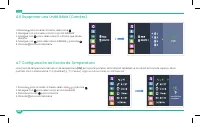
13 ENG 4.6 Deleting the Baby Unit (Camera) 1. Press to access the menu, choose 2. Navigate with to select DELETE option 3. Navigate with to select the camera you want to delete 4. Navigate with to select DELETE and press 5. Press to exit the menu 4.7 Temperature Scale Setting The temperature reading...
Page 14 - Temperature Alert Setting
14 ENG NOTE: The monitor features a built-in automatic temperature alert. The monitor will alert (visual indication) when the temperature in baby’s room is too high (90°F and higher) or too low (55°F and lower). NOTE: Make sure the temperature sensor is not positioned too close to the camera body as...
Page 15 - Time and Time Format Setting
15 ENG 4.9 Time and Time Format Setting This function allows you to choose the desired time format: 12H or 24H and set your time. 1. Press to access the menu, choose and press 2. Navigate with to select and press 3. Navigate with to select the desired format, and set the time 4. Press button to conf...
Page 16 - Warning Alert Volume Setting
16 ENG 4.11 Warning Alert Volume Setting This setting controls the volume of an audio “beep” sound alerting when the Parent Unit is low on battery, High/Low Temp alert or out of range (no connection to Baby Unit). You can set a lower volume level during the night and higher level during the day. 1. ...
Page 17 - Frequency Setting
17 ENG 4.12 Frequency Setting This function allows you to choose desired frequency format 50Hz (for US) or 60Hz (for EU). The screen may flicker in some lighting environments and changing the Frequency Setting helps lower the flickering effect. 1. Press to access the menu, choose and press 2. Naviga...
Page 19 - Split Screen Setting
19 ENG 4.16 Switching between the paired Baby Units (Cameras) • To switch between paired cameras – briefly press the CAMERA SWITCH button (10) on your Parent Unit. NOTE: This function is only available when two or more cameras are paired. 4.17 SCAN Mode - Automatic switching between the paired Baby ...
Page 20 - Possible cause/solution
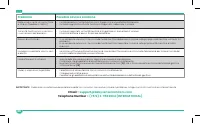
20 ENG Possible cause/solution Problem • The power adapters may not be properly connected. • Ensure that the Baby and Parent Units are ON. • Adjust the monitor antenna to vertical position. • Make sure the Baby and Parent Units are not far away from each other. • Baby and Parent Units may not be pro...
Page 24 - Customer Support
24 ENG 10. Warranty Terms We take quality very seriously. This is why all of our products come with a one-year warranty from the original purchase date against defects in workmanship and materials. If you have warranty or support issues, please contact our customer service. 11. Customer Support If y...
Page 25 - Full HD 1080P Moniteur Vidéo Bébé; GUIDE DE L’UTILISATEUR; Moniteur vidéo numérique sans fil pour bébé
Max View 5.5” Écran partagé Full HD 1080P Moniteur Vidéo Bébé GUIDE DE L’UTILISATEUR Pour toute question relative à ce produit veuillez nous contacter à [email protected]www.babysensemonitors.com Moniteur vidéo numérique sans fil pour bébé Voyez, écoutez et parlez à votre bébé Modèle: Max View - 1 C...
Page 26 - Avertissements et Consignes de sécurité
26 FRE 1. Avertissements et Consignes de sécurité Suivez ces consignes de sécurité pour éviter tout risque d’incendie, de blessure ou de dommage au produit. Lisez ces instructions et conservez-les: Il est très important que vous lisiez les consignes de sécurité et d’utilisation avant d’utiliser votr...
Page 27 - Consignes de Sécurité pour L’adaptateur Secteur
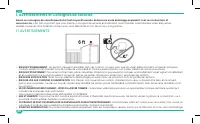
27 FRE • VENTILATION: Ne pas utiliser ce produit dans un lit, sur un canapé, un tapis ou toute autre surface du même type, qui peut obturer les ouvertures des haut-parleurs ou de la ventilation, ne pas le placer dans un endroit confiné comme une bibliothèque ou un tiroir, susceptible de gêner la cir...
Page 28 - Information sur L’élimination de la Batierie et du Produit
28 FRE • Ne pas remplacer la prise ni le cordon de votre adaptateur secteur. Ce produit doit être utilize uniquement avec les adaptateurs secteur fournis par le fabricant et inclus dans l’emballage. • Ne pas plier, abîmer, couper le cordon d’alimentation. • Ne rien poser sur le cordon d’alimentation...
Page 29 - Contenu de l’emballage
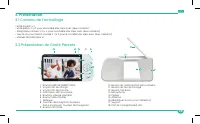
29 FRE 2. Présentation 2.1 Contenu de l’emballage • Unité Parents x 1 • Unité Bébé x 1 (x 2 pour le modèle Max View avec deux caméras) • Adaptateur secteur X 2 (x 3 pour le modèle Max View avec deux caméras) • Jeu de vis pour fixation murale X 1 (x 2 pour le modèle Max View avec deux caméras) • Manu...
Page 30 - Présentation de l’Unité Bébé
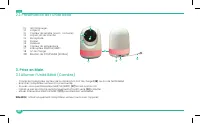
30 FRE 2.3 Présentation de l’Unité Bébé 3. Prise en Main 3.1 Allumer l’Unité Bébé (Caméra) • Connecter l’adaptateur secteur de la caméra à la Port de charge (28) au dos de l’Unité Bébé. • Brancher l’adaptateur secteur à la prise murale. • Assurez-vous que Interrupteur MARCHE/ARRÊT (27) est en positi...
Page 31 - Allumer l’Unité Parents
31 FRE 3.2 Allumer l’Unité Parents • L’adaptateur secteur ne doit pas être exposé à des sources directes de chaleur comme bougie, poêle, radiateur ou tout autre appareil produisant de la chaleur. • Connecter l’adaptateur secteur de l’Unité Parents à la Port de charge (18) sur le côté droit de l’Unit...
Page 32 - Fonctionnement du Moniteur; Présentation de Icônes
32 FRE 3.4 Installation • Une fois que les unités bébé et parents sont allumées, l’écran de l’unité parents affichera la vidéo capturée par l’unité bébé(s). • Les unités bébé sont couplées à l’unité parents lorsqu’elles sont fournies. Il n’est pas nécessaire de coupler à nouveau les unités à moins q...
Page 33 - Réglage de la Berceuse et du Bruit Blanc
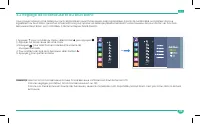
33 FRE 4.2 Réglage de la Berceuse et du Bruit Blanc Vous pouvez apaiser votre bébé pour qu’il s’endorme en jouant 5 berceuses préprogrammées à partir de l’unité bébé. Le moniteur dispose également du bruit blanc, qui est un moyen efficace pour apaiser un bébé qui pleure et endormir votre nouveau-né ...
Page 35 - Réglages de la Luminosité
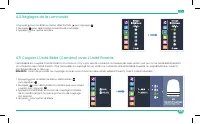
35 FRE 4.4 Réglages de la Luminosité 1. Appuyez pour accéder au menu, sélectionnez puis appuyez 2. Naviguez pour sélectionner la luminosité souhaitée 3. Appuyez pour quitter le menu 4.5 Coupler L’Unité Bébé (Caméra) avec L’Unité Parents L’Unité Bébé est couplée à l’Unité Parents à la livraison. Il n...
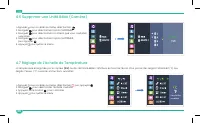
Page 36 - Réglage de L’échelle de Température
36 FRE 4.6 Supprimer une Unité Bébé (Caméra) 1. Appuyez pour accéder au menu, sélectionnez 2. Naviguez pour sélectionner l’option SUPPRIMER 3. Naviguez pour sélectionner la caméra que vous souhaitez supprimer 4. Naviguez pour sélectionner l’option SUPPRIMER, puis appuyez 5. Appuyez pour quitter le m...
Page 37 - Réglage de l’alerte de Température
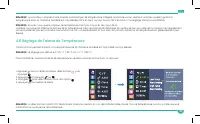
37 FRE REMARQE: Le moniteur comprend une alarme automatique de température intégrée. Le moniteur vous alertera (alarme visuelle) quand la température dans la chambre de bébé est trop élevée (90°F et plus) ou trop basse (55°F et moins). Ce réglage n’est pas modifiable. REMARQE: Assurez-vous que le ca...
Page 38 - Réglage de l’Heure et du format d’Affichage de l’Heure
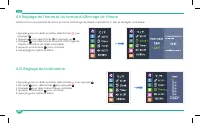
38 FRE 4.9 Réglage de l’Heure et du format d’Affichage de l’Heure Cette fonction vous permet de choisir le format d’affichage de l’heure souhaité 12H or 24H, et de régler votre heure. 1. Appuyez pour accéder au menu, sélectionnez puis appuyez 2. Appuyez pour sélectionner et appuyez sur 3. Naviguez p...
Page 39 - Réglage du Volume D’alerte D’avertissement
39 FRE 4.11 Réglage du Volume D’alerte D’avertissement Ce paramétrage concerne le volume du Bip sonore qui vous alerte quand la batierie de l’Unité Parents est faible ou quand vous êtes hors de portée (pas de connexion avec l’Unité Bébé). Vous pouvez paramétrer un niveau de volume plus bas pendant l...
Page 40 - Réglage de la Fréquence
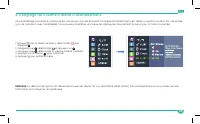
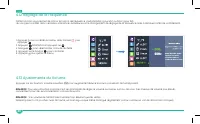
40 FRE 4.12 Réglage de la Fréquence Cette fonction vous permet de choisir le format de fréquence souhaité 60Hz (pour US) ou 50Hz (pour EU) L’écran peut scintiller dans certaines ambiances lumineuses et le changement de réglage de la fréquence aide à diminuer l’effet de scintillement. 1. Appuyez pour...
Page 42 - Réglage de L’écran Partagé
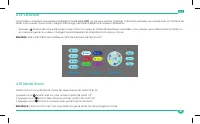
42 FRE 4.16 Basculer entre les Unités Bébé Couplées (Caméras) • Pour basculer entre des caméras pairées - appuyez brièvement sur le bouton de COMMUTATION de la CAMÉRA (10) sur votre Unité Parent. REMARQUE: Cette fonction est disponible seulement quand deux caméras ou plus sont couplées. 4.17 Mode Ba...
Page 43 - Cause possible/Solution; Résolution des Problems
43 FRE Cause possible/Solution Problème • L’adaptateur secteur peut être mal connecté. • Assurez-vous les unités Bébé et Parents sont Allumées.. • Placez l’antenne du moniteur en position verticale. • Assurez-vous que les unités Bébé et Parents ne soient pas trop éloignées l’une de l’autre. • Les un...
Page 46 - Conditions de Garantie
46 FRE 8. Conditions de Garantie Nous prenons les questions de qualité très au sérieux. C’est pourquoi tous nos produits sont garantis un an après leur date d’achat contre tout défaut de fabrication et de matériaux. Si vous avez des questions de garantie ou de service après vente, veuillez contacter...
Page 47 - ” Pantalla dividida; Manual de usuario; Mire, escuche y hable con su bebé
Max View 5.5” Pantalla dividida Full HD 1080P Monitor de video para bebé Manual de usuario Ante cualquier duda o consulta relacionada con el producto, por favor contáctenos a [email protected]www.babysensemonitors.com Mire, escuche y hable con su bebé Voyez, écoutez et parlez à votre bébé Modelo: Ma...
Page 48 - Advertencias e Instrucciones de Seguridad
48 SPA 1. Advertencias e Instrucciones de Seguridad Siga estas instrucciones de seguridad para evitar incendios, lesiones o daños en el producto. • Lea y guarde las instrucciones : Es muy importante que lea todas las instrucciones de seguridad y operación antes de operar el monitor de video de Babys...
Page 50 - Información sobre la eliminación de y el producto
50 SPA cables de alimentación estos se deben asegurar y nunca colgarse sobre la cuna ni cerca de ella. • No reemplace los enchufes o el cable de su adaptador de corriente. Este producto sólo se debe utilizer con los adaptadores de alimentación de CA suministrados por el fabricante, como se incluye e...
Page 51 - Descripción General; Contenido del Paquete
51 SPA 2. Descripción General 2.1 Contenido del Paquete • Unidad de Padres x 1 • Unidad del Bebé x 1 (x 2 en Max View 2 modelo con dos cámaras) • Adaptador de corriente para el Reino Unido con enchufe UE de salida x 2 (x 3 en Max View 2 modelo con dos cámaras) • Juego de tornillos para montaje en pa...
Page 52 - Descripción de la Unidad del Bebé
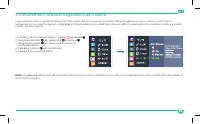
52 SPA 2.3 Descripción de la Unidad del Bebé 3. Primeros pasos 3.1 Alimentación de la Unidad del Bebé (Cámara) • Conecte el adaptador de corriente de la cámara a la Puerto de carga (28) en la parte posterior de la Unidad para Bebés. Conecte el adaptador de corriente de CA a la toma de corriente. • A...
Page 53 - Alimentación de la Unidad de Padres
53 SPA 3.2 Alimentación de la Unidad de Padres • Conecte el adaptador de corriente de la cámara a la Puerto de carga (18) en la parte derecha de la Unidad de Padres. • Conecte el adaptador de corriente de CA a la toma de corriente. • Presione y mantenga presionado el botón de Encendido (1) en el lad...
Page 54 - Operando el monitor; Descripción general del icono de menú
54 SPA 3.4 Instalación • Una vez que las unidades del bebé y padres estén encendidas, la pantalla de la Unidad de Padresmostrará el video captado en la Unidad/es del Bebé. • La Unidad/ed del Bebé está emparejada con la Unidad de Padres por defecto. No hay necesidad de volver a vincular las unidades,...
Page 55 - Configuración de la Canción de Cuna y Ruido Blanco
55 SPA 4.2 Configuración de la Canción de Cuna y Ruido Blanco Puede calmar al bebé para que duerma tocando 5 canciones de cuna pre programadas. El aparato también cuenta con un sonido de Ruido Blanco, que es una forma efectiva de calmar y adormecer a su recién nacido. La función Canción de Cuna y Ru...
Page 58 - Configuración de Escala de Temperatura
58 SPA 4.6 Supprimer une Unité Bébé (Caméra) 1. Presione para acceder al menú, seleccione 2. Navegue con para seleccionar la opción ELIMINAR 3. Navegue con para seleccionar la cámara que desea eliminar 4. Navegue con para seleccionar ELIMINAR, y presione 5. Presione para salir del menu 4.7 Configura...
Page 59 - Configuración de Alerta de Temperatura
59 SPA NOTA: El aparato tiene incorporado una alarma automática de temperatura y alertará (por indicación visual) cuando la temperatura en la habitación del bebé sea demasiado alta (90°F o más) o demasiado baja (55°F o menos). NOTA: Asegúrese de que el sensor de temperatura no esté colocado demasiad...
Page 60 - Configuración de Hora y Formato de Hora.
60 SPA 4.9 Configuración de Hora y Formato de Hora. Esta función le permite seleccionar el formato de hora y fijar la hora: 12H or 24H y fijar la hora. 1. Presione para acceder al menú, seleccione y presione 2. Navegue con para seleccionar y presione 3. Navegue con para seleccionar el formato desead...
Page 61 - Configuración de Volumen de Alerta de Advertencia
61 SPA 4.11 Configuración de Volumen de Alerta de Advertencia Esta configuración controla el volumen de un sonido de “bip” de audio que alerta cuando la unidad para padres tiene poca batería, alerta de temperatura alta/baja o fuera de rango (sin conexión a la unidad para bebés). Puede establecer un ...
Page 62 - Configuración de Frecuencia
62 SPA 4.12 Configuración de Frecuencia Esta función le permite elegir el formato de frecuencia deseado 60Hz (para US) O 50Hz (para UE) La pantalla puede parpadear en algunos entornos de iluminación y cambiar la configuración de frecuencia puede ayudar a reducir el efecto de parpadeo. 1. Appuyez pou...
Page 64 - Alternación entre las unidades del bebé emparejadas (Cámaras)
64 SPA 4.16 Alternación entre las unidades del bebé emparejadas (Cámaras) • Para cambiar entre cámaras emparejadas, presione brevemente el Botón interruptor de cámara (10) en su Unidad para Padres. NOTA: Esta función solo está disponible cuando se emparejan dos o más cámaras. . 4.17 Modo de escaneo ...
Page 65 - Posible causa y solución
65 SPA Posible causa y solución Problema • Los adaptadores de potencia pueden no estar conectados correctamente. • Asegúrese de que las unidades del bebé y de padres estén ON (ENCENDIDAS). • Ajuste la antena del aparato en posición vertical. • Asegúrese de que las unidades del bebé y de padres no es...
Page 68 - Condiciones de Garantia
68 SPA 8. Condiciones de Garantia Tomamos la calidad muy en serio Esta es la razón por la cual todos nuestros productos tienen garantia de un año contra defectos de mano de obra y materiales a partir de la fecha de compra original. Para consultas sobre la garantia o apoyo técnico, consulte nuestro S...
Page 69 - Full HD 1080P Video Baby Monitor; Manuale d‘uso; Video Baby Monitor digitale senza fili
Max View 5.5” Schermo Divisio Full HD 1080P Video Baby Monitor Manuale d‘uso Per ogni domanda relativa al prodotto non esitate a contattarci su:[email protected]www.babysensemonitors.com Video Baby Monitor digitale senza fili Guardate il Vostro Bambino, Ascoltatelo e Parlategli Modelo: Max View - 1 ...
Page 72 - Informazioni sullo Smaltimento del Prodotto
72 ITA • Non sostituire mai le spine o i cavi dell’adattatore. Il prodotto può essere utilizzato solo ed esclusivamente con gli adattatori a corrente alternata forniti dal produttore in dotazione. • Non tagliare né piegare né danneggiare il cavo di alimentazione. • Non porre alcun oggetto sul cavo d...
Page 73 - Pacchetto Contiene
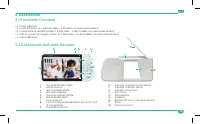
73 ITA 2. Descrizione 2.1 Pacchetto Contiene • n. 1 unità Genitore • n. 1 unità Bambino (n. 2 per Max View – 2 modello con due vidoecamera) • n. 2 Adattatore di alimentazione (n. 3 Max View – 2 per modello con due vidoecamera) • n. 1 Set di viti per montaggio a muro (n. 2 Max View – 2 per modello co...
Page 74 - Descrizione dell’unità Bambino
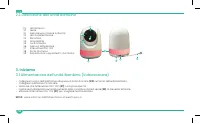
74 ITA 2.3 Descrizione dell’unità Bambino 3. Iniziamo 3.1 Alimentazione dell’unità Bambino (Videocamera) • Collegare la spina dell’adattatore alla presa di Porta di ricaria (28) sul fondo dell’unità Bambino. • Collegare l’adattatore CA alla rete. • Verificare che l’interruttore ON / OFF (27) sia in ...
Page 75 - Alimentazione dell’unità Genitore
75 ITA 3.2 Alimentazione dell’unità Genitore • Collegare la spina dell’adattatore di alimentazione dell’unità genitore alla presa Porta di ricaria (18) sul lato destro dell’unità genitore. • Collegare l’adattatore di alimentazione CA alla presa a muro. • Premere e tenere premuto il tasto di avviamen...
Page 76 - Utilizzo del monitor; Panoramica dell’icona del menu
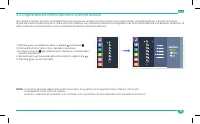
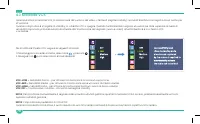
76 ITA 3.4 Impostazioni • Una volta le unità Bambino e Genitore sono accese, lo schermo dell’unità Genitore visualizza le riprese fatte dall’unità Bambino. • L’unità bambino è accoppiata con l’unità Genitore, se fornita. Non serve accoppiare le unità di nuovo a meno che l’unità Bambino non perda il ...
Page 77 - Impostazione Ninna Nanna e Rumore Bianco
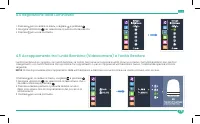
77 ITA 4.2 Impostazione Ninna Nanna e Rumore Bianco Per cullare bambino per farlo addormentare possono essere suonate 5 ninna nanna pre-programmate sull‘unità Bambino. Il monitor è munito inoltre del suono di rumore bianco, che è un modo effettivo per calmare un bambino piangente e per farlo addorme...
Page 79 - Regolazione della Luminosità
79 ITA 4.4 Regolazione della Luminosità 1. Premere per accedere al menu, scegliere e premere 2. Navigare utilizzando per selezionare la luminosità desiderata 3. Premere per uscire dal menu 4.5 Accoppiamento tra l’unità Bambino (Videocamera) e l’unità Genitore L’unità bambino è accoppiata con l’unità...
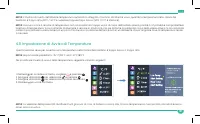
Page 80 - Impostazione della Scala di Temperatura
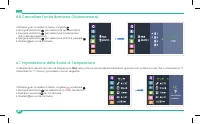
80 ITA 4.6 Cancellare l‘unità Bambino (Videocamera) 1. Premere per accedere al menu, scegliere 2. Navigare utilizzando per selezionare Opzione DELETE 3. Navigare utilizzando per selezionare la telecamera che si desidera eliminare 4. Navigare utilizzando per selezionare DELETE e premere 5. Premere pe...
Page 81 - Impostazione di Avviso di Temperatura
81 ITA NOTA: Il monitor è munito dell’allarme temperatura automatico integrato. Il monitor dà allarme visivo, quando la temperatura nella stanza del bambino è troppo alta (90°F / 32°C e superiore) oppure tropo bassa (55°F / 12°C e inferiore). NOTA: Assicurarsi che il sensore di temperatura non sia p...
Page 82 - Impostazione dell’ora e del Formato dell’ora
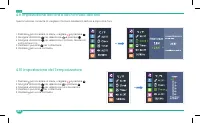
82 ITA 4.9 Impostazione dell’ora e del Formato dell’ora Questa funzione consente di scegliere il formato desiderato dell’ora e impostare l’ora. 1. Premere per accedere al menu, scegliere e premere 2. Navigare utilizzando per selezionare e premere 3. Navigare utilizzando per selezionare il formato de...
Page 83 - Avvertimento di Avviso Regolazione del Volume
83 ITA 4.11 Avvertimento di Avviso Regolazione del Volume Questa impostazione controlla il volume di un “bip” audio che avvisa quando la batteria dell’unità genitore è scarica, avviso di alta / bassa temperatura o fuori portata (nessun collegamento all’unità bimbo). È possibile impostare un livello ...
Page 84 - Impostazione della Frequenza
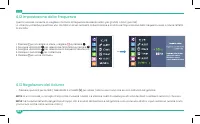
84 ITA 4.12 Impostazione della Frequenza Questa funzione consente di scegliere il formato di frequenza desiderato 60Hz (per gli USA) o 50Hz (per l’UE). Lo schermo potrebbe presentare uno sfarfallio in alcuni ambienti di illuminazione e modificare l’Impostazione della Frequenza aiuta a ridurre l’effe...
Page 86 - Impostazione Schermo Divisio
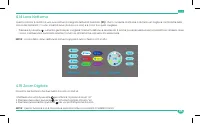
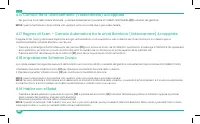
86 ITA 4.16 Cambio tra le unità Bambino (Videocamere) Accoppiate • Per passare fra le telecamere abbinate - premere brevemente il pulsante di CAMBIO TELECAMERA (10) sull’unità del genitore. NOTA: Questa funzione è a disposizione solo qualora siano associate due o più videocamere. 4.17 Regime di Scan...
Page 87 - Possibile causa e soluzione; Risoluzione problem
87 ITA Possibile causa e soluzione Problema • Gli adattatori di alimentazione non sono connessi correttamente. • Assicurarsi che le unità Bambino e Genitore sono accese. • Mettere l’antenna del monitore nella posizione verticale • Assicurarsi che le unità Bambino e Genitore non sono troppo distanti ...
Page 90 - Condizioni di Garanzia; Assistenza Clienti
90 ITA 8. Condizioni di Garanzia Per noi la qualità è un aspetto molto importante. Per questo motivo tutti i nostri prodotti sono coperti da un anno di garanzia dalla data di primo acquisto. La garanzia si riferisce ai difetti di produzione e dei materiali. Nel caso delle domande riguardo la garanzi...
Page 91 - ” Geteilter Bildschirm; Benutzerhandbuch; Drahtloser digitaler Videobabymonitor
Max View 5.5” Geteilter Bildschirm Full HD 1080P Video Babymonitor Benutzerhandbuch Für Fragen zu Produkten kontaktieren Sie uns bitte an:[email protected]www.babysensemonitors.com Drahtloser digitaler Videobabymonitor Schauen Sie zu, hören Sie zu und sprechen Sie mit Ihrem Baby Modell: Max View - 1...
Page 92 - Warnungen und Sicherheitshinweise
92 GER 1. Warnungen und Sicherheitshinweise Befolgen Sie diese Sicherheitsvorkehrungen, um das Risiko eines Feuers, Verletzungen oder Produktschäden zu vermeiden. Lesen Sie und bewahren Sie die Anweisungen auf: Es ist sehr wichtig, dass Sie alle Sicherheits- und Bedienungsanweisungen durchlesen, bev...
Page 93 - Sicherheitshinweise für AC Netzadapter
93 GER • BELÜFTUNG: Dieses Produkt darf nicht auf einem Bett, Sofa, Teppich oder ähnlichen Oberflächen verwendet werden, die die Belüftung oder den Lautsprecheröffnungen blockieren könnten; oder es darf nicht auch in einem umschlossenen Raum wie etwa in einem Bücherregal oder einer Schublade verwend...
Page 94 - Informationen zur Entsorgung von Produkt
94 GER • Berühren Sie den Netzadapter nicht mit feuchten Händen oder lassen Sie keine Flüssigkeiten auf ihn gießen. • Vergewissen Sie sich, dass die Hauptadapterkabel für Ihr Baby und andere kleine Kinder nie zugänglich sind. Um mögliche Gefahren durch Stromkabel zu vermeiden, sollten die Kabel gesi...
Page 95 - Übersicht über die Elterneinheit
95 GER 2. Übersicht 2.1 Packungsinhalt • Elterneinheit x 1 • Babyeinheit x 1 (x 2 im Max View – 2 Modell mit zwei Kameras) • UK-Netzadapter mit EU-Stecker x 2 (x 3 im Max View - 2 Modell mit zwei Kameras) • Schraubensatz für Wandmontage x 1 (x 2 im Max View - 2 Modell mit zwei Kameras) • Benutzerhan...
Page 96 - Übersicht über die Babyeinheit
96 GER 2.3 Übersicht über die Babyeinheit 3. Erste Schritte 3.1 Einschalten der Babyeinheit (Kamera) • Verbinden Sie den Kamera-Netzadapter mit der Ladeanschluss (28) auf der unterseite der Babyeinheit. • Stecken Sie den AC Netzadapter in die Wandsteckdose. • Stellen Sie sicher, dass der EIN/AUS-Sch...
Page 97 - Einschalten der Elterneinheit
97 GER 3.2 Einschalten der Elterneinheit • Verbinden Sie das Netzadapter der Elterneinheit mit der Ladeanschluss (18) auf der rechten Seite der Elterneinheit. • Stecken Sie den AC Netzadapter in die Wandsteckdose. • Drücken Sie und dann halten Sie die Netztaste (1) oben auf der linken Seite der Elte...
Page 98 - Übersicht über Menüsymbole
98 GER 3.4 Einstellung • Wenn sowohl die Baby- als auch die Elterneinheit eingeschaltet sind, zeigt das Display auf der Elterneinheit das von der Babyeinheit aufgenommene Video an. • Die Babyeinheit ist bei Lieferung mit der Elterneinheit gekoppelt. Es ist nicht erforderlich, die Einheiten erneut zu...
Page 99 - Einstellung in Wiegenlied & Weißes Rauschen
99 GER 4.2 Einstellung in Wiegenlied & Weißes Rauschen Sie können das Baby zum Schlafen bringen, indem Sie 5 vorprogrammierte Schlaflieder aus der Babyeinheit spielen. Der Monitor verfügt auch über einen Weißes-Rauschen-Sound, der ein schreiendes Kind beruhigt und Ihren Neugeborenen in den Schla...
Page 101 - Helligkeits Anpassungen
101 GER 4.4 Helligkeits Anpassungen 1. Drücken Sie um auf das Menü zuzugreifen, wählen und drücken Sie 2. Navigieren Sie mit und wählen Sie die gewünschte Helligkeit 3. Drücken um das Menü zu verlassen 4.5 Kopplung der Babyeinheit (Kamera) mit der Elterneinheit Die Babyeinheit ist bei Lieferung mit ...
Page 102 - Temperaturskal Eneinstellung
102 GER 4.6 Löschen der Babyeinheit (Kamera) 1. Drücken Sie um auf das Menü zuzugreifen, wählen 2. Navigieren sie mit wählen sie die Löschen option 3. Navigieren sie mit wählen Sie die Kamera aus, die Sie löschen möchten 4. Navigieren sie mit wählen sie die Löschen option, und drücken Sie 5. Drücken...
Page 104 - Zeit und Zeitformateinstellung
104 GER 4.9 Zeit und Zeitformateinstellung Mit dieser Funktion können Sie das gewünschte Zeitformat wählen und Ihre Zeit einstellen: 12H oder 24H und stellen Sie Ihre Zeit ein. 1. Drücken Sie um auf das Menü zuzugreifen, wählen und drücken Sie 2. Navigieren sie mit wählen Sie und drücken Sie 3. Navi...
Page 106 - Frequenzeinstellung
106 GER 4.12 Frequenzeinstellung Mit dieser Funktion können Sie das gewünschte Frequenzformat auswählen 60Hz (für US) oder 50Hz (für EU) Bei bestimmten Lichtverhältnissen kann der Bildschirm flackern. Durch Ändern der Frequenzeinstellung kann das Flackern verringert werden. 1. Drücken Sie um auf das...
Page 108 - Umschalten zwischen den gekoppelten Babyeinheiten (Kameras)
108 GER 4.16 Umschalten zwischen den gekoppelten Babyeinheiten (Kameras) • Um zwischen gekoppelten kameras umzuschalten - drücken Sie kurz die Kameraschalter (10) an Ihrer Elterneinheit. HINWEIS: Diese Funktion ist nur verfügbar, wenn zwei oder mehr kameras gekoppelt sind. 4.17 Scanmodus - Automatis...
Page 109 - Mögliche Ursache / Lösung; Schalter des Displays des Elterngeräts
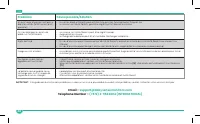
109 GER Mögliche Ursache / Lösung Problem • Die Netzadapter sind möglicherweise nicht richtig angeschlossen. • Vergewissern Sie sich, dass die Baby- und Elterneinheit eingeschaltet sind. • Stellen Sie die Monitorantenne auf die senkrechte Position. • Vergewissern Sie sich, dass die Baby- und Elterne...
Page 112 - Garantiebedingungen
112 GER 8. Garantiebedingungen Wir nehmen das Thema Qualität sehr ernst. Aus diesem Grund haben alle unsere Produkte ab dem ursprünglichen Kaufdatum eine einjährige Garantie auf Fertigungs- und Materialfehler. Wenn Sie Garantieprobleme oder technische Unterstützung aller Art benötigen, wenden Sie si...