Page 7 - Safety Tips; Attention
3 EN Safety Tips Thanks for choosing the high-performance and multifunctional intelligent LED TV produced by Gazer company� This precious thing will bring you better audiovisual enjoyment� The design of this product has given consideration to the factors affecting personal safety, and the product it...
Page 8 - Equipment� Description of buttons on the remote control
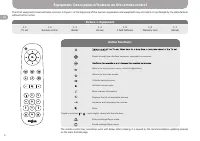
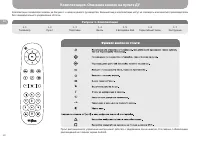
4 EN may be chosen. Moves through the interface elements, changes the channels. Returns to the previous menu, exits the application. Returns to the main screen. Calls the settings menu. Activate mouse mode. Open channel information. Displays the list of accessible sources. Increases and decreases th...
Page 9 - Picture 3. Description of the Connectors; Description of the Connectors; Picture 4. Description of the Connectors
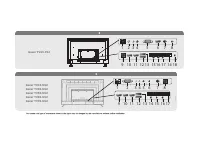
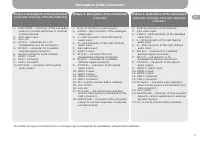
5 EN Picture 3. Description of the Connectors (TV43-FS2) 1. RJ45 to connect a wired network. 2. VIDEO – RCA connector of the analogue video input. 3. L – RCA connector of the left channel audio input. 4. R – RCA connector of the right channel audio input. 5. VGA video input. 6. HDMI 1 input. 7. RF(T...
Page 10 - Preparation of the TV Set; Installation of the TV Set:; Preparation of the Remote Control
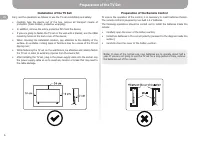
6 EN Preparation of the TV Set Note: In case of the normal use, new batteries are to operate about half a year� If you are not going to use the TV set for a long period of time, remove the batteries out of the remote� Installation of the TV Set: Carry out the operations as follows to use the TV set ...
Page 11 - Product specifications
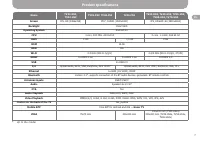
7 EN Product specifications Name TV24-HS2, TV32-HS2 TV32-FS2, TV40-FS2 TV43-FS2 TV43-US2, TV49-US2, TV55-US2, TV65-US2, TV70-US2 Screen IPS, HD (1366x768) IPS*, FullHD (1920x1080) IPS, UltraHD 4K (3840x2160) Backlight Direct LED Operating System Android 9�0 CPU 4 core, 900 MHz, A53 64 bit 4 core, 1�...
Page 12 - Trouble Shooting; centre�
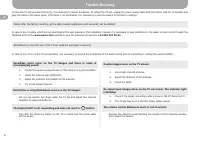
8 EN Trouble Shooting In case the TV set operates incorrectly, it is necessary to reboot the device� To reboot the TV set, unplug the power-supply cable from the mains, wait for 15 seconds and plug the cable in the mains again� If the fault is not eliminated, it is necessary to reset the device to t...
Page 13 - Меры предосторожности; Внимание
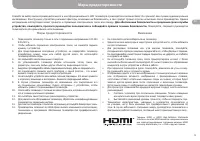
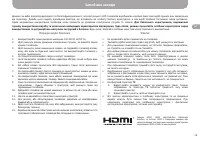
9 RU Меры предосторожности Спасибо за выбор высокопроизводительного и многофункционального LED телевизора производства компании Gazer. Он принесет вам лучшее аудиовизуальное наслаждение. Конструкция устройства учитывает факторы, влияющие на безопасность, а сам продукт прошел строгие испытания после ...
Page 14 - Комплектация� Описание кнопок на пульте ДУ; Рисунок 1. Комплектация
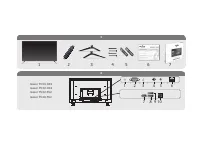
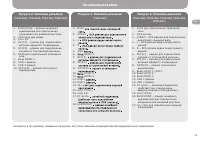
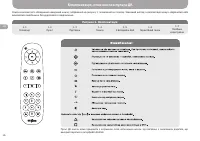
10 RU OK 1 2 3 4 7 8 9 0 5 6 Комплектация� Описание кнопок на пульте ДУ Рисунок 1. Комплектация 1.1 Телевизор 1.2 Пульт 1.3 Подставки 1.4 Винты 1.5 2 Батарейки ААА 1.6 Гарантийный талон 1.7 Инструкция Комплектация телевизора показан на Рисунке 1 в начале данного руководства. Внешний вид и комплектац...
Page 15 - Рисунок 3. Описание разъемов; Описание разъемов; Рисунок 4. Описание разъемов
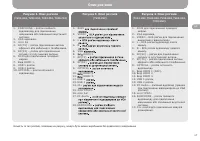
11 RU Рисунок 3. Описание разъемов (TV43-FS2) 1. PC Audio – линейный аудиовход (работает при подключении видеоисточника к VGA разъему). 2. VGA выход. 3. RJ45 для подключения проводной сети. 4. VIDEO – RCA разъем для подключения аналогового видеосигнала. 5. L – RCA разъем аудио входа левого канала. 6...
Page 16 - Подготовка телевизора; Установка телевизора:
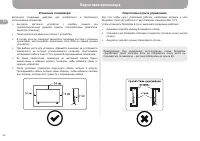
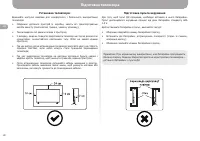
12 RU Подготовка телевизора Примечание: При нормальном использовании, новые батарейки проработают около полугода. Если вы собираетесь очень долго не пользоваться телевизором – достаньте батарейки из пульта ДУ. Установка телевизора: Выполните следующие действия для комфортного и безопасного использов...
Page 17 - Технические характеристики
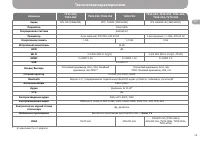
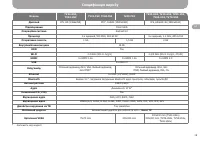
13 RU Технические характеристики Название TV24-HS2, TV32-HS2 TV32-FS2, TV40-FS2 TV43-FS2 TV43-US2, TV49-US2, TV55-US2, TV65-US2, TV70-US2 Экран IPS, HD (1366x768) IPS*, FullHD (1920x1080) IPS, UltraHD 4K (3840x2160) Подсветка Direct LED Операционная система Android 9�0 Процессор 4-рех ядерный, 900 M...
Page 18 - Проблемы и методы их устранения
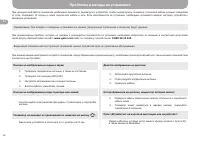
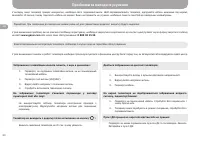
14 RU Проблемы и методы их устранения Примечание: При возврате к заводским установкам все данные (загруженные приложения и аккаунты) будут удалены. Внимание! Неправильная эксплуатация телевизора лишает покупателя прав на гарантийное обслуживание. Помехи на изображении и шумы в звуке: Двоится изображ...
Page 19 - Запобіжні заходи; Поради щодо безпеки
15 UA Запобіжні заходи Дякуємо за вибір високопродуктивного та багатофункціонального, інтелектуального LED телевізора виробництва компанії Gazer. Цей виріб принесе вам задоволення від перегляду. Дизайн цього виробу враховував фактори, що впливають на особисту безпеку користувача, а сам виріб пройшов...
Page 20 - Комплектація, опис кнопок пульта ДК; Рисунок 1. Комплектація
16 UA OK 1 2 3 4 7 8 9 0 5 6 Комплектація, опис кнопок пульта ДК Рисунок 1. Комплектація 1.1 Телевізор 1.2 Пульт 1.3 Підставки 1.4 Гвинти 1.5 2 Батарейки ААА 1.6 Гарантійний талон 1.7 Посібник користувача Список комплектного обладнання наведений нижче, зображений на рисунку 1 та вказаний на початку....
Page 21 - Рисунок 3. Опис роз’ємів; Опис роз’ємів; Рисунок 4. Опис роз’ємів
17 UA Рисунок 3. Опис роз’ємів (TV43-FS2) 1. PC Audio – лінійний аудіовхід (працює при підключенні відеоджерела до VGA роз’єму). 2. VGA відеовхід. 3. RJ45 для підключення провідної мережі. 4. VIDEO – RCA роз’єм для підключення аналогового відеосигналу. 5. L – RCA роз’єм аудіовходу лівого каналу. 6. ...
Page 22 - Підготовка телевізора; Установка телевізора:
18 UA Підготовка телевізора Примітка: При нормальному використанні, нові батарейки пропрацюють близько півроку. Якщо ви збираєтеся довго не користуватися телевізором – дістаньте батарейки з пульта ДК. Установка телевізора: Виконайте наступні вказівки для комфортного і безпечного використання телевіз...
Page 23 - Специфікація виробу
19 UA Специфікація виробу Модель TV24-HS2, TV32-HS2 TV32-FS2, TV40-FS2 TV43-FS2 TV43-US2, TV49-US2, TV55-US2, TV65-US2, TV70-US2 Дисплей IPS, HD (1366x768) IPS*, FullHD (1920x1080) IPS, UltraHD 4K (3840x2160) Підсвічування Direct LED Операційна система Android 9�0 Процесор 4-х ядерний, 900 MHz, A53 ...
Page 24 - Проблеми та методи їх усунення
20 UA Проблеми та методи їх усунення Примітка: При поверненні до заводських налаштувань всі дані (завантажені додатки і акаунти) будуть видалені. Увага! Неправильна експлуатація телевізора позбавляє покупця прав на гарантійне обслуговування. Зображення телевізійних каналів сніжить, є шум в динаміках...