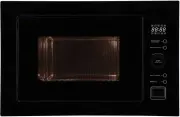
Esatto MC25BF Microwave – User Manual, read for free online in PDF format. We hope this helps you resolve any issues you may have. If you have further questions, please contact us through the contact form.
1
2
3
4
5
6
7
8
9
10
11
12
13
14
15
16
17
18
19
20
Table of Contents:
Page 3 – Page; Residentia
Page 4 – Safety Instructions
Page 5 – User Manual
Page 6 – Your Microwave Oven
Page 7 – Installation Instructions
Page 10 – Operating Your Microwave
Page 14 – Cleaning & Maintenance
Page 15 – Troubleshooting
Page 16 – Warranty
Page 18 – Purchase Details
Page 19 – Receipt
Page 20 – Model Code
Loading the manual
User Manual
\
25L Built-in Microwave
\
MC25BF
\
MC25BS
"Loading the manual" means you need to wait until the file loads and becomes available for online reading. Some manuals are very large, and the time they take to appear depends on your internet speed.
Residentia \ 04 This microwave must only be installed in accordance with the instructions provided. Incorrect installation may cause harm to persons, damage property and void the product’s warranty. Important Please ensure that you read the entire instructions carefully before beginning the installa...
Page 5 - User Manual
User Manual \ 05 Unpacking During transportation, protective packaging was used to protect the appliance against any damage. After unpacking, please dispose of all elements of packaging in a way that will not cause damage to the environment. All materials used for packaging the appliance are environ...
Page 6 - Your Microwave Oven
Residentia \ 06 Your Microwave Oven \ Parts and Accessories A- Control Panel B- Turntable shaft C- Turntable ring assembly D- Glass turntable E- Observation window F- Door assembly G- Safety door lock system Model MC25BF/MC25BS Rated Voltage 240V~50Hz Rated Input Power (microwave) 1450W Rated Output...
Page 7 - Installation Instructions
User Manual \ 07 Installation Instructions \ Typical installation tools required You’ll most likely require the following tools/equipment (not supplied) for the installation of your microwave. – Electrical drill – Tape Measure – Screw-driver It’s important to carefully read the following installatio...
Page 10 - Operating Your Microwave
Residentia \ 10 SETTING THE CLOCK When the microwave is first powered, the LED clock will display "0:00" and the buzzer will sound once. – Press the "Clock/Kitchen Timer" button twice to select the clock function, the hour figures will flash. – Turn the dial to adjust the hour figure...
Page 14 - Cleaning & Maintenance
Residentia \ 14 Cleaning & Maintenance \ By ensuring proper cleaning and maintenance of your microwave, you can ensure that it will have a long and fault free operation. WARNING! Do not start cleaning the microwave until it has completely cooled. – Typically you should only ever need to clean yo...
Page 15 - Troubleshooting
User Manual \ 15 Troubleshooting \ OPERATION IN CASE OF EMERGENCY In the event of an emergency you should: – Switch off all microwave controls (i.e. Press the "Stop/Clear" button). – Switch the microwave off at the isolation switch or at the fuse box. – Call the Residentia Support Team on 13...
Page 16 - Warranty
Residentia \ 16 Warranty terms and conditions Cooking appliances (microwaves) This document sets out the terms and conditions of the product warranties for Residentia Group Appliances. It is an important document. Please keep it with your proof of purchase documents in a safe place for future refere...
Page 18 - Purchase Details
Residentia \ 18 Purchase Details \ For your records, please record details of your purchase below and staple your receipt on the opposite page. Store details Store name | Address | Telephone | Purchase date | Product details Model no. | Serial no.* | * Note. Your serial number can be found on the re...