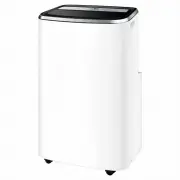
Page 2 - Subject to change without notice.; Visit our website to:; CONTENTS
2 www.electrolux.com WE’RE THINKING OF YOU CUSTOMER CARE AND SERVICE Thank you for purchasing an Electrolux appliance. You’ve chosen a product that brings with it decades of professional experience and innovation. Ingenious and stylish, it has been designed with you in mind. So whenever you use it, ...
Page 3 - SAFETY INFORMATION; WARNING
3 ENGLISH 1. SAFETY INFORMATION WARNING! • This appliance is not intended for use by persons (including children) with reduced physical, sensory or mental capabilities, or lack of experience and knowledge, unless they have been given supervision or instruction concerning use of the appliance by a pe...
Page 8 - SAFETY INSTRUCTION; Notes on Operation
8 www.electrolux.com 2. SAFETY INSTRUCTION 2.1 Notes on Operation • Allow 4 minutes for the compressor to restart cooling� If you turn the air conditioner off and immediately restart it, allow 4 minutes for the compressor to restart cooling� There is an electronic device in the unit that keeps the c...
Page 9 - warning
9 ENGLISH warning meaning Plug in power plug properly Otherwise, it may cause electric shock, fire and explosion due to excess heat generation Do not operate or stop the unit by inserting or pulling out the power plug It may cause electric shock, fire and explosion due to heat generation Do not use ...
Page 11 - UNIT DESCRIPTION; instructions for their usage�; PARTS; Drain hose
11 ENGLISH 3 6 7 89 12 4 5 10 11 1 2 13 3. UNIT DESCRIPTION 12 56 3 10111213 9 4 78 Remote controlSignal receiver Carrying handle(both sides)Air intake Room air outlet Air exhaustPower plug socket Castor Control panel Power cord Continuous drain outlet Bottom drain outlet Pump drain outlet 4. ACCESS...
Page 12 - INSTALLATION INSTRUCTIONS; Exhausting hot air; Lock
12 www.electrolux.com 5. INSTALLATION INSTRUCTIONS 5.1 Exhausting hot air In the Cool Mode the appliance must be placed close to a window or opening so that the warm exhaust air can be ducted outside� First position unit on a flat floor and make sure there’s a minimum of 50cm clearance around the un...
Page 13 - Installation in a double-hung
13 ENGLISH )LJ &XWWKLVWRILW\RXUZLQGRZ Fig. 11 V PP FUHZV PPVFUHZVRUPP KH[KHDGFDSVFUHZV :LQGRZVWRRO :LQGRZVOLGHUNLW )LJ )LJ )RDPVHDO% 2. Open the window sash and place the window slider kit on the window stool (Fig� 9)� Attach the window slider kit to the window sill� Adjust the length of the win...
Page 14 - GRZVWRRO
14 www.electrolux.com )LJ )RDPVHDO$ DGKHVLYHW\SH 1. Cut the Foam seal * (adhesive type) to the proper lengths and attach them to the window frame� See Fig� 14� 5.3 Installation in a sliding sash window )LJ :LQGRZVWRRO :LQGRZVOLGHUNLW VFUHZV FPa FP )LJ :LQ PP VFUHZV PP VFUHZV GRZVWRRO :LQGRZVOLGHUNLW...
Page 15 - OPERATING INSTRUCTIONS; Cooling mode; Usage of the Control; AIR CONDITIONER FEATURES; Control Panel; Dry mode
15 ENGLISH 7. OPERATING INSTRUCTIONS Some of the following instructions can only be used by using the Control Panel� It is not necessary to use the drainage hose in the "cool" mode� Cooling mode Heating mode (on some models) In this mode the exhaust adaptor hose MUST be used� In this mode th...
Page 17 - Battery Installation and Important; Remote Control
17 ENGLISH 56 78 User Max. 5 m Remote control Portable AC Remove the cover at the back of the remote control�Insert the provided batteries correctly(see the instructions inside the battery compartment)�Close up the cover� Battery Installation and Important Instructions 7.2 Remote Control 12 5 3 7 4 ...
Page 18 - How to Use the Remote Control
18 www.electrolux.com Turning the unit on How to Use the Remote Control Plug in the unit, then press the “on/ off” button (when turned on, the unit will operate as the last setting before shutdown� To switch the unit off, press “on/off” button again, then remove the plug� Always switch the unit off ...
Page 19 - Louvre Swing Function
19 ENGLISH Press the “swing” button to enable louvre swing function, and the upper side of screen will display “ ”� The louvre on the top panel will swing up and down� Press this button again to disable the louvre swing function� Louvre Swing Function °F/°C function Timer mode Press the " + "...
Page 20 - Fault code; Continuous Drainage; Drainage instruction
20 www.electrolux.com NOTE: • Unscrew the drain cap of continuous drain outlet ( Fig.20 )� • Connect one end of the garden hose (sold separately) or drain hose to the drain outlet then lead the other end into a drain that is lower than the unit ( Fig.21 )� • Condensate may flow out after removing th...
Page 21 - Cleaning the unit
21 ENGLISH NOTE: To ensure all condensate residue has been removed, tilt the unit by lifting it slightly upwards from the front until no more condensate comes out from the drain outlet� Emptying the condensate residue inside the unit during winter storage�Put a drip tray (not supplied) under bottom ...
Page 22 - Winter Storage; TROUBLE SHOOTING; Air conditioner will not operate.
22 www.electrolux.com 1. Drain the water collection tank completely and leave the bottom drain cap and rubber plug long time enough to allow any residual water to drain out� Once the tank is completely drained and no more water flows out, reinstall the rubber plug and cap� 1. Make sure the filter an...
Page 23 - ENVIRONMENTAL CONCERNS
23 ENGLISH • Dirty air filters - air restricted� Clean air filters� • Outside temperature extremely hot� Set FAN speed to a faster setting to bring air through cooling coils more frequently� Room too cold. • Set temperature too low� Increase set temperature� • Exhaust duct not connected or blocked� ...