Dyson 368801-01 - User Manual
Dyson 368801-01 Heater – User Manual, read for free online in PDF format. We hope this helps you resolve any issues you may have. If you have further questions, please contact us through the contact form.


Table of Contents:
- Page 4 – Power and continuous monitoring
- Page 5 – Information menu
- Page 7 – Heating and Cooling modes
- Page 8 – Changing your HEPA+Carbon filter; sec
- Page 9 – Changing your HEPA and carbon filters; Resetting your HEPA and carbon filter life
- Page 11 – Looking after your machine; Trouble shooting
Contents
Assembling your machine
Getting started
Connecting to the Dyson Link app
Connecting to your smart home
Power and continuous monitoring
Information menu
Auto mode
Airflow speed and direction
Oscillation
Heating and Cooling modes
Night mode
Sleep timer
Changing your HEPA+Carbon filter
Resetting your HEPA+Carbon filter life
Changing your HEPA and carbon filters
Resetting your HEPA and carbon filter life
Changing your HEPA+Carbon filters
with a catalytic filter
Resetting your HEPA+Carbon filter life
Looking after your machine
User manual
SV
12
J
N
.00000
P
N
.000000-
00-
00
00
.0
0.0
0 V
ER
SI
O
N
N
O
.0
1
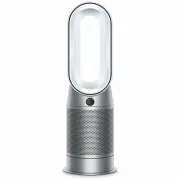
The Dyson Pure Hot plus Cool™
purifier fan heater, with the
amplifier loop and mesh filter
cover, screen below the loop
amplifier and outer cover
release button on the side.
Dyson Purifier Hot+Cool™
"Loading the manual" means you need to wait until the file loads and becomes available for online reading. Some manuals are very large, and the time they take to appear depends on your internet speed.
Was this manual helpful?
About this manual
- Brand
- Dyson
- Model
- 368801-01
- Document type
- User Manual
- Category
- Heater
- Language(s)
- English
- Pages
- 11
- File size
- 8.5 MB
- Format
Summary
Power and continuous monitoring Standby on/off Wi-Fi Connectivity Continuous monitoring Continuous monitoring Press the Standby on/off button on your Dyson purifying fan heater or remote control to stop your machine. It will continue to monitor the air quality. Wi-Fi is on by default. To turn the Wi...
Information menu Press this button to scroll through the information being monitored by your Dyson purifying fan heater. Information about air quality, temperature, humidity and filter levels is shown on the LCD screen. When a particular type of pollutant causes air quality to decrease, a symbol for...
Press the button to set the required room temperature. Your machine will pause when the temperature set has been reached. Press the Cooling mode button to switch your machine from heating mode to cooling mode. Your Dyson purifying fan heater will turn off automatically after the selected amount of t...
Ask a question
Related manuals
Other Dyson appliances
 Dyson 307174-01 User Manual
 Dyson 400473-01 User Manual
 Dyson 405866-01 User Manual
 Dyson 447261-01 User Manual
 Dyson 447921-01 User Manual
 Dyson 447922-01 User Manual
 Dyson 447923-01 User Manual
 Dyson 447930-01 User Manual
 Dyson airblade AB02 User Manual
 Dyson AM02 Manual
 Dyson AM 04 Manual
 Dyson AM09 Manual
 Dyson AM10 User Manual
 Dyson BABy DC22 allergy User Manual
 Dyson BALL User Manual
 Dyson Ball Allergy Manual
 Dyson Ball DC24 User Manual
 Dyson Big Ball Allergy 2 Manual
 Dyson Big Ball Multifloor 2+ User Manual
 Dyson Cinetic Big Ball Animal Pro 2 User Manual