Page 4 - Recording to memory card; segments via the mobile app.; Script support
4 Recording to memory card Enable continuous video recording or activate it during specific events, and view recorded video segments via the mobile app. Script support Set up automation scripts and various actions to perform automatically upon trigger events. Two-way voice communication Activate the...
Page 5 - PRODUCT DESCRIPTION
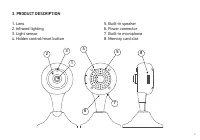
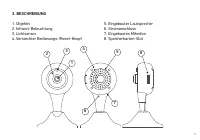
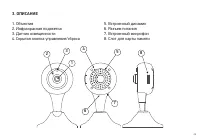
5 3. PRODUCT DESCRIPTION 1. Lens 2. Infrared lighting 3. Light sensor 4. Hidden control/reset button 5. Built-in speaker 6. Power connector 7. Built-in microphone 8. Memory card slot 1 2 3 4 5 6 7 8
Page 6 - Device management; button; Press the button quickly; device to the configuration/pairing mode.
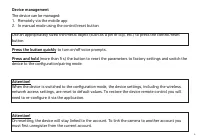
6 Device management The device can be managed:1. Remotely via the mobile app2. In manual mode using the control/reset button Use an appropriately sized thin metal object (such as a pin or clip, etc.) to press the control/reset button Press the button quickly to turn on/off voice prompts. Press and h...
Page 8 - WiFi signal indicator; *For cameras with the rotary mechanism
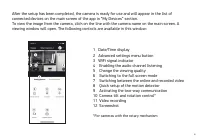
8 After the setup has been completed, the camera is ready for use and will appear in the list of connected devices on the main screen of the app in “My Devices” section.To view the image from the camera, click on the line with the camera name on the main screen. A viewing window will open. The follo...
Page 10 - MAIN TECHNICAL SPECIFICATIONS; • Glass
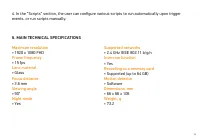
10 4. In the “Scripts” section, the user can configure various scripts to run automatically upon trigger events, or run scripts manually. 6. MAIN TECHNICAL SPECIFICATIONS Maximum resolution • 1920 х 1080 FHD Frame frequency • 15 fps Lens material • Glass Focus distance • 3.6 mm Viewing angle • 90° N...
Page 11 - • Use only the accessories approved by the manufacturer.
11 7. PACKAGE CONTENTS • IP-camera DiVision 300• Adapter with a USB cable • Mounting kit• User manual 8. SAFETY INSTRUCTIONS • Do not disassemble or repair the device yourself. In the event of a malfunction, contact the service centre. • The permissible ambient temperature in the operation mode is: ...
Page 13 - year; Nippon Klick Systems LLP
13 Warranty period: 1 year The full version of this user manual can be found on the product page at www.digma-global.com MANUFACTURER: Nippon Klick Systems LLP Address: 40 Willoughby Road, London, N8 0JG, United Kingdom of Great Britain and Northern IrelandMade in China IMPORTER IN EU: Merlion Trade...
Page 14 - ge
14 Wir bedanken uns, dass Sie sich für ein DIGMA-Produkt entschieden haben! Bitte lesen Sie die Bedienungsanleitung aufmerksam durch, bevor Sie die IP-Kamera starten, um richtig mit ihr umzugehen und um Schäden vorzubeugen. Software, konstruktive Details des Geräts und Inhalt dieser Bedienungsanleit...
Page 16 - Die kostenlose App; DIGMA SmartLife; für Smartphones und Tablets ist für OS Android (Version 5.1
16 Aufzeichnen auf die Speicherkarte Sie können eine fortlaufende Videoaufzeichnung oder Aufnahmen bestimmter Ereignisse aktivieren. Die aufgezeichneten Videos können Sie dann mit einer Mobile App ansehen. Unterstützung von Szenarien Stellen Sie automatisierte Szenarien ein, um verschiedene automati...
Page 18 - Kamerabedienung; Drücken Sie einmal; kurz; auf den Knopf, um die Sprachansagen zu aktivieren/deaktivieren.; Langes Drücken; Gerät in den Konfigurationsmodus/Anschlussmodus.
18 Kamerabedienung Die Kamera kann bedient werden:1. Durch Fernbedienung über Mobile App2. Manuell mit dem Bedienungs-/Reset-Knopf Um auf den Bedienungs-/Reset-Knopf zu drücken, benutzen Sie einen geeigneten dünnen Gegenstand aus Metall (Stecknadel, Heftklammer usw.). Drücken Sie einmal kurz auf den...
Page 19 - Klicken auf die Taste „Fertig“.
19 4. ERSTE SCHRITTE Um das Gerät mit einer Mobile App bedienen zu können, ist es notwendig, die Grundeinstellungen einzustellen. Notwendige Schritte: 1. Schließen Sie Ihr Mobilgerät an das Standard 2.4 GHz Wireless-Netzwerk an.2. Laden Sie die App DIGMA SmartLife im AppStore Ihres Mobilgeräts herun...
Page 20 - Aktivierung des Audiokanals; *Für Kameras mit Drehmechanismus
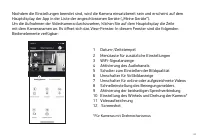
20 Nachdem die Einstellungen beendet sind, wird die Kamera einsatzbereit sein und erscheint auf dem Hauptdisplay der App in der Liste der angeschlossenen Geräte („Meine Geräte“).Um die Aufnahmen der Videokamera durchzusehen, klicken Sie auf dem Hauptdisplay die Zeile mit dem Kameranamen an. Es öffne...
Page 21 - ZUSÄTZLICHE EINSTELLUNGEN; erhalten hat
21 5. ZUSÄTZLICHE EINSTELLUNGEN 1. Das Gerät ist mit einer Funktion für Sprachansagen zu Modi/Arbeitszustand ausgestattet. Um die Sprachmeldungen zu deaktivieren, drücken Sie einmal kurz auf den Bedienungs-/Reset-Knopf. Danach ertönt ein fortwährender Signalton.Das wiederholte kurze Drücken auf den ...
Page 22 - DIE WICHTIGSTEN TECHNISCHEN EIGENSCHAFTEN
22 Maximale Auflösung • 1920 х 1080 FHD Bildfolgefrequenz • 15 fps Linsenmaterial • Glas Fokusabstand • 3.6 mm Blickwinkel • 90° Nachtmodus • Vorhanden Unterstützte Netzwerke • 2.4 GHz IEEE 802.11 b/g/n Intercom-Funktion • Vorhanden Aufzeichnung auf die Speicherkarte • Vorhanden (bis zu 64 GB) Beweg...
Page 23 - SICHERHEITSMASSNAHMEN
23 7. LIEFERUMFANG • IP-Kamera DiVision 300 • Adapter mit USB-Kab • Montagesatz • Benutzerhandbuch 8. SICHERHEITSMASSNAHMEN • Sie sollten das Gerät weder selbst reparieren noch auseinander nehmen. Bei Defekten wenden Sie sich an die Mitarbeiter des Servicezentrums. • Zulässige Betriebstemperatur: vo...
Page 24 - Dieses Gerät erfordert keine Montage oder Befestigung.; Bedingungen für die Lagerung; ist auf der Verpackung angegeben.; Die Nutzungsdauer; Monate ab Herstellungsdatum.
24 Wichtige Parameter Eingang: DC 5 В 1 АStromverbrauch: 5 W Regeln und Bedingungen für die Montage Dieses Gerät erfordert keine Montage oder Befestigung. Bedingungen für die Lagerung Das Gerät soll bei Temperaturen von -5 bis +40°С und einer relativen Feuchtigkeit von nicht mehr als 85 % aufbewahrt...
Page 27 - Назначение продукта; посредством мобильного приложения; Контроль через интернет; приложение; Детектор движения
27 1. ВВЕДЕНИЕ Назначение продукта Бытовая IP-камера DiVision 300 предназначена для осуществления удаленного видеонаблюдения внутри помещений. Устройство имеет функцию дистанционного управления через сеть Интернет посредством мобильного приложения DIGMA SmartLife. 2. ДОСТУПНЫЕ ФУНКЦИИ Контроль через...
Page 28 - Ночной режим; активировав инфракрасную подсветку.; Запись на карту памяти; Бесплатное приложение для смартфонов и планшетов; доступно для ОС Android
28 Ночной режим В условиях низкой освещенности камера автоматически переключится в ночной режим, активировав инфракрасную подсветку. Запись на карту памяти Включите непрерывную видеозапись, либо активируйте ее при наступлении событий, просматривайте записанные видеофрагменты через мобильное приложен...
Page 30 - Управление устройством; Используйте; короткое нажатие; на кнопку для включения/выключения голосовых подсказок.; Длительное нажатие; (более 5 с) осуществляет сброс параметров на заводские настройки и
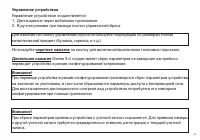
30 Управление устройством Управление устройством осуществляется:1. Дистанционно через мобильное приложение2. В ручном режиме при помощи кнопки управления/сброса Для нажатия на кнопку управления/сброса используйте подходящий по размерам тонкий металлический предмет (булавка, скрепка, и т.д.) Использу...
Page 32 - *Для камер с поворотным механизмом
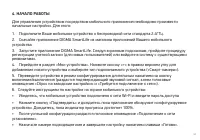
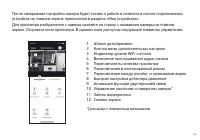
32 После завершения настройки камера будет готова к работе и появится в списке подключенных устройств на главном экране приложения в разделе «Мои устройства».Для просмотра изображения с камеры нажмите на строку с названием камеры на главном экране. Откроется окно просмотра. В данном окне доступны сл...
Page 33 - ДОПОЛНИТЕЛЬНЫЕ НАСТРОЙКИ
33 5. ДОПОЛНИТЕЛЬНЫЕ НАСТРОЙКИ 1. Устройство снабжено функцией голосовых оповещений о режимах/состояниях работы. Для отключения голосовых оповещений однократно кратковременно нажмите на кнопку управления/ сброса. После отпускания кнопки раздастся подтверждающий звуковой сигнал.Повторное кратковремен...
Page 34 - ОСНОВНЫЕ ТЕХНИЧЕСКИЕ ХАРАКТЕРИСТИКИ; • Стекло
34 • Настройка профиля учетной записи• Просмотр/редактирование списка сценариев• Просмотр/редактирование списка доверенных лиц, имеющих гостевой доступ к добавленным устройствам• Доступ к центру сообщений – просмотр событий, для которых были получены уведомления 4. В разделе «Сценарии» пользователь ...
Page 35 - • IP-камера DiVision
35 7. КОМПЛЕКТАЦИЯ • IP-камера DiVision 300 • Адаптер с USB-кабелем• Монтажный комплект• Руководство пользователя 8. ТЕХПОДДЕРЖКА • Не разбирайте и не ремонтируйте устройство самостоятельно. В случае его неисправности обратитесь в сервисный центр. • Допустимая температура внешней среды в режиме эксп...
Page 36 - более 85%, а также избегать попадания прямых солнечных лучей.
36 Основные параметры Вход: DC 5 В 1 АПотребление энергии: 5 Вт Правила и условия монтажа Данное устройство не требует какого-либо монтажа или постоянной фиксации. Условия хранения Устройство требуется хранить при температуре от -5 до +40 °С при относительной влажности не более 85%, а также избегать...
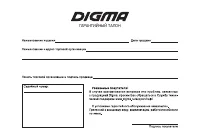
Page 43 - ГАРАНТИЙНЫЙ ТАЛОН