Page 3 - Getting Started
Dell t Tower External Battery Module for use with 1000W and 1920/1500W UPS models Getting Started With Your System K788N, H914N, J716N, K789N K806N, H965N w w w . d e l l . c o m | s u p p o r t . d e l l . c o m
Page 4 - Notes and Warnings; moderate injury or in property damage incidents.; This UPS contains; LETHAL VOLTAGES; . All repairs and service should be performed by; AUTHORIZED SERVICE PERSONNEL ONLY
Notes and Warnings NOTE: A NOTE indicates important information that helps you make better use of your software. CAUTION: A CAUTION indicates a potentially hazardous situation which, if not avoided, may result in minor or moderate injury or in property damage incidents. WARNING: A WARNING indicates ...
Page 5 - Finding Information; The; document provides important safety and; Dell UPS Disc
3 Finding Information | Finding Information CAUTION: The Safety, Environmental, and Regulatory Information document provides important safety and regulatory information. What are You Looking For? Find It Here S The user's guide for my UPS S The user's guide for the Dell Network Management Card S Del...
Page 6 - Installation; important regulatory information in your; Unpacking the External Battery Module
4 | Installation Installation CAUTION: Before performing the procedures in this document, read and follow the safety instructions and important regulatory information in your Safety, Environmental, and Regulatory Information document. Unpacking the External Battery Module 1 Unpack the External Batte...
Page 7 - Removing the Battery Connector Cover
5 Installation | Removing the Battery Connector Cover NOTE: A small amount of arcing may occur when connecting an EBM to the UPS. This is normal and will not harm personnel. Insert the EBM cable into the UPS battery connector quickly and firmly. NOTE: If the UPS is stored or used without an EBM, the...
Page 8 - Connecting the EBM Cable; Plug the EBM cable into the UPS battery connector.; Follow the instructions in the; document or the; for instructions on installing the UPS.
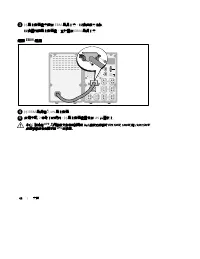
6 | Installation 3 Install the battery connector cover under the EBM cable to provide strain relief. Rotate the battery connector cover on its side and position under the EBM cable. Connecting the EBM Cable 4 Plug the EBM cable into the UPS battery connector. 5 Secure the battery connector cover to ...
Page 9 - Démarrer
Module de Batterie Externe en Tour Dell t pour une utilisation avec 1000W et 1920/1500W Modèles de l'onduleur Démarrer avec votre système K788N, H914N, J716N, K789N K806N, H965N w w w . d e l l . c o m | s u p p o r t . d e l l . c o m
Page 10 - Remarques et avertissements; pourrait provoquer la mort ou une blessure.; Cet onduleur contient des; TENSIONS MORTELLES; . Toutes les réparations et tous les entretiens; UNIQUEMENT PAR UN PERSONNEL D’ENTRETIEN AGRÉÉ; pièce à l’intérieur de cet onduleur; NE PEUT ÊTRE ENTRETENUE PAR L’UTILISATEUR
Remarques et avertissements REMARQUE : Une REMARQUE indique des informations importantes qui vous aident à mieux utiliser votre logiciel. MISE EN GARDE : Une MISE EN GARDE indique une situation dangereuse potentielle qui, si elle n'est pas évitée, peut provoquer une blessure mineure ou modérée ou de...
Page 11 - Trouver des informations; Le document; Disque de l'onduleur Dell
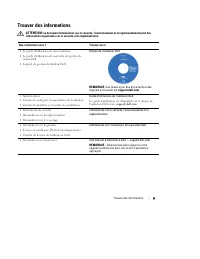
9 Trouver des informations | Trouver des informations ATTENTION! Le document Informations sur la sécurité, l'environnement et la réglementation fournit des informations importantes sur la sécurité et la réglementation. Que recherchez-vous ? Trouvez-le ici S Le guide d'utilisation de mon onduleur S L...
Page 12 - Déballage du Module de batterie externe
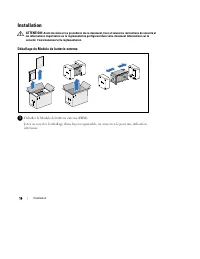
10 | Installation Installation ATTENTION! Avant de réaliser les procédures de ce document, lisez et suivez les instructions de sécurité et les informations importantes sur la réglementation qui figurent dans votre document Informations sur la sécurité, l'environnement et la réglementation . Déballag...
Page 13 - Retrait du Couvercle du Connecteur des Batteries
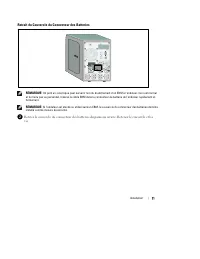
11 Installation | Retrait du Couvercle du Connecteur des Batteries REMARQUE: Un petit arc électrique peut survenir lors du branchement d'un EBM à l'onduleur. Ceci est normal et ne nuira pas au personnel. Insérez le câble EBM dans le connecteur de batterie de l'onduleur rapidement etfermement. REMARQ...
Page 14 - Installation du Support du Serre-Câble
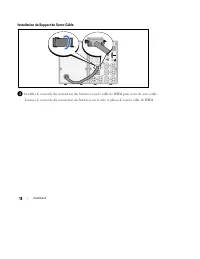
12 | Installation Installation du Support du Serre-Câble 3 Installez le couvercle du connecteur des batteries sous le câble de l'EBM pour servir de serre-câble. Tournez le couvercle du connecteur des batteries sur le côté et placez-le sous le câble de l'EBM.
Page 15 - Connexion du Câble de l'EBM; Suivez les instructions du document; ou le; pour des instructions sur l'installation de
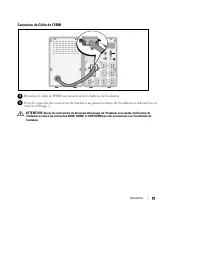
13 Installation | Connexion du Câble de l'EBM 4 Branchez le câble de l'EBM au connecteur de la batterie de l'onduleur. 5 Fixez le couvercle du connecteur des batteries au panneau arrière de l'onduleur en utilisant les vis retirées à l'Etape 2. ATTENTION! Suivez les instructions du document Démarrage...
Page 17 - Erste Schritte
Dell t Tower Externes Batteriemodul zur Verwendung mit 1000W und 1920/1500W USV-Typen Erste Schritte Mit Ihrem System K788N, H914N, J716N, K789N K806N, H965N w w w . d e l l . c o m | s u p p o r t . d e l l . c o m
Page 18 - Hinweise und Warnungen; Verletzungen führt, wenn sie nicht vermieden wird.; Diese USV führt; LEBENSGEFÄHRLICHE SPANNUNG; dürfen; NUR VON BEFUGTEM WARTUNGSPERSONAL; durchgeführt werden. Im Inneren der; KEINE VOM BENUTZER WARTBAREN TEILE
Hinweise und Warnungen HINWEIS: Ein HINWEIS macht auf eine wichtige Information aufmerksam, mit deren Hilfe Sie Ihre Software optimal nutzen können. ACHTUNG: ACHTUNG macht auf eine potenziell gefährliche Situation aufmerksam, die zu geringen oder mäßigen Verletzungen oder Sachschäden führen kann, we...
Page 19 - Auffinden von Informationen; Im Dokument; Die Disk für die Dell USV
17 Auffinden von Informationen | Auffinden von Informationen ACHTUNG: Im Dokument Informationen zu Sicherheit, Umweltschutz und Ordnungsvorschriften finden Sie wichtige Sicherheitshinweise und Informationen zu gesetzlichen Bestimmungen. Was suchen Sie? Hier finden Sie es S Die Benutzeranleitung für ...
Page 20 - Auspacken des Externen Batteriemoduls; den späteren Gebrauch auf.
18 | Installation Installation ACHTUNG: Vor der Ausführung der Verfahren in diesem Dokument lesen und befolgen Sie bitte die Sicherheitshinweise und wichtigen Informationen zu Ordnungsvorschriften in Ihrem Dokument über Informationen zu Sicherheit, Umweltschutz und Ordnungsvorschriften . Auspacken d...
Page 21 - Entfernen der Batterieanschlussabdeckung
19 Installation | Entfernen der Batterieanschlussabdeckung HINWEIS: Beim Anschließen eines EBM an die USV kann es zu einem kleinen Lichtbogen kommen. Dies ist normal und für Personen unschädlich. Verbinden Sie das EBM-Kabel rasch und fest mit dem Batterieanschlussder USV. HINWEIS: Sollte die USV ohn...
Page 22 - Anschluss des EBM-Kabels; hierzu die in Schritt 2 entfernten Schrauben.; Folgen Sie den Anweisungen aus dem Dokument; oder der; für Anweisungen zur Installation der USV.
20 | Installation 3 Installieren Sie die Batterieanschlussabdeckung unter dem EBM-Kabel, um einen Druckausgleich zu gewährleisten. Drehen Sie die Batterieanschlussabdeckung auf die Seite, und positionieren Sie diese unter dem EBM-Kabel. Anschluss des EBM-Kabels 4 Stecken Sie das EBM-Kabel in den USV...
Page 23 - Начало работы
Модуль внешней батареи Dell™ "Башня" для использования с 1000 Вт и 1920/1500 Вт моделями ИБП Начало работы c вашей системой K788N, H914N, J716N, K789N K806N, H965N w w w . d e l l . c o m | s u p p o r t . d e l l . c o m
Page 24 - Примечания и предупреждения; Пометка ПРЕДУПРЕЖДЕНИЕ указывает на потенциально опасную; В устройстве ИБП некоторые узлы находятся под; СМЕРТЕЛЬНО ОПАСНЫМ; . Все работы по ремонту и обслуживанию должны выполняться; ТОЛЬКО УПОЛНОМОЧЕННЫМ ОБСЛУЖИВАЮЩИМ ПЕРСОНАЛОМ
Примечания и предупреждения ПРИМЕЧАНИЕ: Пометка ПРИМЕЧАНИЕ указывает на важную информацию, которая поможет вам более эффективно использовать свое программное обеспечение. ВНИМАНИЕ: Пометка ВНИМАНИЕ указывает на потенциально опасную ситуацию, которая, если ее не избежать, может привести к травмам лег...
Page 25 - Поиск информации; Документ; содержит важную информацию о технике
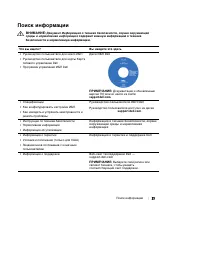
23 Поиск информации | Поиск информации ВНИМАНИЕ: Документ Информация о технике безопасности, охране окружающей среды и нормативная информация содержит важную информацию о технике безопасности и нормативную информацию. Что вы ищете? Вы найдете это здесь S Руководство пользователя для моего ИБП S Руко...
Page 26 - Установка; Перед выполнением процедур, описанных в данной документации,; Модуль внешней батареи - Распаковка
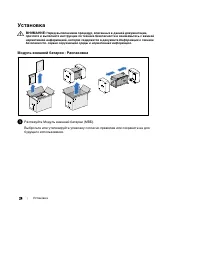
24 | Установка Установка ВНИМАНИЕ: Перед выполнением процедур, описанных в данной документации, прочтите и выполните инструкции по технике безопасности и ознакомьтесь с важнойнормативной информацией, которая содержится в документе Информация о технике безопасности, охране окружающей среды и норматив...
Page 27 - Снятие крышки разъема батарей
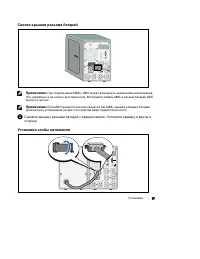
25 Установка | Снятие крышки разъема батарей Примечание: При подключении МВБ к ИБП может возникнуть незначительное искрение. Это нормально и не опасно для персонала. Вставляйте кабель МВБ в разъем батарей ИБПбыстро и прочно. Примечание: Если ИБП хранится или используется без МВБ, крышка разъема бата...
Page 28 - Подключение кабеля МВБ; Подключите кабель МВБ к разъему батарей.; При установке ИБП следуйте инструкциям, которые приведены в; или
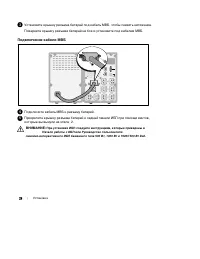
26 | Установка 3 Установите крышку разъема батарей под кабель МВБ, чтобы снизить натяжение. Поверните крышку разъема батарей на бок и установите под кабелем МВБ. Подключение кабеля МВБ 4 Подключите кабель МВБ к разъему батарей. 5 Прикрепите крышку разъема батарей к задней панели ИБП при помощи винто...
Page 29 - Inicio
Módulo de la batería externa de torre de Dell t para uso con 1000W y 1920/1500W Modelos de UPS Inicio de su sistema K788N, H914N, J716N, K789N K806N, H965N w w w . d e l l . c o m | s u p p o r t . d e l l . c o m
Page 30 - Notas y advertencias; como resultado la muerte o una lesión.; Este UPS contiene; VOLTAJES LETALES; debe realizar las reparaciones y el servicio.; NO HAY PIEZAS QUE PUEDAN RECIBIR SERVICIO
Notas y advertencias NOTA: Una NOTA indica información importante que lo ayuda a utilizar mejor el software. PRECAUCIÓN: Una PRECAUCIÓN indica una situación potencialmente peligrosa que, si no se evita, puede dar como resultado una lesión moderada o leve, o incidentes de daños a la propiedad. ADVERT...
Page 31 - Búsqueda de información; El documento; brinda información; Disco del UPS de Dell
29 Búsqueda de información | Búsqueda de información PRECAUCIÓN: El documento Información ambiental, regulatoria y de seguridad brinda información regulatoria y sobre seguridad importante. ¿Qué está buscando? Encuéntrelo aquí S La guía del usuario para mi UPS S La guía del usuario para la Tarjeta de...
Page 32 - Instalación; Cómo desembalar el Módulo de batería externa
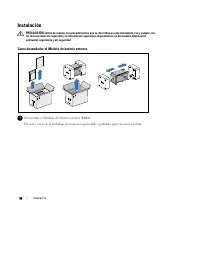
30 | Instalación Instalación PRECAUCIÓN: Antes de realizar los procedimientos que se describen en este documento, lea y cumpla con las instrucciones de seguridad y la información regulatoria importante en su documento Información ambiental, regulatoria y de seguridad . Cómo desembalar el Módulo de b...
Page 33 - Cómo retirar la cubierta del conector; Cómo instalar el soporte de tubo pasacables
31 Instalación | Cómo retirar la cubierta del conector NOTA: Puede haber un pequeño arco al momento de conectar un EBM al UPS. Esto es normal y no ocasionará daños personales. Inserte el cable del EBM en el conector de la batería del UPS de forma rápida y firme. NOTA: Si el UPS se almacena o se util...
Page 34 - Cómo conectar el cable del EBM; Enchufe el cable del EBM en el conector de la batería del UPS.; Siga las instrucciones del documento; o la; para obtener indicaciones sobre cómo instalar
32 | Instalación 3 Instale la cubierta del conector de la batería debajo del cable del EBM para proporcionar un tubo pasacables. Gire la cubierta del conector de la batería hacia su lado y colóquela debajo del cable del EBM. Cómo conectar el cable del EBM 4 Enchufe el cable del EBM en el conector de...
Page 36 - 注意:; 小心:; 警告:; 危险:; UPS
注意: “注意”表示可帮助您更好使用本软件的重要信息。 小心: “小心”表示潜在危险情况,如果不加以避免,可能导致轻度或中度伤害,或财产损失事故。 警告: “警告”表示潜在危险情况,如果不加以避免,可能会导致死亡或伤害。 危险: “危险”表示紧急危险情况,如果不加以避免,将导致死亡或严重的伤害。 危险: 遵守下列须知有助于防止紧急危险情况,其若不加以避免,将导致死亡或严重的伤害: S 本 UPS 包含危险致命的电压。 所有维修和服务都只能由经过 授权的维修人员进行。 UPS 中没有用户可自行维修的部件。 本文档所含信息如有更改,恕不另行通知。 © 2009 Dell Inc. 保留所有权利。 ...
Page 37 - 查找信息; 安全、环保和法规信息; Dell UPS
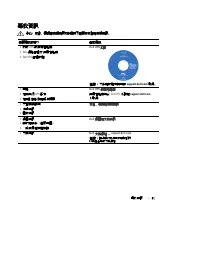
35 查找信息 | 查找信息 小心: 安全、环保和法规信息 文件提供了重要的安全和法规信息。 您正在寻找什么? 在此查找 S 我的 UPS 的用户指南 S Dell 网络管理卡用户指南 S Dell UPS 管理软件 注意: 文件和软件更新可在 support.dell.com 找到。 Dell UPS 光盘 S 规格 S 如何配置 UPS 设置 S 如何诊断故障和解决问题 Dell UPS 用户指南 用户指南可从 Dell UPS 光盘和 support.dell.com 上找到。 S 安全操作说明 S 行政法规信息 S 回收信息 安全、环保和法规信息 S 保修信息 S 条款和条件(仅限美国...
Page 38 - 安装; 拆开外部电池模块包装; 拆开外部电池模块 (
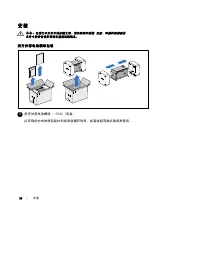
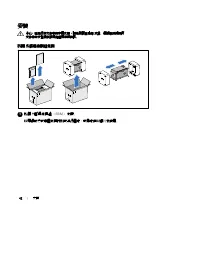
36 | 安装 安装 小心: 在进行本文件中的步骤之前,请先阅读和遵循 安全、环保和法规信息 文件中的安全操作说明和重要法规信息。 拆开外部电池模块包装 1 拆开外部电池模块 ( EBM )包装。 以环保的方式处理包装材料或回收循环利用,或者收起存放以备将来使用。
Page 39 - 取下电池连接器盖; 从后面板上取下电池连接器盖。 保留外盖和螺钉。; 安装应变消除支架
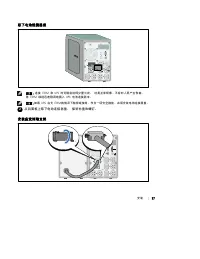
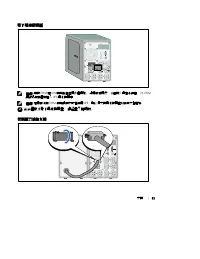
37 安装 | 取下电池连接器盖 注意: 连接 EBM 和 UPS 时可能会出现少量火花。 这是正常现象,不会对人员产生伤害。 将 EBM 线缆迅速稳固地插入 UPS 电池连接器中。 注意: 如果 UPS 在无 EBM 的情况下储存或使用,作为一项安全措施,必须安装电池连接器盖。 2 从后面板上取下电池连接器盖。 保留外盖和螺钉。 安装应变消除支架
Page 40 - 连接; 电缆; 入门指南; Dell 在线互动塔式 UPS
38 | 安装 3 将电池连接器盖安装在 EBM 电缆下方,以提供应变消除。 以侧边旋转电池连接器盖,并放置在 EBM 电缆下方。 连接 EBM 电缆 4 将 EBM 电缆插入 UPS 电池连接器。 5 用步骤 2 中取下的螺钉将电池连接器盖固定在 UPS 后面板上。 小心: 按照 UPS 入门指南 文件中的说明或 Dell 在线互动塔式 UPS 500W , 1000W 和 1920/1500W 用户指南 中有关安装 UPS 的说明。
Page 42 - 危險:
注意: 「注意」表示可協助您更妥善地使用本軟體的重要資訊。 小心: 「小心」表示潛在危險情況,如果不加以避免,可能導致輕度或中度傷害,或財產損失事故。 警告: 「警告」表示潛在危險情況,如果不加以避免,將會導致死亡或嚴重的傷害。 危險: 「危險」表示緊急危險情況,如果不加以避免,將導致死亡或嚴重的傷害。 危險: 遵守以下須知有助於防止緊急危險情況,其若不加以避免,將導致死亡或嚴重的傷害。 S 本 UPS 包含危險致命的電壓。 所有維修和服務都只能由經過授權的維修人員 進行。 UPS 中沒有可由使用者自行維修的零件。 本文件所含資訊如有變更,恕不另行通知。 © 2009 Dell Inc. 保留...
Page 43 - 尋找資訊; 小心; 安全、環保和法規資訊
41 尋找資訊 | 尋找資訊 小心 : 安全、環保和法規資訊 文件提供了重要的安全和法規資訊。 您要尋找什麼? 在此尋找 S 我的 UPS 的使用者指南 S Dell 網路管理卡 使用者指南 S Dell UPS 管理軟體 注意: 文件和軟體更新可在 support.dell.com 取得。 Dell UPS 光碟 S 規格 S 如何進行 UPS 設定 S 如何診斷故障和解決問題 Dell UPS 使用者指南 使用者指南可從 Dell UPS 光碟和 support.dell.com 上取得。 S 安全操作說明 S 法規資訊 S 回收資訊 安全、環保和法規資訊 S 保固資訊 S 條款和條件(僅...
Page 44 - 安裝; 拆開 外部電池模組包裝; 拆開 外部電池模組 (
42 | 安裝 安裝 小心 : 在進行本文件中的步驟之前,請先閱讀並遵循 安全、環保和法規資訊 文件中的安全操作說明和重要法規資訊。 拆開 外部電池模組包裝 1 拆開 外部電池模組 ( EBM ) 包裝。 以環保的方式棄置包裝材料或進行回收,或是收存以備將來使用。
Page 45 - 取下電池接頭蓋; 注意; 從後面板上取下電池接頭蓋。 保留蓋子和螺釘。; 安裝應力消除支架
43 安裝 | 取下電池接頭蓋 注意 : 連接 EBM 和 UPS 時可能會出現少量電弧。 這是正常現象,不會對人員產生傷害。 將 EBM 纜線迅速穩固地插入 UPS 電池接頭中。 注意 : 如果在沒有 EBM 的時候存放或者使用 UPS ,則必須安裝電池接頭蓋以作為安全措施。 2 從後面板上取下電池接頭蓋。 保留蓋子和螺釘。 安裝應力消除支架
Page 46 - 連接; 電纜; 入門指南
44 | 安裝 3 將電池接頭蓋安裝在 EBM 電纜下方,以提供應力消除。 以側面旋轉電池接頭蓋,並放置在 EBM 電纜下方。 連接 EBM 電纜 4 將 EBM 電纜插入 UPS 電池接頭。 5 使用步驟 2 中取下的螺釘,將電池接頭蓋固定在 UPS 後面板上。 小心 : 請遵循 UPS 入門指南 文件中的說明或 Dell 在線互動塔式 UPS 500W, 1000W, 和 1920/1500W 使用者指南 中有關安裝 UPS 的說明。
Page 47 - 사용자의 시스템
Dell t 타워 외장형 배터리 모듈 함께 사용 1000W 및 1920/1500W UPS 모델 사용자의 시스템 시작하기 K788N, H914N, J716N, K789N K806N, H965N w w w . d e l l . c o m | s u p p o r t . d e l l . c o m
Page 48 - 참고 및 경고
참고 및 경고 참고 : “참고”는 소프트웨어를 더 잘 활용하는 데 도움이 되는 중요한 정보를 나타냅니다. : “주의”는 피하지 않을 경우 경미하거나 보통의 상해 또는 재산 손실 사고를 야기할 수 있는 잠재적 위험 상황을 표시합니다. 경고 : “경고”는 피하지 않을 경우 죽음이나 상해를 야기할 수 있는 잠재적 위험 상황을 표시합니다. 위험 : “위험”은 피하지 않을 경우 급박한 위험 상황이 사망이나 중상의 결과를 야기할 수 있음을 나타냅니다. 위험 : 아래의 지시사항을 준수하여, 피하지 않을 경우 사망이나 중상의 결과를 야기할 수 있...
Page 49 - 정보 찾아보기
47 정보 찾아보기 | 정보 찾아보기 주의: 안전, 환경, 및 규제 관련 정보 문서는 중요한 안전 및 규제 정보를 제공합니다. 찾는 정보 항목 정보의 소재 S UPS 용 사용자 설명서 S Dell 네트워크 관리카드용 사용자 설명서 S Dell UPS Management Software 참고: 문서 및 소프트웨어 업데이트는 support.dell.com 에서 조회할 수 있습니다. Dell UPS 디스크 S 사양 S UPS 설정 구성 방법 S 장애 처리 및 문제점 해결 Dell UPS 사용자 설명서 사용자 설명서는 Dell UPS 디스...
Page 50 - 설치; 외장 배터리 모듈 포장풀기
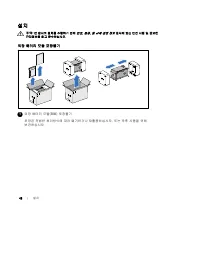
48 | 설치 설치 주의: 본 문서의 절차를 수행하기 전에 안전, 환경, 및 규제 관련 정보 문서에 있는 안전 지침 및 중요한 규제정보를 읽고 준수하십시오. 외장 배터리 모듈 포장풀기 1 외장 배터리 모듈( EBM ) 포장풀기. 포장은 적법한 처리방식에 따라 폐기하거나 재활용하십시오. 또는 추후 사용을 위해보관하십시오.
Page 51 - 배터리 커넥터 커버 분리하기; 뒷면 패널에서 배터리 커넥터 커버를 분리합니다. 커버와 스크류를 잘 보관합니다.; 응력 완화 브래킷 설치하기
49 설치 | 배터리 커넥터 커버 분리하기 참고: EBM 을 UPS 에 연결할 때 소량의 아크( arc )가 발생할 수 있습니다. 이것은 정상적인 것이며 인체에 해를 주지 않습니다. EBM 케이블을 UPS 배터리 커넥터에 신속하고 단단히 삽입하십시오. 참고: EBM 없이 UPS 를 보관하거나 사용할 경우, 배터리 커넥터 커버를 설치해야 합니다. 2 뒷면 패널에서 배터리 커넥터 커버를 분리합니다. 커버와 스크류를 잘 보관합니다. 응력 완화 브래킷 설치하기
Page 52 - 응력을 완화시키기 위해 배터리 커넥터 커버를; 케이블 연결; 시작
50 | 설치 3 응력을 완화시키기 위해 배터리 커넥터 커버를 EBM 아래에 설치하십시오. 배터리 커넥터 커버를 돌려 EBM 케이블 아래에 위치시키십시오. EBM 케이블 연결 4 EBM 케이블을 UPS 배터리 커넥터에 꽂으십시오. 5 2 단계에서 분리한 스크류를 사용하여 배터리 커넥터 커버를 UPS 뒷면 패널에 고정시키십시오. 주의: UPS 시작 문서 또는 Dell Line-Interactive Tower UPS 500W, 1000W, 1920/1500W 사용자 설명서 에 있는 설명서를 따르십시오.
Page 53 - はじめに
Dell t タワー型外付けバッテリー モジュール以下での使用 1000W および 1920/1500W UPS 型 はじめに システムについて K788N 、 H914N 、 J716N 、 K789N K806N 、 H965N w w w . d e l l . c o m | s u p p o r t . d e l l . c o m
Page 54 - 注意および警告; 注記
注意および警告 注記 : 「注記」は、ソフトウェアを有効に利用するための重要な情報を示しています。 注意: 「注意」は、回避しないと軽傷、または中程度の傷害を招く恐れがある潜在的に危険な状況を 示しています。 警告: 「警告」は、回避しないと死亡、または重傷を招く潜在的に危険な状況を示しています。 危険: 「危険」は、回避しないとほぼ確実に死亡、または重傷を招く危険な状況を示しています。 危険: 回避しないとほぼ確実に死亡、または重傷を招く危険な状況を防ぐため、以下の説明をよく お読みください: S この UPS の中には 致死的な電圧 が掛かっています。すべての修理や点検は、 公認のサービス...
Page 55 - 情報検索; 安全、環境、規則に関する情報
53 情報検索 | 情報検索 注意: 安全、環境、規則に関する情報 資料には、安全および規定に関する重要情報が含まれて います。 どんな情報をお探しですか? こちらでご覧いただけます S UPS ユーザーガイド S Dell ネットワークマネージメントカード用の ユーザーガイド S Dell UPS 制御ソフトウェア 注記説明書およびソフトウェアの更新情報は、 support.dell.com でご確認いただけます。 Dell UPS ディスク S 仕様 S UPS の設定方法 S トラブルシューティングおよび問題の解決方法 Dell UPS ユーザーガイド ユーザーガイドは Dell UPS...
Page 56 - 取り付け; 外付けバッテリーモジュールの開梱方法; 外付けバッテリーモジュール(外付けバッテリーモジュール)を開梱します。
54 | 取り付け 取り付け 注意: 当資料の手順を実施する前に、 安全、環境、規則に関する情報 資料に記載されている安全に 関する説明書および重要な規制情報をご覧いただき、これらの情報に従ってください。 外付けバッテリーモジュールの開梱方法 1 外付けバッテリーモジュール(外付けバッテリーモジュール)を開梱します。 責任を持ってパッケージを処分、またはリサイクルし、あるいは将来使えるように保管します。
Page 57 - バッテリーコネクタカバーを取り外します。; 注記:; ストレイン リリーフ ブラケットの取り付け方
55 取り付け | バッテリーコネクタカバーを取り外します。 注記: 外付けバッテリーモジュールを UPS に接続する際、少量のアーク放電が起こることが あります。 これは正常であり、人に損傷を与えることはありません。 即座にしっかりと、外付けバッテリーモジュールケーブルを UPS バッテリーコネクタへ挿入します。 注記: UPS を外付けバッテリーモジュールなしで保管、あるいは使用する場合、バッテリー コネク タカバーは、安全注意事項に従い取り付けなければいけません。 2 リヤパネルからバッテリーコネクタカバーを取り外します。カバーとネジを保管しておきます。 ストレイン リリーフ ブラケット...
Page 58 - 外付けバッテリーモジュールケーブルの接続方法
56 | 取り付け 3 張力を逃すため、外付けバッテリーモジュールケーブルの下にバッテリーコネクタカバーを取り付けます。 バッテリーコネクタカバーを横にし、外付けバッテリーモジュールケーブルの下に配置します。 外付けバッテリーモジュールケーブルの接続方法 4 外付けバッテリーモジュールケーブルを UPS バッテリーコネクタへ接続します。 5 ステップ 2 で取り外したネジを使って、 UPS のリヤパネルにバッテリーコネクタカバーを 固定します。 注意: UPS の取り付けに関する説明書に関しましては、 UPS はじめに の資料、または Dell ラインインタラクティブ式タワー型 UPS 50...