Page 3 - Quick Start Guide
Page 4 - About Notes
About Notes NOTE: A NOTE indicates important information that helps you make better use of your device. __________________ Information in this document is subject to change without notice.© 2010 Dell Inc. All rights reserved. Dell ™ , the DELL logo, and Streak ™ are trademarks of Dell Inc. November ...
Page 5 - Getting Started
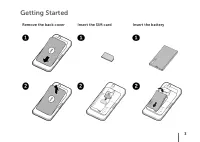
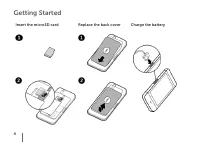
3 Getting Started Remove the back cover Insert the SIM card Insert the battery
Page 7 - Overview
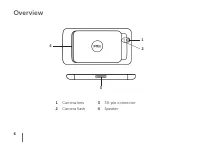
5 Overview 9 10 11 12 13 5 1 2 34 6 7 8 1 Back button 6 Earpiece 11 Volume down button 2 Menu button 7 Front-facing camera lens 12 Power and Sleep/Wake button 3 Home button 8 Ambient light sensor 13 Camera button 4 Microphone 9 Headphone connector 5 Proximity sensors 10 Volume up button
Page 9 - Turn on Your Device
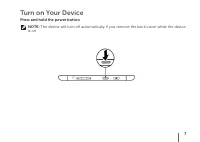
7 Turn on Your Device Press and hold the power button NOTE: The device will turn off automatically if you remove the back cover while the device is on.
Page 10 - Connect Headphones
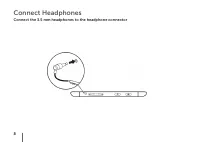
8 Connect Headphones Connect the 3.5 mm headphones to the headphone connector
Page 11 - Lock Screen
9 Lock Screen The tablet enters sleep mode automatically after a preset duration of inactivity. To wake up the tablet from sleep mode, press the power button once. To unlock the screen, touch and drag to the top of the screen. To set the duration after which the tablet enters sleep mode, touch the H...
Page 12 - Dell Stage
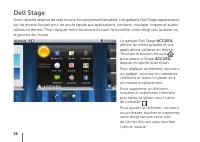
10 Dell Stage Your tablet has seven Home screens that you can customize. The Dell Stage widgets appear on the Home screens and provide quick access to recently used applications, contacts, music, pictures, and so on. To navigate across the Home screens, flick your finger to the right or left on the ...
Page 13 - Launcher
11 Launcher The Launcher displays all the available applications on your tablet, including any applications that you downloaded and installed from Android Market or other sources.To open the Launcher, touch the Launcher icon on the Home screen. To open an application, touch the appropriate icon.To c...
Page 14 - Connect to a Wi-Fi Network
12 Connect to a Wi-Fi Network To connect your tablet to a Wi-Fi network: Touch the Home button 1. → Menu button → Settings . Touch 2. Wireless & networks → Wi-Fi to select the Wi-Fi check box. The device scans for available wireless networks.Touch 3. Wi-Fi settings . The names and security setti...
Page 15 - Adding Your Gmail Contacts
13 Adding Your Gmail Contacts To add your Gmail contacts to the Contact list on your tablet: In the Home screen, touch the Launcher icon 1. → Contacts . Touch the Menu button 2. → Accounts . In the 3. Accounts & sync settings screen, ensure that you have selected the Auto-sync and Background dat...
Page 16 - Connect and Sync With a Computer (Optional)
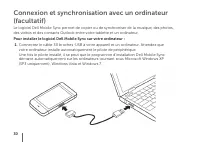
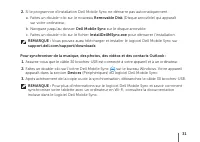
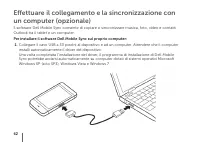
14 Connect and Sync With a Computer (Optional) The Dell Mobile Sync software allows you to copy or sync music, photos, videos, and Outlook contacts between your tablet and a computer. To install the Dell Mobile Sync software on your computer: Connect the 30-pin-to-USB cable to your device and a comp...
Page 18 - For More Information
16 For More Information To learn more about the features and settings available on your tablet, see the User’s Manual available on the SD card on your tablet or at support.dell.com/manuals . To view the User’s Manual available on the SD card, launch the QuickOffice application and then select Memory...
Page 19 - Guide d’information rapide
Page 20 - À propos des remarques
À propos des remarques REMARQUE : une REMARQUE indique des informations importantes qui peuvent vous aider à mieux utiliser l’appareil. __________________ Les informations contenues dans ce document sont sujettes à modification sans préavis.© 2010 Dell Inc. Tous droits réservés. Dell ™ , le logo DEL...
Page 21 - Mise en route
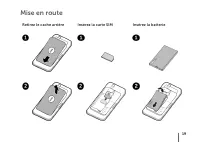
19 Mise en route Retirez le cache arrière Insérez la carte SIM Insérez la batterie
Page 23 - Présentation
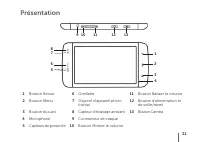
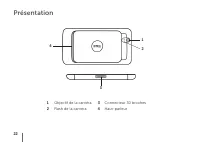
21 Présentation 9 10 11 12 13 5 1 2 34 6 7 8 1 Bouton Retour 6 Oreillette 11 Bouton Baisser le volume 2 Bouton Menu 7 Objectif d’appareil photo frontal 12 Bouton d’alimentation et de veille/réveil 3 Bouton Accueil 8 Capteur d’éclairage ambiant 13 Bouton Caméra 4 Microphone 9 Connecteur de casque 5 C...
Page 25 - Allumez votre appareil
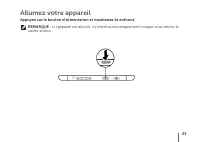
23 Allumez votre appareil Appuyez sur le bouton d’alimentation et maintenez-le enfoncé REMARQUE : si l’appareil est allumé, il s’éteint automatiquement lorsque vous retirez le cache arrière.
Page 26 - Connectez le casque
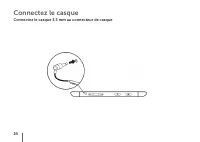
24 Connectez le casque Connectez le casque 3,5 mm au connecteur de casque
Page 27 - Verrouillage de l‘écran
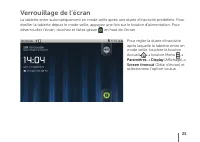
25 Verrouillage de l‘écran La tablette entre automatiquement en mode veille après une durée d’inactivité prédéfinie. Pour éveiller la tablette depuis le mode veille, appuyez une fois sur le bouton d’alimentation. Pour déverrouiller l’écran, touchez et faites glisser en haut de l’écran. Pour régler l...
Page 29 - Lanceur
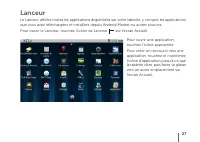
27 Lanceur Le Lanceur affiche toutes les applications disponibles sur votre tablette, y compris les applications que vous avez téléchargées et installées depuis Android Market ou autres sources.Pour ouvrir le Lanceur, touchez l’icône de Lanceur sur l’écran Accueil. Pour ouvrir une application, touch...
Page 30 - Connexion à un réseau Wi-Fi
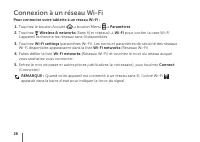
28 Connexion à un réseau Wi-Fi Pour connecter votre tablette à un réseau Wi-Fi : Touchez le bouton Accueil 1. → bouton Menu → Paramètres . Touchez 2. Wireless & networks (Sans fil et réseaux) → Wi-Fi pour cocher la case Wi-Fi. L’appareil recherche les réseaux sans fil disponibles.Touchez 3. Wi-F...
Page 31 - Ajour de vos contacts Gmail
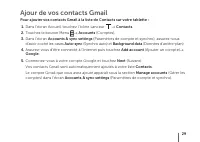
29 Ajour de vos contacts Gmail Pour ajouter vos contacts Gmail à la liste de Contacts sur votre tablette : Dans l’écran Accueil, touchez l’icône Lanceur 1. → Contacts . Touchez le bouton Menu 2. → Accounts (Comptes). Dans l’écran 3. Accounts & sync settings (Paramètres de compte et synchro), ass...
Page 34 - Pour plus d‘informations
32 Pour plus d‘informations Pour en savoir plus sur les fonctions et paramètres disponibles sur votre tablette, consultez le Manuel d’utilisation disponible sur la carte SD de votre tablette ou à l’adresse support.dell.com/manuals . Pour consulter le Manuel d’utilisation disponible sur la carte SD, ...
Page 35 - Schnellstart-Handbuch
Page 36 - Wissenswertes über Anmerkungen
Wissenswertes über Anmerkungen ANMERKUNG: Eine ANMERKUNG macht auf wichtige Informationen aufmerksam, die die Arbeit mit dem Gerät erleichtern. __________________ Irrtümer und technische Änderungen vorbehalten.© 2010 Dell Inc. Alle Rechte vorbehalten. Dell ™ , das DELL-Logo und Streak ™ sind Marken ...
Page 37 - Erste Schritte
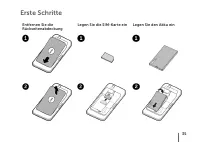
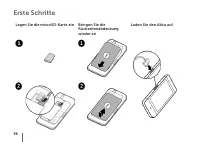
35 Erste Schritte Entfernen Sie die Rückseitenabdeckung Legen Sie die SIM-Karte ein Legen Sie den Akku ein
Page 39 - Übersicht
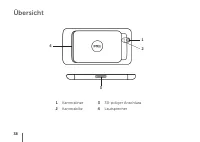
37 Übersicht 9 10 11 12 13 5 1 2 34 6 7 8 1 Zurück-Taste 6 Hörer 11 Lautstärkeregler (leiser) 2 Menütaste 7 Nach vorn ausgerichtete Kameralinse 12 Ein/Aus- und Standby/ Aktiv-Taste 3 Startseite-Taste 8 Umgebungslichtsensor 13 Kamera-Taste 4 Mikrofon 9 Kopfhöreranschluss 5 Näherungssensoren 10 Lautst...
Page 41 - Gerät einschalten
39 Gerät einschalten Halten Sie den Betriebsschalter gedrückt ANMERKUNG: Das Gerät schaltet sich automatisch aus, wenn Sie die Rückseitenabdeckung entfernen, solange es eingeschaltet ist.
Page 42 - Kopfhörer anschließen
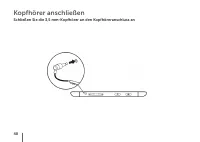
40 Kopfhörer anschließen Schließen Sie die 3,5 mm-Kopfhörer an den Kopfhöreranschluss an
Page 43 - Bildschirmsperre
41 Bildschirmsperre Das Tablet wechselt nach Ablauf eines festgelegten Zeitlimits für Inaktivität automatisch in den Energiesparmodus. Zum Aktivieren des Tablets aus dem Ruhemodus drücken Sie einmal die Ein/Aus-Taste. Zum Freigeben des Bildschirms tippen und ziehen Sie zum oberen Rand des Bildschirm...
Page 45 - Startprogramm
43 Startprogramm Das Startprogramm zeigt alle auf dem Tablet verfügbaren Anwendungen an, einschließlich aller Anwendungen, die Sie über Android Market oder andere Quellen heruntergeladen und installiert haben Zum Öffnen des Startprogramms tippen Sie auf der Startseite auf das Startprogramm-Symbol . ...
Page 46 - Verbindung mit einem WiFi-Netzwerk herstellen
44 Verbindung mit einem WiFi-Netzwerk herstellen So verbinden Sie das Tablet mit einem WiFi-Netzwerk: Tippen Sie auf die Startseite-Taste 1. → Menü-Taste → Einstellungen . Tippen Sie auf 2. Wireless & networks (Wireless und Netzwerke) → Wi-Fi (WiFi), um das Kontrollkästchen „Wi-Fi“ (WiFi) zu akt...
Page 47 - Hinzufügen Ihrer Gmail-Kontakte
45 Hinzufügen Ihrer Gmail-Kontakte So fügen Sie Ihre Gmail-Kontakte zur Kontaktliste auf dem Tablet hinzu: Tippen Sie auf der Startseite auf das Startprogramm-Symbol 1. → Kontakte . Tippen Sie auf die Menü-Taste 2. → Accounts (Konten). Stellen Sie im Bildschirm 3. Accounts & sync settings (Konte...
Page 50 - Weitere Informationen
48 Weitere Informationen Weitere Informationen zu den auf dem Tablet verfügbaren Funktionen und Einstellungen finden Sie im Benutzerhandbuch auf der SD-Karte im Tablet oder unter support.dell.com/manuals . Zum Anzeigen des Benutzerhandbuchs auf der SD-Karte, starten Sie die Anwendung „QuickOffice“ u...
Page 51 - Guida introduttiva rapida
Page 52 - Informazioni sulle note
Informazioni sulle note N.B.: una N.B. evidenzia informazioni importanti per un uso ottimale del dispositivo. __________________ Le informazioni contenute in questo documento sono soggette a modifica senza preavviso.© 2010 Dell Inc. Tutti i diritti riservati. Dell ™ , il logo DELL e Streak ™ sono ma...
Page 53 - Guida introduttiva
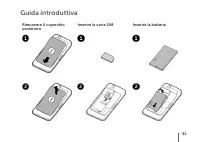
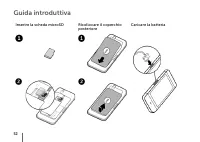
51 Guida introduttiva Rimuovere il coperchio posteriore Inserire la carta SIM Inserire la batteria
Page 55 - Panoramica
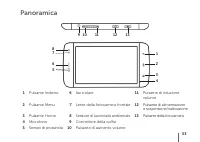
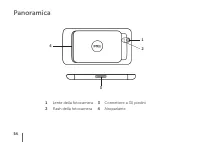
53 Panoramica 9 10 11 12 13 5 1 2 34 6 7 8 1 Pulsante Indietro 6 Auricolare 11 Pulsante di riduzione volume 2 Pulsante Menu 7 Lente della fotocamera frontale 12 Pulsante di alimentazione e sospensione/riattivazione 3 Pulsante Home 8 Sensore di luminosità ambientale 13 Pulsante della fotocamera 4 Mic...
Page 57 - Accendere il dispositivo
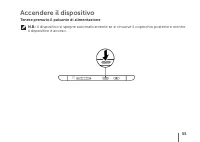
55 Accendere il dispositivo Tenere premuto il pulsante di alimentazione N.B.: il dispositivo si spegne automaticamente se si rimuove il coperchio posteriore mentre il dispositivo è acceso.
Page 58 - Collegare le cuffie
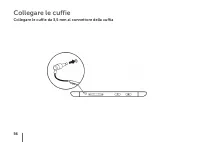
56 Collegare le cuffie Collegare le cuffie da 3,5 mm al connettore della cuffia
Page 59 - Blocco dello schermo
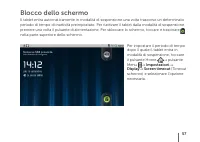
57 Blocco dello schermo Il tablet entra automaticamente in modalità di sospensione una volta trascorso un determinato periodo di tempo di inattività preimpostato. Per riattivare il tablet dalla modalità di sospensione, premere una volta il pulsante di alimentazione. Per sbloccare lo schermo, toccare...
Page 62 - Connessione a una rete Wi-Fi
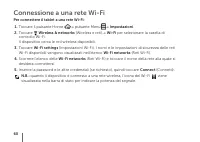
60 Connessione a una rete Wi-Fi Per connettere il tablet a una rete Wi-Fi: Toccare il pulsante Home 1. → pulsante Menu → Impostazioni . Toccare 2. Wireless & networks (Wireless e reti) → Wi-Fi per selezionare la casella di controllo Wi-Fi. Il dispositivo cerca le reti wireless disponibili.Toccar...
Page 63 - Come aggiungere i propri contatti Gmail
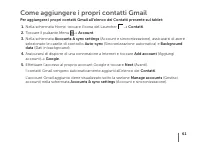
61 Come aggiungere i propri contatti Gmail Per aggiungere i propri contatti Gmail all’elenco dei Contatti presente sul tablet: Nella schermata Home, toccare l’icona del Launcher 1. → Contatti . Toccare il pulsante Menu 2. → Account . Nella schermata 3. Accounts & sync settings (Account e sincron...
Page 66 - Per maggiori informazioni
64 Per maggiori informazioni Per maggiori informazioni sulle caratteristiche e le configurazioni disponibili per il proprio tablet, consultare il Manuale dell’utente disponibile sulla scheda SD integrata nel tablet o all’indirizzo Web support.dell.com/manuals . Per visualizzare il Manuale dell’utent...
Page 67 - Guía de inicio rápido
Page 68 - Sobre las notas
Sobre las notas NOTA: Una NOTA proporciona información importante que le ayudará a utilizar mejor el dispositivo. __________________ La información contenida en este documento puede modificarse sin previo aviso.© 2010 Dell Inc. Todos los derechos reservados. Dell ™ , el logo de DELL, y Streak ™ son ...
Page 69 - Introducción
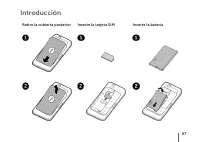
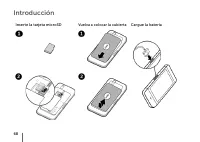
67 Introducción Retire la cubierta posterior Inserte la tarjeta SIM Inserte la batería
Page 71 - Visión general
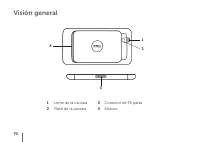
69 Visión general 9 10 11 12 13 5 1 2 34 6 7 8 1 Botón Atrás 6 Auricular 11 Botón de bajada de volumen 2 Botón del menú 7 Lente de la cámara frontal 12 Botón de encendido y de suspensión/reactivación 3 Botón de Inicio 8 Sensor de luz ambiental 13 Botón de la cámara 4 Micrófono 9 Conector de auricula...
Page 73 - Encendido del dispositivo
71 Encendido del dispositivo Pulse y mantenga pulsado el botón de encendido NOTA: el dispositivo se apagará automáticamente si extrae la cubierta posterior mientras esté encendido.
Page 74 - Conexión de los auriculares
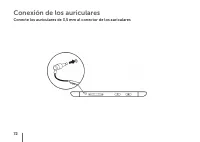
72 Conexión de los auriculares Conecte los auriculares de 3,5 mm al conector de los auriculares
Page 75 - Bloquear la pantalla
73 Bloquear la pantalla La tableta entra en modo de suspensión automáticamente después de un período predeterminado de inactividad. Para despertar la tableta del modo de suspensión, presione el botón de encendido una vez. Para desbloquear la pantalla, toque y arrastre hacia la parte superior de la p...
Page 78 - Conectarse a una red Wi-Fi
76 Conectarse a una red Wi-Fi Para conectar la tableta a una red Wi-Fi: Toque el botón Inicio 1. → botón Menu (Menú) → Configuración . Toque 2. Wireless & networks (Wireless y redes) → Wi-Fi (Wi-Fi) para seleccionar la casilla de verificación del Wi-Fi. El dispositivo busca redes inalámbricas di...
Page 79 - Añadir los contactos de Gmail
77 Añadir los contactos de Gmail Para añadir los contactos de Gmail a la lista de contactos de la tableta: En la pantalla Inicio, toque el icono del Launcher (Iniciador) 1. → Contactos . Toque el botón de Menu (Menú) 2. → Accounts (Cuentas). En la pantalla de 3. Accounts & sync settings (Cuentas...
Page 80 - Conectar y sincronizar con un equipo (opcional)
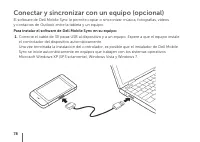
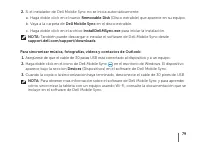
78 Conectar y sincronizar con un equipo (opcional) El software de Dell Mobile Sync le permite copiar o sincronizar música, fotografías, vídeos y contactos de Outlook entre la tableta y un equipo. Para instalar el software de Dell Mobile Sync en su equipo: Conecte el cable de 30 patas USB al disposit...
Page 82 - Para obtener más información
80 Para obtener más información Para obtener más información acerca de las funciones y configuraciones disponibles en la tableta, consulte el User’s Manual (Manual del usuario) disponible en la tarjeta SD de la tableta o en support.dell.com/manuals . Para ver el User’s Manual (Manual del usuario) di...