Page 2 - Abbreviations and Acronyms; Windows
Notes, Notices, and Cautions NOTE: A NOTE indicates important information that helps you make better use of your computer. NOTICE: A NOTICE indicates either potential damage to hardware or loss of data and tells you how to avoid the problem. CAUTION: A CAUTION indicates a potential for property dama...
Page 3 - Contents; Index
Contents 3 Contents Finding Information . . . . . . . . . . . . . . . . . . . . . . . . . . . . . . . . 5 Setting Up Your Computer . . . . . . . . . . . . . . . . . . . . . . . . . . . . . 8 About Your Computer . . . . . . . . . . . . . . . . . . . . . . . . . . . . . . . . 9 Front View . . . . . . ...
Page 7 - To view
Quick Reference Guide 7 • How to use Windows XP• How to work with programs and files• How to personalize my desktop Windows Help and Support Center 1 Click Start → Help and Support . 2 Type a word or phrase that describes your problem and click the arrow icon. 3 Click the topic that describes your p...
Page 8 - Setting Up Your Computer; Unpack the accessories box.
8 Quick Reference Guide Setting Up Your Computer CAUTION: Before you begin any of the procedures in this section, follow the safety instructions in the Product Information Guide . 1 Unpack the accessories box. 2 Set aside the contents of the accessories box, which you will need to complete the setup...
Page 9 - About Your Computer; Front View
Quick Reference Guide 9 About Your Computer Front View 1 display latch 8 touch pad/track stick buttons 2 display 9 track stick 3 power button 10 keyboard status lights 4 device status lights 11 volume control buttons 5 speakers (2) 12 mute button 6 keyboard 13 ambient light sensor 7 touch pad 1 5 2 ...
Page 10 - Left Side View
10 Quick Reference Guide Left Side View Right Side View 1 security cable slot 6 infrared sensor 2 air vents 7 wireless switch 3 1394 connector 8 wireless activity light 4 audio connectors 9 PC Card slot 5 ExpressCard slot 10 smart card slot 1 media bay 2 USB connectors (2) 1 2 6 3 4 7 5 8 9 10 1 2
Page 11 - Back View
Quick Reference Guide 11 Back View CAUTION: Do not block, push objects into, or allow dust to accumulate in the air vents. Do not store your computer in a low-airflow environment, such as a closed briefcase, while it is running. Restricting the airflow can damage the computer or cause a fire. Bottom...
Page 12 - Using a Battery; Battery Performance; Using optical drives
12 Quick Reference Guide Using a Battery Battery Performance NOTE: For information about the Dell warranty for your computer, see the Product Information Guide or separate paper warranty document that shipped with your computer. For optimal computer performance and to help preserve BIOS settings, op...
Page 13 - Checking the Battery Charge; Power Meter; DellTM QuickSet Battery Meter; Help; Microsoft; pressing and holding; press
Quick Reference Guide 13 CAUTION: Misuse of the battery may increase the risk of fire or chemical burn. Do not puncture, incinerate, disassemble, or expose the battery to temperatures above 65°C (149°F). Keep the battery away from children. Handle damaged or leaking batteries with extreme care. Dama...
Page 14 - To check the battery health using the charge gauge,; Charging the Battery; The battery is too hot to start charging if the; Replacing the Battery; To remove the battery:
14 Quick Reference Guide To check the battery health using the charge gauge, press and hold the status button on the battery charge gauge for at least 3 seconds. If no lights appear, the battery is in good condition, and more than 80 percent of its original charge capacity remains. Each light repres...
Page 15 - Using the tab on the battery, lift the battery out of the computer.; Storing a Battery; Troubleshooting; Dell Technical Update Service; To enroll for the Dell Technical Update service, go to; Dell Diagnostics
Quick Reference Guide 15 3 Slide the battery-bay latch release on the bottom of the computer until the release clicks. 4 Using the tab on the battery, lift the battery out of the computer. To replace the battery, place the battery in the bay and press down until the battery-bay latch release clicks....
Page 16 - When to Use the Dell Diagnostics; Start the Dell Diagnostics from either your hard drive or from the; Starting the Dell Diagnostics From Your Hard Drive; Shut down the computer.; During the assessment, answer any questions that appear.
16 Quick Reference Guide When to Use the Dell Diagnostics If you experience a problem with your computer, perform the checks in "Lockups and Software Problems" on page 18 and run the Dell Diagnostics before you contact Dell for technical assistance. It is recommended that you print these pro...
Page 17 - Starting the Dell Diagnostics From the Drivers and Utilities CD; Run the 32 Bit Dell Diagnostics; Dell Diagnostics Main Menu; Main
Quick Reference Guide 17 Starting the Dell Diagnostics From the Drivers and Utilities CD 1 Insert the Drivers and Utilities CD. 2 Shut down and restart the computer. When the DELL logo appears, press <F12> immediately. If you wait too long and the Windows logo appears, continue to wait until y...
Page 18 - Lockups and Software Problems; The computer does not start up; The computer stops responding
18 Quick Reference Guide 3 If you run a test from the Custom Test or Symptom Tree option, click the applicable tab described in the following table for more information. 4 When the tests are completed, if you are running the Dell Diagnostics from the Drivers and Utilities CD , remove the CD. When th...
Page 23 - Rövid ismertető
w w w . d e l l . c o m | s u p p o r t . d e l l . c o m Dell Precision™ Mobile Workstation M65 Rövid ismertető Típus: PP04X
Page 25 - Tartalomjegyzék; Információ keresés; Tárgymutató
Tartalomjegyzék 25 Tartalomjegyzék Információ keresés . . . . . . . . . . . . . . . . . . . . . . . . . . . . . . . 27 A számítógép üzembe helyezése . . . . . . . . . . . . . . . . . . . . . . . . 30 A számítógép . . . . . . . . . . . . . . . . . . . . . . . . . . . . . . . . . . 31 Elölnézet . . . ...
Page 27 - Témakör; Dell PrecisionTM Mobile Workstation Felhasználói kézikönyv; Start; DellTM Termékinformációs kézikönyv
Rövid kezelési útmutató 27 Információ keresés MEGJEGYZÉS: Néhány szolgáltatás vagy adathordozó opcionális, ezért nem biztos, hogy a számítógép rendelkezik vele. Elképzelhető, hogy egyes funkciók vagy meghajtók bizonyos országokban nem elérhetőek. MEGJEGYZÉS: A számítógéphez kiegészítő információk is...
Page 28 - Szervizcímke és Microsoft Windows
28 Rövid kezelési útmutató • Szervizcímke és expressz szervizkód • Microsoft Windows licenccímke Szervizcímke és Microsoft Windows ® licenc A címkék a számítógép Media Base egységén találhatóak. • A support.dell.com webhely használatakor vagy a műszaki támogatás igénybevételekor a szervizcímkével tu...
Page 29 - Windows súgó és támogatási központ; Dell QuickSet súgó; Operációs rendszer CD
Rövid kezelési útmutató 29 • A Windows XP használata• Programok és fájlok kezelése• Az asztal személyre szabása Windows súgó és támogatási központ 1 Kattintson a Start → Help and Support (Súgó és támogatás) elemre. 2 Írjon be egy szót vagy kifejezést a probléma leírására, majd kattintson a nyíl ikon...
Page 30 - A számítógép üzembe helyezése; biztonsági előírásait.; Csomagolja ki a tartozékokat.
30 Rövid kezelési útmutató A számítógép üzembe helyezése VIGYÁZAT! Az ebben a részben ismertetett műveletek elvégzése előtt tanulmányozza a Termékinformációs kézikönyv biztonsági előírásait. 1 Csomagolja ki a tartozékokat. 2 Rakja ki egymás mellé a tartozékokat a dobozból, ezekre szüksége lesz a szá...
Page 31 - A számítógép; Elölnézet
Rövid kezelési útmutató 31 A számítógép Elölnézet 1 a képernyő zárja 8 az érintőpanel és a joystick-bütyök gombjai 2 képernyő 9 joystick-bütyök 3 tápellátás gomb 10 a billentyűzet állapotjelző-lámpái 4 az eszközök állapotjelző-lámpái 11 hangerő-szabályozó gombok 5 hangszórók (2) 12 némítás gomb 6 bi...
Page 32 - Bal oldali nézet
32 Rövid kezelési útmutató Bal oldali nézet Jobb oldali nézet 1 biztonsági kábel nyílása 6 infravörös érzékelő 2 szellőzőnyílások 7 vezeték nélküli kapcsoló 3 1394 -csatlakozó 8 vezeték nélküli aktivitás visszajelző 4 audio csatlakozók 9 PC-kártya nyílása 5 ExpressCard kártyanyílás 10 smart card fog...
Page 33 - Hátulnézet
Rövid kezelési útmutató 33 Hátulnézet VIGYÁZAT! A számítógép szellőző- és egyéb nyílásait soha ne zárja el, a nyílásokon semmit ne dugjon be, illetve ne hagyja, hogy a nyílásokban por rakódjon le. Működés közben ne tartsa a számítógépet rosszul szellőző helyen, például becsukott táskában. Megfelelő ...
Page 34 - Az akkumulátor használata; Akkumulátorteljesítmény; Control Panel; Power; Optikai meghajtók használata
34 Rövid kezelési útmutató Az akkumulátor használata Akkumulátorteljesítmény MEGJEGYZÉS: A számítógépre vonatkozó Dell garanciával kapcsolatban lásd a Termékinformációs kézikönyv vagy a számítógéphez járó különálló, a garanciavállalással kapcsolatos információkat tartalmazó dokumentumot. Az optimáli...
Page 35 - majd engedje el
Rövid kezelési útmutató 35 VIGYÁZAT! Az akkumulátor nem megfelelő módon történő használata növeli a tűz- és robbanásveszélyt. Az akkumulátort ne lyukassza ki, ne égesse el, ne szerelje szét, és ne tegye ki 65°C-nál (149°F) magasabb hőmérsékletnek. Az akkumulátort gyermekek elől elzárva tartsa. A sér...
Page 36 - nyomja meg és tartsa nyomva; Energiagazdálkodási lehetőségek Tulajdonságok; Az akkumulátor töltése; Ha a; Az akkumulátor cseréje
36 Rövid kezelési útmutató Az akkumulátor kondíciójának ellenőrzése MEGJEGYZÉS: Az akkumulátor kondícióját két módon ellenőrizheti: az alább leírt módon, az akkumulátoron található töltöttségmérővel és a Dell QuickSet Battery Meter segédprogramjával. A QuickSet segédprogrammal kapcsolatos további ré...
Page 37 - Az akkumulátor eltávolítása:; Az akkumulátor tárolása
Rövid kezelési útmutató 37 VIGYÁZAT! Nem megfelelő elem használata növeli a tűz- és robbanásveszélyt. Az akkumulátort csak a Delltől származó, kompatibilis akkumulátorra cserélje. Az akkumulátort az Ön Dell™ számítógépével történő használatra terveztük. Számítógépéhez ne használjon más számítógépekb...
Page 38 - Hibaelhárítás; Dell Technical Update szolgálat; Mikor van szükség a Dell diagnosztika használatára?; Indítsa el a Dell Diagnostics alkalmazást a merevlemezről vagy; Diagnostics
38 Rövid kezelési útmutató Hibaelhárítás Dell Technical Update szolgálat A Dell Technical Update szolgálat proaktív e-mail értesítéseket küld a számítógépét érintő szoftver és hardverfrissítésekről. A szolgáltatás ingyenes, a tartalma, formátuma és az értesítések gyakorisága pedig személyre szabható...
Page 39 - Booting
Rövid kezelési útmutató 39 • A számítógép beindulásakor nyomja meg és tartsa nyomva a <Fn> gombot. MEGJEGYZÉS: Ha egy üzenet arra figyelmeztet, hogy nem található a diagnosztikai segédprogramok partíciója, futtassa a Dell Diagnostics programot az illesztő- és segédprogramokat tartalmazó CD-ről...
Page 40 - A Dell diagnosztika Főmenüje; (Fő menü) képernyő megjelenését követően; Custom Test; (Jelenség szerinti vizsgálat) opcióval futtat; Lehetőség
40 Rövid kezelési útmutató A Dell diagnosztika Főmenüje 1 A Dell Diagnostics betöltődését és a Main Menu (Fő menü) képernyő megjelenését követően kattintson a kívánt beállításnak megfelelő gombra. 2 Ha egy teszt során probléma merült fel, megjelenik egy üzenet a hibakóddal és a probléma leírásával. ...
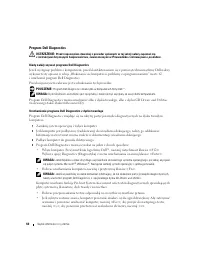
Page 41 - Illesztőprogramok és segédprogramok; Lefagyások és szoftver problémák
Rövid kezelési útmutató 41 4 Amikor a tesztek befejeződtek, ha a Dell Diagnostics programot az Illesztőprogramok és segédprogramok CD-lemezről futtatja, vegye ki a CD-t. Amikor a tesztek befejeződtek, zárja be a teszt-képernyőt, hogy visszatérhessen a Main Menu (Fő menü) képernyőhöz. Ha ki akar lépn...
Page 42 - Egybefüggő kék képernyő jelenik meg; S t a r t
42 Rövid kezelési útmutató Egybefüggő kék képernyő jelenik meg K A P C S O L J A K I A S Z Á M Í T Ó G É P E T — Ha a számítógép a billentyűzetre vagy az egér mozgatására nem reagál, a tápellátás gombot 8 - 10 másodpercig nyomva tartva kapcsolja ki a számítógépet. Ezután indítsa be újra. Egyéb szoft...
Page 45 - Szybki informator o systemie
w w w . d e l l . c o m | s u p p o r t . e u r o . d e l l . c o m Stacja robocza Dell Precision™ Mobile M65 Szybki informator o systemie Model PP04X
Page 47 - Spis treści; Wyszukiwanie informacji; Indeks
Spis treści 47 Spis treści Wyszukiwanie informacji . . . . . . . . . . . . . . . . . . . . . . . . . . . 49 Przygotowywanie komputera do pracy . . . . . . . . . . . . . . . . . . . . 52 Informacje o komputerze . . . . . . . . . . . . . . . . . . . . . . . . . . . . 53 Widok od przodu . . . . . . . ....
Page 49 - Znajdziesz tutaj; System Guides; Przewodnik z informacjami o produkcie firmy DellTM
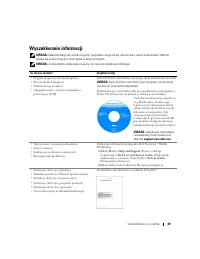
Szybki informator o systemie 49 Wyszukiwanie informacji UWAGA: Niektóre funkcje lub nośniki mogą być opcjonalne i mogą nie być dostarczane z danym komputerem. Niektóre funkcje lub nośniki mogą być niedostępne w pewnych krajach. UWAGA: Z komputerem użytkownika mogą być dostarczone dodatkowe informacj...
Page 50 - Numer seryjny i licencja systemu Microsoft
50 Szybki informator o systemie • Znacznik usługi i kod ekspresowej obsługi • Etykieta licencji Microsoft Windows Numer seryjny i licencja systemu Microsoft ® Windows ® Etykiety te znajdują się na spodniej części obudowy komputera. • Numer seryjny pozwala zidentyfikować komputer podczas korzystania ...
Page 51 - Centrum pomocy i obsługi technicznej systemu Windows
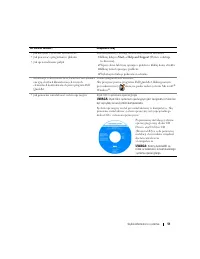
Szybki informator o systemie 51 • Jak korzystać z systemu Windows XP• Jak pracować z programami i plikami• Jak spersonalizować pulpit Centrum pomocy i obsługi technicznej systemu Windows 1 Kliknij kolejno Start → Help and Support (Pomoc i obsługa techniczna). 2 Wpisz słowo lub frazę opisujące proble...
Page 52 - Przygotowywanie komputera do pracy; z instrukcjami dotyczącymi bezpieczeństwa, zamieszczonymi w; Rozpakuj pojemnik z akcesoriami.
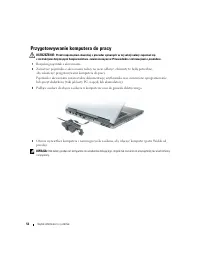
52 Szybki informator o systemie Przygotowywanie komputera do pracy OSTRZEŻENIE: Przed rozpoczęciem dowolnej z procedur opisanych w tej sekcji należy zapoznać się z instrukcjami dotyczącymi bezpieczeństwa, zamieszczonymi w Przewodniku z informacjami o produkcie . 1 Rozpakuj pojemnik z akcesoriami. 2 ...
Page 53 - Informacje o komputerze; Widok od przodu
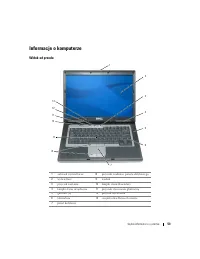
Szybki informator o systemie 53 Informacje o komputerze Widok od przodu 1 zatrzask wyświetlacza 8 przyciski wodzika i panelu dotykowego 2 wyświetlacz 9 wodzik 3 przycisk zasilania 10 lampki stanu klawiatury 4 lampki stanu urządzenia 11 przyciski sterowania głośnością 5 głośniki (2) 12 przycisk wycis...
Page 54 - Widok z lewej strony
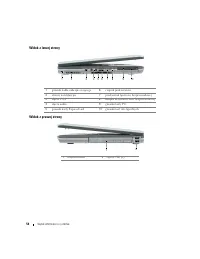
54 Szybki informator o systemie Widok z lewej strony Widok z prawej strony 1 gniazdo kabla zabezpieczającego 6 czujnik podczerwieni 2 otwory wentylacyjne 7 przełącznik łączności bezprzewodowej 3 złącze 1394 8 lampka aktywności sieci bezprzewodowej 4 złącza audio 9 gniazdo karty PC 5 gniazdo karty Ex...
Page 55 - Widok od tyłu
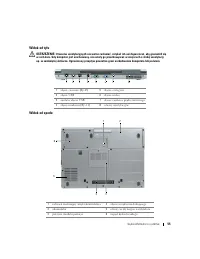
Szybki informator o systemie 55 Widok od tyłu OSTRZEŻENIE: Otworów wentylacyjnych nie wolno zasłaniać, zatykać ich ani dopuszczać, aby gromadził się w nich kurz. Gdy komputer jest uruchomiony, nie należy go przechowywać w miejscach o słabej wentylacji, np. w zamkniętej aktówce. Ograniczony przepływ ...
Page 56 - Korzystanie z akumulatora; Wydajność akumulatora; Korzystanie z napędów optycznych.
56 Szybki informator o systemie Korzystanie z akumulatora Wydajność akumulatora UWAGA: Informacje na temat gwarancji firmy Dell dla posiadanego komputera można znaleźć w Przewodniku z informacjami o produkcie lub w oddzielnym papierowym dokumencie, dostarczonym wraz z komputerem. Podczas korzystania...
Page 57 - Sprawdzanie stanu naładowania akumulatora; Miernik akumulatora programu DellTM QuickSet; Miernik energii systemu Microsoft; nacisnąć i zwolnić
Szybki informator o systemie 57 OSTRZEŻENIE: Niewłaściwe użycie akumulatora może zwiększyć zagrożenie pożarem lub poparzeniem środkami chemicznymi. Akumulatora nie wolno dziurawić, palić, rozbierać ani wystawiać na działanie temperatury powyżej 65°C (149°F). Akumulator należy przechowywać w miejscu ...
Page 58 - nacisnąć i przytrzymać; Power Options; Ładowanie baterii; Jeśli lampka; Wymiana akumulatora
58 Szybki informator o systemie Aby sprawdzić stopień zużycia akumulatora za pomocą miernika naładowania, należy nacisnąć i przytrzymać przycisk stanu na mierniku naładowania akumulatora przez przynajmniej 3 sekundy. Jeśli nie zaświeci się żadna lampka, oznacza to, że akumulator jest w dobrym stanie...
Page 59 - Aby wyjąć akumulator:; Przechowywanie akumulatora; Rozwiązywanie problemów; Usługa technicznej aktualizacji firmy Dell
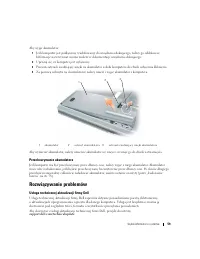
Szybki informator o systemie 59 Aby wyjąć akumulator: 1 Jeśli komputer jest podłączony (zadokowany) do urządzenia dokującego, należy go oddokować. Informacje na ten temat można znaleźć w dokumentacji urządzenia dokującego. 2 Upewnij się, że komputer jest wyłączony. 3 Przesuń zatrzask zwalniający wnę...
Page 60 - Program Dell Diagnostics; Kiedy należy używać programu Dell Diagnostics
60 Szybki informator o systemie Program Dell Diagnostics OSTRZEŻENIE: Przed rozpoczęciem dowolnej z procedur opisanych w tej sekcji należy zapoznać się z instrukcjami dotyczącymi bezpieczeństwa, zamieszczonymi w Przewodniku z informacjami o produkcie . Kiedy należy używać programu Dell Diagnostics J...
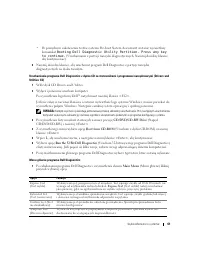
Page 61 - Booting Dell Diagnostic Utility Partition. Press any key; Menu główne programu Dell Diagnostics; Opcja
Szybki informator o systemie 61 • Po pomyślnym zakończeniu testów systemu Pre-boot System Assessment zostanie wyświetlony komunikat Booting Dell Diagnostic Utility Partition. Press any key to continue. (Uruchamianie z partycji narzędzi diagnostycznych. Naciśnij dowolny klawisz, aby kontynuować). 5 N...
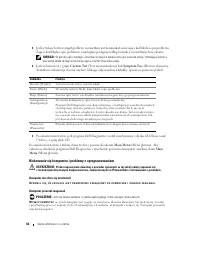
Page 62 - Jeśli wybrano test z grupy; Blokowanie się komputera i problemy z oprogramowaniem; Komputer nie chce się uruchomić; Zakładka
62 Szybki informator o systemie 2 Jeśli w trakcie testu wystąpił problem, wyświetlany jest komunikat zawierający kod błędu i opis problemu. Zapisz kod błędu i opis problemu, a następnie postępuj według instrukcji wyświetlanych na ekranie. UWAGA: W górnej części każdego z ekranów testowych umieszczon...
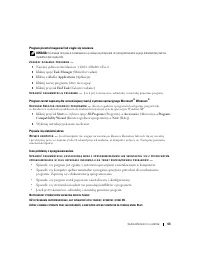
Page 63 - Program przestał reagować lub ciągle się zawiesza; Pojawia się niebieski ekran
Szybki informator o systemie 63 Program przestał reagować lub ciągle się zawiesza UWAGA: Instrukcje dotyczące instalowania są zazwyczaj dołączane do oprogramowania w jego dokumentacji lub na dyskietce (lub dysku CD). Z A K O Ń C Z D Z I A ŁA N I E P R O G R A M U — 1 Naciśnij jednocześnie klawisze &...
Page 67 - Краткий справочник
w w w . d e l l . c o m | s u p p o r t . d e l l . c o m Dell Precision™ Mobile Workstation M65 Краткий справочник Модель PP04X
Page 68 - Примечания, замечания и предупреждения; Аббревиатуры и сокращения; DellTM n Series
Примечания, замечания и предупреждения ПРИМЕЧАНИЕ. Содержит важную информацию, которая помогает более эффективно работать с компьютером. ВНИМАНИЕ. Указывает на возможность повреждения устройства или потери данных и подсказывает, как избежать этой проблемы. ПРЕДУПРЕЖДЕНИЕ. Указывает на потенциальную ...
Page 69 - Содержание; Указатель
Содержание 69 Содержание Источники информации . . . . . . . . . . . . . . . . . . . . . . . . . . . . 71 Настройка компьютера . . . . . . . . . . . . . . . . . . . . . . . . . . . . . 75 О компьютере . . . . . . . . . . . . . . . . . . . . . . . . . . . . . . . . . . 76 Вид спереди . . . . . . . . ....
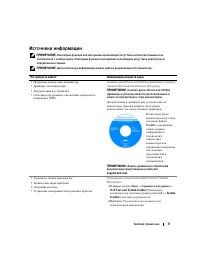
Page 71 - Dell User and System Guides (
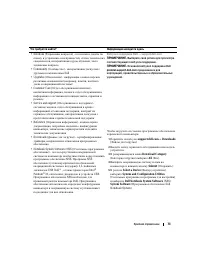
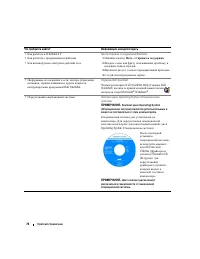
Краткий справочник 71 Источники информации ПРИМЕЧАНИЕ. Некоторые функции или материалы мультимедиа могут быть вспомогательными и не поставляться с компьютером. Некоторые функции и материалы мультимедиа могут быть недоступны в определенных странах. ПРИМЕЧАНИЕ. Дополнительную информацию можно найти в ...
Page 75 - Настройка компьютера
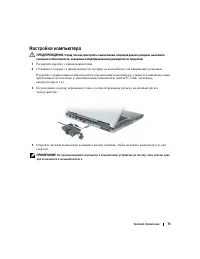
Краткий справочник 75 Настройка компьютера ПРЕДУПРЕЖДЕНИЕ. Перед тем как приступить к выполнению операций данного раздела, выполните указания по безопасности, описанные в Информационном руководстве по продуктам . 1 Распакуйте коробку с принадлежностями . 2 Отложите в сторону те принадлежности , кото...
Page 76 - О компьютере; Вид спереди
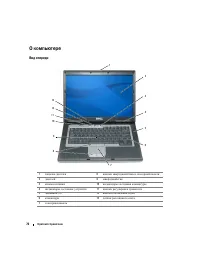
76 Краткий справочник О компьютере Вид спереди 1 защелка дисплея 8 кнопки микроджойстика и сенсорной панели 2 дисплей 9 микроджойстик 3 кнопка питания 10 индикаторы состояния клавиатуры 4 индикаторы состояния устройств 11 кнопки регулировки громкости 5 динамики (2) 12 кнопка отключения звука 6 клави...
Page 77 - Вид слева
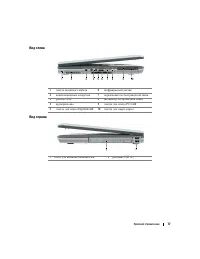
Краткий справочник 77 Вид слева Вид справа 1 гнездо защитного кабеля 6 инфракрасный датчик 2 вентиляционные отверстия 7 переключатель беспроводной связи 3 разъем 1394 8 индикатор беспроводной связи 4 аудиоразъемы 9 гнездо для платы PC Card 5 гнездо для платы ExpressCard 10 гнездо для смарт - карты 1...
Page 78 - Вид сзади
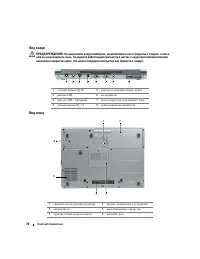
78 Краткий справочник Вид сзади ПРЕДУПРЕЖДЕНИЕ. Не закрывайте воздухозаборник, не вставляйте в него предметы и следите, чтобы в нем не накапливалась пыль. Не держите работающий компьютер в местах с недостаточной вентиляцией, например в закрытом кейсе. Это может повредить компьютер или привести к пож...
Page 79 - Использование аккумулятора; Работа аккумулятора; DellTM
Краткий справочник 79 Использование аккумулятора Работа аккумулятора ПРИМЕЧАНИЕ. Информацию о гарантиях корпорации Dell на компьютер можно найти в документе Информация о продукте или в отдельном гарантийном документе, прилагаемом к компьютеру. Чтобы достичь оптимальной производительности и сохранить...
Page 80 - Dell QuickSet Battery Meter,; Программа DellTM QuickSet Battery Meter; QuickSet Battery; Индикатор питания Microsoft; Индикатор заряда; нажмите; нажмите
80 Краткий справочник ПРЕДУПРЕЖДЕНИЕ. Неправильное обращение с аккумулятором может повысить риск возгорания или химического ожога. Не протыкайте, не сжигайте, не разбирайте и не нагревайте аккумулятор до температуры выше 65°C (149°F). Храните аккумулятор в недоступном для детей месте. Обращайтесь с ...
Page 81 - Предупреждение о недостаточном заряде аккумулятора; QuickSet; Power Options Properties; Зарядка аккумулятора
Краткий справочник 81 Проверка работоспособности аккумулятора ПРИМЕЧАНИЕ. Работоспособность аккумулятора можно определить двумя способами: по индикатору заряда аккумулятора, как описано ниже или в окне Battery Meter программы Dell QuickSet. Для получения подробной информации о программе QuickSet щел...
Page 82 - Замена аккумулятора; Хранение аккумулятора
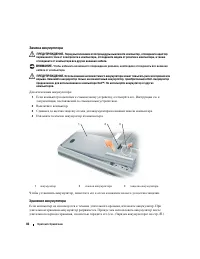
82 Краткий справочник Замена аккумулятора ПРЕДУПРЕЖДЕНИЕ. Перед выполнением этой процедуры выключите компьютер, отсоедините адаптер переменного тока от электросети и компьютера, отсоедините модем от розетки и компьютера, а также отсоедините от компьютера все другие внешние кабели. ВНИМАНИЕ. Чтобы из...
Page 83 - Поиск и устранение неисправностей; Служба обновлений Dell; Когда использовать программу Dell Diagnostics; Запуск программы Dell Diagnostics с жесткого диска
Краткий справочник 83 Поиск и устранение неисправностей Служба обновлений Dell Служба обновлений Dell отправляет своевременные уведомления по электронной почте об обновлениях оборудования и программного обеспечения компьютера . Эта услуга является бесплатной , и в ней можно настроить содержимое и фо...
Page 84 - Booting Dell; Run the 32 Bit Dell Diagnostics (
84 Краткий справочник • Нажмите и удерживайте нажатой клавишу <Fn> во время включения питания компьютера . ПРИМЕЧАНИЕ. Если получено сообщение о том, что раздел Diagnostics Utility не найден, запустите программу Dell Diagnostics с дополнительного компакт*диска Drivers and Utilities (Драйверы и...
Page 85 - Главное меню Dell Diagnostics; Symptom Tree
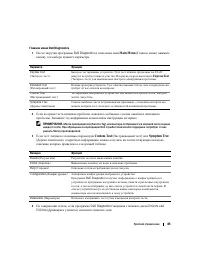
Краткий справочник 85 Главное меню Dell Diagnostics 1 После загрузки программы Dell Diagnostics и появления окна Main Menu ( Главное меню ) нажмите кнопку для выбора нужного параметра . 2 Если во время теста возникла проблема , появится сообщение с кодом ошибки и описанием проблемы . Запишите эту ин...
Page 86 - Блокировки и неполадки программного обеспечения; Компьютер не запускается; Программа не отвечает, или постоянно возникают сбои
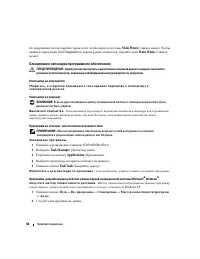
86 Краткий справочник По завершении тестов закройте экран теста , чтобы вернуться в окно Main Menu ( Главное меню ). Чтобы выйти из программы Dell Diagnostics и перезагрузить компьютер , закройте окно Main Menu ( Главное меню ). Блокировки и неполадки программного обеспечения ПРЕДУПРЕЖДЕНИЕ. Перед т...
Page 87 - Появляется сплошной синий экран; Другие неполадки программ
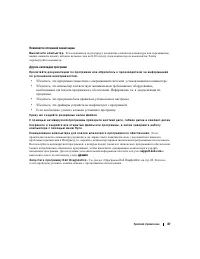
Краткий справочник 87 Появляется сплошной синий экран В ы к л ю ч и т е к о м п ь ю т е р . Если компьютер не реагирует на нажатие клавиш на клавиатуре или перемещение мыши , нажмите кнопку питания не менее чем на 8-10 секунд , пока компьютер не выключится . Затем перезагрузите компьютер . Другие не...