Page 3 - DellTM LatitudeTM Systems; Media Base Setup Guide
w w w . d e l l . c o m | s u p p o r t . d e l l . c o m Dell™ Latitude™ Systems Media Base Setup Guide Model PR09S
Page 4 - Abbreviations and Acronyms
Notes, Notices, and Cautions NOTE: A NOTE indicates important information that helps you make better use of your computer. NOTICE: A NOTICE indicates either potential damage to hardware or loss of data and tells you how to avoid the problem. CAUTION: A CAUTION indicates a potential for property dama...
Page 5 - Contents
Contents 3 Contents CAUTION: Safety Instructions . . . . . . . . . . . . . . . . . . . . . . . . . . . 5 SAFETY: General Safety . . . . . . . . . . . . . . . . . . . . . . . . . . . . 5 SAFETY: Power Safety . . . . . . . . . . . . . . . . . . . . . . . . . . . . 6 Equipment Protection Instructions ....
Page 7 - CAUTION: Safety Instructions; SAFETY: General Safety; Wash hands after handling.
Media Base Setup Guide 5 CAUTION: Safety Instructions Use the following safety guidelines to help ensure your own personal safety and to help protect your device (computer, port replicator, media base, docking station, and similar devices) and working environment from potential damage. SAFETY: Gener...
Page 8 - Equipment Protection Instructions
6 Media Base Setup Guide SAFETY: Power Safety • If this product is provided with a 3-prong power cable, be sure to plug it into a properly grounded power source in order to help prevent electric shock. Do not use adapter plugs or remove the grounding prong from the power cable plug. If you use a pow...
Page 9 - Protecting Against Electrostatic Discharge
Media Base Setup Guide 7 Protecting Against Electrostatic Discharge Electrostatic discharge (ESD) events can harm electronic components inside your computer. Under certain conditions, ESD may build up on your body or an object, such as a peripheral, and then discharge into another object, such as yo...
Page 10 - About Your Media Base; Left View; Right View
8 Media Base Setup Guide About Your Media Base Left View C O M P U T E R R E L E A S E L E V E R — Releases the computer from the media base if the media base is not secured by an antitheft device. U S B C O N N E C T O R — The USB 2.0-compliant connector allows you to connect USB devices such as pr...
Page 11 - Back View
Media Base Setup Guide 9 Back View 1 USB connector 2 network connector 3 serial connector 4 parallel connector 5 digital video connector (DVI) 6 VGA video connector 7 Powered USB connector 8 AC adapter connector 9 security slot Connector Description N E T W O R K C O N N E C T O R — Connects the med...
Page 13 - Top View
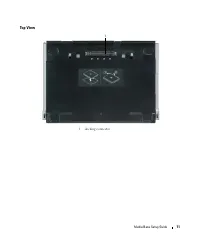
Media Base Setup Guide 11 Top View 1 docking connector 1
Page 14 - Setting Up Your Media Base; Start
12 Media Base Setup Guide Setting Up Your Media Base CAUTION: The AC adapter works with electrical outlets worldwide. However, power connectors and power strips vary among countries. Using an incompatible cable or improperly connecting the cable to the power strip or electrical outlet may cause fire...
Page 15 - Securing the Media Base
Media Base Setup Guide 13 Securing the Media Base NOTE: If the computer is docked to the media base and an antitheft device is attached to the security cable slot on the media base, you cannot undock the computer without first removing the antitheft device. 1 Attach a commercially available antithef...
Page 16 - Docking Your Computer
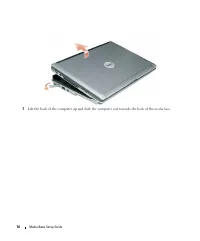
14 Media Base Setup Guide Docking Your Computer NOTE: If you are docking your computer for the first time and have not completed the steps in "Setting Up Your Media Base" on page 12, complete them before proceeding to the next step. NOTE: After docking the computer for the first time, the co...
Page 17 - Undocking Your Computer
Media Base Setup Guide 15 Undocking Your Computer 1 Before you undock your computer, save and close any open files, and exit any open programs. 2 Set your computer power management settings so that the computer does not enter standby or hibernate mode when you close (lower) the display: Windows XP a...
Page 19 - Installing the Optical Drive
Media Base Setup Guide 17 Installing the Optical Drive 1 Save and close any open files or programs, and turn off the computer. 2 Insert the optical drive into the bay on the media base. (See "Right View" on page 8.) 3 Insert the securing screw that holds the optical drive in place. 4 Turn on...
Page 20 - Removing the Optical Drive; Unplug or Eject Hardware
18 Media Base Setup Guide Removing the Optical Drive 1 Save and close any open files or programs, and shut down the computer. 2 Remove the securing screw that secures the optical drive and use your screwdriver to slide the drive out of the module bay. See "Right View" on page 8. Using Extern...
Page 21 - Specifications
Media Base Setup Guide 19 Specifications Physical Height 12.8 mm (0.50 inches) Width 292 mm (11.5 inches) Depth 207 mm (8.15 inches) Weight (without a drive in the module bay) 0.61 kg (1.35 lb) AC Adapter Input voltage 100–240 VAC Input current (maximum) 1.5 A Input frequency 50–60 Hz Output current...
Page 23 - Regulatory Notices
Media Base Setup Guide 21 Regulatory Notices Electromagnetic Interference (EMI) is any signal or emission, radiated in free space or conducted along power or signal leads, that endangers the functioning of a radio navigation or other safety service or seriously degrades, obstructs, or repeatedly int...
Page 26 - Σήμα; CE pazi
24 Media Base Setup Guide CE-Hinweis (Europäische Union) Σήµα CE ( Ευρωπαϊκή Ένωση ) CE jelzés (Európai Unió) Avviso CE (Unione Europea) CE pazi ņ ojums (Eiropas Savien ī ba)
Page 27 - Avvi
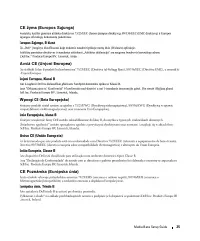
Media Base Setup Guide 25 CE žyma (Europos S ą junga) Avvi ż CE (Unjoni Ewropea) Wymogi CE (Unia Europejska) Aviso CE (União Europeia) CE Poznámka (Európska únia)
Page 28 - AB Bildirimi (Avrupa Birli
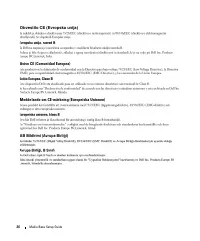
26 Media Base Setup Guide Obvestilo CE (Evropska unija) Aviso CE (Comunidad Europea) Meddelande om CE-märkning (Europeiska Unionen) AB Bildirimi (Avrupa Birli ğ i)
Page 29 - MIC
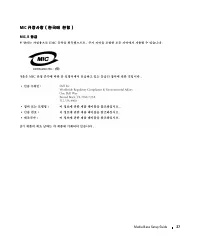
Media Base Setup Guide 27 MIC 규정사항 ( 한국에 한함 ) 규정사항 ( 한국에 한함 ) 규정사항 ( 한국에 한함 ) 규정사항 ( 한국에 한함 ) MIC, B 등급 등급 등급 등급
Page 30 - BSMI
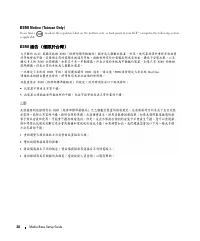
28 Media Base Setup Guide BSMI Notice (Taiwan Only) If you find a mark on the regulatory label on the bottom, side, or back panel of your Dell™ computer, the following section is applicable: BSMI 通告 通告 通告 通告 ( ( ( (僅限於台灣 僅限於台灣 僅限於台灣 僅限於台灣) ) ) )
Page 31 - Información para NOM (únicamente para México)
Media Base Setup Guide 29 VCCI ( ( ( (日本 日本 日本 日本のみ のみ のみ のみ) ) ) ) VCCI 、 クラス クラス クラス クラス B Información para NOM (únicamente para México) La información siguiente se proporciona en el dispositivo o dispositivos descritos en este documento, en cumplimiento con los requisitos de la Norma oficial mexi...
Page 33 - Guide de configuration
w w w . d e l l . c o m | s u p p o r t . d e l l . c o m Dell™ Latitude™ Systems Guide de configuration Base média Modèle PR09S
Page 34 - Démarrer; Guide d'utilisation Dell Latitude
Remarques, avis et précautions REMARQUE : Une REMARQUE fournit des informations importantes qui vous aident à mieux utiliser votre ordinateur. AVIS : Un AVIS vous avertit d’un risque de dommage matériel ou de perte de données et vous indique comment éviter le problème. PRÉCAUTION : Une PRÉCAUTION in...
Page 35 - Sommaire
Sommaire 33 Sommaire PRÉCAUTION : Consignes de sécurité . . . . . . . . . . . . . . . . . . . . . . 35 SECURITE : Sécurité générale . . . . . . . . . . . . . . . . . . . . . . . 35 SECURITE : Sécurité d'alimentation . . . . . . . . . . . . . . . . . . . . 36 Instructions de protection d'équipement ....
Page 37 - PRÉCAUTION : Consignes de sécurité; SECURITE : Sécurité générale; Lavez-vous les mains après la manipulation.
Guide de configuration Base média 35 PRÉCAUTION : Consignes de sécurité Pour votre sécurité et pour protéger votre appareil (ordinateur, duplicateur de ports, base média, station d'accueil et autres périphériques) ainsi que votre environnement de travail contre d'éventuels dommages, respectez les co...
Page 38 - Instructions de protection d'équipement
36 Guide de configuration Base média SECURITE : Sécurité d'alimentation • Si ce produit est fourni avec un câble secteur à 3 broches, vérifiez qu'il est branché dans une prise avec mise à la terre correcte pour éviter tout choc électrique. N'utilisez pas de fiche intermédiaire et ne coupez pas la br...
Page 39 - Protection contre les décharges électrostatiques
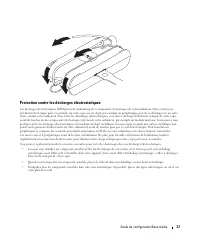
Guide de configuration Base média 37 Protection contre les décharges électrostatiques Les décharges électrostatiques (ESD) peuvent endommager les composants électroniques de votre ordinateur. Dans certains cas, de l'électricité statique peut s'accumuler sur votre corps ou sur objet, par exemple un p...
Page 40 - A propos de la base média; Vue de gauche; Vue de droite
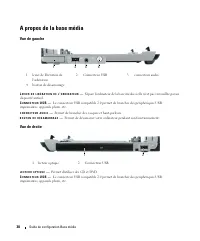
38 Guide de configuration Base média A propos de la base média Vue de gauche L E V I E R D E L I B É R A T I O N D E L ' O R D I N A T E U R — Sépare l'ordinateur de la base média si elle n'est pas verrouillée par un dispositif antivol. C O N N E C T E U R U S B — Le connecteur USB compatible 2.0 pe...
Page 41 - Vue arrière
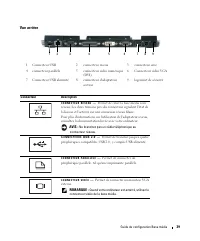
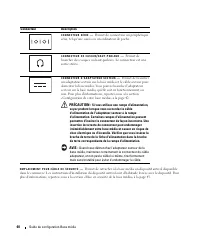
Guide de configuration Base média 39 Vue arrière 1 Connecteur USB 2 connecteur réseau 3 connecteur série 4 connecteur parallèle 5 connecteur vidéo numérique (DVI) 6 Connecteur vidéo VGA 7 Connecteur USB alimenté 8 connecteur d'adaptateur secteur 9 logement de sécurité Connecteur Description C O N N ...
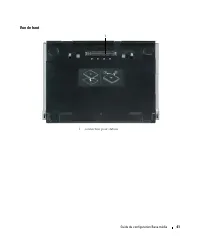
Page 43 - Vue de haut
Guide de configuration Base média 41 Vue de haut 1 connecteur pour station 1
Page 44 - Configuration de votre base média
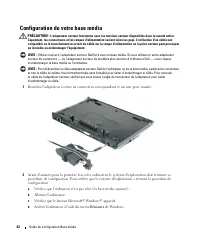
42 Guide de configuration Base média Configuration de votre base média PRÉCAUTION : L'adaptateur secteur fonctionne avec les tensions secteur disponibles dans le monde entier. Cependant, les connecteurs et les rampes d'alimentation varient selon les pays. L'utilisation d'un câble non compatible ou l...
Page 45 - Mise en sécurité de la base média
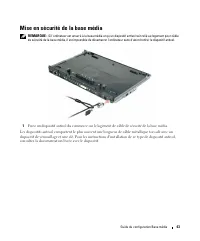
Guide de configuration Base média 43 Mise en sécurité de la base média REMARQUE : Si l'ordinateur est amarré à la base média et qu'un dispositif antivol soit relié au logement pour câble de sécurité de la base média, il est impossible de désamarrer l'ordinateur sans d'abord retirer le dispositif ant...
Page 46 - Amarrage de votre ordinateur
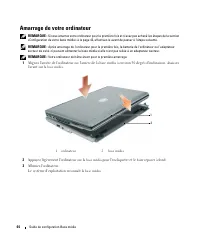
44 Guide de configuration Base média Amarrage de votre ordinateur REMARQUE : Si vous amarrez votre ordinateur pour la première fois et n'avez pas achevé les étapes de la section «Configuration de votre base média» à la page 42, effectuez-le avant de passer à l'étape suivante. REMARQUE : Après amarra...
Page 47 - Désamarrage de votre ordinateur
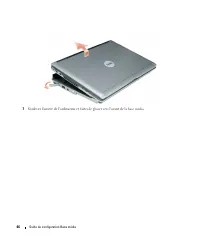
Guide de configuration Base média 45 Désamarrage de votre ordinateur 1 Avant de désamarrer votre ordinateur, enregistrez et fermez les fichiers ouverts, quittez les programmes ouverts. 2 Réglez les paramètres d'économie d'énergie de façon que l'ordinateur n'entre pas en mode veille ou veille prolong...
Page 49 - Installation de lecteur optique
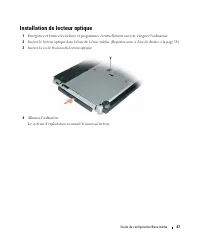
Guide de configuration Base média 47 Installation de lecteur optique 1 Enregistrez et fermez les fichiers et programmes éventuellement ouverts, éteignez l'ordinateur. 2 Insérez le lecteur optique dans la baie de la base média. (Reportez-vous à «Vue de droite» à la page 38). 3 Insérez la vis de fixat...
Page 50 - Retrait du lecteur optique; Déconnecter ou éjecter le matériel
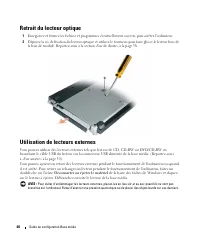
48 Guide de configuration Base média Retrait du lecteur optique 1 Enregistrez et fermez les fichiers et programmes éventuellement ouverts, puis arrêtez l'ordinateur. 2 Déposez la vis de fixation du lecteur optique et utilisez le tournevis pour faire glisser le lecteur hors de la baie de module. Repo...
Page 51 - Caractéristiques
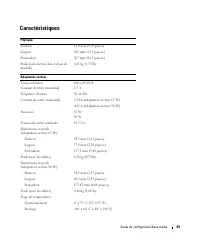
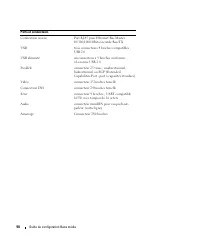
Guide de configuration Base média 49 Caractéristiques Physique Hauteur 12,8 mm (0,50 pouce) Largeur 292 mm (11,5 pouces) Profondeur 207 mm (8,15 pouces) Poids (sans lecteur dans la baie de module) 0,61 kg (1,35 lb) Adaptateur secteur Tension d'entrée 100–240 VCA Courant d'entrée (maximal) 1,5 A Fréq...
Page 53 - Conformité réglementaire
Guide de configuration Base média 51 Conformité réglementaire Une interférence électromagnétique (EMI, Electromagnetic Interference) est un signal ou une émission, véhiculé(e) dans l'espace libre ou par des conducteurs électriques ou de signaux, qui peut mettre en danger le fonctionnement d'une radi...
Page 55 - Guia de configuração
w w w . d e l l . c o m | s u p p o r t . d e l l . c o m Dell™ Latitude™ Systems Guia de configuração da base de mídia Modelo PR09S
Page 56 - Guia do usuário; Iniciar; Guia do usuário do Dell Latitude
Notas, avisos e advertências NOTA: Uma NOTA apresenta informações importantes para ajudar você a utilizar melhor o computador. AVISO: Um AVISO indica um potencial de riscos ao hardware ou a perda de dados e descreve como evitar o problema. ADVERTÊNCIA: Uma ADVERTÊNCIA indica riscos potenciais de dan...
Page 57 - Índice
Índice 55 Índice ADVERTÊNCIA: Instruções de segurança . . . . . . . . . . . . . . . . . . . . 57 SEGURANÇA: Geral . . . . . . . . . . . . . . . . . . . . . . . . . . . . . 57 SEGURANÇA: Energia . . . . . . . . . . . . . . . . . . . . . . . . . . . 58 Instruções de proteção do equipamento . . . . . ....
Page 59 - ADVERTÊNCIA: Instruções de segurança; Lave as mãos após manusear o cabo.
Guia de configuração da base de mídia 57 ADVERTÊNCIA: Instruções de segurança Use as diretrizes de segurança a seguir para ajudar a garantir a sua segurança pessoal e para ajudar a proteger o dispositivo (computador, replicador de porta, base de mídia, estação de acoplamento e dispositivos similares...
Page 60 - Instruções de proteção do equipamento
58 Guia de configuração da base de mídia SEGURANÇA: Energia • Se este produto é fornecido com um cabo de alimentação de três pinos, certifique-se de conectá-lo a uma fonte de alimentação aterrada corretamente de forma a ajudar a evitar choques elétricos. Não use plugues adaptadores ou remova o pino ...
Page 61 - Proteção contra descarga eletrostática
Guia de configuração da base de mídia 59 ADVERTÊNCIA: Ao preparar o adaptador CA para viagem, embale ambos os cabos em volta do adaptador no mesmo sentido como mostrado na figura a seguir. A negligência à orientação para embalar os cabos no sentido correto pode resultar em danos aos cabos, que não é...
Page 62 - Sobre a base de mídia; Vista esquerda; Vista direita
60 Guia de configuração da base de mídia Sobre a base de mídia Vista esquerda A L A V A N C A D E L I B E R A Ç Ã O D O C O M P U T A D O R — Libera o computador da base de mídia se esta não estiver presa por um dispositivo antifurto. C O N E C T O R U S B — O conector USB compatível com 2.0 permite...
Page 63 - Vista traseira
Guia de configuração da base de mídia 61 Vista traseira 1 conector USB 2 conector de rede 3 conector serial 4 conector paralelo 5 conector de vídeo digital (DVI) 6 conector de vídeo VGA 7 conector USB energizado 8 conector do adaptador CA 9 encaixe do cabo de segurança Conector Descrição C O N E C T...
Page 65 - Vista superior
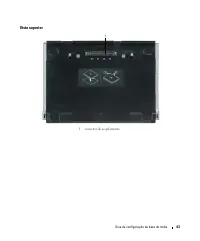
Guia de configuração da base de mídia 63 Vista superior 1 conector de acoplamento 1
Page 66 - Como configurar a base de mídia
64 Guia de configuração da base de mídia Como configurar a base de mídia ADVERTÊNCIA: O adaptador CA funciona com tomadas elétricas do mundo todo. No entanto, os conectores de energia e os filtros de linha variam de país para país. O uso de um cabo incompatível ou a conexão incorreta ao filtro de li...
Page 67 - Como proteger a base de mídia
Guia de configuração da base de mídia 65 Como proteger a base de mídia NOTA: Se o computador estiver acoplado à base de mídia e um dispositivo antifurto estiver conectado ao encaixe do cabo de segurança na base de mídia, não será possível desacoplar o computador sem entes remover o dispositivo antif...
Page 68 - Como acoplar o seu computador
66 Guia de configuração da base de mídia Como acoplar o seu computador NOTA: Se você estiver acoplando o seu computador pela primeira vez e não tiver concluído as etapas em “Como configurar a base de mídia” na página 64, complete-as antes de prosseguir para a próxima etapa. NOTA: Após acoplar o comp...
Page 69 - Como desacoplar o computador
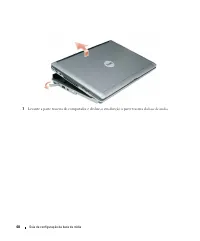
Guia de configuração da base de mídia 67 Como desacoplar o computador 1 Antes de desacoplar o computador, salve e feche todos os arquivos e programas que estiverem abertos. 2 Defina as configurações de gerenciamento de energia em seu computador de forma que não entre no modo de espera ou hibernação ...
Page 71 - Como instalar a unidade óptica
Guia de configuração da base de mídia 69 Como instalar a unidade óptica 1 Salve e feche quaisquer arquivos ou programas abertos e desligue o computador. 2 Insira a unidade óptica no compartimento na base de mídia. (Consulte “Vista direita” na página 60) 3 Insira o parafuso de fixação que prende a un...
Page 72 - Como remover a unidade óptica; Retirar ou ejetar hardware
70 Guia de configuração da base de mídia Como remover a unidade óptica 1 Salve e feche quaisquer arquivos ou programas abertos e desligue o computador. 2 Remova o parafuso de fixação que prende a unidade óptica e use a chave de fenda para deslizar a unidade para fora do compartimento de módulos. Con...
Page 73 - Especificações
Guia de configuração da base de mídia 71 Especificações Físicas Altura 12,8 mm (0,50 polegadas) Largura 292 mm (11,5 polegadas) Profundidade 207 mm (8,15 polegadas) Peso (sem qualquer unidade no compartimento de módulos) 0,61 kg (1,35 lb) Adaptador CA Tensão de entrada 100–240 VCA Corrente de entrad...
Page 75 - Avisos de regulamentação
Guia de configuração da base de mídia 73 Avisos de regulamentação EMI (ElectroMagnetic Interference [interferência eletromagnética]) é qualquer sinal ou emissão, irradiada no espaço livre ou conduzida por fiação de energia ou de sinal, que põe em perigo o funcionamento de um serviço de rádio navegaç...
Page 77 - Guía de configuración de la
w w w . d e l l . c o m | s u p p o r t . d e l l . c o m Dell™ Latitude™ Systems Guía de configuración de la base para medios Modelo PP09S
Page 79 - Contenido
Contenido 77 Contenido PRECAUCIÓN: Instrucciones de seguridad . . . . . . . . . . . . . . . . . . . 79 SEGURIDAD: Seguridad general . . . . . . . . . . . . . . . . . . . . . . 79 SEGURIDAD: Seguridad de la alimentación eléctrica . . . . . . . . . . . 80 Instrucciones para la protección del equipo . ...
Page 81 - PRECAUCIÓN: Instrucciones de seguridad; SEGURIDAD: Seguridad general; Lávese las manos después de manipularlo
Guía de configuración de la base para medios 79 PRECAUCIÓN: Instrucciones de seguridad Aplique las siguientes pautas de seguridad para garantizar su seguridad personal y proteger el equipo (ordenador, replicador de puertos, base para medios, estación de acoplamiento y otros dispositivos similares), ...
Page 82 - SEGURIDAD: Seguridad de la alimentación eléctrica; Instrucciones para la protección del equipo
80 Guía de configuración de la base para medios SEGURIDAD: Seguridad de la alimentación eléctrica • Si el producto se entrega con un cable de alimentación de 3 clavijas, asegúrese de enchufarlo en una toma de corriente con toma a tierra para evitar posibles descargas eléctricas. No utilice adaptador...
Page 83 - Protección contra descargas electrostáticas
Guía de configuración de la base para medios 81 Protección contra descargas electrostáticas Las descargas electrostáticas (ESD [Electrostatic Discharge]) pueden dañar los componentes electrónicos del interior del equipo. En determinadas condiciones, se pueden acumular cargas electrostáticas en el pr...
Page 84 - Acerca de la base para medios; Vista izquierda
82 Guía de configuración de la base para medios Acerca de la base para medios Vista izquierda P A L A N C A D E L I B E R A C I Ó N D E L E Q U I P O : Libera el equipo de la base para medios si ésta no está sujeta mediante un dispositivo antirrobo. C O N E C T O R U S B : El conector compatible USB...
Page 85 - Vista posterior
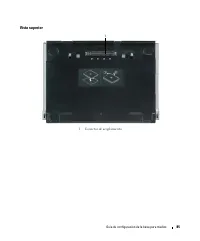
Guía de configuración de la base para medios 83 Vista posterior 1 Conector USB 2 Conector de red 3 Conector serie 4 Conector paralelo 5 Conector de vídeo digital (DVI) 6 Conector de vídeo VGA 7 Conector USB alimentado 8 Conector del adaptador de CA 9 Ranura de seguridad Conector Descripción C O N E ...
Page 88 - Configuración de la base para medios; Inicio
86 Guía de configuración de la base para medios Configuración de la base para medios PRECAUCIÓN: El adaptador de CA funciona con tomas de alimentación eléctrica de todo el mundo. No obstante, los conectores de alimentación y los enchufes múltiples varían de un país a otro. El uso de un cable incompa...
Page 89 - Fijación de la base para medios
Guía de configuración de la base para medios 87 Fijación de la base para medios NOTA: Si el equipo está acoplado a la base para medios y tiene un dispositivo antirrobo fijado a la ranura del cable de seguridad, no podrá desacoplarlo sin primero quitar el dispositivo antirrobo. 1 Fije un dispositivo ...
Page 90 - Acoplamiento del equipo
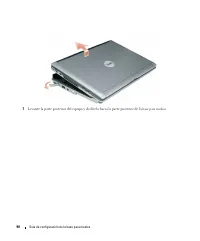
88 Guía de configuración de la base para medios Acoplamiento del equipo NOTA: Si va a acoplar el dispositivo por primera vez y aún no ha completado los pasos reflejados en “Configuración de la base para medios” en la página 86, complételos antes de continuar con el siguiente paso. NOTA: Después de a...
Page 91 - Desacoplamiento del equipo
Guía de configuración de la base para medios 89 Desacoplamiento del equipo 1 Antes de desacoplar el equipo, guarde y cierre los archivos abiertos y salga de todos los programas activos. 2 Configure los parámetros de administración de energía del equipo para que no entre en el modo de espera o de hib...
Page 93 - Instalación de la unidad óptica
Guía de configuración de la base para medios 91 Instalación de la unidad óptica 1 Guarde y cierre los archivos o programas que estén abiertos y apague el equipo. 2 Inserte la unidad óptica en el compartimento de la base para medios. (Consulte el apartado “Vista derecha” en la página 82.) 3 Inserte e...
Page 94 - Extracción de la unidad óptica; Desconectar
92 Guía de configuración de la base para medios Extracción de la unidad óptica 1 Guarde y cierre los archivos que estén abiertos, salga de todas las aplicaciones y apague el equipo. 2 Retire el tornillo que sujeta la unidad óptica y utilice el destornillador para sacarla del compartimento para módul...
Page 95 - Especificaciones
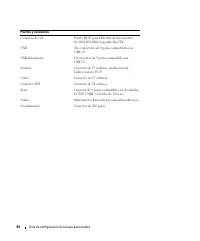
Guía de configuración de la base para medios 93 Especificaciones Aspectos físicos Altura 12,8 mm (0,5 pulgadas) Anchura 292 mm (11,5 pulgadas) Fondo 207 mm (8,15 pulgadas) Peso (sin ninguna unidad en el compartimento para módulos) 0,61 kg (1,35 lb) Adaptador de CA Tensión de entrada 100–240 VCA Inte...
Page 97 - Información reglamentaria
Guía de configuración de la base para medios 95 Información reglamentaria Interferencia electromagnética (EMI) es cualquier señal o emisión, radiada en el espacio libre o conducida mediante cables con energía o señal, que pone en peligro el funcionamiento de los servicios de radionavegación o de otr...