Page 3 - DellTM PowerVaultTM 100 Systems; Getting Started With
Dell™ PowerVault™ 100 Systems Getting Started With Your System Model MVT01
Page 5 - C o n t e n t s; Index
Contents 3 C o n t e n t s System Features . . . . . . . . . . . . . . . . . . . . . . 5 Supported Operating Systems . . . . . . . . . . . . . . . 7 Other Information You May Need . . . . . . . . . . . . . 7 Obtaining Technical Assistance . . . . . . . . . . . . . 8 Installation and Configuration . ...
Page 7 - System Features
Getting Started With Your System 5 System Features This section describes the major hardware and software features of your system. It also provides information about other documents you may need when setting up your system and how to obtain technical assistance. Major hardware and software features ...
Page 9 - Supported Operating Systems; Other Information You May Need
Getting Started With Your System 7 Supported Operating Systems Your system supports the following operating system: • Microsoft ® Windows Storage Server™ 2003 R2 Express Edition (x64) • Microsoft Windows Storage Server 2003 R2 Workgroup Edition (x64) Other Information You May Need CAUTION: The Produ...
Page 10 - Obtaining Technical Assistance; Installation and Configuration
8 Getting Started With Your System Obtaining Technical Assistance If you do not understand a procedure in this guide or if the system does not perform as expected, see your Hardware Owner’s Manual . Dell ™ Enterprise Training and Certification is available; see www.dell.com/training for more informa...
Page 11 - Connecting the Keyboard, Mouse, and Monitor
Getting Started With Your System 9 Connecting the Keyboard, Mouse, and Monitor Connect the keyboard, mouse, and monitor (optional). The connectors on the back of your system have icons indicating which cable to plug into each connector. Be sure to tighten the screws (if any) on the monitor's cable c...
Page 12 - Turning on the System; Complete the 0perating System Setup
10 Getting Started With Your System Turning on the System Turn on the system and monitor (optional). Press the power button on the system and the monitor. The power indicators should light. Adjust the monitor’s controls until the displayed image is satisfactory. Complete the 0perating System Setup I...
Page 13 - Technical Specifications
Getting Started With Your System 11 Technical Specifications Processor Processor type Intel Core 2 Duo processor or Intel Celeron ® D, 300 sequence or Intel Pentium ® 4, 600 sequence Expansion Buses Bus type PCIe, PCI-X, PCI Expansion slots PCIe One 3.3-V, x1 One 3.3-V, x8 PCI-X Two full-height, ful...
Page 19 - Systèmes DellTM; Guide de mise en route
Systèmes Dell™ PowerVault™ 100 Guide de mise en route Modèle MVT01
Page 20 - Remarques, avis et précautions
Remarques, avis et précautions REMARQUE : Une REMARQUE indique des informations importantes qui vous aident à mieux utiliser votre ordinateur. AVIS : Un AVIS vous avertit d'un risque de dommage matériel ou de perte de données et vous indique comment éviter le problème. PRÉCAUTION : Une PRÉCAUTION in...
Page 21 - S o m m a i r e
Sommaire 19 S o m m a i r e Caractéristiques du système . . . . . . . . . . . . . . 21 Systèmes d'exploitation pris en charge . . . . . . . . . 23 Autres informations utiles . . . . . . . . . . . . . . . . 24 Obtention d'une assistance technique . . . . . . . . . 25 Installation et configuration . ....
Page 23 - Caractéristiques du système
Guide de mise en route 21 Caractéristiques du système Cette section décrit les principales caractéristiques du système sur le plan matériel et logiciel. Elle vous donne aussi des renseignements sur les autres documents utiles à la configuration du système et sur l'obtention d'assistance technique. L...
Page 25 - Systèmes d'exploitation pris en charge
Guide de mise en route 23 Les logiciels suivants sont livrés avec le système : • Un programme de configuration du système, pour consulter et modifier rapidement les informations sur la configuration du système. Pour plus d'informations, voir “Using the System Setup Program” (Utilisation du programme...
Page 26 - Autres informations utiles
24 Guide de mise en route Autres informations utiles PRÉCAUTION : Le document Product Information Guide (Guide d'information sur le produit) contient d'importantes informations se rapportant à la sécurité et aux réglementations. Les informations sur la garantie se trouvent soit dans ce document, soi...
Page 27 - Obtention d'une assistance technique; Installation et configuration
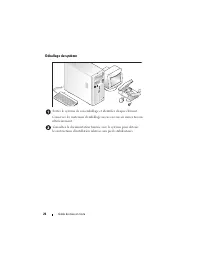
Guide de mise en route 25 Obtention d'une assistance technique Si vous ne comprenez pas une procédure décrite dans ce guide ou si le système ne réagit pas comme prévu, consultez le document Hardware Owner's Manual (Manuel du propriétaire). Des formations et certifications Dell ™ Enterprise sont disp...
Page 29 - Connexion du clavier, de la souris et du moniteur
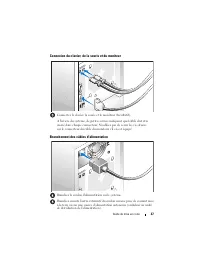
Guide de mise en route 27 Connexion du clavier, de la souris et du moniteur Connectez le clavier, la souris et le moniteur (facultatif). À l'arrière du système, de petites icônes indiquent quel câble doit être inséré dans chaque connecteur. N'oubliez pas de serrer les vis situées sur le connecteur d...
Page 30 - Mise sous tension du système
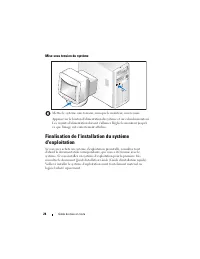
28 Guide de mise en route Mise sous tension du système Mettez le système sous tension, ainsi que le moniteur, si nécessaire. Appuyez sur le bouton d'alimentation du système et sur celui du moniteur. Les voyants d'alimentation doivent s'allumer. Réglez le moniteur jusqu'à ce que l'image soit correcte...
Page 31 - Spécifications techniques
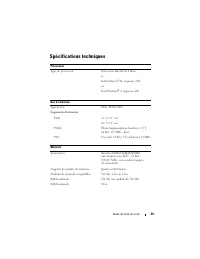
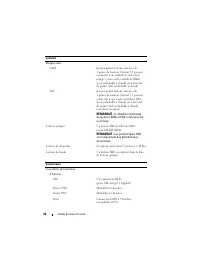
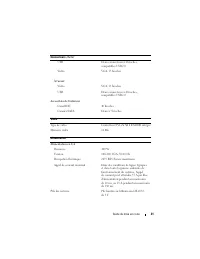
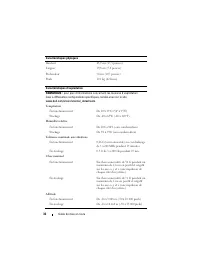
Guide de mise en route 29 Spécifications techniques Processeur Type de processeur Processeur Intel Core 2 Duo or Intel Celeron ® D, séquence 300 or Intel Pentium ® 4, séquence 600 Bus d'extension Type de bus PCIe, PCI-X, PCI Logements d'extension PCIe x1 / 3,3 V : un x8 / 3,3 V : un PCI-X Pleine lon...
Page 37 - Sistemas DellTM PowerVaultTM 100; Primeiros passos
Sistemas Dell™ PowerVault™ 100 Primeiros passos com o sistema Modelo MVT01
Page 38 - Notas, Avisos e Advertências
Notas, Avisos e Advertências NOTA: NOTA fornece informações importantes para ajudar você a usar melhor o computador. AVISO: AVISO indica possíveis danos ao hardware ou a possibilidade de perda de dados e ensina como evitar o problema. ADVERTÊNCIA: ADVERTÊNCIA indica um potencial de danos à proprieda...
Page 39 - Í n d i c e; Índice remissivo
Índice 37 Í n d i c e Recursos do sistema . . . . . . . . . . . . . . . . . . . 39 Sistemas operacionais compatíveis . . . . . . . . . . 41 Outras informações úteis . . . . . . . . . . . . . . . . 42 Como obter assistência técnica . . . . . . . . . . . . . 43 Instalação e configuração . . . . . . . ...
Page 41 - Recursos do sistema
Primeiros passos com o sistema 39 Recursos do sistema Esta seção descreve os principais recursos de hardware e software do sistema. Também fornece informações sobre outros documentos de que talvez necessite quando configurar o sistema e sobre como obter assistência técnica. Os principais recursos de...
Page 43 - Sistemas operacionais compatíveis
Primeiros passos com o sistema 41 O software a seguir está incluído no sistema: • Um programa de configuração do sistema para visualizar rapidamente e alterar as informações da configuração do sistema. Para obter mais informações sobre este programa, consulte a seção “Como utilizar o programa de con...
Page 44 - Outras informações úteis
42 Primeiros passos com o sistema Outras informações úteis ADVERTÊNCIA: O Guia de informações do produto fornece informações importantes sobre segurança e regulamentação. As informações sobre garantia podem estar incluídas neste documento ou serem fornecidas como documento separado. • O Manual do pr...
Page 45 - Como obter assistência técnica; Instalação e configuração
Primeiros passos com o sistema 43 Como obter assistência técnica Se não compreender algum procedimento descrito neste guia ou se o sistema não apresentar o desempenho esperado, consulte o Manual do proprietário de hardware . Existem recursos de treinamento e certificação empresarial da Dell ™ ; visi...
Page 46 - Conexão de teclado, mouse e monitor
44 Primeiros passos com o sistema Remoção do sistema da embalagem Remova o sistema da embalagem e identifique cada item. Guarde todos os materiais de envio caso sejam necessários mais tarde. Consulte a documentação fornecida com o sistema para saber como instalar os pés estabilizadores no sistema. C...
Page 47 - Conexão da energia
Primeiros passos com o sistema 45 Conexão da energia Conecte os cabos de alimentação ao sistema. Conecte a outra extremidade do cabo a uma tomada elétrica aterrada ou a uma fonte de energia separada como, por exemplo, uma UPS (Uninterrupted Power Supply – Fonte de alimentação contínua) ou uma PDU (P...
Page 48 - Como ligar o sistema; Conclua a configuração do sistema operacional
46 Primeiros passos com o sistema Como ligar o sistema Ligue o sistema e o monitor (opcional). Pressione o botão liga/desliga do sistema e do monitor. As luzes indicadoras de força deverão se acender. Ajuste os controles do monitor até que a imagem exibida seja satisfatória. Conclua a configuração d...
Page 49 - Especificações técnicas
Primeiros passos com o sistema 47 Especificações técnicas Processador Tipo de processador Processador Intel Core 2 Duo ou Processador Intel Celeron ® D, série 300 ou Processador Intel Pentium ® 4, série 600 Barramentos de expansão Tipo de barramento PCIe, PCI-X, PCI Slots de expansão PCIe Um de 3,3 ...
Page 55 - Procedimientos iniciales
Sistemas Dell™ PowerVault™ 100 Procedimientos iniciales con el sistema Modelo MVT01
Page 56 - Notas, avisos y precauciones
Notas, avisos y precauciones NOTA: una NOTA proporciona información importante que le ayudará a utilizar mejor el ordenador. AVISO: un AVISO indica la posibilidad de daños en el hardware o la pérdida de datos, e informa de cómo evitar el problema. PRECAUCIÓN: un mensaje de PRECAUCIÓN indica el riesg...
Page 57 - C o n t e n i d o
Contenido 55 C o n t e n i d o Componentes del sistema . . . . . . . . . . . . . . . . 57 Sistemas operativos admitidos . . . . . . . . . . . . . 59 Otra información útil . . . . . . . . . . . . . . . . . . . 59 Obtención de asistencia técnica . . . . . . . . . . . . 60 Instalación y configuración ....
Page 59 - Componentes del sistema
Procedimientos iniciales con el sistema 57 Componentes del sistema En esta sección se describen los principales componentes de hardware y software del sistema. También se ofrece información sobre otros documentos que puede necesitar para instalar el sistema y sobre cómo obtener asistencia técnica. L...
Page 61 - Sistemas operativos admitidos; Otra información útil
Procedimientos iniciales con el sistema 59 • Diagnósticos del sistema para evaluar los componentes y los dispositivos del sistema. Para obtener información sobre el uso de los diagnósticos del sistema, consulte “Ejecución de los diagnósticos del sistema” en el Manual del propietario del hardware . •...
Page 62 - Obtención de asistencia técnica
60 Procedimientos iniciales con el sistema • En la documentación del software de administración de sistemas se describen las funciones, los requisitos, la instalación y el funcionamiento básico del software. • En la documentación del sistema operativo se describe cómo instalar (si es necesario), con...
Page 63 - Instalación y configuración
Procedimientos iniciales con el sistema 61 Instalación y configuración PRECAUCIÓN: antes de realizar el procedimiento siguiente, lea y siga las instrucciones de seguridad y la información importante sobre normativas incluidas en la Guía de información del producto . En esta sección se describen los ...
Page 64 - Conexión del teclado, el ratón y el monitor
62 Procedimientos iniciales con el sistema Conexión del teclado, el ratón y el monitor Conecte el teclado, el ratón y el monitor (opcional). Los conectores de la parte posterior del sistema incluyen iconos que indican qué cable debe enchufarse en cada conector. Asegúrese de apretar los tornillos (si...
Page 65 - Conexión de la alimentación
Procedimientos iniciales con el sistema 63 Conexión de la alimentación Conecte los cables de alimentación al sistema. Conecte el otro extremo del cable a una toma eléctrica con conexión a tierra o a otra fuente de energía, como por ejemplo un sistema de alimentación ininterrumpida (SAI) o una unidad...
Page 66 - Encendido del sistema
64 Procedimientos iniciales con el sistema Encendido del sistema Encienda el sistema y el monitor (opcional). Presione el botón de encendido del sistema y del monitor. Los indicadores luminosos de alimentación deberían encenderse. Ajuste los controles del monitor hasta que la imagen mostrada sea sat...
Page 67 - Especificaciones técnicas
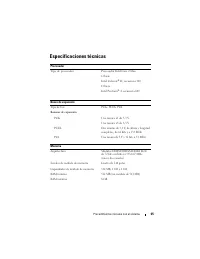
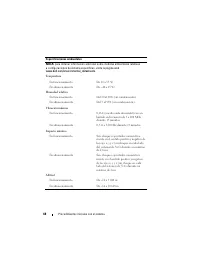
Procedimientos iniciales con el sistema 65 Especificaciones técnicas Procesador Tipo de procesador Procesador Intel Core 2 Duo O bien: Intel Celeron ® D, secuencia 300 O bien: Intel Pentium ® 4, secuencia 600 Buses de expansión Tipo de bus PCIe, PCI-X, PCI Ranuras de expansión PCIe Una ranura x1 de ...