Page 3 - DellTM PowerVaultTM 500 Systems; Getting Started
Dell™ PowerVault™ 500 Systems Getting Started With Your System Model EMS01
Page 5 - C o n t e n t s
Contents 3 C o n t e n t s System Features . . . . . . . . . . . . . . . . . . . . . . 5 Supported Operating Systems . . . . . . . . . . . . . . . 7 Other Information You May Need . . . . . . . . . . . . . 7 Obtaining Technical Assistance . . . . . . . . . . . . . 7 Installation and Configuration . ...
Page 7 - System Features
Getting Started With Your System 5 System Features The major hardware and software features of your system include: • One or two Dual-Core Intel ® Xeon ® Processors 5000 Sequence. • Support for symmetric multiprocessing (SMP), which is available on systems with two Intel Xeon processors. SMP greatly...
Page 9 - Supported Operating Systems; Obtaining Technical Assistance
Getting Started With Your System 7 • Front-panel connectors include a video and two USB connectors. • Front-panel 1x5 LCD for system ID and error messaging. • System ID button on the front and back panels. For more information about specific features, see "Technical Specifications" on page 1...
Page 10 - Installation and Configuration; Install the Rails and System in a Rack
8 Getting Started With Your System Installation and Configuration CAUTION: Before performing the following procedure, read and follow the safety instructions and important regulatory information in your Product Information Guide . This section describes the steps to set up your system for the first ...
Page 12 - Connect the Power
10 Getting Started With Your System Connect the Power Connect the monitor (optional) and system power, and connect the system’s power cable(s) to the system. If your system has an expansion card with a video output connector, do not connect the monitor to system’s integrated video connector. Instead...
Page 13 - Install the Power Cord Retention Bracket
Getting Started With Your System 11 Install the Power Cord Retention Bracket Attach the power cord retention bracket on the right bend of the power supply handle. Bend the system power cable into a loop as shown in the illustration and attach to the bracket’s cable clasp. Repeat the procedure for th...
Page 14 - Turn on the System
12 Getting Started With Your System Turn on the System Turn on the system and monitor (optional). Press the power button on the system and the monitor. The power indicators should light. Adjust the monitor's controls until the displayed image is satisfactory. Install the Bezel Install the bezel (opt...
Page 15 - Complete the 0perating System Setup; Technical Specifications
Getting Started With Your System 13 Complete the 0perating System Setup If you purchased a preinstalled operating system, see the operating system documentation that ships with your system. To install an operating system for the first time, see the Quick Installation Guide . Be sure the operating sy...
Page 19 - Systèmes DellTM PowerVaultTM 500; Guide de mise en route
Systèmes Dell™ PowerVault™ 500 Guide de mise en route Modèle EMS01
Page 20 - Remarques, avis et précautions
Remarques, avis et précautions REMARQUE : Une REMARQUE indique des informations importantes qui peuvent vous aider à mieux utiliser votre système. AVIS : un AVIS vous avertit d'un risque de dommage matériel ou de perte de données et vous indique comment éviter le problème. PRÉCAUTION : le message AT...
Page 21 - S o m m a i r e
Sommaire 19 S o m m a i r e Caractéristiques du système . . . . . . . . . . . . . . 21 Systèmes d'exploitation pris en charge . . . . . . . . 23 Autres informations utiles . . . . . . . . . . . . . . . 24 Obtention d'une assistance technique . . . . . . . . . 24 Installation et configuration . . . ....
Page 23 - Caractéristiques du système
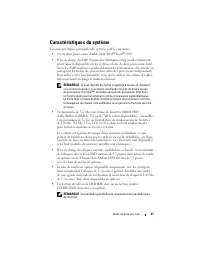
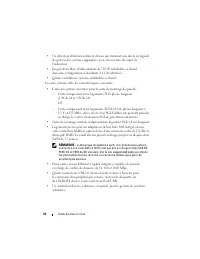
Guide de mise en route 21 Caractéristiques du système Les caractéristiques principales du système sont les suivantes : • Un ou deux processeurs double cœur Intel ® Xeon ® 5000. • Prise en charge du SMP (Symmetric Multiprocessing [multi-traitement symétrique]), disponible sur les systèmes dotés de de...
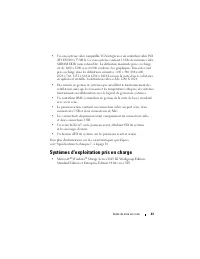
Page 25 - Systèmes d'exploitation pris en charge
Guide de mise en route 23 • Un sous-système vidéo compatible VGA intégré avec un contrôleur vidéo PCI ATI ES1000 à 33 MHz. Ce sous-système contient 16 Mo de mémoire vidéo SDRAM DDR (non extensible). La définition maximale prise en charge est de 1600 x 1200 avec 64 000 couleurs. Les graphiques True-c...
Page 26 - Autres informations utiles; Obtention d'une assistance technique
24 Guide de mise en route Autres informations utiles PRÉCAUTION : Le document Product Information Guide (Guide d'informations sur le produit) contient d'importantes informations se rapportant à la sécurité et aux réglementations. Les informations sur la garantie se trouvent soit dans ce document, so...
Page 27 - Installation et configuration; Installation des rails et du système dans un rack
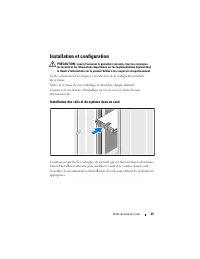
Guide de mise en route 25 Installation et configuration PRÉCAUTION : avant d'exécuter la procédure suivante, lisez les consignes de sécurité et les informations importantes sur les réglementations figurant dans le Guide d'informations sur le produit . Veillez à les respecter scrupuleusement. Cette s...
Page 28 - Connexion du clavier, de la souris et du moniteur
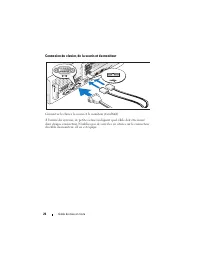
26 Guide de mise en route Connexion du clavier, de la souris et du moniteur Connectez le clavier, la souris et le moniteur (facultatif). À l'arrière du système, de petites icônes indiquent quel câble doit être inséré dans chaque connecteur. N'oubliez pas de serrer les vis situées sur le connecteur d...
Page 30 - Fixez le support du câble d'alimentation
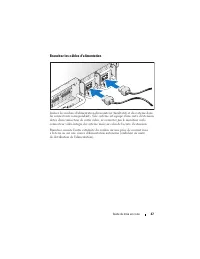
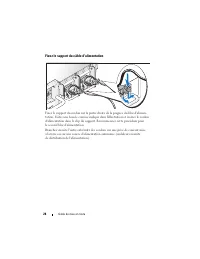
28 Guide de mise en route Fixez le support du câble d'alimentation Fixez le support du cordon sur la partie droite de la poignée du bloc d'alimen-tation. Faites une boucle comme indiqué dans l'illustration et insérez le cordon d'alimentation dans le clip du support. Recommencez cette procédure pour ...
Page 31 - Mise sous tension du système
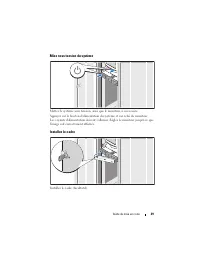
Guide de mise en route 29 Mise sous tension du système Mettez le système sous tension, ainsi que le moniteur, si nécessaire. Appuyez sur le bouton d'alimentation du système et sur celui du moniteur. Les voyants d'alimentation doivent s'allumer. Réglez le moniteur jusqu'à ce que l'image soit correcte...
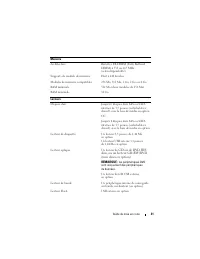
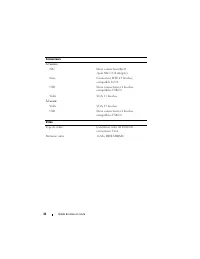
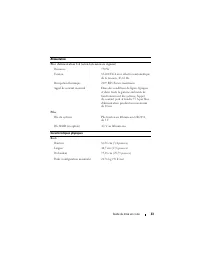
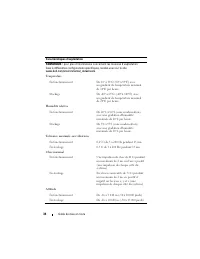
Page 32 - Spécifications techniques
30 Guide de mise en route Finalisation de l'installation du système d'exploitation Si vous avez acheté un système d'exploitation préinstallé, consultez tout d'abord la documentation correspondante, qui vous a été fournie avec le système. Si vous installez un système d'exploitation pour la première f...
Page 37 - Sistemas DellTM PowerVaultTM 500; Primeiros passos
Sistemas Dell™ PowerVault™ 500 Primeiros passos com o sistema Modelo EMS01
Page 38 - Notas, avisos e advertências
Notas, avisos e advertências NOTA: NOTA fornece informações importantes para ajudar você a usar melhor o computador. AVISO: AVISO indica possíveis danos ao hardware ou a possibilidade de perda de dados e ensina como evitar o problema. ADVERTÊNCIA: ADVERTÊNCIA indica um potencial de danos à proprieda...
Page 39 - C o n t e ú d o
Conteúdo 37 C o n t e ú d o Recursos do sistema . . . . . . . . . . . . . . . . . . 39 Sistemas operacionais admitidos . . . . . . . . . . . 41 Outras informações úteis . . . . . . . . . . . . . . . . 42 Como obter assistência técnica . . . . . . . . . . . . 42 Instalação e configuração . . . . . . ...
Page 41 - Recursos do sistema
Primeiros passos com o sistema 39 Recursos do sistema As principais características de hardware e software do sistema incluem: • Um ou dois processadores Intel ® Xeon ® Dual Core Série 5000. • Suporte para multiprocessamento simétrico (SMP), disponível nos sistemas com dois processadores Intel Xeon....
Page 43 - Sistemas operacionais admitidos
Primeiros passos com o sistema 41 • Um subsistema de vídeo compatível com o padrão VGA, com um controlador de vídeo PCI ATI ES1000 de 33 MHz. O subsistema de vídeo contém 16 MB de memória de vídeo DDR SDRAM (não atualizável). A resolução máxima é de 1600 x 1200 com 64 mil cores e os gráficos do tipo...
Page 44 - Outras informações úteis; Como obter assistência técnica
42 Primeiros passos com o sistema Outras informações úteis ADVERTÊNCIA: O Guia de informações do produto fornece informações importantes sobre segurança e regulamentação. As informações sobre garantia podem estar incluídas neste documento ou serem fornecidas como documento separado. • O documento Ra...
Page 45 - Instalação e configuração; Instale os trilhos e o sistema no rack
Primeiros passos com o sistema 43 Instalação e configuração ADVERTÊNCIA: Antes de executar o seguinte procedimento, leia e siga as instruções de segurança e as informações importantes de normalização contidas no Guia de informações do produto . Esta seção descreve as etapas para a configuração do si...
Page 46 - Conecte o teclado, o mouse e o monitor
44 Primeiros passos com o sistema Conecte o teclado, o mouse e o monitor Conecte o teclado, o mouse e o monitor (opcional). Os conectores localizados na parte traseira do sistema possuem ícones indicando quais cabos devem ser ligados a cada conector. Certifique-se de apertar os parafusos (se houver ...
Page 47 - Conecte à energia
Primeiros passos com o sistema 45 Conecte à energia Conecte o monitor (opcional) e o sistema à fonte de energia e, em seguida, conecte o(s) cabo(s) de alimentação do sistema a este. Caso o sistema possua uma placa de expansão com conector para saída de vídeo, não conecte o monitor ao conector de víd...
Page 48 - Instale o suporte de retenção do cabo de alimentação
46 Primeiros passos com o sistema Instale o suporte de retenção do cabo de alimentação Conecte o suporte de retenção do cabo de alimentação na dobra direita da alça da fonte de alimentação. Dobre o cabo de alimentação do sistema em forma de laço conforme apresentado na ilustração e conecte-o ao colc...
Page 49 - Como ligar o sistema
Primeiros passos com o sistema 47 Como ligar o sistema Ligue o sistema e o monitor (opcional). Pressione o botão liga/desliga do sistema e do monitor. As luzes indicadoras de força deverão se acender. Ajuste os controles do monitor até que a imagem exibida seja satisfatória. Instale o painel Instale...
Page 50 - Conclua a configuração do sistema operacional; Especificações técnicas
48 Primeiros passos com o sistema Conclua a configuração do sistema operacional Caso tenha adquirido um sistema operacional pré-instalado, consulte a respectiva documentação fornecida com o sistema. Para instalar um sistema operacional pela primeira vez, consulte o Guia de instalação rápida . Certif...
Page 55 - Procedimientos iniciales
Sistemas Dell™ PowerVault™ 500 Procedimientos iniciales con el sistema Modelo EMS01
Page 56 - Notas, avisos y precauciones
Notas, avisos y precauciones NOTA: una NOTA proporciona información importante que le ayudará a utilizar mejor el sistema. AVISO: un AVISO indica la posibilidad de daños en el hardware o la pérdida de datos, e informa de cómo evitar el problema. PRECAUCIÓN: un mensaje de PRECAUCIÓN indica el riesgo ...
Page 57 - C o n t e n i d o
Contenido 55 C o n t e n i d o Componentes del sistema . . . . . . . . . . . . . . . . 57 Sistemas operativos admitidos . . . . . . . . . . . . . 59 Otra información útil . . . . . . . . . . . . . . . . . . 60 Obtención de asistencia técnica . . . . . . . . . . . . 60 Instalación y configuración . ....
Page 59 - Componentes del sistema
Procedimientos iniciales con el sistema 57 Componentes del sistema Los principales componentes de hardware y software del sistema son: • Uno o dos procesadores Intel ® Xeon ® de doble núcleo 5000 Sequence. • Compatibilidad con SMP (multiprocesamiento simétrico), disponible en sistemas con dos proces...
Page 61 - Sistemas operativos admitidos
Procedimientos iniciales con el sistema 59 • Un subsistema de vídeo integrado compatible con VGA con una controladora de vídeo PCI ATI ES1000 a 33 MHz. Este subsistema de vídeo contiene 16 MB de memoria de vídeo SDRAM DDR (no ampliable). La resolución máxima es de 1 600 x 1 200 con 64 000 colores; s...
Page 62 - Otra información útil; Obtención de asistencia técnica
60 Procedimientos iniciales con el sistema Otra información útil PRECAUCIÓN: la Guía de información del producto contiene información importante sobre seguridad y normativas. La información sobre la garantía puede estar incluida en este documento o constar en un documento aparte. • En los documentos...
Page 63 - Instalación y configuración; Instalación de los rieles y del sistema en un rack
Procedimientos iniciales con el sistema 61 Instalación y configuración PRECAUCIÓN: antes de realizar el procedimiento siguiente, lea y siga las instrucciones de seguridad y la información importante sobre normativas incluidas en la Guía de información del producto . En esta sección se describen los ...
Page 65 - Conexión de la alimentación
Procedimientos iniciales con el sistema 63 Conexión de la alimentación Conecte la alimentación del monitor (opcional) y del sistema, y conecte los cables de alimentación al sistema. Si el sistema tiene una tarjeta de expansión con un conector de salida de vídeo, no conecte el monitor al conector de ...
Page 66 - Instalación del soporte de retención del cable de alimentación
64 Procedimientos iniciales con el sistema Instalación del soporte de retención del cable de alimentación Fije el soporte de retención del cable de alimentación en el codo derecho del asa de la fuente de alimentación. Doble el cable de alimentación del sistema en forma de bucle, tal como se muestra ...
Page 67 - Encendido del sistema
Procedimientos iniciales con el sistema 65 Encendido del sistema Encienda el sistema y el monitor (opcional). Presione el botón de encendido del sistema y del monitor. Los indicadores luminosos de alimentación deberían encenderse. Ajuste los controles del monitor hasta que la imagen mostrada sea sat...
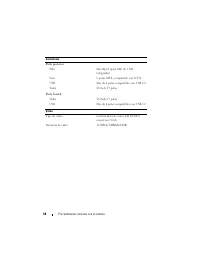
Page 68 - Especificaciones técnicas
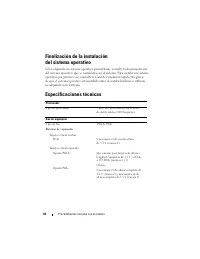
66 Procedimientos iniciales con el sistema Finalización de la instalación del sistema operativo Si ha adquirido un sistema operativo preinstalado, consulte la documentación del sistema operativo que se suministra con el sistema. Para instalar un sistema operativo por primera vez, consulte la Guía de...