Page 3 - Requirements for
w w w . d e l l . c o m | s u p p o r t . d e l l . c o m Dell™ PowerVault™ 136T LTO Tape Library Requirements for LTO-2/LTO-3 Mixed Mode Configurations
Page 5 - Overview
Dell PowerVault 136T LTO Tape Library 3 Overview This document provides requirements for operating a mix of LTO-2 and LTO-3 drives in the Dell™ PowerVault™ 136T LTO tape library. The following requirements must be met in order to operate a mixed mode library: • LTO-2 and LTO-3 drive modules are inst...
Page 6 - Minimum Firmware Requirements
4 Dell PowerVault 136T LTO Tape Library Minimum Firmware Requirements In order to utilize LTO-2 and LTO-3 mixed mode, the minimum firmware versions for the library and drives are as follows: • Library: 3.35.0001 • RMU: 193D.00002 • LTO-2 Drive: 53Y3 • LTO-3 Drive: 54K1 • SNC (Gen1): 4.25.04 • SNC (G...
Page 7 - Media Bar Code Labels
Dell PowerVault 136T LTO Tape Library 5 • The library may display an error message that states: Your library firmware versions do not match. Download the latest version to the library . • The library may display an error message that states: One or more drives have downlevel firmware. You may wish t...
Page 8 - Enabling Extended Bar Code Reading; Configuring Backup Software
6 Dell PowerVault 136T LTO Tape Library Enabling Extended Bar Code Reading In order for the library to recognize media via bar code labels, extended bar code reading must be enabled in the library. By default, the library reads an extended bar code label (5 to 13 characters). You can access the exte...
Page 9 - Troubleshooting
Dell PowerVault 136T LTO Tape Library 7 Troubleshooting • The LTO drive keeps posting a "!7" when a backup or restore job is submitted: If an LTO-3 media is loaded into an LTO-2 drive, the LTO-2 drive will post a '!7' indicating an unrecognized media resource. – Remove the piece of media man...
Page 11 - 混合模式
w w w . d e l l . c o m | s u p p o r t . d e l l . c o m Dell™ PowerVault™ 136T LTO 磁带库 LTO-2/LTO-3 混合模式 配置要求
Page 12 - 注、注意和警告; 注意:; 警告:
注、注意和警告 注: 注表示可以帮助您更好地使用计算机的重要信息。 注意: 注意表示可能会损坏硬件或导致数据丢失, 并告诉您如何避免此类问题。 警告: 警告表示可能会导致财产损失、人身伤害甚 至死亡。 ____________________ 本文件中的信息如有更改,恕不另行通知。 © 2005 Dell Inc. 版权所有,翻印必究。 未经 Dell Inc. 书面许可,严禁以任何形式进行复制。 本文中使用的商标: Dell 、 DELL 徽标和 PowerVault 是 Dell Inc. 的商标; Microsoft 和 Windows 是 Microsoft Corporation 的...
Page 13 - 概览; 安装; 最低固件要求
Dell PowerVault 136T LTO 磁带库 11 概览 本说明文件介绍在 Dell™ PowerVault™ 136T LTO 磁带库中混合使用 LTO-2 和 LTO-3 驱动器时的相关要求。为了实现混合模式的磁带库, 必须满足以下要求: • 将 LTO-2 和 LTO-3 驱动器模块安装到磁带库中。 • 磁带库满足最低的固件要求。 • 对磁带库中的所有 LTO 介质应用正确的条形码标签。 • 将磁带库配置为读取扩展条形码标签。 • 将备份软件配置为管理混合介质和混合驱动器。 安装 LTO-2 和 LTO-3 驱动器模块 如果要安装 LTO-3 驱动器或升级到 LTO-3 驱动...
Page 15 - 介质条形码标签; 启用扩展条形码读取功能
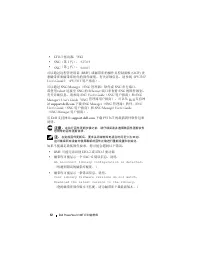
Dell PowerVault 136T LTO 磁带库 13 • 磁带库可能显示一条错误信息,说明: One or more drives have downlevel firmware. You may wish to update these drives. See User's Guide. (一个或多个驱动器的固件级别较低。您可能需要更新这 些驱动器。请参阅《用户指南》。) 将固件更新到上述列出的所需固件级别,以免出现错误。 介质条形码标签 为了使 PV136T 能够识别和正确地初始化同一个磁带库中的 LTO-2 和 LTO-3 介质,必须对磁带库中的所有介质应用正确的条形码标签。 ...
Page 16 - 配置备份软件
14 Dell PowerVault 136T LTO 磁带库 使用以下步骤配置条形码长度。 1 从 Main menu (主菜单)中选择 Setup (设置)。 2 选择 Library (磁带库)。 3 选择 Media (介质)。 4 使用 Change (更改)以选择以下选项之一: • Default (默认)— 磁带库读取 6 个字符的条形码标签。 • Extended (扩展)— 磁带库读取 5 至 13 个字符的条 形码标签。 注: 如果要将备份软件设置为根据条形码标签管理介质, 请使用扩展长度。 5 选择 OK (确定)。 配置备份软件 要使系统能够识别和初始化混合的 LTO-...
Page 17 - 故障排除
Dell PowerVault 136T LTO 磁带库 15 故障排除 • 在提交备份或恢复作业时, LTO 驱动器保持显示“ !7 ”: 如果在 LTO-2 驱动器中装入 LTO-3 介质, LTO-2 驱动器将显 示“ !7 ”,表示无法识别介质资源。 – 从驱动器中手动卸下介质,验证此介质已应用正确的条形码标签。有关详细信息,请参阅“介质条形码标签”。 – 检查是否启用了扩展条形码。有关详细信息,请参阅“介质条形码标签”。 – 确保备份应用程序已正确实施了条形码规则、介质池或驱动器池。请参阅备份软件用户手册。 • RMU 不能识别 LTO-2 或 LTO-3 驱动器: 如果 RMU 的...
Page 19 - Configuration requise
w w w . d e l l . c o m | s u p p o r t . d e l l . c o m Bibliothèque de bandes LTO PowerVault™ 136T Dell™ Configuration requise pour les bibliothèques comprenant des lecteurs LTO-2 et LTO-3
Page 20 - Remarques, avis et précautions
Remarques, avis et précautions REMARQUE : une REMARQUE indique des informations importantes qui peuvent vous aider à mieux utiliser votre ordinateur. AVIS : un AVIS vous avertit d'un risque de dommage matériel ou de perte de données et vous indique comment éviter le problème. PRÉCAUTION : une PRÉCAU...
Page 21 - Présentation générale
Bibliothèque de bandes LTO PowerVault 136T Dell 19 Présentation générale Ce document présente la configuration requise pour l'utilisation simultanée de lecteurs LTO-2 et LTO-3 dans la bibliothèque de bandes LTO Dell™ PowerVault™ 136T. Les conditions suivantes doivent être réunies pour que la bibliot...
Page 22 - Niveaux de micro-code requis
20 Bibliothèque de bandes LTO PowerVault 136T Dell Niveaux de micro-code requis Pour pouvoir utiliser à la fois des lecteurs LTO-2 et LTO-3, la bibliothèque et les lecteurs doivent utiliser les versions minimales de micro-code suivantes : • Bibliothèque : 3.35.0001 • Unité de gestion à distance : 19...
Page 23 - Étiquettes de codes barres des médias
Bibliothèque de bandes LTO PowerVault 136T Dell 21 Si le niveau minimal de micro-code requis n'est pas installé, vous risquez de rencontrer les erreurs suivantes : • L'unité de gestion à distance (RMU) ne reconnaît pas les lecteurs LTO-2 ou LTO-3. • La bibliothèque affiche l'erreur SAC 42 suivante :...
Page 25 - Configuration du logiciel de sauvegarde; Dépannage
Bibliothèque de bandes LTO PowerVault 136T Dell 23 Configuration du logiciel de sauvegarde Pour que le système puisse identifier et exploiter des lecteurs et des supports LTO-3 et LTO-2, nous vous recommandons de configurer les règles des codes barres, les pools de médias et les pools de lecteurs da...
Page 27 - Anforderungen für
w w w . d e l l . c o m | s u p p o r t . d e l l . c o m Dell™ PowerVault™ 136T LTO- Bandbibliothek Anforderungen für gemischte LTO-2/LTO-3 Konfigurationen
Page 29 - Übersicht
Dell PowerVault 136T LTO-Bandbibliothek 27 Übersicht In diesem Dokument sind die Anforderungen für den gemischten Betrieb mit LTO-2- und LTO-3-Laufwerken in der Dell™ PowerVault™ 136T LTO-Bandbibliothek beschrieben. Folgende Anforderungen müssen zum gemischten Bibliotheksbetrieb erfüllt sein: • In d...
Page 30 - Mindestanforderungen an die Firmware
28 Dell PowerVault 136T LTO-Bandbibliothek Mindestanforderungen an die Firmware Für den gemischten Betreib von LTO 2 und LTO 3 gelten folgende Mindestvoraussetzungen an die Firmwareversionen von Bibliothek und Laufwerken: • Bibliothek: 3.35.0001 • Fernverwaltungseinheit (RMU): 193D.00002 • LTO-2-Lau...
Page 31 - Strichcode-Etiketten für Medien
Dell PowerVault 136T LTO-Bandbibliothek 29 Falls die Mindestanforderungen an die Firmware nicht erfüllt werden, treten möglicherweise folgende Fehler auf: • Die Fernverwaltungseinheit erkennt möglicherweise die LTO-2- oder LTO-3-Laufwerke nicht. • Die Bibliothek zeigt möglicherweise folgende SAC-42-...
Page 33 - Konfiguration von Datensicherungssoftware; Fehlerbehebung
Dell PowerVault 136T LTO-Bandbibliothek 31 Konfiguration von Datensicherungssoftware Um das System für das Erkennen und Verwenden von gemischten LTO-3- und LTO-2-Laufwerken und Medien einzurichten, sollten die Strichcode-Regeln sowie die Medien- oder Laufwerkpools in der Datensicherungsan-wendung ko...
Page 35 - のミックスモー
w w w . d e l l . c o m | s u p p o r t . d e l l . c o m Dell™ PowerVault™ 136T LTO テープライブラリ LTO-2/LTO-3 のミックスモー ド構成の要件
Page 36 - メモ、注意、警告
メモ、注意、警告 メモ: コンピュータを使いやすくするための重要な情報 を説明しています。 注意: ハードウェアの損傷やデータの損失の可能性を示 し、その危険を回避するための方法を説明しています。 警告: 物的損害、けが、または死亡の原因となる可能性 があることを示します。 ____________________ 本書の内容は予告なく変更されることがあります。 © 2005 すべての著作権は Dell Inc. にあります。 Dell Inc. の書面による許可のない複製は、いかなる形態においても厳 重に禁じられています。本書で使用されている商標について: Dell 、 DELL ロゴ、およ...
Page 37 - 概要; のドライブモジュールの取
Dell PowerVault 136T LTO テープライブラリ 35 概要 本書では、 Dell™ PowerVault™ 136T LTO テープライブラリに LTO-2 ドライブと LTO-3 ドライブが混在する場合の動作要件について説明し ます。ミックスモードのライブラリが動作するには、次の要件を満た す必要があります。 • ライブラリに LTO-2 と LTO-3 のドライブモジュールが取り付け られている。 • ライブラリがファームウェアの最小要件を満たしている。 • ライブラリのすべての LTO メディアに正しいバーコードラベルが 貼られている。 • ライブラリが拡張バーコード...
Page 38 - ファームウェアの最小要件
36 Dell PowerVault 136T LTO テープライブラリ ファームウェアの最小要件 LTO-2 と LTO-3 のミックスモードを活用するには、ライブラリとドラ イブは次のファームウェアバージョンの最小要件を満たしている必要 があります。 • ライブラリ: 3.35.0001 • RMU:193D.00002 • LTO-2 ドライブ: 53Y3 • LTO-3 ドライブ: 54K1 • SNC ( Gen1 ): 4.25.04 • SNC ( Gen2 ): 4.60.03 ライブラリとライブラリコンポーネントのファームウェアレベルは、 リモート管理ユニット( RMU )、...
Page 39 - メディアのバーコードラベル
Dell PowerVault 136T LTO テープライブラリ 37 ファームウェアの最小要件が満たされていない場合は、次のエラーが 発生する可能性があります。 • RMU が LTO-2 または LTO-3 ドライブを認識しない。 • ライブラリに次の SAC 42 エラーメッセージが表示される。 An incorrect library configuration is detected. (検出されたライブラリの構成が正しくありません。) • ライブラリに次のエラーメッセージが表示される。 Your library firmware versions do not match. Do...
Page 40 - 拡張バーコード読み取り機能の有効化
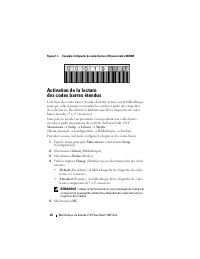
38 Dell PowerVault 136T LTO テープライブラリ 図 1-1 WORM メディア用 LTO バーコードラベルの例 拡張バーコード読み取り機能の有効化 ライブラリがバーコードラベルによってメディアを認識するには、ラ イブラリの拡張バーコード読み取り機能を有効にする必要があります。 デフォルトでは、ライブラリは拡張バーコードラベル( 5 ~ 13 文字) を読み取ります。 拡張バーコードの設定には、 PV136T の正面コントロールパネルから 次の手順でアクセスできます。 Main menu (メインメニュー)→ Setup (セットアップ)→ Library (ライブラリ...
Page 41 - バックアップソフトウェアの設定; トラブルシューティング
Dell PowerVault 136T LTO テープライブラリ 39 バックアップソフトウェアの設定 システムが LTO-3 と LTO-2 の混在するドライブとメディアを認識して 利用するためには、バーコードルール、メディアプール、またはドラ イブプールをバックアップソフトウェアアプリケーション内で設定す ることをお勧めします。ドライブの混在がサポートされる期間は、 バックアップソフトウェアパッケージによって異なります。詳細につ いては、バックアップソフトウェアのマニュアルを参照してください。 メモ: カートリッジのラベルを変更した場合は、インベントリの作成 を実行し、バックアップアプリ...
Page 43 - 혼합
w w w . d e l l . c o m | s u p p o r t . d e l l . c o m Dell™ PowerVault™ 136T LTO 테 이프 라이브러리 LT0-2/LT0-3 혼합 모드 구성 요구 사항
Page 45 - 개요; 드라이브
Dell PowerVault 136T LTO 테이프 라이브러리 43 개요 이 문서에서는 Dell ™ PowerVault ™ 136T LTO 테이프 라이브러리에서 LTO-2 및 LTO-3 드라이브를 함께 작동하기 위한 요구 사항을 제공합니다 . 혼합 모드 라이브러리를 작동하려면 다음 요구 사항을 충족해야 합니다 . • LTO-2 및 LTO-3 드라이브 모듈이 라이브러리에 설치되어 있어야 합니다 . • 라이브러리가 최소 펌웨어 사양을 충족해야 합니다 . • 올바른 바코드 레이블이 라이브러리의 모든 LTO 미디어에 지정되 어 있어야 합니...
Page 46 - 최소
44 Dell PowerVault 136T LTO 테이프 라이브러리 최소 펌웨어 사양 LTO-2 및 LTO-3 혼합 모드를 사용하기 위한 라이브러리 및 드라이브의 최소 펌웨어 버전은 다음과 같습니다 . • 라이브러리 : 3.35.0001 • RMU: 193D.00002• LTO-2 드라이브 : 53Y3 • LTO-3 드라이브 : 54K1 • SNC (Gen1): 4.25.04• SNC (Gen2): 4.60.03 라이브러리의 작동 제어판 (OCP) 또는 원격 관리 장치 (RMU) 를 통해 라 이브러리의 펌웨어 레벨과 라이브러리 구성...
Page 47 - 미디어
Dell PowerVault 136T LTO 테이프 라이브러리 45 • 라이브러리에 다음과 같은 오류 메시지가 나타날 수 있습니다 . Your library firmware versions do not match. Download the latest version to the library . • 라이브러리에 다음과 같은 오류 메시지가 나타날 수 있습니다 . One or more drives have downlevel firmware. You may wish to update these drives. See User's Guide ...
Page 49 - 문제
Dell PowerVault 136T LTO 테이프 라이브러리 47 문제 해결 • 백업 또는 복원 작업이 전송될 때 LTO 드라이브가 "!7" 포스트 상태 로 유지되는 경우 : LTO-3 미디어가 LTO-2 드라이브에 로드되면 LTO-2 드라이브는 인식되지 않은 미디어 자원을 나타내는 '!7' 을 포스트합니다 . – 드라이브에서 미디어의 일부를 수동으로 제거하여 미디어에 올 바른 바코드 레이블이 지정되어 있는지 확인하십시오 . 자세한 내용은 " 미디어 바코드 레이블 " 을 참조하십시오 . – 확장 바코드...
Page 51 - Biblioteca de cintas DellTM; Requisitos para
w w w . d e l l . c o m | s u p p o r t . d e l l . c o m Biblioteca de cintas Dell™ PowerVault™ 136T LTO Requisitos para configuraciones de modo mixto LTO-2/LTO-3
Page 52 - Notas, avisos y precauciones
Notas, avisos y precauciones NOTA: una NOTA proporciona información importante que le ayudará a utilizar mejor el ordenador. AVISO: un AVISO indica la posibilidad de daños en el hardware o la pérdida de datos, e informa de cómo evitar el problema. PRECAUCIÓN: un mensaje de PRECAUCIÓN indica el riesg...
Page 53 - Información general
Biblioteca de cintas Dell PowerVault 136T LTO 51 Información general En este documento se indican los requisitos para utilizar una combinación de unidades LTO-2 y LTO-3 en la biblioteca de cintas Dell™ PowerVault™ 136T LTO. Para utilizar una biblioteca en modo mixto deben cumplirse los requisitos si...
Page 54 - Requisitos de firmware mínimos
52 Biblioteca de cintas Dell PowerVault 136T LTO Requisitos de firmware mínimos Las versiones de firmware mínimas en la biblioteca y las unidades para utilizar el modo mixto LTO-2 y LTO-3 son las siguientes: • Biblioteca: 3.35.0001 • RMU: 193D.00002 • Unidad LTO-2: 53Y3 • Unidad LTO-3: 54K1 • SNC (G...
Page 55 - Etiquetas de código de barras para soportes
Biblioteca de cintas Dell PowerVault 136T LTO 53 Si no se cumplen los requisitos mínimos de firmware, pueden producirse las siguientes situaciones de error: • Es posible que la RMU no reconozca las unidades LTO-2 o LTO-3 • La biblioteca puede mostrar el mensaje de error SAC 42 siguiente: An incorrec...
Page 57 - Solución de problemas
Biblioteca de cintas Dell PowerVault 136T LTO 55 Configuración del software de copia de seguridad Para que el sistema pueda identificar y utilizar unidades y soportes mixtos LTO-3 y LTO-2, es recomendable que las reglas de los códigos de barras, el conjunto de soportes o el conjunto de unidades se c...