Dell ChromeBox For Meetings- User Manual
Dell ChromeBox For Meetings– User Manual, read for free online in PDF format. We hope this helps you resolve any issues you may have. If you have further questions, please contact us through the contact form.
Dell Chromebox for Meetings
3010
Quick Start Guide
Guide de démarrage rapide
Guía de Inicio rápido
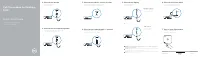
1 Connect the camera
Connecter la caméra
Conecte la cámara
2 Connect the microphone/speaker
Connecter le microphone/haut-parleur
Conecte el micrófono/altavoz
3 Connect the remote-control receiver
Connecter le récepteur de la télécommande
Conecte el receptor de control remoto
4 Connect the network cable — optional
Connecter le câble réseau — facultatif
Conecte el cable de red — opcional
5 Connect the display
Connecter l’affichage
Conecte la pantalla
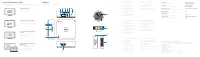
DisplayPort connector
Connecteur DisplayPort
Conector DisplayPort
Or
| Ou | O
HDMI connector
Connecteur HDMI
Conector HDMI
6 Connect the power cable
Connecter le câble d’alimentation
Conecte el cable de alimentación
7 Turn on your Chromebox
Activer votre Chromebox
Encienda su Chromebox
© 2014 Dell Inc.
© 2014 Google Inc.
Printed in Poland.
2014-07
NOTE:
You have to switch the display’s input source to HDMI or DisplayPort
after turning on the display.
REMARQUE :
Vous devez basculer la source d’entrée de l’affichage vers HDMI
ou DisplayPort après avoir activé l’affichage.
NOTA:
debe cambiar la fuente de entrada de la pantalla a HDMI o DisplayPort
después de encender la pantalla.
"Loading the manual" means you need to wait until the file loads and becomes available for online reading. Some manuals are very large, and the time they take to appear depends on your internet speed.


