Page 2 - ВВЕДЕНИЕ; CRUNCH
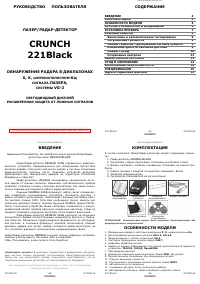
2 ВВЕДЕНИЕ Уважаемый владелец лазер / радар - детектора . Поздравляем Вас с покупкой нашего прибора , мы уверены , что он будет очень полезен и прослужит Вам долго . Детектор CRUNCH 2190 относится к абсолютно новой серии радар - детекторов CRUNCH и является лазер / радар - детектором , который реаги...
Page 7 - Установка
7 Внимание : Когда вы выходите из машины обязательно выключите радар - детектор . Даже слабый сигнал может вызвать разрядку аккумулятора . Установка батарей Радар - детектор CRUNCH 2190 оснащен двумя батареями типа АА ( щелочными или литиевыми ). Для наилучшей работы радара не используйте другие бат...
Page 8 - Крепление
8 дорога находилась в прямой видимости детектора . Помните , радарная антенна и лазерный датчик расположены за задней панелью прибора . Для точного и безошибочного обнаружения сигналов антенну и лазерный датчик детектора нужно направить на линию горизонта ( параллельно поверхности дороги ), постарай...
Page 9 - РАБОТА; Подключение
9 Для этого выполните следующие шаги : • Прикрепите " присоски " к кронштейну , вставив их в предусмотренные для этого отверстия . • Прикрепите кронштейн " присосками " к внутренней поверхности ветрового стекла . • Прикрепите детектор к кронштейну . • Для коррекции угла обнаружения В...
Page 10 - Dim
10 Регулировка громкости Для настройки уровня громкости используйте регулятор , расположенный сбоку радара . Регулировка яркости Функция Dim уменьшает яркость дисплея . Нажмите кнопку "Dim" для выбора одного из 4- х уровней приглушения яркости свечения светодиодного дисплея : Bright ( ярко )...
Page 11 - Режим
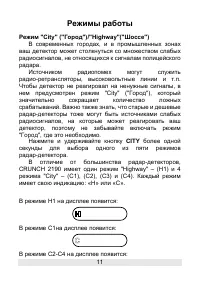
11 Режимы работы Режим "City" (" Город ")/"Highway"(" Шоссе ") В современных городах , и в промышленных зонах ваш детектор может столкнуться со множеством слабых радиосигналов , не относящихся к сигналам полицейского радара . Источником радиопомех могут служить радио ...
Page 12 - voice off
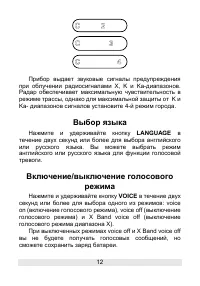
12 Прибор выдает звуковые сигналы предупреждения при облучении радиосигналами Х , K и Ka- диапазонов . Радар обеспечивает максимальную чувствительность в режиме трассы , однако для максимальной защиты от K и Ka- диапазонов сигналов установите 4- й режим города . Выбор языка Нажмите и удерживайте кно...
Page 13 - TUTORIAL
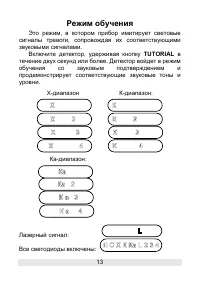
13 Режим обучения Это режим , в котором прибор имитирует световые сигналы тревоги , сопровождая их соответствующими звуковыми сигналами . Включите детектор , удерживая кнопку TUTORIAL в течение двух секунд или более . Детектор войдет в режим обучения со звуковым подтверждением и продемонстрирует соо...
Page 16 - СПЕЦИФИКАЦИЯ
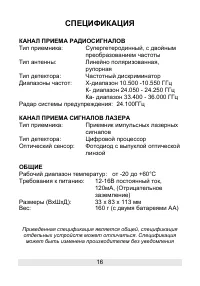
16 СПЕЦИФИКАЦИЯ КАНАЛ ПРИЕМА РАДИОСИГНАЛОВ Тип приемника : Супергетеродинный , с двойным преобразованием частоты Тип антенны : Линейно поляризованная , рупорная Тип детектора : Частотный дискриминатор Диапазоны частот : Х - диапазон 10.500 -10.550 ГГц К - диапазон 24.050 - 24.250 ГГц Ка - диапазон 3...
Page 17 - Radar and Laser detector; OPERATION MANUAL
17 CRUNCH 2190 X-, K-, Superwide Ka-Band Radar and Laser detector OPERATION MANUAL
Page 19 - IDENTIFYING PARTS OF THE UNIT
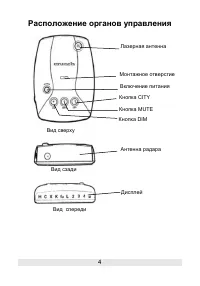
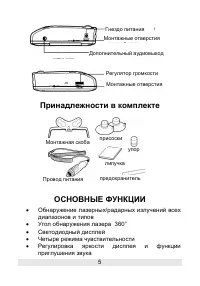
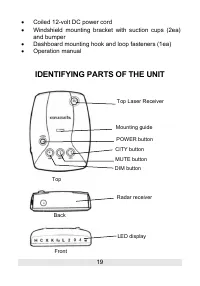
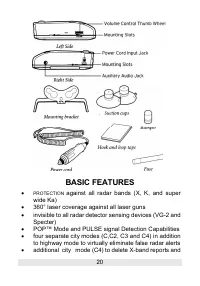
19 • Coiled 12-volt DC power cord • Windshield mounting bracket with suction cups (2ea) and bumper • Dashboard mounting hook and loop fasteners (1ea) • Operation manual IDENTIFYING PARTS OF THE UNIT Top Laser Receiver Mounting guide POWER button CITY button MUTE button DIM button Radar receiver LED ...
Page 20 - BASIC FEATURES; 60° laser coverage against all laser guns
20 BASIC FEATURES • PROTECTION against all radar bands (X, K, and super wide Ka) • 360° laser coverage against all laser guns • invisible to all radar detector sensing devices (VG-2 and Specter) • POP™ Mode and PULSE signal Detection Capabilities • four separate city modes (C,C2, C3 and C4) in addit...
Page 21 - ADDITIONAL FEATURES; Additional audio output
21 eliminate most false radar alerts • user selectable brightness and mute on/off • separate power on/off button and volume control wheel • LED-BACKLIT text display • tutorial mode to demonstrate operations • memory to retain previously set operational modes after power-off • cordless power connecti...
Page 22 - Battery installation; The CRUNCH 2190 is designed to operate on two AA; Battery life
22 pressing any button while the audio and visual warning is being displayed. Turn off the CRUNCH 2190 whenever you leave your vehicle. Even a weak signal can cause the CRUNCH 2190 to remain on and drain your batteries. Battery installation The CRUNCH 2190 is designed to operate on two AA alkaline b...
Page 23 - Voice alert; CRUNCH 2190 provides voice announcements when; INSTALLING THE UNIT; Mounting guidelines; The CRUNCH 2190 can be mounted on your windshield or; Windshield mounting; Install the suction cups and bumper onto the windshield
23 Voice alert CRUNCH 2190 provides voice announcements when function buttons are used, so that you can know which function was actually activated. However, for the purpose of extended battery life, the CRUNCH 2190 was designed to give voice announcements only for the secondary functions (language, ...
Page 24 - Dashboard mounting; RADAR OPERATION; Power on; POWER
24 mounting bracket by sliding them into their holes (if not pre-installed). 2. Press the bracket base firmly against the windshield until the suction cups securely take hold. 3. Slide the unit up to the bracket until the bracket arms click into the slots on both sides of the unit. 4. Bend the angle...
Page 25 - Volume control; Dim mode reduces the brightness of the display. When a; Highway/city mode selection
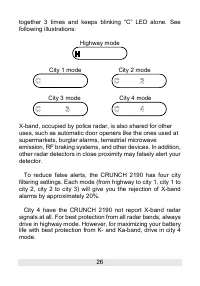
25 previously set in memory. Volume control Use the volume thumb wheel, located on the side of the CRUNCH 2190, to adjust volume level. Display brightness control (dim mode) Press the DIM button repeatedly to toggle between three levels of brightness modes: bright, dim, and dark. Dim mode reduces th...
Page 28 - the end of tutorial mode.
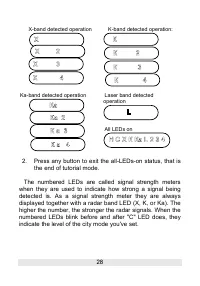
28 X-band detected operation K-band detected operation: Ka-band detected operation Laser band detected operation All LEDs on 2. Press any button to exit the all-LEDs-on status, that is the end of tutorial mode. The numbered LEDs are called signal strength meters when they are used to indicate how st...
Page 29 - TROUBLESHOOTING; If the detector does not turn on:; If the receiving signals are weak:
29 TROUBLESHOOTING If the detector does not turn on: • Make sure that the POWER button is in the ON position. • Check the power cord. Be sure all power connectors are properly installed. • Check the fuse that controls power to the cigarette lighter socket. See your vehicles owner's manual • The ciga...
Page 30 - CARE AND MAINTENANCE; Here are some tips to help you care for your CRUNCH; Fuse replacement; The lighter socket adapter of the power cord has a
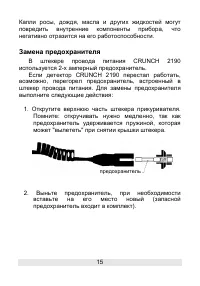
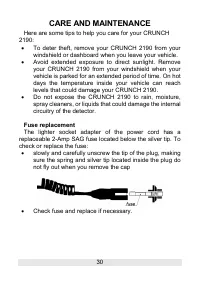
30 CARE AND MAINTENANCE Here are some tips to help you care for your CRUNCH 2190: • To deter theft, remove your CRUNCH 2190 from your windshield or dashboard when you leave your vehicle. • Avoid extended exposure to direct sunlight. Remove your CRUNCH 2190 from your windshield when your vehicle is p...
Page 31 - SPECIFICATIONS; RADAR; Dual conversion superheterodyne; LASER; Pulsed laser signal receiver; GENERAL; Power requirements:
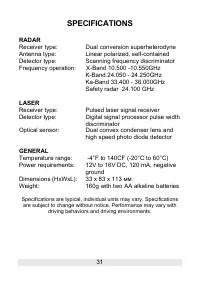
31 SPECIFICATIONS RADAR Receiver type: Dual conversion superheterodyne Antenna type: Linear polarized, self-contained Detector type: Scanning frequency discriminator Frequency operation: X-Band 10.500 -10.550GHz K-Band 24.050 - 24.250GHz Ka-Band 33.400 - 36.000GHz Safety radar 24.100 GHz LASER Recei...
Page 32 - FIND ANOTHER; With CRUNCH your car will be more safe
32 FIND ANOTHER CRUNCH Radar-detectors ! CRUNCH 2110 CRUNCH 2130 CRUNCH 2160 CRUNCH 2170 CRUNCH 2180 With CRUNCH your car will be more safe