Page 2 - READ ALL INSTRUCTIONS BEFORE USE; COOKING FORWARDTM; size makes it perfect for small spaces.; The Chefman
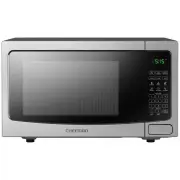
READ ALL INSTRUCTIONS BEFORE USE For your safety and continued enjoyment of this product, always read the instruction manual before using. COOKING FORWARD™ Welcome! Thank you for choosing the Countertop Select 1.1 Cu. Ft. Microwave as the newest addition to your kitchen. Whether this is your first C...
Page 3 - CONTENTS
4 Safety Instructions 10 Features 12 Operating Instructions 21 Troubleshooting 23 Cleaning and Maintenance 24 Terms and Conditions 26 Warranty Registration CONTENTS
Page 4 - Specifications; SAFETY INSTRUCTIONS; IMPORTANT SAFEGUARDS
4 PRECAUTIONS TO AVOID POSSIBLE EXPOSURE TO EXCESSIVE MICROWAVE ENERGY 1. Do not attempt to operate this oven with the door open since this can result in harmful exposure to microwave energy. It is important not to disable or tamper with the safety interlocks. 2. Do not place any object between the ...
Page 8 - GROUNDING INSTRUCTIONS; DANGER; Improper use of the grounding plug can result in electrical shock.
8 GROUNDING INSTRUCTIONS DANGER Electrical Shock HazardTouching some of the internal components can cause serious personal injury or death.Do not disassemble this appliance. This appliance must be grounded. In the event of an electrical short circuit, grounding reduces the risk of electrical shock b...
Page 9 - UTENSIL TEST; use it in the microwave.
9 Do not place the appliance on a stovetop or any other heatable surface, even if the stovetop is not on. Doing so is a fire hazard. 3. If an extension cord is used: a. The marked electrical rating of the cord set and/or the marked electrical rating of the extension cord should be at least as great ...
Page 10 - FEATURES
10 Oz POWE R CLO CK TIM ER TIM E CO OK TIM E DEF ROST WE IGH T DEF ROST VEG GIES LEF TOVE RS POTA TO BEVER AG E POP CO RN PIZZ A QUI CK S TAR T SEL ECT FAV OR ITE SAFE TY LOC K ECO MOD E ON | OFF STO P CA NCE L 1 2 3 4 5 6 7 8 0 9 STA RT +30 s FEATURES 7 4 5 1 3 6 1. Door Assembly2. Safety Interlock...
Page 12 - OPERATING INSTRUCTIONS; BEFORE FIRST USE; Never immerse the unit in water or other liquids.; COUNTERTOP INSTALLATION; • a minimum clearance of 12 inches
12 OPERATING INSTRUCTIONS BEFORE FIRST USE 1. Remove all packaging materials, and read and remove all removable stickers. (Leave the rating label on the unit.) Be sure that all parts and accessories are accounted for before throwing away any packaging. 2. Gently wipe the exterior and interior of the...
Page 13 - receiver are on different branch circuits.; TURNTABLE INSTALLATION; If the turntable
13 OPERATING INSTRUCTIONS 2. Place the oven far away from radios and television sets, as the operation of the microwave oven may cause interference with radios or TVs. If there is still interference, it can be reduced by taking the following measures: a. Clean the door and sealing surface of the ove...
Page 14 - MATERIALS YOU CAN AND CAN’T USE IN THE OVEN
14 OPERATING INSTRUCTIONS Material Can Use in the Oven? Notes Dinnerware Yes, microwave-safe only Refer to manufacturer’s label and/or instructions. Do not use cracked or chipped dishes. Glass jars Yes Always remove lid. Use to heat food only until just warm. Most glass jars are not heat-resistant a...
Page 15 - MATERIALS YOU CAN AND CAN’T USE IN THE OVEN (continued)
15 OPERATING INSTRUCTIONS Material Can Use in the Oven? Notes Plastic wrap Yes, microwave-safe only Use to cover food containers during cooking to retain moisture. Do not allow plastic wrap to touch food. Plastic containers Yes, microwave-safe only Check manufacturer’s label and instructions. Some p...
Page 16 - TO MICROWAVE IN MANUAL MODE; Press TIME COOK, and use the keypad to enter the cooking time.
16 SETTING THE CLOCK To set the clock to the time of day, press the CLOCK button once; "00:00" will display. Then use the number keypad to enter the current time. Press CLOCK again to finish. TO USE THE QUICK-COOK FUNCTIONS Use the Quick-Cook buttons for simple, one-touch microwaving at 100%...
Page 17 - Press START. The unit will begin cooking and counting down.; TO DEFROST; Press START. The unit will begin defrosting and counting down.
17 OPERATING INSTRUCTIONS 4. Press START. The unit will begin cooking and counting down. 5. While the unit is operating, press the +30 SEC button at any time to add 30 seconds of cooking time at the current power level. Pressing the STOP/CANCEL button OR opening the door pauses the cooking and the t...
Page 18 - TO USE PRESET FUNCTIONS; PRESET FUNCTION CHART
18 OPERATING INSTRUCTIONS TO USE PRESET FUNCTIONS The preset functions make it quick and easy to program the oven for cooking some popular foods. 1. Open the door and place your food on the turntable in a microwave-safe vessel. 2. Press one of the preset icons and continue pressing that button to to...
Page 19 - TO USE THE FAVORITES FUNCTION
19 OPERATING INSTRUCTIONS TO USE THE FAVORITES FUNCTION You can program up to three favorite cooking cycles (for instance, 5 minutes and 30 seconds at 50% power) to be stored in memory and activated with one touch. 1. To program: Press the "0" button on the keypad once (press it twice to pro...
Page 20 - OTHER FUNCTIONS; used to cook when the timer is in use.; Safety Lock
20 OPERATING INSTRUCTIONS OTHER FUNCTIONS Turning Sound Off and On To mute all beeps on the unit, press and hold the "8" on the keypad for 3 seconds. To turn the sound back on, press and hold the same button for 3 seconds. Timer The built-in kitchen timer gives you a timer at your fingertips...
Page 21 - TROUBLESHOOTING
21 TROUBLESHOOTING Problem Possible Cause Solution Oven will not start a. Electrical cord for oven is not plugged in. b. Door is open.c. Wrong operation is set. a. Plug into a three-prong outlet.b. Close the door and try again.c. Check instructions. Arcing or sparking while oven is running a. Wrong ...
Page 23 - CLEANING & MAINTENANCE
23 CLEANING & MAINTENANCE Periodically wipe down the interior of the microwave with a damp cloth.If food splatters on the interior or on the glass turntable, clean both with mild soap and a damp cloth. The turntable is also top-rack dishwasher safe.Do not immerse the unit in water. The unit and ...
Page 24 - TERMS AND CONDITIONS; Limited Warranty
24 TERMS AND CONDITIONS Limited Warranty RJ Brands, LLC d/b/a Chefman® offers a limited 1-year Warranty (the “Warranty”) available on sales through authorized distributors and retailers only. Please note that this Warranty becomes valid from the date of initial retail purchase and that the Warranty ...
Page 26 - CHEFMAN; Label depicted here is an example.; What do I need to register my product?
26 MADE IN CHINA/FABRIQUE EN CHINE AC ONLY/ AC SEULEMENT DATE CODE: ACCESS CODE: Model/Modele: RJ25-C Conveyor toaster 120v~60hz 1800W CONFORMS TO UL STD. 1026 CERTIFIED TO CSA STD.C22.2 No.64 CAUTION: DO NOT IMMERSE IN WATER ATTENTION: NE PAS PLONGER DANS L’EAU WARNING: TO PREVENT ELECTRIC SHOCK, U...
Page 27 - For product information,; Chefman® is a registered trademark of RJ Brands, LLC.
27 CHEFMAN ® WARRANTY REGISTRATION For product information, visit Chefman.com. EXCEPT WHERE SUCH LIABILITY IS REQUIRED BY LAW, THIS WARRANTY DOES NOT COVER, AND CHEFMAN ® SHALL NOT BE LIABLE FOR, INCIDENTAL, INDIRECT, SPECIAL, OR CONSEQUENTIAL DAMAGES, INCLUDING WITHOUT LIMITATION, DAMAGE TO, OR LOS...